1. Okwu mmalite
Thank you for choosing the Baseus Blade 100W 20000mAh Portable Charger. This slim and powerful device is designed to provide reliable and fast charging for a wide range of electronic devices, including laptops, smartphones, tablets, and more. Its high capacity and multiple output ports make it an ideal companion for travel, work, and daily use. This manual provides essential information on how to set up, operate, maintain, and troubleshoot your portable charger.

The Baseus Blade 100W 20000mAh Portable Charger, a versatile power solution for various devices.
2. Ngwaahịa gafereview
2.1 Akụkụ
- Baseus Blade 100W 20000mAh Portable Charger
- USB-C to USB-C Cable (100W)
- Akwụkwọ ntuziaka onye ọrụ
2.2 Features and Ports
The Baseus Blade portable charger is designed with user convenience and high performance in mind. It features a slim profile, an intuitive digital display, and multiple ports for versatile charging.

The Baseus Blade 100W Portable Charger and its accompanying USB-C cable.
- Nchaji ngwa ngwa 100W PD: Capable of charging laptops and other high-power devices rapidly.
- Ike dị elu nke 20000mAh: Provides multiple charges for smartphones and significant power for laptops.
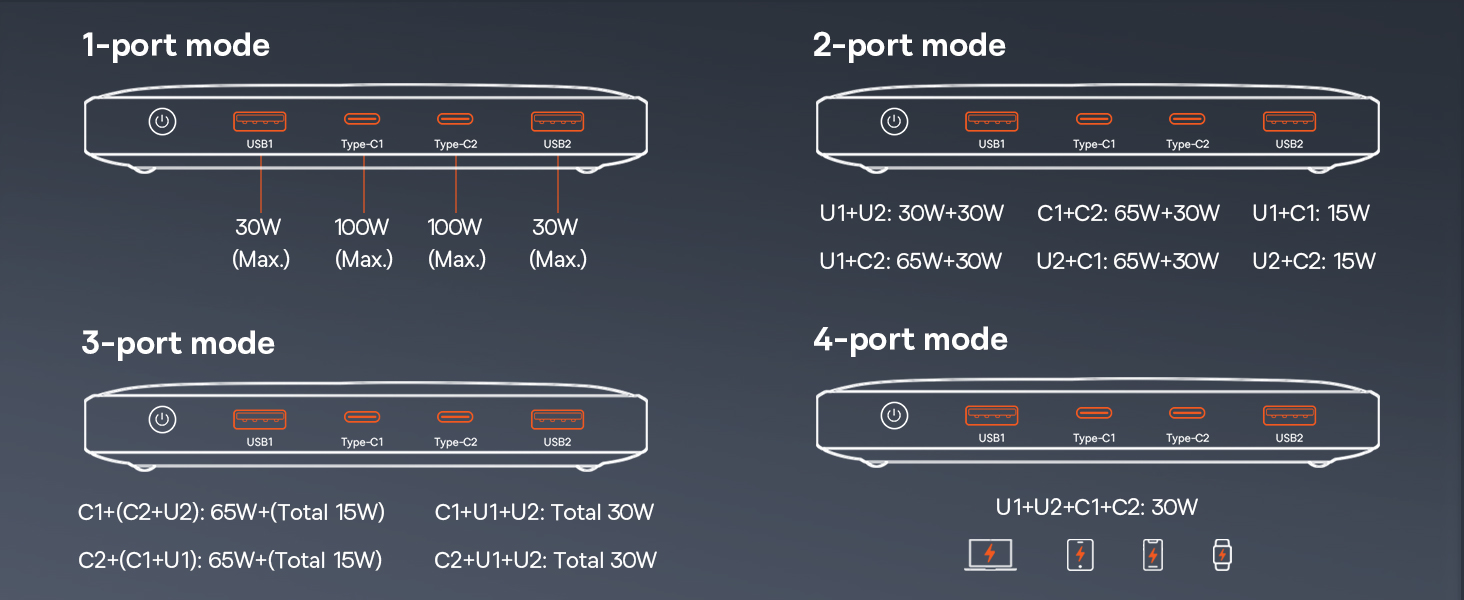
- Ọtụtụ ọdụ ụgbọ mmiri: Equipped with two USB-C ports (input/output) and two USB-A ports (output) for charging up to four devices simultaneously.
- Ngosipụta Digital: An intuitive screen shows remaining battery percentage, charging power (Volts/Amps), and estimated charging time left.
- Nhazi dị obere na nke enwere ike ibugharị: With a thickness of 0.7 inches and weighing 15.9 ounces, it's designed for easy portability.

The ultra-slim design of the Baseus Blade, making it highly portable.

The intuitive digital display provides real-time charging information.
3. Nhazi
3.1 Nchaji mbụ nke ụlọ akụ ọkụ
Before first use, it is recommended to fully charge your Baseus Blade portable charger. Use the provided USB-C to USB-C cable and a compatible power adapter (not included) to connect the power bank to a power outlet. The digital display will show the charging progress.
Recharging the Baseus Blade with its 60W high-speed input capability.
3.2 Gbanyụọ ma ọ bụ gbanyụọ
To power on the device, press the power button located on the side. The digital display will illuminate. The device will automatically power off when not in use for a period to conserve battery.
4. Ntuziaka ọrụ
4.1 Ngwaọrụ Nchaji
Connect your device to one of the available USB-C or USB-A output ports using a compatible charging cable. The power bank will automatically detect the device and begin charging. The digital display will show the current output and estimated time remaining for the power bank to fully charge the connected devices.

Charging a MacBook Pro with the 100W PD fast charging capability.

The Baseus Blade can charge up to four devices concurrently.
4.2 Low-Current Mode
For charging low-power devices such as earbuds, smartwatches, or fitness trackers, activate the low-current mode. Press and hold the power button for approximately 3 seconds until the display indicates low-current mode is active. This mode ensures safe and efficient charging for devices with smaller battery capacities.
4.3 Simultaneous Charging and Recharging (Pass-Through)
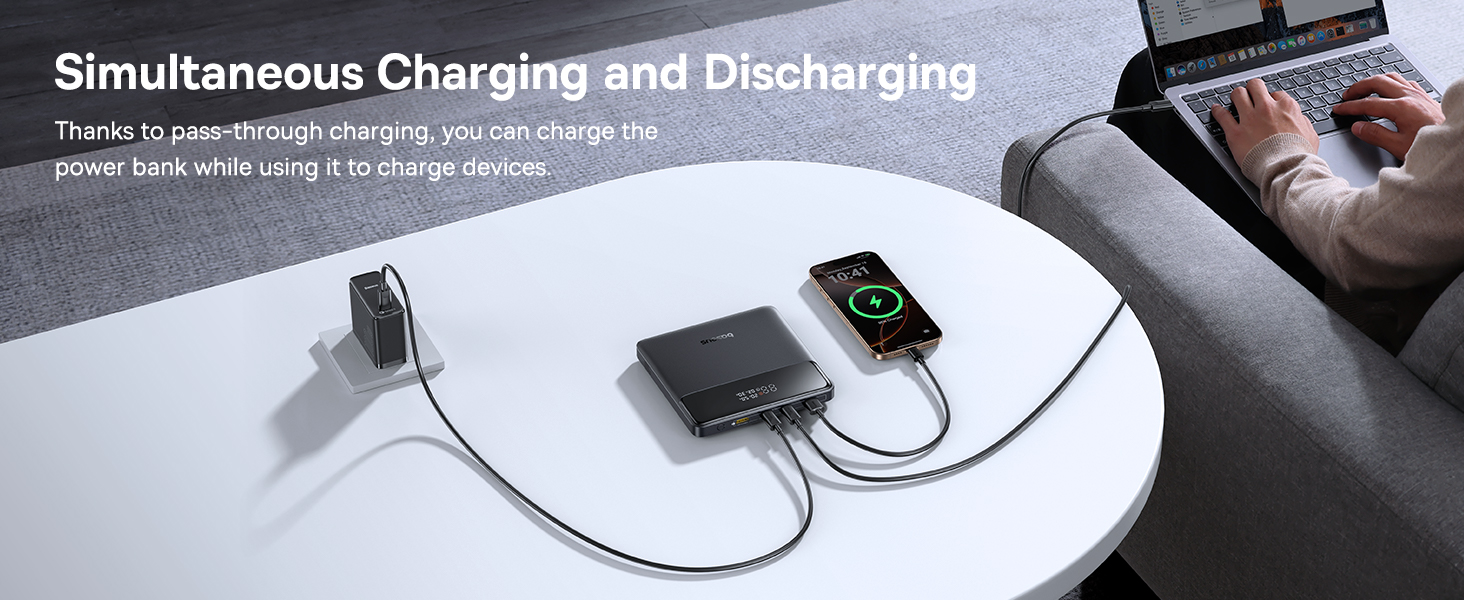
The Baseus Blade supports pass-through charging, allowing you to recharge the power bank itself while simultaneously charging your devices. Connect the power bank to a power source via one of its USB-C input/output ports, and then connect your devices to the remaining output ports.
Simultaneous charging and recharging capability of the power bank.
4.4 Ihe ngosi ojiji
The Baseus Blade is versatile for various environments:
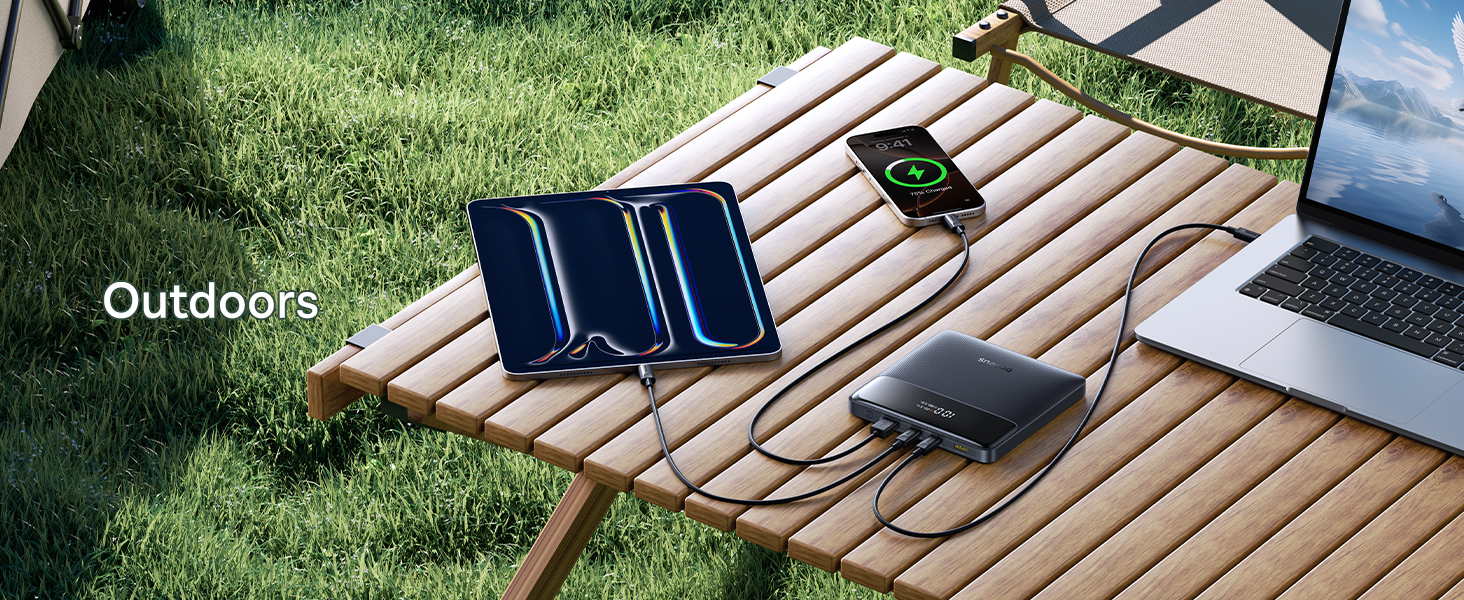
- N'èzí: Keep your devices powered during outdoor activities.
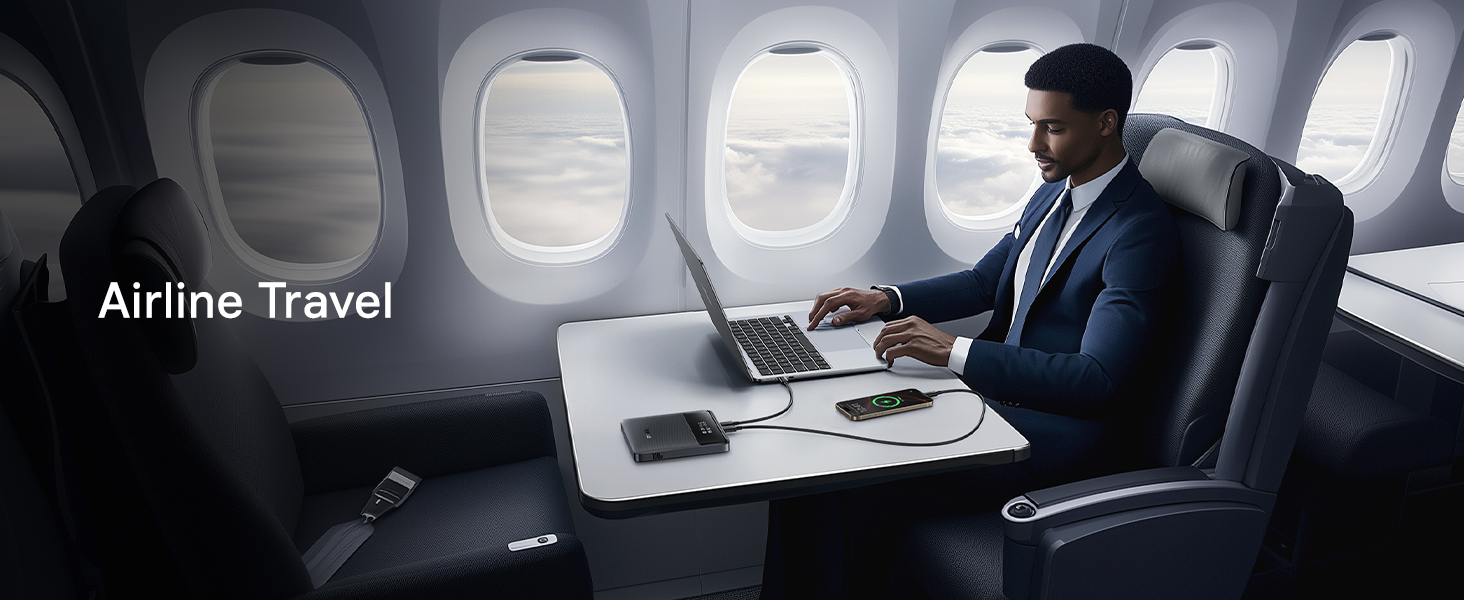
- Njem ụgbọ elu: FAA-compliant design for hassle-free travel.
- Ntụrụndụ: Power gaming devices like Steam Deck or Nintendo Switch.
- Ụlọ ọrụ: Ensure your laptop and other work devices stay charged during meetings or long work sessions.

Ideal for keeping devices charged during outdoor adventures.
Perfect for maintaining power during airline travel.
Powering gaming devices for extended entertainment.
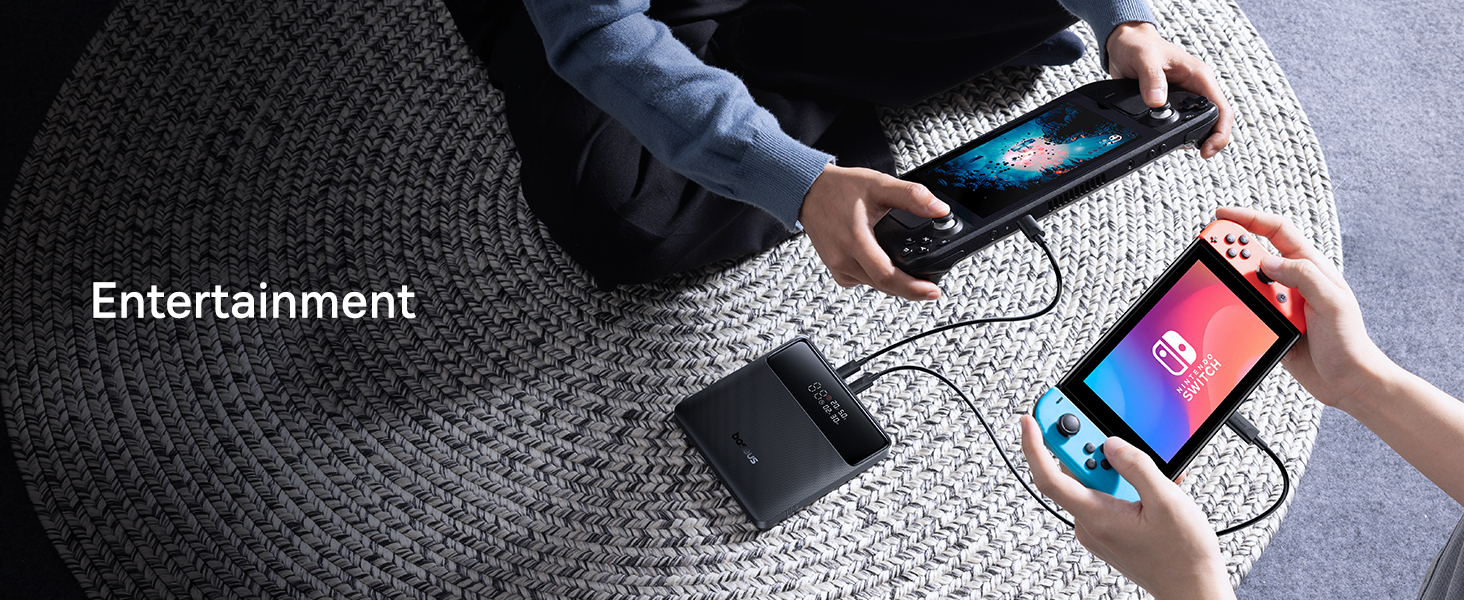
Reliable power for your devices in an office environment.
5. Ndakọrịta
The Baseus Blade 100W Portable Charger offers broad compatibility with a wide range of devices, thanks to its versatile USB-C and USB-A ports. It is designed to work with:
- Laptọọpụ: MacBook Pro/Air, Dell XPS, Chromebooks, Surface Pro, and other Windows OS laptops.
- Ekwentị mkpanaaka: iPhone 16/15/14/13/12 series, Samsung Galaxy series, and other iOS/Android devices.
- Mbadamba ụrọ: iPad, Samsung Tab, and other tablets.
- Ngwa ndị ọzọ: AirPods, Steam Deck, Nintendo Switch, handheld fans, smartwatches (e.g., iWatch), and more.

Visual representation of the broad device compatibility.
6. Ozi nchekwa
The Baseus Blade portable charger incorporates advanced safety features to protect both the device and your connected electronics. These protections are certified by UL/IEC and other authoritative reports.
- Nchekwa oke ụgwọ: Prevents battery damage from excessive charging.
- Nchedo nfefe oke: Protects the battery from being fully depleted.
- Nchekwa oke ọkụ: Monitors temperature to prevent overheating.
- Nchekwa obere okirikiri: Na-ebipụ ike na-akpaghị aka ma ọ bụrụ na enwere obere sekit.
- Nchekwa n'ofe ugbu a: Nchekwa megide oke eruba ugbu a.
- Over-power Protection: Prevents damage from power surges.
- N'elu voltage Nchedo: Na-echebe megide voltagna mgbanwe.
- Recovery Protection: Ensures safe recovery after protection activation.
- Electromagnetic Field Protection: Shields against electromagnetic interference.

Comprehensive safety mechanisms for secure operation.
7. Nkọwapụta
| Njirimara | Nkọwa |
|---|---|
| Akụkụ ngwaahịa | 5.27 x 5.27 x 0.78 sentimita asatọ |
| Ibu Ibu | 15.9 ounces |
| Nọmba nlereanya | P10021604123-00 |
| Ụdị batrị | Lithium polymer |
| Ike batrị | 20000 ndeamp Oge awa |
| Ike kacha mma | 100W |
| Oke ntinye ike | 60W (for recharging) |
| ọdụ ụgbọ mmiri | 2x USB-C (Input/Output), 2x USB-A (Output) |
| Atụmatụ pụrụ iche | Digital Display, Low-current Mode, Ultra-thin |
| Agba | Black Cosmic |
| Onye nrụpụta | Baseus |
| Mba onye si | China |
8. Nlekọta
Proper maintenance ensures the longevity and optimal performance of your Baseus Blade portable charger.
- Nhicha: Use a soft, dry cloth to wipe the surface of the power bank. Avoid using harsh chemicals or abrasive materials.
- Nchekwa: Store the power bank in a cool, dry place away from direct sunlight, extreme temperatures, and humidity. If storing for extended periods, charge it to about 50-70% capacity every three months to preserve battery health.
- Ijikwa: Avoid dropping or subjecting the device to strong impacts. Do not disassemble or attempt to repair the power bank yourself.
9. Nchọpụta nsogbu
If you encounter issues with your Baseus Blade portable charger, refer to the following common problems and solutions:
| Nsogbu | Ngwọta enwere ike |
|---|---|
| Ụlọ akụ ọkụ anaghị akwụ ụgwọ | Ensure the charging cable and power adapter are working correctly. Try a different cable or adapter. Check if the power bank's input port is clean and free of debris. |
| Ngwaọrụ anaghị akwụ ụgwọ site na ụlọ akụ ọkụ | Ensure the power bank is powered on. Try a different output port or charging cable. Verify that your device is compatible with the power bank's output specifications. If charging a low-power device, ensure low-current mode is activated. |
| Ngosipụta dijitalụ anaghị arụ ọrụ | Press the power button to activate the display. If it remains off, the battery might be completely depleted; try charging the power bank. |
| Nchaji nwayọ | Ensure you are using a high-quality cable that supports fast charging. Check if your device supports the fast charging protocols (e.g., PD) provided by the power bank. Charging multiple devices simultaneously may reduce individual charging speeds. |
| Power bank gets hot during use | It is normal for the power bank to warm up during high-power charging or discharging. If it becomes excessively hot, disconnect all devices and allow it to cool down. Ensure proper ventilation and avoid covering the power bank during use. |
10. Official Product Videos
Watch the official product video from Baseus for a visual guide on the features and usage of your portable charger.
Ihe ngosi vidiyo gọọmentịasing the Baseus Blade Slim Laptop Portable Charger Power Bank.
11. Akwụkwọ ikike na nkwado
Baseus provides a Akwụkwọ ikike nke ọnwa 24 for worry-free ownership of your portable charger. For any technical assistance, product guidance, or support inquiries, our professional support team is available 24/7. We offer free returns or replacements to ensure your complete satisfaction.
Maka enyemaka ọzọ, biko gaa na Ụlọ Ahịa Baseus or contact customer support through your purchase platform.


