Darmoshark M3microPRO Mini Wireless Gaming Mouse User Manual
Model: M3microPRO

Image: Darmoshark M3microPRO Mini Wireless Gaming Mouse, top view.
1. Ngwaahịa gafereview
The Darmoshark M3microPRO is a lightweight, tri-mode wireless gaming mouse designed for precision and versatility. It features a high-performance PAW3950 optical sensor, multiple connectivity options, and programmable buttons to enhance your gaming and productivity experience.
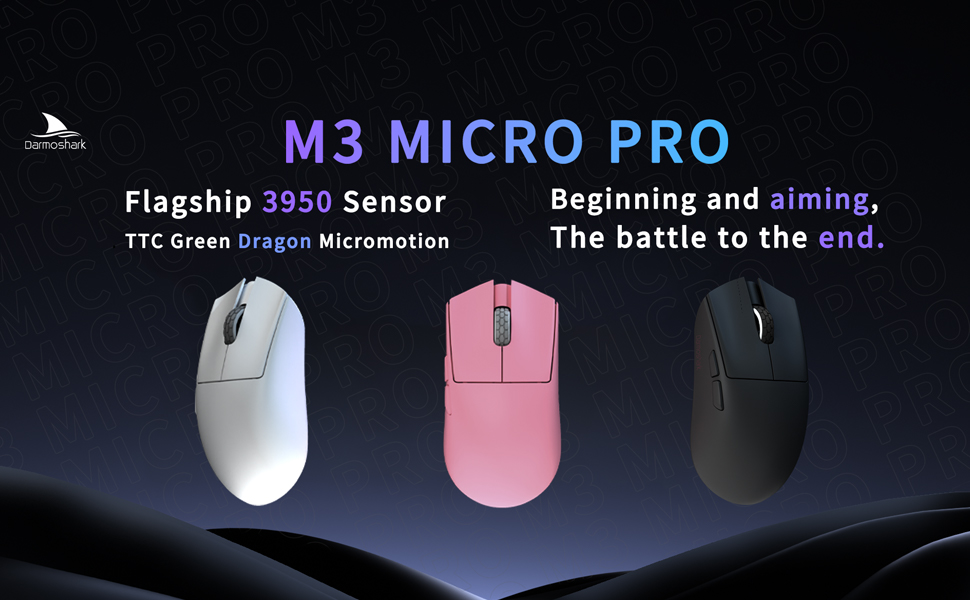
Image: The M3microPRO mouse displayed in white, pink, and black color options.
2. Ọdịnaya na Ntọala Ngwugwu
Before using your Darmoshark M3microPRO mouse, please ensure all components are present and follow the setup instructions.
2.1 Unboxing
The package typically includes the M3microPRO mouse, a USB-C charging/data cable, a 2.4G wireless receiver, and documentation.
Video: An unboxing demonstration of the Darmoshark M3microPRO Mini Wireless Gaming Mouse, showing the contents of the package.
2.2 Ụdị Njikọta
The M3microPRO supports three connection modes:
- Ọnọdụ ikuku 2.4G: For low-latency gaming. Insert the 2.4G USB receiver into your computer's USB port. The mouse will automatically connect.
- Ọnọdụ Bluetooth: For general use and multi-device connectivity. Activate Bluetooth on your device and pair with the mouse. The mouse can connect to up to 3 devices simultaneously.
- Ọnọdụ Wired: Connect the mouse directly to your computer using the provided USB-C cable. This mode also charges the mouse.
2.3 Nwụnye ọkwọ ụgbọala
To unlock full customization options, including DPI settings, button functions, and macro settings, download and install the dedicated driver software from the official Darmoshark websaịtị.

Image: Screenshot of the dedicated driver software interface for customizing mouse settings.
3. Ntuziaka ọrụ
3.1 bọtịnụ Ọrụ
The M3microPRO features 8 programmable buttons. Refer to the diagram below for default button assignments. These can be customized via the driver software.

Image: Diagram illustrating the button layout and dimensions of the M3microPRO mouse, including left click, right click, track roller key, tri-mode switching key, DPI adjustment key, forward button, and backspace button.
3.2 DPI mmezi
The mouse features a PAW3950 optical sensor with up to 30000 DPI resolution. Use the dedicated DPI adjustment button (as shown in the diagram above) to cycle through preset DPI levels. Fine-tune DPI settings using the driver software.

Image: Close-up of the PAW3950 sensor highlighting 30000 DPI sensitivity and 750 IPS tracking speed.
3.3 Ọnụego ntuli aka
The M3microPRO supports up to 8000Hz polling rate for ultra-responsive tracking. It comes standard with a 1K receiver, and can be expanded to 8KHz with an NXP high-speed master 4K receiver (sold separately or included in specific bundles). This provides a response time of only 0.125ms.

Image: The M3microPRO mouse shown with its 8KHz compatible receiver, illustrating high return rate capability.
4. Nlekọta
To ensure the longevity and optimal performance of your Darmoshark M3microPRO mouse, follow these maintenance guidelines:
- Nhicha: Jiri ákwà dị nro ma kpọọ nkụ hichaa elu òké ahụ. Zere kemịkalụ siri ike ma ọ bụ ihe ndị na-emebi ihe.
- Nchekwa: Chekwaa òké ahụ n'ebe dị jụụ, kpọrọ nkụ pụọ na ìhè anyanwụ kpọmkwem na oke okpomọkụ.
- Ụkwụ PTFE: The mouse features PTFE curling footbeds for smooth glide. If wear occurs, replacement feet may be available.
- Nlekọta USB: The soft umbrella cord is designed for durability. Avoid sharp bends or excessive pulling.

Image: Visual representation of the mouse's delicate skin-soothing coating and PTFE curling footbeds.
5. Nchọpụta nsogbu
If you encounter issues with your M3microPRO mouse, refer to the following common solutions:
- Òké anaghị aza: Ensure the mouse is charged. Check the connection mode (2.4G, Bluetooth, or wired) and ensure the receiver is properly inserted or Bluetooth is paired.
- Lag or disconnections in wireless mode: Ensure the receiver is close to the mouse and there are no major obstructions. Try switching to a different USB port or reducing interference from other wireless devices.
- DPI anaghị agbanwe: Verify the DPI adjustment button is functioning. If using custom settings, check the driver software.
- Bọtịnụ anaghị arụ ọrụ: Check button assignments in the driver software. Ensure the mouse is not in a mode that disables certain buttons.
- Nsogbu ngwanrọ: Reinstall the driver software from the official Darmoshark websaịtị.
6. Nkọwapụta
Key technical specifications for the Darmoshark M3microPRO Mini Wireless Gaming Mouse:
| Njirimara | Nkọwapụta |
|---|---|
| Nlereanya | M3microPRO |
| Njikọta | Tri-Mode (2.4G Wireless, Bluetooth, USB-C Wired) |
| Sensọ | PAW3950 Ihe mmetụta anya |
| Mkpebi DPI | Ruo 30000 DPI |
| Ọsọ nsochi | 650 IPS (750 IPS mentioned in image) |
| Osooso | 50G |
| Ọnụego ntuli aka | Up to 8000Hz (with optional 4K receiver) |
| Ibu | 43g (approx. 42+2 grams) |
| Bọtịnụ | 8 bọtịnụ mmemme |
| Batrị | 300 mAh Lithium Polymer (up to 84 hours with light off, 55 hours with light on) |
| Akụkụ | Length: 105.5 mm, Width: 54.6 mm, Height: 33.5 mm (from diagram) |

Foto: gbawara view diagram of the M3microPRO mouse, detailing internal components such as the roller, outer shell, sensors, encoder, NANO receiver, polymer lithium battery, and PTFE feet.

Image: Illustration of the mouse's built-in 300 mAh lithium polymer battery and its estimated battery life.
7. Akwụkwọ ikike na nkwado
Darmoshark products are manufactured to high-quality standards. For warranty information, please refer to the documentation included with your purchase or visit the official Darmoshark website. For technical support, product inquiries, or warranty claims, please contact Darmoshark customer service through their official channels.


