1. Okwu mmalite
This manual provides instructions for the safe and effective use of your BAOFENG BL-W31 Li-ion Battery. This battery is designed for use with BAOFENG W31, WP31, and MP31 two-way radios.
The BL-W31 battery features a 1500mAh capacity and USB-C charging capability, ensuring reliable power for your communication needs.
2. Ozi nchekwa
Ntuziaka nchekwa dị mkpa: To prevent damage, injury, or fire, observe the following precautions:
- Do not remove the plastic covering from the battery pack.
- Akwụsịla batrị ahụ.
- Atụpụla batrị n'ọkụ.
- Agbanwela ma ọ bụ chajịa batrị n'ebe dị ize ndụ.
- Emegharịala ọnụ ọnụ ọnụ ụzọ mkpirisi.
The battery incorporates advanced protection features including low heat dissipation, overcurrent protection, over-temperature protection, and PCM short circuit protection to enhance safety and longevity.
Must be recycled or disposed of properly. Recycling facilities may not exist in all areas.

This image displays the warning label on the BL-W31 battery, detailing critical safety precautions such as not disassembling or short-circuiting the battery, and proper disposal instructions.
3. Ihe ngwugwu
Ngwungwu gị kwesịrị ịnwe:
- 2 x BAOFENG BL-W31 Batteries
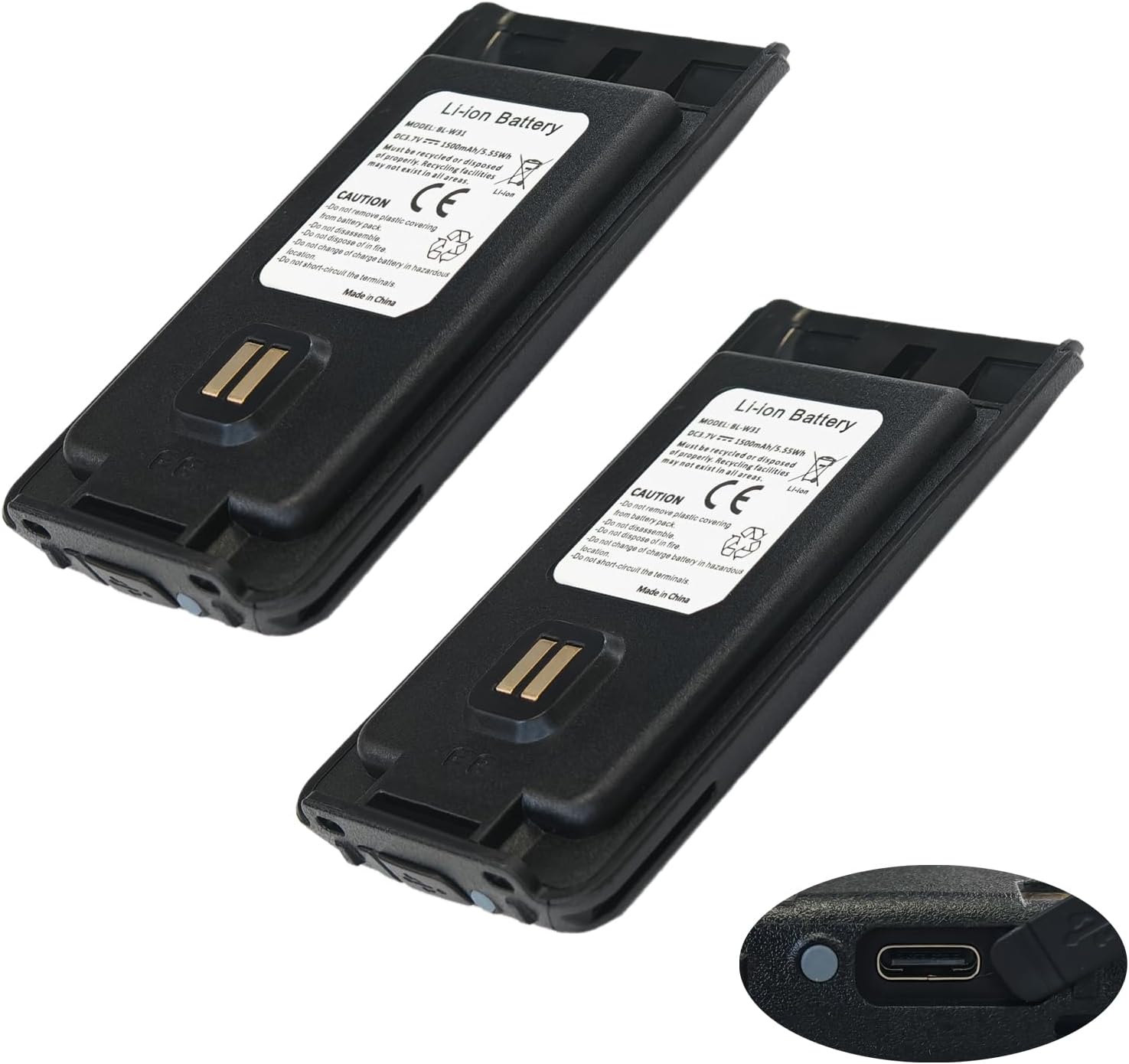
This image shows two BL-W31 batteries, highlighting their compact design and the integrated USB-C charging port on the bottom right of one battery.
4. Nhazi
Ịwụnye batrị:
- Ensure your radio is powered off.
- Align the battery with the battery compartment on your compatible BAOFENG radio (W31, WP31, or MP31).
- Malite batrị n'ime ebe ruo mgbe ọ pịrị na nchekwa.
- Verify the battery is firmly seated before powering on the radio.
5. .rụ ọrụ
Ịchaji batrị:
The BL-W31 battery features a convenient USB-C charging port.
- Locate the USB-C port on the battery.
- Connect a standard USB-C charging cable to the battery port.
- Jikọọ nsọtụ nke ọzọ nke eriri USB-C na isi iyi ike USB dakọtara (dịka ọmụmaatụ, ihe nkwụnye mgbidi, ọdụ USB kọmputa).
- The battery's indicator light will show charging status (refer to radio manual for specific light indications if charging via radio, or battery itself if it has one).
- Ozugbo chajịrị chaja zuru oke, kwụpụ eriri nchaji.

Ihe onyonyo a na-enye nkọwa zuru ezu view of the BL-W31 battery's bottom, clearly showing the USB-C charging port and two small LED indicator lights, which typically display charging status.
6. Nlekọta
Battery Care and Storage:
- Chekwaa batrị ahụ n'ebe dị jụụ, kpọrọ nkụ na-adịghị na ìhè anyanwụ kpọmkwem na oke okpomọkụ.
- Avoid fully discharging the battery for extended periods. For long-term storage, charge the battery to approximately 50-70%.
- Clean the battery terminals periodically with a dry cloth to ensure good contact with the radio.
mkpofu:
Dispose of the battery according to local regulations. Do not dispose of with household waste. Look for designated battery recycling facilities.
7. Nchọpụta nsogbu
Okwu ndị nkịtị:
- Batrị anaghị akwụ ụgwọ: Ensure the USB-C cable and power source are functioning correctly. Check for debris in the USB-C port.
- Battery not powering radio: Verify the battery is correctly installed and fully charged. Clean battery contacts on both the battery and the radio.
- Shortened battery life: This may indicate the battery is nearing the end of its lifespan. Ensure proper charging practices are followed.
If problems persist, contact BAOFENG customer support.
8. Nkọwapụta
Nkọwapụta ngwaahịa:
| Nọmba nlereanya | BL-W31 |
| Ụdị batrị | Lithium ion |
| Ike batrị | 1500 mAh |
| Voltage | 3.7V |
| Ike | 5.55 W |
| Redio dakọtara | BAOFENG W31, WP31, MP31 |
| Nchaji ọdụ ụgbọ mmiri | USB-C |
| Ibu Ibu | 3.7 ounces |
| Akụkụ ngwugwu | 4.72 x 4.69 x 1.06 sentimita asatọ |
9. Nkwado
For further assistance, technical support, or inquiries regarding compatible models, please contact BAOFENG customer service.
Refer to the official BAOFENG websaịtị maka ozi kọntaktị.


