Okwu mmalite
Thank you for choosing the House of Marley Little Bird True Wireless Earbuds. These earbuds are designed to provide a high-quality audio experience with the convenience of true wireless technology, crafted with sustainable materials. This manual provides essential information for setup, operation, and maintenance of your earbuds.

Image: The Little Bird True Wireless Earbuds in blue, showcasing their compact design and bamboo-finished stems.
Kedu ihe dị na Igbe ahụ
Your House of Marley Little Bird True Wireless Earbuds package includes:
- Little Bird True Wireless Earbuds (Left and Right)
- Nchaji case
- USB-C eriri USB
- Akwụkwọ ntuziaka (akwụkwọ a)

Image: The Little Bird Earbuds nestled within their blue charging case, ready for storage or charging.
Melite
1. Ịchaji ihe ntị na akpa
Before first use, fully charge the earbuds and the charging case. The case provides additional charges for extended listening.
- Tinye ntị ntị abụọ n'ime akpa chaja.
- Connect the USB-C charging cable to the charging port on the case and plug the other end into a USB power source.
- The indicator lights on the case will show charging status. A full charge for the earbuds provides approximately 6 hours of playtime, and the case provides up to 18 additional hours, totaling 24 hours of listening.
2. Ijikọ na ngwaọrụ gị
Follow these steps to pair your Little Bird Earbuds with a Bluetooth-enabled device:
- Gbaa mbọ hụ na a na-akwụ ụgwọ ekwe ntị yana n'ime igbe nchaji.
- Open the charging case lid. The earbuds will automatically enter pairing mode, indicated by a flashing LED light on the earbuds.
- Na ngwaọrụ gị (smartphone, mbadamba, kọmputa), gaa na ntọala Bluetooth.
- Select "Little Bird" from the list of available devices.
- Once connected, the LED indicator on the earbuds will stop flashing, and you will hear an audible confirmation.
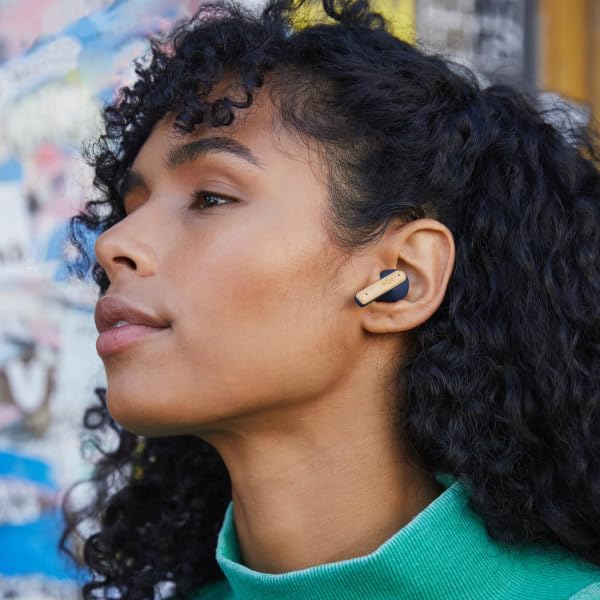
Image: A person wearing a Little Bird earbud, demonstrating its in-ear fit.
Ntuziaka ọrụ
Njikwa mmetụ
The Little Bird Earbuds feature intuitive touch controls on each earbud for managing audio playback and calls. You will hear an alert sound with each successful touch input.
| Omume | Njikwa |
|---|---|
| Gwuo/kwụsịtụ | Otu mgbata na ntị ntị |
| Track na-esote | Pịa bọtịnụ ntị aka nri ugboro abụọ |
| Egwu gara aga | Kpatụ ntị ugboro abụọ n'akụkụ aka ekpe |
| Zaa/Kwụsị Oku | Otu mgbata na ntị ntị |
| Jụ oku | Pịa ma jide otu ntị ntị maka sekọnd 2 |
| Mee ka onye enyemaka olu rụọ ọrụ | Pịa ugboro atọ na ntị ntị |
Ịkpọ oku
The built-in microphone allows for clear communication during phone calls. Use the touch controls as described above to manage calls.
Movie and Gaming Mode
Enhance your audio experience for video content and gaming by activating the dedicated Movie and Gaming Mode. This mode optimizes audio latency for better synchronization between audio and video.
- To activate: Consult the quick start guide or product packaging for the specific touch sequence to enable Movie and Gaming Mode.

Image: A person enjoying music with the Little Bird earbuds, illustrating the "All Day Audio" capability.
Nlekọta
Proper care will extend the life and performance of your Little Bird Earbuds.
- Nhicha: Gently wipe the earbuds and charging case with a soft, dry, lint-free cloth. Do not use harsh chemicals or abrasive materials.
- Nchekwa: Mgbe ejighị ya, chekwaa earbuds n'ime akpa nchaji ha iji chebe ha ma debe ha ebubo.
- Mkpughe mmiri: These earbuds are not water resistant. Avoid exposure to water, sweat, or excessive moisture.
- Okpomọkụ: Zere ikpughe ntị ntị n'ọnọdụ okpomọkụ dị oke njọ (ọkụ ma ọ bụ oyi).

Image: Hands holding the earbuds and case, emphasizing their construction from sustainable materials like bamboo and recycled plastics.
Nchọpụta nsogbu
If you encounter issues with your Little Bird Earbuds, try the following solutions:
| Nsogbu | Ngwọta |
|---|---|
| Igwe ntị anaghị ejikọta ọnụ |
|
| Enweghị ụda sitere na otu ntị ntị |
|
| Ogo ụda adịghị mma |
|
| Earbuds anaghị akwụ ụgwọ |
|
Nkọwapụta
| Njirimara | Nkọwa |
|---|---|
| Aha Nlereanya | Nnụnụ nta |
| Nọmba nlereanya | EM-JE123-BL |
| Teknụzụ Njikọta | Ikuku (Bluetooth) |
| Ụdị Bluetooth | 5.0 |
| Oge egwu ntị | Ruo awa iri abụọ |
| ngụkọta oge egwuregwu (ya na ikpe) | Ruo awa iri abụọ |
| Nchaji Interface | USB-C |
| Usoro njikwa | Metụ aka |
| Igwe okwu arụnyere n'ime ya | Ee |
| Ọkwa Nguzogide mmiri | Ọ bụghị mmiri na-eguzogide |
| Akụrụngwa | Bamboo, natural wood fibre, mica composites, recycled plastics |
| Ibu Ibu | 0.03 Kilograms (earbuds) / 1.06 ounces (total product) |
| Akụkụ ngwaahịa | 0.79 x 2.2 x 1.73 sentimita asatọ |
| UPC | 846885011560 |
Akwụkwọ ikike na nkwado
House of Marley products are designed with quality and durability in mind. For detailed warranty information and customer support, please visit the official House of Marley websaịtị ma ọ bụ kpọtụrụ ndị ahịa ha ọrụ.
Nkwado n'ịntanetị: www.thehouseofmarley.com/support
Onye nrụpụta: House of Marley, FKA Brands
UPC: 846885011560


