1. Okwu mmalite
Thank you for choosing the Mesqool CR1025 Clock Radio. This device combines an alarm clock, Bluetooth speaker, FM radio, night light, and phone charger into one compact unit. This manual provides detailed instructions for setup, operation, and maintenance to ensure optimal performance and user experience.

Figure 1: Mesqool CR1025 Clock Radio
2. Ngwaahịa gafereview
2.1 Atụmatụ
- Nhazi ọtụtụ ọrụ: Alarm Clock, Bluetooth Speaker, FM Radio, Night Light, and Phone Charger.
- Bluetooth Bluetooth: For stable and quick wireless audio streaming.
- Igwe Redio: 87.5MHz-108.0MHz frequency range with 20 preset stations.
- Icha ọkụ nwere ike ịgbanwe: 5 levels for the LED display.
- Olu nwere ike imeghari: 16 levels (45dB to 116dB).
- Oge ụra: Allows automatic shutdown of audio playback.
- Ọrụ Sooze: 9-minute delay for alarms.
- Ndabere batrị: Retains time and alarm settings during power outages.
- Ọdụ ụgbọ mmiri USB abụọ: Type-C and USB-A for device charging.
- Ụdị oge: 12-hour and 24-hour display options.
- Oge nchekwa ụbọchị (DST): Quick adjustment feature.

Figure 2: 5-in-1 Functionality
Ihe ngwugwu 2.2
- Mesqool CR1025 Clock Radio
- Ihe nkwụnye ọkụ
- eriri USB
- CR2032 Lithium Battery (pre-installed or separate for backup)
- Akwụkwọ ntuziaka (akwụkwọ a)

Ọgụgụ 3: Ihe ngwugwu
3. Njikwa na Ngosipụta
Familiarize yourself with the buttons and ports on your Mesqool CR1025 Clock Radio.
3.1 Njikwa Panel kacha elu
- Sleep Timer Knob: Rotate to set sleep timer duration. Press to confirm.
- Bọtịnụ mkpu: Press to set or activate/deactivate alarms.
- Time/12/24 Button: Press to set time. Hold to switch between 12/24-hour format.
- Dimmer/DST Button: Press to adjust display brightness. Hold to activate/deactivate Daylight Saving Time.
- Bọtịnụ SOOZE/LIGHT: Press to snooze alarm or turn night light on/off.
- Preset/Pair Button: Press to cycle through FM presets. Hold to enter Bluetooth pairing mode.
- Play/Mode Button: Press to play/pause in Bluetooth mode. Hold to switch between FM/Bluetooth modes.
- Power/Scan Knob: Rotate to adjust volume. Press to power on/off. Hold to auto-scan FM stations.
3.2 ọdụ ụgbọ mmiri azụ
- DC N'ime: ọdụ ụgbọ mmiri ntinye ike.
- Mmepụta USB-A: Maka ịchaji ngwaọrụ mpụga.
- Ụdị-C mmepụta: Maka ịchaji ngwaọrụ mpụga.
4. Nhazi
4.1 Njikọ ike
- Connect the power adapter to the DC IN port on the back of the clock radio.
- Plug the power adapter into a standard wall outlet. The display will light up.

Ọgụgụ 4: Njikọ Ike
4.2 Ndabere Batrị
The CR2032 battery provides backup for time and alarm settings during a power outage. The display will not show time, and alarms will not sound until power is restored.
- Ensure the battery insulator tab is removed if the battery was pre-installed.
- If replacing, open the battery compartment on the bottom and insert a new CR2032 battery with the correct polarity.
4.3 Isetịpụ oge
- Pịa ma jide Time/12/24 bọtịnụ ruo mgbe ọnụọgụgụ awa ahụ na-enwu.
- Tugharia ihe Ike/nyocha kụọ aka ịgbanwe elekere.
- Pịa Time/12/24 button again to confirm the hour, and the minute digits will flash.
- Tugharia ihe Ike/nyocha knob to adjust the minutes.
- Pịa Time/12/24 button to save the time setting.
4.4 12/24-Hour Format
Iji gbanwee n'etiti usoro oge awa iri na abụọ na awa iri abụọ na anọ, pịa bọtịnụ oge Time/12/24 button briefly while the time is displayed.

Figure 5: 12H/24H and DST Display
4.5 Oge nchekwa ụbọchị (DST)
To activate or deactivate DST, press and hold the Dimmer/DST button. The 'DST' indicator will appear or disappear on the display.
5. Ntuziaka ọrụ
5.1 Ịtọ ntọala mkpu
- Pịa ma jide Oti mkpu bọtịnụ ruo mgbe ọnụọgụgụ awa mkpu na-enwu.
- Tugharia ihe Ike/nyocha knob to adjust the alarm hour.
- Pịa Oti mkpu button again to confirm the hour, and the minute digits will flash.
- Tugharia ihe Ike/nyocha knob to adjust the alarm minutes.
- Pịa Oti mkpu button to save the alarm time.
- Iji mee ka mkpu ahụ rụọ ọrụ/gbanyụọ ya, pịa bọtịnụ Oti mkpu button briefly. An alarm icon will appear/disappear on the display.
5.2 Ọrụ snooze
Mgbe oti mkpu dara, pịa nwuo/Ìhè button to activate the 9-minute snooze function. The alarm will sound again after 9 minutes. This can be repeated up to 9 times. To stop the alarm completely, press the Oti mkpu bọtịnụ.

Foto nke 6: Ọrụ Ịhịa Ụra
5.3 FM Redio arụ ọrụ
- Pịa Play/Mode bọtịnụ ka ịgbanwee gaa na ọnọdụ redio FM.
- Nyocha onwe: Pịa ma jide Ike/nyocha knob to automatically scan and save available FM stations (up to 20 presets).
- Akwụkwọ ntuziaka: Briefly rotate the Ike/nyocha knob to fine-tune the frequency.
- Họrọ atọrọ atọ: Pịa Preset/Pair button to cycle through saved stations.
- Ndozi olu: Tugharia ihe Ike/nyocha knob to adjust the volume (16 levels).

Figure 7: FM Radio Features
5.4 Bluetooth Speaker Operation
- Pịa Play/Mode button to switch to Bluetooth mode. The 'BT' icon will flash on the display.
- On your mobile device, enable Bluetooth and search for 'CR1025'.
- Select 'CR1025' to pair. Once connected, the 'BT' icon will stop flashing.
- Play audio from your device. Use the Play/Mode bọtịnụ iji kpọọ/kwụsịtụ.
- Ndozi olu: Tugharia ihe Ike/nyocha igodo iji mezie olu.

Ọgụgụ 8: Bluetooth 5.0 Njikọta
5.5 Night Light Operation
Pịa nwuo/Ìhè button to turn the night light on or off. The night light provides a soft, warm glow.

Figure 9: Warm Night Light
5.6 Ngosipụta mmezi ihie
Pịa Dimmer/DST button repeatedly to cycle through 5 levels of display brightness, from off to brightest.
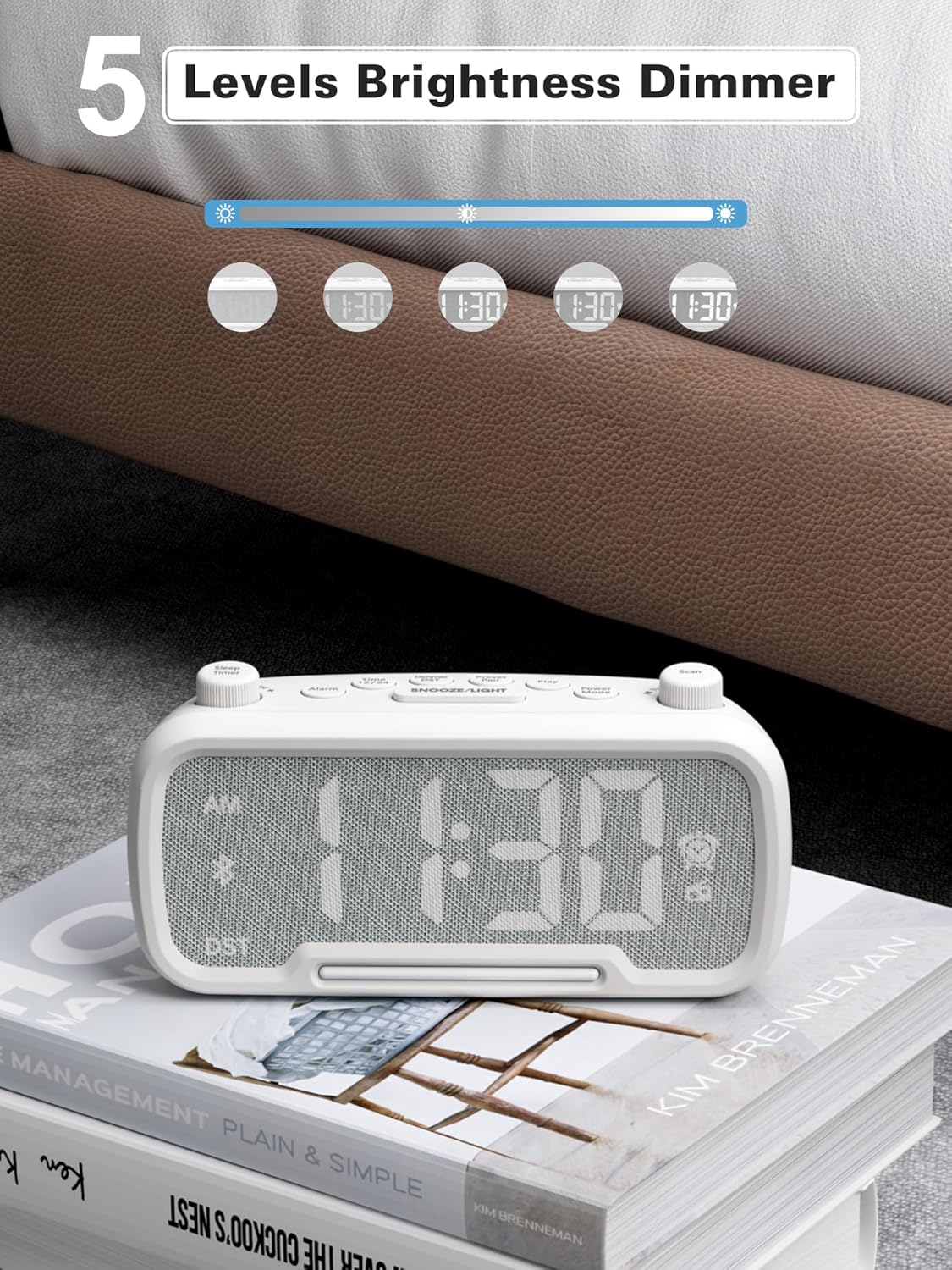
Figure 10: 5 Levels Brightness Dimmer
5.7 Ngụ oge ụra
The sleep timer allows you to set a duration after which the radio or Bluetooth audio will automatically turn off.
- While playing FM radio or Bluetooth audio, rotate the Oge ihi ụra knob to select the desired sleep duration (e.g., 15, 30, 60, 90 minutes).
- The display will show the remaining sleep time. The audio will turn off automatically when the timer expires.
5.8 Nchaji ekwentị
The clock radio features two USB charging ports (Type-C and USB-A) for convenient charging of your mobile devices.
- Connect your device's charging cable to either the USB-A or Type-C port on the back of the clock radio.
- Connect the other end of the cable to your mobile device. Charging will begin automatically.

Figure 11: Dual USB Charging Ports
6. Nlekọta
- Jiri akwa dị nro hichaa otu ahụ. Ejila ihe nchacha abrasive ma ọ bụ ihe mgbaze.
- Debe unit ahụ pụọ na ìhè anyanwụ kpọmkwem, isi okpomọkụ na mmiri.
- Gbaa mbọ hụ na ikuku ikuku dị na gburugburu unit ahụ.
- If the unit will not be used for an extended period, unplug it from the power outlet.
7. Nchọpụta nsogbu
| Nsogbu | Ihe nwere ike ime | Ngwọta |
|---|---|---|
| Enweghị ike/Ngosipụta | Ejikọtaghị ihe nkwụnye ọkụ ma ọ bụ mejọrọ. | Ensure power adapter is securely plugged into the unit and wall outlet. Check outlet functionality. |
| Oti mkpu anaghị ada ụda | Agbaghị mkpu ma ọ bụ ahazighị ya nke ọma. | Verify alarm time is set and the alarm icon is visible on the display. Check alarm volume. |
| Nnabata redio FM adịghị mma | Mgbama ma ọ bụ nnyonye anya adịghị ike. | Adjust the unit's position. Try auto-scanning again. |
| Bluetooth anaghị ejikọta | Ngwaọrụ adịghị na ọnọdụ njikọta ma ọ bụ tere aka. | Ensure the clock radio is in Bluetooth mode (BT icon flashing). Move device closer. Forget device on phone and re-pair. |
| Nchaji USB anaghị arụ ọrụ | Cable faulty or device incompatible. | Try a different USB cable. Ensure the clock radio is powered on. |
8. Nkọwapụta
- Ụdị: CR1025
- Ntinye ike: AC 100-240V, 50/60Hz
- Ndabere batrị: 1 x CR2032 (gụnyere)
- Ugboro FM: 87.5 - 108.0 MHz
- Ụdị Bluetooth: 5.0
- USB mmepụta: USB-A, Type-C (Charging only)
- Gosipụta ihie: 5 ọkwa
- Ọkwa olu: 16 levels (45dB - 116dB)
- Akụkụ: 5.9 x 3.81 x 8.4 cm (2.32 x 1.5 x 3.31 inch)
- Arọ: 216g (0.48 lbs)
Ọgụgụ 12: Akụkụ ngwaahịa
9. Akwụkwọ ikike na nkwado
Mesqool products are designed and manufactured to the highest quality standards. For warranty information, technical support, or customer service inquiries, please refer to the contact information provided on the product packaging or visit the official Mesqool websaịtị.
Websaịtị: Mesqool Official Store


