1. Okwu mmalite
This manual provides essential instructions for the safe and efficient use of your DALI IO-8 Wireless/Wired Hi-Fi Headphones. Please read this manual thoroughly before using the product and retain it for future reference. The DALI IO-8 headphones are designed to deliver a high-fidelity audio experience with advanced features such as Active Noise Cancellation (ANC), Bluetooth AptX Adaptive connectivity, and a long-lasting battery.
2. Ngwaahịa gafereview
Familiarize yourself with the components and controls of your DALI IO-8 headphones.

Foto 2.1: N'ihu view nke ekweisi DALI IO-8, ihe ngosiasing the caramel and white color scheme and overall design.

Foto 2.2: Si elu gbadata view of the DALI IO-8 headphones, highlighting the earcups and visible control buttons on the side.
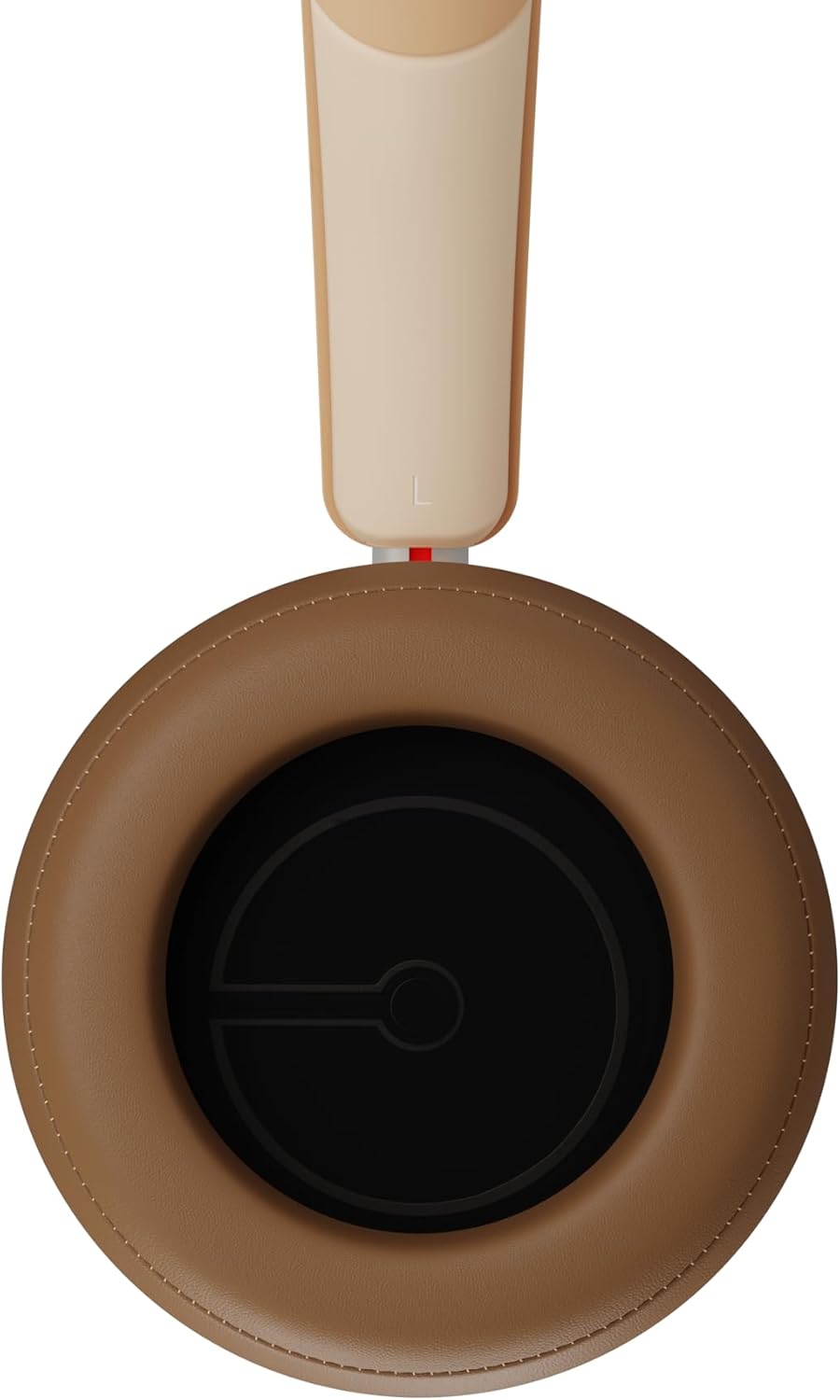
Foto 2.3: Ime ụlọ view of a DALI IO-8 earcup, showing the soft padding and driver grille, designed for comfort and sound delivery.

Foto 2.4: Agara nso view of the DALI IO-8 earcup, showing the USB-C charging port and other control buttons.
Ihe ngwugwu 2.1
- DALI IO-8 ekweisi
- USB-C eriri USB
- 3.5mm Audio USB
- Akpa Njem (ọ bụrụ na etinyere ya)
- Akwụkwọ ntuziaka (akwụkwọ a)
2.2 Ihe Ndị E Ji Ekwe Ntị Mee

Foto 2.5: Gbawara view illustrating the internal components of the DALI IO-8 headphones, including the 50mm driver, circuitry, and earcup structure.
- Headband (Adjustable)
- Earcups (Over-ear design with genuine leather)
- 50mm Driver (SMC Driver Technology)
- Control Buttons (Power, Volume, ANC, Multifunction)
- USB-C Port (Charging and Wired Audio)
- 3.5mm Audio Jack (Wired Audio)
- Microphones (for ANC and calls)
3. Nhazi
3.1 Ịchaji ekweisi
Before initial use, fully charge your DALI IO-8 headphones.
- Connect the supplied USB-C cable to the USB-C port on the headphone earcup.
- Jikọọ nsọtụ nke ọzọ nke eriri USB-C na isi iyi ike USB dakọtara (dịka ọmụmaatụ, ọdụ ụgbọ USB kọmputa, ihe nkwụnye mgbidi USB).
- The LED indicator will show charging status. A full charge provides up to 35 hours of playback with ANC enabled.
- Ozugbo chachara chajịrị, kwụpụ eriri ahụ.
3.2 Gbanyụọ ma ọ bụ gbanyụọ
- Iji gbanye: Press and hold the Power button for approximately 2 seconds until the LED indicator illuminates.
- Iji gbanyụọ: Pịa ma jide bọtịnụ ike maka ihe dịka sekọnd 3 ruo mgbe ihe ngosi LED gbanyụrụ.
3.3 Njikọ Bluetooth
The DALI IO-8 supports Bluetooth AptX Adaptive for high-quality wireless audio.
- Gbaa mbọ hụ na agbanyụrụ ekweisi.
- Press and hold the Power button for approximately 5 seconds until the LED indicator flashes blue rapidly. This indicates pairing mode.
- Na ngwaọrụ ọdịyo gị (ama, mbadamba, kọmputa), mee ka Bluetooth rụọ ọrụ ma chọọ ngwaọrụ dị.
- Select "DALI IO-8" from the list of found devices.
- Once paired, the LED indicator will glow solid blue or flash slowly.
- Ekweisi ndị a ga-anwa ijikọghachi na ngwaọrụ ikpeazụ ejikọtara na akpaghị aka mgbe agbanyere ya.
3.4 Njikọ wired
The DALI IO-8 can be used with a wired connection via the 3.5mm audio jack or USB-C.
- Igwe ọdịyo 3.5mm: Connect one end of the supplied 3.5mm audio cable to the headphone's 3.5mm jack and the other end to your audio source's headphone output. The headphones can be used passively in this mode, or actively with ANC and amplification if powered on.
- USB-C Audio: Connect the supplied USB-C cable to the headphone's USB-C port and the other end to a compatible USB audio output on your computer or device. This mode allows for digital audio transmission and charging simultaneously.
4. Na-arụ ọrụ ekweisi
4.1 Nkagbu mkpọtụ mkpọtụ (ANC)
The DALI IO-8 features three distinct ANC modes and wind noise suppression.
- Press the dedicated ANC button to cycle through the available modes:
- ANC na: Maximum noise cancellation.
- Ụdị nghọta: Allows ambient sounds to pass through for situational awareness.
- ANC kwụsịrị: Active noise cancellation is disabled.
- Wind noise suppression is automatically engaged in ANC modes to reduce interference from wind.
4.2 Ụdị ụda
Customize your listening experience with two sound profiles.
- Press the Sound Mode button (if available, or refer to specific button on device) to switch between:
- Ụdị Hi-Fi: Delivers a balanced and neutral sound signature.
- Ụdị Bass: Enhances low-frequency response for a more impactful bass.
4.3 Playback and Volume Control
Use the control buttons on the earcup for media playback and volume adjustments.
- Olu elu: Pịa bọtịnụ '+'.
- Olu ala: Pịa bọtịnụ '-'.
- Gwuo/kwụsịtụ: Pịa bọtịnụ Multifunction otu ugboro.
- Track na-esote: Double-press the Multifunction button.
- Gara aga Track: Triple-press the Multifunction button.
4.4 Njikwa oku
Manage phone calls when connected via Bluetooth.
- Azịza/Kwụsị Oku: Pịa bọtịnụ Multifunction otu ugboro.
- Jụ oku: Pịa ma jide bọtịnụ Multifunction maka sekọnd 2.
- Mee ka onye enyemaka olu rụọ ọrụ: Press and hold the Multifunction button for 2 seconds (when not on a call).
5. Nlekọta
5.1 Nhicha
- Jiri akwa dị nro, kpọrọ nkụ, hichaa ekweisi.
- Do not use abrasive cleaners, solvents, or chemical sprays.
- For earcups, gently wipe with a slightly damp cloth if necessary, then dry immediately.
- Ensure no moisture enters the ports or openings.
5.2 Nchekwa
- Mgbe ị naghị eji ya, debe ekweisi n'ime akpa nchekwa njem ha iji gbochie mmebi.
- Zere ikpughe ekweisi na oke okpomọkụ, iru mmiri, ma ọ bụ ìhè anyanwụ kpọmkwem.
6. Nchọpụta nsogbu
| Nsogbu | Ihe nwere ike ime | Ngwọta |
|---|---|---|
| Enweghị ike | Batrị agwụla. | Chajie ekweisi ahụ site na iji eriri USB-C enyere. |
| Enweghị ike ijikọ site na Bluetooth | Igwe ekweisi adịghị na ọnọdụ njikọta; gbanyụọ ngwaọrụ Bluetooth; tere aka site na ngwaọrụ. | Ensure headphones are in pairing mode (rapid blue LED flash). Turn on Bluetooth on your device. Move headphones closer to the device. Forget "DALI IO-8" on your device and re-pair. |
| Enweghị ụda | Volume too low; incorrect input source; headphones not connected. | Increase volume on headphones and source device. Check Bluetooth connection or wired cable. Ensure the correct audio output is selected on your device. |
| ANC anaghị arụ ọrụ nke ọma | ANC mode off; poor earcup seal. | Ensure ANC is enabled. Adjust headphones for a proper seal around your ears. |
7. Nkọwapụta
| Njirimara | Nkọwa |
|---|---|
| Aha Nlereanya | DALI IO-8 |
| Ụdị | DALI |
| Teknụzụ Njikọta | Waya, Igwe na-enweghị eriri (Bluetooth) |
| Teknụzụ nzikọrịta ozi ikuku | Bluetooth (AptX Adaptive) |
| Nkagbu mkpọtụ | Active Noise Suppression (ANC) with Wind Noise Suppression |
| Ntinye ntị | Ntị n'elu |
| Nha ọkwọ ụgbọ ala | 50mm (SMC Driver Technology) |
| Mgbochi | 25 ohm |
| Jack ekweisi | 3.5 mm |
| Ndụ batrị | Ruo awa iri atọ (na ANC) |
| Akụrụngwa | Genuine Leather (earcups) |
8. Ozi nchekwa
Please observe the following safety guidelines to ensure safe operation and prevent damage to your headphones or injury to yourself.
- Do not expose the headphones to water, rain, or moisture.
- Zere oke okpomọkụ.
- Do not disassemble, repair, or modify the headphones. This voids the warranty.
- Gee ntị n'ogo olu na-agafeghị oke iji gbochie mmebi ntị.
- Debe ebe ụmụaka na-apụghị iru.
- Tụfuo ngwaahịa ahụ nke ọma dịka iwu mpaghara siri dị.
9. Akwụkwọ ikike na nkwado
DALI products are manufactured to high standards and are covered by a limited warranty. For specific warranty terms and conditions, please refer to the warranty card included with your product or visit the official DALI website. For technical support, troubleshooting assistance, or service inquiries, please contact your authorized DALI dealer or DALI customer support.

Foto 9.1: A person wearing the DALI IO-8 headphones, demonstrating their comfortable fit and use in a real-world environment.


