Okwu mmalite
This instruction manual provides detailed guidance for the Anderic RR787T Replacement Remote Control. Designed as a direct replacement for RH787T and UC787T remotes, it offers comprehensive control for Casablanca DC motor ceiling fans and other compatible high-end models. Features include six fan speeds, reverse airflow, and dimmable light control (for incandescent bulbs). This remote is specifically engineered for ceiling fans utilizing receivers with 4 dip switches, including those originally paired with the RH786R receiver.
Ihe ngwugwu
Chọpụta na ihe niile dị na ngwugwu gị:
- Anderic RR787T Remote Control
- Mgbochi Mgbidi Mgbidi
- Skrọsị Ịwụnye na Anchor Mgbidi
- Note: Two AAA batteries are required and not included.

Image: Anderic RR787T remote control securely placed in its wall mount holder.
Melite
Follow these steps to set up your new remote control:
- Wụnye batrị: Open the battery compartment on the back of the remote. Insert two AAA batteries (not included), ensuring correct polarity.
- Set Dip Switches: Locate the 4 dip switches inside the battery compartment. Match the dip switch settings on your new Anderic RR787T remote to the settings on your existing ceiling fan receiver or old remote. This step is crucial for proper communication between the remote and the fan.
- Mkpịsị Mgbidi Ugwu: Use the provided screws and wall anchors to securely mount the wall bracket in a convenient location.
- Insert Remote: Slide the remote control into the mounted wall bracket.

Foto: N'azụ view of the Anderic RR787T remote, highlighting the battery compartment and dip switches for configuration.
Vidiyo Ngosipụta Ntọala
Video: A demonstration of a similar Anderic remote (UC7225T) showing its features and operation, which can provide general guidance for setup and use. Note that this video is for a different model (UC7225T) but from the same brand.
Ntuziaka ọrụ
The Anderic RR787T remote offers intuitive control over your ceiling fan and light:
- Gbanyụọ/ Gbanyụọ: Pịa bọtịnụ ike ka ịgbanwuo fan ma gbanye ma ọ bụ gbanyụọ.
- Njikwa ọsọ fan: Use the fan speed buttons (typically marked I, II, III, IV, V, VI or Low, Med, High) to adjust the fan's rotation speed. The RR787T supports 6 fan speeds.
- Ntughari ikuku: Press the reverse button to change the direction of the fan blades, allowing for seasonal comfort (downward airflow for cooling, upward for circulating warm air).
- Njikwa ọkụ:
- Pịa bọtịnụ ọkụ ka ịgbanwuo ma ọ bụ gbanyụọ ọkụ.
- To dim the light (with incandescent bulbs), press and hold the light button. Release when the desired brightness is reached.
- Note: For LED, CFL, or other non-incandescent bulbs, the dimming function can be disabled inside the battery compartment to prevent issues.
- Ọrụ ngụ oge: The remote includes timer buttons (e.g., 1H, 2H, 4H, 8H) to set the fan to operate for a specific duration before automatically turning off.
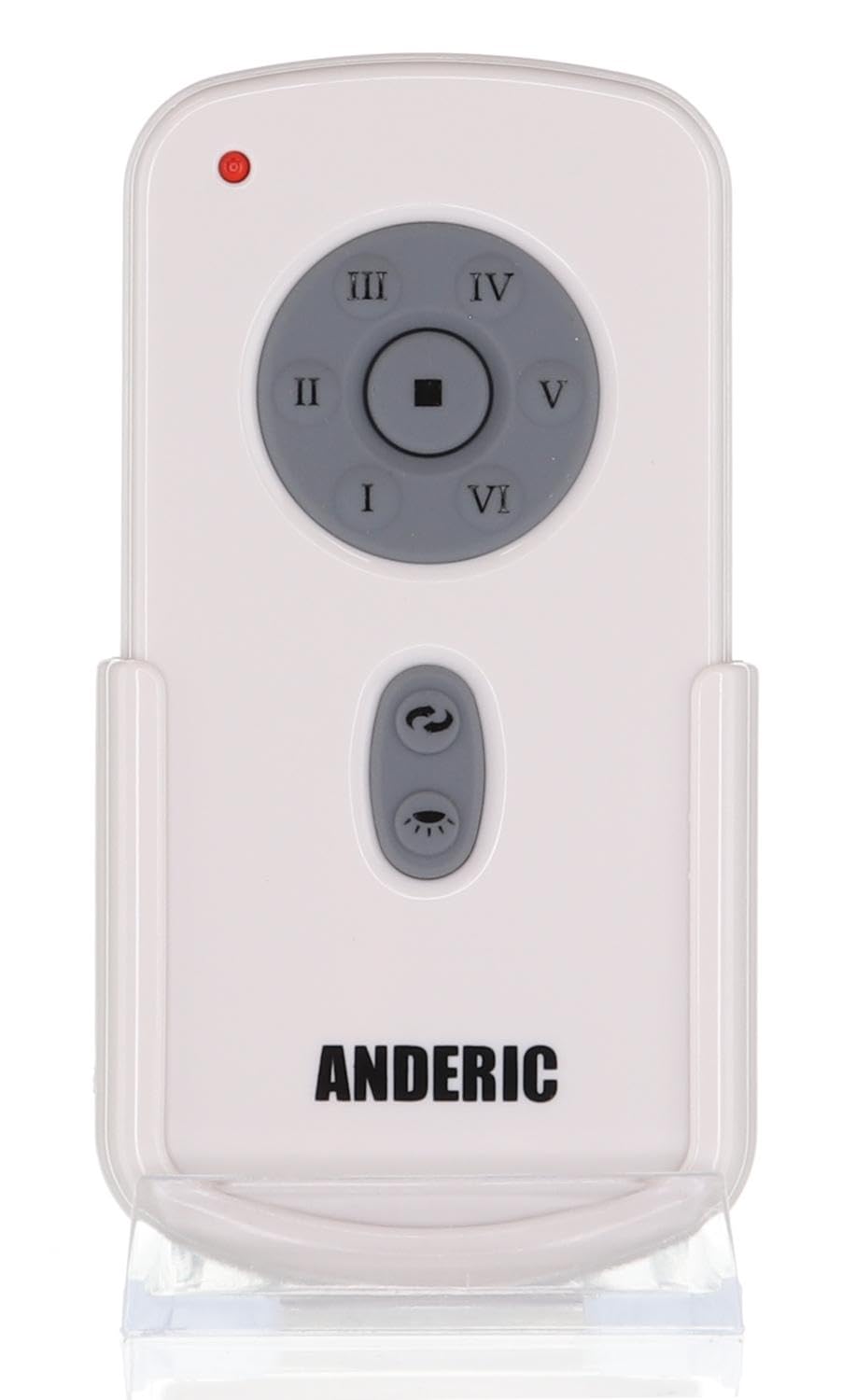
Foto: N'ihu view of the Anderic RR787T remote control, displaying its intuitive button layout for easy operation.
Ndakọrịta
The Anderic RR787T is designed for broad compatibility with specific ceiling fan systems:
- Ndị nnata: Designed for ceiling fans that use receivers with 4 dip switches, including models originally paired with RH786R, RH787T, and UC787T remotes.
- Fan Brands: Compatible with high-end ceiling fans from brands such as Casablanca, Monte Carlo, Fanimation, Regency, and Home Decorators Collection.
- Ụdị akwadoro: Includes Casablanca Panama, Stealth, Stingray, Fellini, and Monte Carlo Vision, Arcade, Hicks, and Dover series.
- Ihe ndetu dị mkpa: Not compatible with Fanimation Slinger fans (especially newer models), fans requiring 5 dip switch receivers, or 315 MHz systems like Harbor Breeze ZJF-HH-YK-A008. Always verify your fan's receiver type before purchase.
Nlekọta
Iji hụ na ogologo ndụ na ịrụ ọrụ kacha mma nke njikwa remote gị, soro ntuziaka mmezi ndị a:
- Ngbanwe batrị: Replace batteries when the remote's performance diminishes. Ensure correct battery type (2 AAA) and polarity.
- Nhicha: Wipe the remote with a soft, dry cloth. Avoid using harsh chemicals or abrasive cleaners.
- Nchekwa: Debe ihe eji emechi ihe n'ebe dị jụụ ma kpọọ nkụ, ebe anwụ na-anaghị anwụ kpọmkwem na oke okpomọkụ dị oke njọ.
Nchọpụta nsogbu
Ọ bụrụ na ịnwee nsogbu na njikwa remote gị, rụtụ aka na azịza ndị a na-ahụkarị:
- Remote anaghị aza:
- Lelee ọkwa batrị wee dochie ma ọ dị mkpa.
- Ensure the dip switch settings on the remote match the receiver.
- Verify the fan's power supply is active.
- Light Not Dimming:
- Confirm that incandescent bulbs are being used.
- Check if the dimming function is enabled inside the battery compartment.
- Fan Not Changing Speed/Direction:
- Hụ na ihe ntanetị ahụ dị n'ime ebe nnata ahụ ga-anọ.
- Re-check dip switch settings.
Nkọwapụta
| Ụdị | Anderik |
| Nọmba nlereanya | RR787T (replaces RH787T) |
| Akụkụ ngwugwu | 4.96 x 4.92 x 2.8 sentimita asatọ |
| Ibu Ibu | 3.2 ounces |
| Batrị | Batrị 2 AAA (anaghị etinye ya) |
| Njirimara Pụrụ Iche | Agụnyere ugwu mgbidi |
| Agba | Ọcha |
| Ọnụọgụ ngwaọrụ akwadoro kacha | 1 |
| Ngwa dakọtara | Onye ofufe |
Akwụkwọ ikike na nkwado
For warranty information or technical support, please refer to the product packaging or contact Anderic customer service directly. Keep your proof of purchase for any warranty claims.


