1. Nhazi
1.1 Ịkpọghe igbe na Mmalite Ike Gbanye
Carefully remove the laptop and all accessories from the packaging. Ensure the power adapter, stylus, and any included documentation are present. Connect the power adapter to the laptop's USB-C power jack and then to an electrical outlet. Press the power button, typically located on the side or keyboard, to turn on the device.

Image: The Lenovo IdeaPad 5 2-in-1 laptop in its open, traditional laptop configuration, displaying the Windows desktop interface.
1.2 Mbido Windows Mmalite
Upon first power-on, the Windows 10 Home operating system will guide you through an initial setup process. Follow the on-screen prompts to configure language, region, network connection, user accounts, and privacy settings. An active internet connection is recommended for this process.
1.3 Stylus Pairing
If a stylus is included, it may require initial pairing via Bluetooth. Navigate to Windows Settings > Devices > Bluetooth & other devices. Ensure Bluetooth is enabled on your laptop. Follow the stylus's specific instructions for entering pairing mode, then select it from the list of available devices on your laptop to complete the connection.

Image: The Lenovo IdeaPad 5 2-in-1 laptop configured in tent mode, with a digital stylus positioned next to it, indicating its touch and pen input capabilities.
2. Ntuziaka ọrụ
2.1 Ọrụ ndị bụ isi
- Gbanyụọ/ Gbanyụọ: Pịa bọtịnụ ike ka ịgbanwuo. Iji mechie, pịa bọtịnụ Malite, wee Power> Mechie.
- Modera Modera: Mechie mkpuchi ahụ ma ọ bụ pịa bọtịnụ Malite, wee pịa Power > Sleep.
- Malitegharịa: Pịa bọtịnụ Malite, wee pịa Ike > Malitegharịa ekwentị.
2.2 Touchscreen and 2-in-1 Modes
The IdeaPad 5 features a 16-inch IPS touchscreen display and a 360-degree hinge, allowing it to be used in multiple modes:
- Ụdị laptọọpụ: Traditional laptop configuration for typing.
- Ụdị ụlọ ntu: Stand the laptop in an inverted 'V' shape for presentations or media viewing.
- Ụkpụrụ guzoro: Flip the keyboard underneath the screen, ideal for touch-based interaction.
- Ụdị mbadamba: Fold the screen completely back against the base for a tablet experience.

Image: The Lenovo IdeaPad 5 2-in-1 laptop shown in a flexible, partially folded configuration, highlighting its versatility for different viewing and interaction angles.
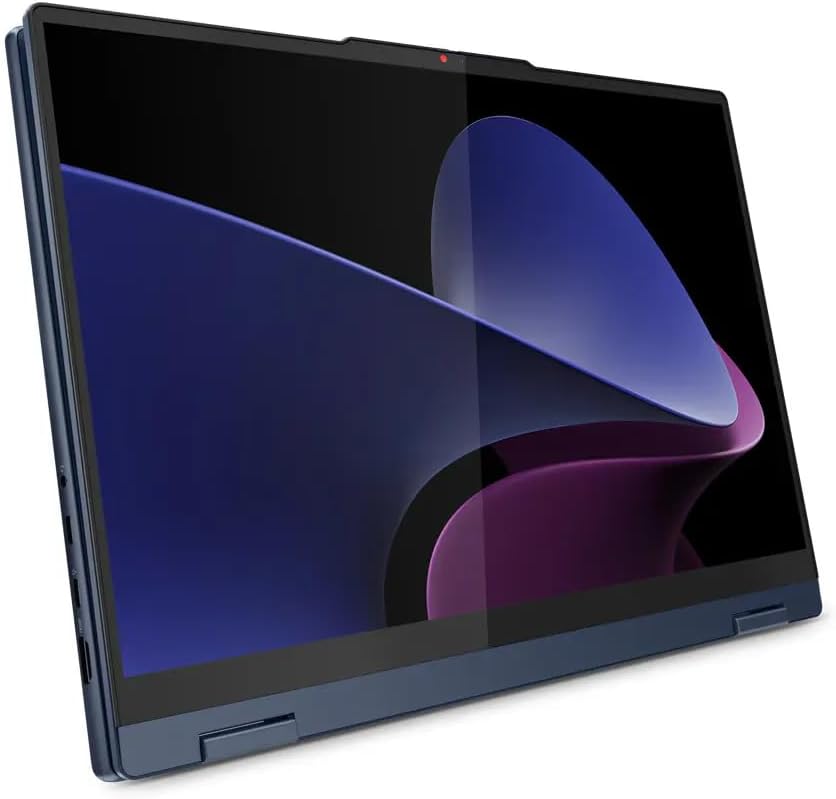
Image: The Lenovo IdeaPad 5 2-in-1 laptop fully converted into tablet mode, with the screen oriented upwards, ready for touch input.
2.3 Ojiji nke ahụigodo na Touchpad
- Ahụigodo azụ azụ: Press Fn + Spacebar (or a dedicated key) to adjust keyboard backlight brightness.
- Nọmba nọmba: The integrated numeric keypad provides efficient data entry.
- Ọgụgụ mkpịsị aka: Use the integrated fingerprint reader for secure and quick login via Windows Hello. Set up your fingerprint in Windows Settings > Accounts > Sign-in options.
- Mpempe aka: Supports multi-touch gestures for navigation. Refer to Windows settings for customization.
2.4 Njikọta Peripherals
The laptop offers various ports for external devices:
- USB 3.2 Gen 2 Type-C (x2): Supports Power Delivery, DisplayPort, and data transfer up to 10Gbps.
- Ụdị-A nke USB 3.2 Gen 1 (x2): One port supports 'Always On' charging. Data transfer up to 5Gbps.
- HDMI v1.4: Jikọọ na ngosipụta mpụga ma ọ bụ projectors.
- Onye na-agụ kaadị: Tinye kaadị ebe nchekwa dakọtara maka nnyefe data.
- Njikọ Jack ekweisi/igwe okwu: Jikọọ ekweisi ma ọ bụ ekweisi.

Foto: A nso nso view of the left side of the Lenovo IdeaPad 5 2-in-1 laptop, detailing the arrangement of its USB-C, HDMI, and USB-A ports.

Foto: A nso nso view of the right side of the Lenovo IdeaPad 5 2-in-1 laptop, illustrating the placement of its USB-A port, card reader, and headphone/microphone combo jack.
2.5 Wi-Fi na Bluetooth Njikọta
- Wi-Fi 6: Connect to wireless networks via MediaTek Wi-Fi 6 (802.11ax). Access Wi-Fi settings through the taskbar network icon or Windows Settings > Network & Internet > Wi-Fi.
- Bluetooth Bluetooth: Pair with Bluetooth devices like headphones, mice, or keyboards. Manage Bluetooth devices in Windows Settings > Devices > Bluetooth & other devices.
2.6 Ojiji igwefoto
The laptop features a 1080p FHD camera with a privacy shutter. Slide the physical shutter to cover or uncover the camera lens for privacy control.
3. Nlekọta
3.1 Na-ehicha ngwaọrụ
- Ihuenyo: Jiri akwa dị nro na nke enweghị mmiri ọkụ dampejiri mmiri ma ọ bụ ihe ngwọta nhicha ihe mkpuchi kpuchie ya. Zere kemịkalụ siri ike.
- Ahụigodo na chassis: Jiri ákwà dị nro. Maka unyi siri ike, jiri obere damp cloth is acceptable. Compressed air can remove debris from between keys.
- ọdụ ụgbọ mmiri: Hụ na ọdụ ụgbọ mmiri ahụ enweghị uzuzu na ihe ruru unyi. Jiri ikuku a na-akpọchi akpọchi ma ọ dị mkpa.
3.2 Nlekọta batrị
- Ịchaji: Use only the provided 65W AC adapter. Avoid fully discharging the battery frequently.
- Nchekwa: If storing the laptop for an extended period, charge the battery to approximately 50-60% to prolong its lifespan.
- Okpomọkụ: Zere ikpughe laptọọpụ ahụ n'ọnọdụ okpomọkụ dị oke njọ, nke nwere ike imebi arụmọrụ batrị.
3.3 Mmelite ngwanrọ
Regularly update Windows and device drivers to ensure optimal performance, security, and compatibility. Windows Update can be accessed via Settings > Update & Security > Windows Update. Lenovo Vantage software (if pre-installed) can assist with driver updates.
3.4 Njikwa nchekwa
The 512GB NVMe M.2 SSD provides fast storage. To maintain performance, periodically clean up unnecessary files using Windows Disk Cleanup and avoid filling the drive to full capacity.
4. Nchọpụta nsogbu
4.1 Okwu nkịtị
- Enweghị ike: Ensure the power adapter is securely connected to both the laptop and a working electrical outlet. Try a different outlet.
- Ngosipụta nsogbu: If the screen is blank, try connecting an external monitor to check if the issue is with the laptop's display. Adjust brightness settings.
- Okwu njikọ Wi-Fi: Check if Wi-Fi is enabled. Restart your router and the laptop. Ensure drivers are up to date.
- Ịrụ ngwa ngwa: Mechie ngwa ndị na-adịghị mkpa. Lelee maka mmelite ndabere. Hụ na ohere nchekwa zuru oke.
4.2 Restarting the System
A simple restart can resolve many minor software glitches. If the system is unresponsive, press and hold the power button for approximately 10-15 seconds until the laptop powers off, then press it again to restart.
5. Nkọwapụta
| Njirimara | Nkọwa |
|---|---|
| Aha Nlereanya | IdeaPad 5 2-n'ime-1 16AHP9 (83DS) |
| Nhazi | AMD Ryzen 5 8645HS 6-Core (Up to 5.0 GHz) |
| Eserese | AMD Radeon 760M Graphics (Agbakwunyere) |
| Ngosipụta | 16" LED-backlit IPS Touchscreen, 1920 x 1200 resolution, 300 nits, 60Hz |
| Ebe nchekwa | 16GB LPDDR5 6400 MHz |
| Nchekwa | 512GB NVMe M.2 SSD |
| Sistemụ nrụọrụ | Windows 10 Ụlọ |
| Njikọ ikuku | MediaTek Wi-Fi 6 (2x2), Bluetooth 5.3 |
| ọdụ ụgbọ mmiri | 2x USB 3.2 Gen 2 Type-C, 2x USB 3.2 Gen 1 Type-A, 1x HDMI v1.4, 1x Card Reader, 1x Headphone/Microphone Combo Jack |
| Igwefoto | 1080p FHD with Privacy Shutter |
| Ahụigodo | Ahụigodo azụ na-enwu enwu zuru oke yana nọmba nọmba, ihe na-agụ mkpịsị aka |
| Batrị | 3 Cell 57 Wh (Ojiji ruo awa 6 nkezi) |
| Akụkụ (LxWxH) | 14.02 x 10.03 x 0.72 sentimita asatọ |
| Ibu | 4.41 n'arọ |
| Agba | Cosmic Blue |
6. Akwụkwọ ikike na nkwado
6.1 Ozi akwụkwọ ikike
This Lenovo IdeaPad 5 2-in-1 laptop includes 1 Year Support from Lenovo within the US. For detailed terms and conditions of your warranty, please refer to the documentation included with your product or visit the official Lenovo support websaịtị.
6.2 Nkwado kọntaktị
For technical assistance, warranty claims, or service inquiries, please contact Lenovo support through their official website or the contact information provided in your product's warranty documentation. Have your laptop's model number (83DS) and serial number ready when contacting support.


