1. Okwu mmalite
This manual provides essential instructions for the safe operation, assembly, and maintenance of your Genesis Designs Smart Full Body Massage Chair, model GM1-W. Please read this manual thoroughly before using the product to ensure proper function and to prevent injury or damage.
The Genesis Designs GM1-W massage chair features 2D SL-track rollers, voice activation, a tablet remote control, 12 auto pre-programmed modes, and 6 massage techniques. It includes a zero-gravity function, built-in Bluetooth speakers, and a USB charging port. Airbag massage is provided for the shoulders, arms, waist, legs, and feet, along with a heated lumbar function and foot rollers.
2. Ozi nchekwa dị mkpa
WARNING: To reduce the risk of electric shock, burns, fire, or injury, always follow these basic precautions:
- Read all instructions before using the massage chair.
- Ejila mgbakwunye ndị nrụpụta akwadoghị.
- Kwụpụ na oghere mgbe ejighị ya, tupu itinye ma ọ bụ wepụ akụkụ, na tupu ihicha.
- Nleba anya dị mkpa mgbe ngwaahịa a na-eji, na, ma ọ bụ nso ụmụaka, ndị na-adịghị mma, ma ọ bụ ndị nwere nkwarụ na-eji ngwaahịa a.
- Arụla ọrụ n'okpuru blanketị ma ọ bụ ohiri isi. Oke kpo oku nwere ike ime ma bute ọkụ, ọkụ eletrik, ma ọ bụ mmerụ ahụ ndị mmadụ.
- Ejila ngwaahịa a rụọ ọrụ ma ọ bụrụ na ọ nwere eriri ma ọ bụ plọg mebiri emebi, ọ bụrụ na ọ naghị arụ ọrụ nke ọma, ọ bụrụ na atụpụrụ ya ma ọ bụ mebie ya, ma ọ bụ tinye ya na mmiri.
- Debe eriri ahụ ka ọ ghara ikpo ọkụ.
- Ejila n'èzí.
- Arụla ọrụ ebe a na-eji ngwaahịa aerosol (spray) ma ọ bụ ebe a na-enye oxygen.
- Ka ịkwụpụ njikọ, tụgharịa njikwa niile gaa na ọnọdụ gbanyụọ, wee wepụ plọg na mpụta.
- Ezubere ngwa a maka iji naanị ụlọ.
- Gakwuru dọkịta tupu i jiri ya ma ọ bụrụ na ị nwere nsogbu ahụike ọ bụla, dị ime, ma ọ bụ nwee pacemaker.
3. Ihe ngwugwu
Chọpụta na akụrụngwa niile dị na nkwakọ ngwaahịa:
- Genesis Designs GM1-W Massage Chair (Main Unit)
- Njikwa Nwepu Mbadamba ụrọ
- Ụdọ ọkụ
- Akwụkwọ ntuziaka (akwụkwọ a)

Foto 3.1: "In The Box" diagram illustrating the main chair unit, the tablet remote control, and the power cord.
4. Ntọala na Mgbakọ
The Genesis Designs GM1-W massage chair typically arrives partially assembled. Follow these steps for final assembly and placement.
4.1 Mwepu na ntinye
- Carefully remove all packaging materials. It is recommended to retain packaging for future transport or service.
- Position the chair in a suitable location. Ensure there is enough space around the chair for full recline, especially for the zero-gravity function. The chair requires approximately 66.33 inches in length when fully reclined.
- Ensure the chair is placed on a level surface.

Foto 4.1: Akụkụ ihu view of the Genesis Designs GM1-W massage chair.

Foto 4.2: Akụkụ view of the Genesis Designs GM1-W massage chair, illustrating its profile.
4.2 Ijikọ ike
- Locate the power input port on the back or bottom of the chair.
- Connect the power cord securely to the chair.
- Tinye nsọtụ nke ọzọ nke eriri ọkụ n'ime oghere eletrik gbadoro ụkwụ.
5. Ntuziaka ọrụ
Your Genesis Designs GM1-W massage chair offers various functions for a personalized massage experience.
5.1 Na-achịkwaview
The chair can be controlled via the handheld tablet remote or the quick-start buttons on the right armrest.

Foto 5.1: Handheld tablet remote control interface.

Foto 5.2: Quick-start control panel on the right armrest.
5.2 Starting a Massage
- Sit comfortably in the chair.
- Press the Power button on the tablet remote or the quick-start panel.
- Họrọ otu n'ime 12 auto pre-programmed modes or choose from 6 massage techniques using the tablet remote.
5.3 Isi atụmatụ na ọrụ
- 2D SL-Track Rollers: The massage rollers follow the natural curve of your spine, extending from your neck to your thighs, providing a comprehensive massage.
- Zero Gravity Function: Activate zero gravity mode to recline the chair to a position that elevates your legs above your heart, reducing pressure on your spine and enhancing relaxation. The chair offers multiple recline levels.

Foto 5.3: Illustration of the chair's zero gravity recline positions.
- Nkwalite olu: Use voice commands to control various functions of the massage chair. Refer to the tablet remote interface for specific voice commands.
- Airbag Massage: Airbags located in the shoulders, arms, waist, legs, and feet inflate and deflate to provide compression massage. Adjust intensity via the tablet remote.
- Heated Lumbar Function: Activate the heating function for the lower back to soothe muscles and enhance relaxation.
- Foot Massage: The legrest can extend up to 6.25 inches to accommodate different user heights. Foot rollers provide a targeted massage to the soles of your feet.
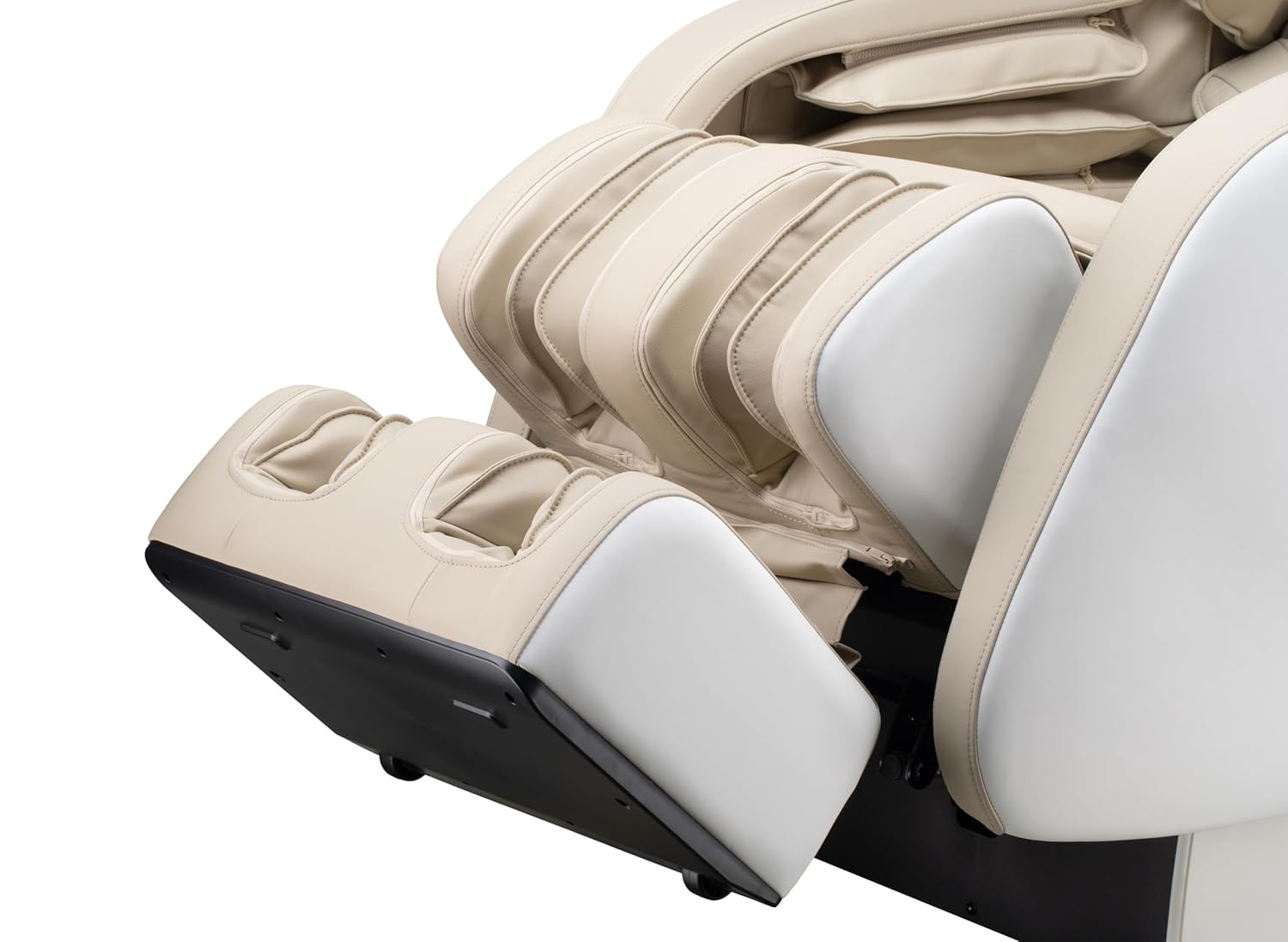
Foto 5.4: Detail of the footrest with integrated foot rollers.
- Ndị na-ekwu okwu Bluetooth: Connect your personal device via Bluetooth to enjoy audio during your massage.
- Kwado Bluetooth na ngwaọrụ gị.
- Chọọ maka "Genesis Massage Chair" or similar on your device's Bluetooth settings.
- Jikọọ na jikọọ.
- USB Nchaji Port: A convenient USB port is available for charging your mobile devices.

Foto 5.5: gafereview of main features and their locations on the chair.
6. Nlekọta na nlekọta
Nlekọta kwesịrị ekwesị na-eme ka oche ịhịa aka gị dị ogologo ma nwee ike ịrụ ọrụ nke ọma.
6.1 Nhicha
- Mputa: Jiri nwayọ hichaa ọcha, damp Ákwà. Ejila ihe nhicha, ihe mgbaze, ma ọ bụ kemịkal siri ike, n'ihi na ha nwere ike imebi ihe mkpuchi ahụ.
- Ime: Periodically vacuum any dust or debris from crevices.
- Ensure the chair is unplugged before cleaning.
6.2 Nchekwa
If storing the chair for an extended period, unplug it and cover it to protect from dust and moisture. Store in a cool, dry place.
7. Nchọpụta nsogbu
If you encounter issues with your massage chair, refer to the following common problems and solutions:
| Nsogbu | Ihe nwere ike ime | Ngwọta |
|---|---|---|
| Oche anaghị agba ọkụ. | Agbanyeghi eriri ọkụ na nke ọma. Enweghị ike si na mpụta. | Check power cord connection to chair and outlet. Test outlet with another device. |
| Ihe e ji asa ahụ anaghị agagharị. | Chair is in standby mode. Program not selected. | Ensure chair is powered on. Select an auto program or manual massage technique. |
| Bluetooth anaghị ejikọ. | Bluetooth on device is off. Chair's Bluetooth is off or not discoverable. | Ensure Bluetooth is enabled on your device. Check tablet remote for Bluetooth activation. Try restarting both devices. |
| Voice activation not responding. | Microphone obstructed. Incorrect commands. | Ensure no obstructions near the microphone. Speak clearly and use the specified voice commands. |
| Mkpọtụ na-adịghị ahụkebe n'oge arụ ọrụ. | Normal operational sounds. Loose component. | Some motor and airbag sounds are normal. If noise is excessive or new, discontinue use and contact customer support. |
If the problem persists after attempting these solutions, please contact Genesis Designs customer support for assistance.
8. Nkọwapụta
| Njirimara | Nkọwa |
|---|---|
| Nọmba nlereanya | GM1-W |
| Ụdị | Atụmatụ Jenesis |
| Massage Track | 2D SL-Track |
| Akụkụ kwụ ọtọ (L x W x H) | 57.67 x 29.72 x 44.33 sentimita asatọ |
| Zero Gravity Dimensions (L x W x H) | 66.33 x 29.72 x 38.77 sentimita asatọ |
| Ibu ngwaahịa | 165 pound |
| Obosara oche | 21 sentimita asatọ |
| Legrest Extension | Ruo 6.25 sentimita asatọ |
| Mmemme ịhịa aka n'ahụ | 12 Auto Modes, 6 Manual Techniques |
| Atụmatụ pụrụ iche | Voice Activation, Bluetooth Speakers, USB Charging, Heated Lumbar, Foot Rollers |
| Asambodo | ETL kwadoro |
| UPC / GTIN | 811691028064 |

Foto 8.1: Dimensional diagram of the massage chair.
9. Akwụkwọ ikike na nkwado ndị ahịa
For warranty information, please refer to the documentation included with your purchase or contact Genesis Designs customer support directly. Keep your proof of purchase for warranty claims.
If you require technical assistance, have questions about operation, or need to report a problem, please contact Genesis Designs customer support through their official websaịtị ma ọ bụ ozi kọntaktị enyere na ngwaahịa gị.


