1. Okwu mmalite
Welcome to your new Amazon Fire TV 55-inch 4-Series 4K UHD Smart TV. This manual provides essential information for setting up, operating, maintaining, and troubleshooting your television. Your Fire TV combines stunning 4K Ultra HD visuals with the intelligence of Alexa, offering a seamless entertainment experience.

Foto: N'ihu view of the Amazon Fire TV 4-Series 55-inch TV, showcasing bezels ya dị gịrịgịrị na nguzo ya.

Image: A graphic highlighting key features of the Fire TV 4-Series: 4K Resolution, HDR10+ display, Ambient Experience, and Alexa integration.
2. Nhazi
2.1 Mwepu na nyocha
Carefully remove all components from the packaging. Inspect the TV and accessories for any signs of damage. Retain the packaging for future transport or service needs.
2.2 Stand Assembly (Optional)
If you are not wall-mounting your TV, attach the included TV stand legs:
- Debe ihuenyo TV n'elu ala dị nro ma dị ọcha iji gbochie ncha.
- Kwado ụkwụ kwụ ọtọ nke ọ bụla na oghere kwekọrọ na ala TV.
- Secure each leg using the provided screws (4 screws total).
The distance between the TV legs is approximately 43.3 inches.
2.3 Mgbidi mgbidi (nhọrọ)
For wall mounting, use a VESA-compatible mount that supports a 300 mm x 300 mm standard. Consult a professional for installation if you are unsure.
2.4 Njikọta Peripherals
Jikọọ ngwaọrụ gị na TV site na iji ọdụ ụgbọ mmiri dị:
- ọdụ ụgbọ mmiri HDMI: 3 HDMI 2.0 ports and 1 HDMI 2.1 port with eARC for high-definition audio and video devices (e.g., gaming consoles, Blu-ray players, soundbars).
- Ọdụ ụgbọ mmiri USB: 1 USB 3.0 port for connecting external storage devices.
- Digital Optical Audio Port: 1 port for connecting to external audio systems.
- Njikọ Ethernet: 1 port for a wired internet connection.
Gbaa mbọ hụ na ejikọrọ eriri niile na nchekwa.
2.5 Njikọ ike
Plug the power cord into the TV's power input, then into a wall outlet.
2.6 Ntọala njikwa anya
Insert the two included AAA batteries into the Alexa Voice Remote Enhanced. The remote will automatically pair with your TV upon initial setup.
2.7 Mmalite Ike na Ntọala Netwọk
Press the power button on the remote. Follow the on-screen instructions to:
- Họrọ asụsụ gị.
- Connect to your Wi-Fi network (supports Wi-Fi 6) or use the Ethernet connection.
- Jiri akaụntụ Amazon gị banye.
- Complete the guided setup for your Fire TV experience.
3. .rụ ọrụ
3.1 Gbanyụọ ma ọ bụ gbanyụọ
Press the power button on the Alexa Voice Remote Enhanced to turn the TV on or off. The TV may enter a sleep mode rather than fully powering down, allowing for quick startup and Ambient Experience features.
3.2 Alexa Voice Remote Enhanced
Your TV comes with an Alexa Voice Remote Enhanced, designed for intuitive control:
- Njikwa olu: Press and hold the Alexa button and speak naturally to find content, manage smart home devices, or ask questions.
- Bọtịnụ akwadoro: Use the dedicated app buttons for quick access to your favorite streaming services.
- Ntugharị: Use the directional pad and select button to navigate the Fire OS interface.
Alternatively, you can use the free Fire TV app on your smartphone (available for Fire OS, Android, and iOS) for voice control and navigation.

Image: The Fire TV interface showing the Alexa search bar and icons for popular streaming applications, demonstrating voice control capabilities.
3.3 Fire OS Interface and Content Access
The Fire OS provides a personalized home screen where you can easily find and launch apps, movies, TV shows, and live TV. Navigate through categories and recommendations to discover new content. You can access over 1.8 million movies and TV episodes, including over 400,000 episodes of free content. Subscription fees may apply for certain services.
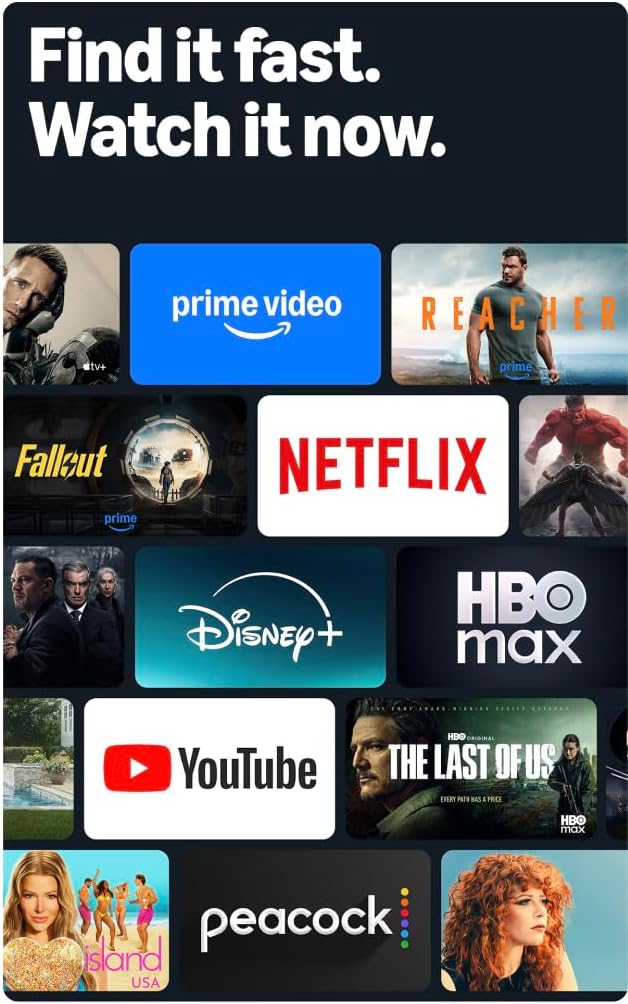
Image: A collage of streaming service logos and content thumbnails on the Fire TV screen, illustrating the wide range of available entertainment.
3.4 Picture Quality
Experience vivid visuals with 4K Ultra HD resolution and HDR10+ support. This technology delivers bright, crisp images with enhanced contrast, ensuring details are visible even in dark scenes.

Image: A visual comparison demonstrating the superior detail and clarity of 4K resolution compared to HD, using a close-up of a chameleon.
3.5 Audio
The TV features Dolby Digital Plus audio support with passthrough of Dolby-encoded audio, providing clear and immersive sound. The integrated speakers offer 10W + 10W audio power.
3.6 Ambient Experience
Utilize the custom Omnisense technology. Built-in sensors wake the display when you enter the room, allowing it to show your favorite artwork or quickly resume watching content.

Image: The Fire TV screen displaying vibrant abstract art, illustrating the Ambient Experience feature that activates when motion is detected.
3.7 Ịgba egwu
Download free games from the Appstore or stream games from the cloud with Amazon Luna, offering a versatile gaming experience directly on your TV.
4. Nlekọta
4.1 Na-ehicha TV gị
- Ihuenyo: Jiri nwayọ hichaa ihuenyo ahụ site na iji akwa dị nro, kpọrọ nkụ, akwa enweghị akwa. Maka akara ndị isi ike, dị obere dampen akwa na mmiri ma ọ bụ ihe ngwọta na-ehicha ihuenyo kpọmkwem nke e mere maka ngwá electronic. Afesala mmiri mmiri ozugbo na ihuenyo.
- Casing: Jiri akwa dị nro ma kpọọ nkụ hichaa TV casing. Zere ihe nhicha ma ọ bụ ihe mgbaze.
Wepụ TV mgbe niile na ebe ọkụ tupu ihicha ya.
4.2 Mmelite ngwanrọ
Your Fire TV receives automatic software security updates. Ensure your TV is connected to the internet to receive these updates, which improve performance and security. This device receives guaranteed software security updates until at least four years after the device is last available for purchase as a new unit on our websaịtị.
5. Nchọpụta nsogbu
If you encounter issues with your Amazon Fire TV, refer to the following common troubleshooting steps:
- Enweghị ike: Hụ na e tinyere eriri ọkụ eletrik n'ime TV na ebe a na-etinye ihe na mgbidi nke na-arụ ọrụ nke ọma. Nwaa ebe a na-etinye ihe na-esi ísì ụtọ dị iche.
- Enweghị foto/ụda: Verify that all HDMI cables are correctly connected to both the TV and your external devices. Check the input source on your TV.
- Remote anaghị aza: Replace the AAA batteries in the Alexa Voice Remote Enhanced. Ensure there are no obstructions between the remote and the TV.
- Okwu njikọ netwọkụ: Check your Wi-Fi router and ensure it is functioning correctly. Restart your router and the TV. If using a wired connection, ensure the Ethernet cable is securely connected.
- Ịrụ ngwa ngwa: Restart your TV by unplugging it from the power outlet for 30 seconds and then plugging it back in. Clear cache for apps if necessary.
Maka nsogbu ndị ọzọ gbasara nchọpụta nsogbu ma ọ bụ nsogbu ndị na-adịgide adịgide, gaa na nkwado Amazon Fire TV websaịtị ma ọ bụ kpọtụrụ ndị ahịa.
6. Nkọwapụta
| Njirimara | Nkọwa |
|---|---|
| Nha ihuenyo | 55 inches (54.6 inches viewike) |
| Mkpebi | 4K UHD (3840 x 2160) |
| Ọdịdị dị elu dị elu (HDR) | HDR10+, HDR10, HLG |
| Ụdị ọkụ azụ | Igwe ọkụ ozugbo |
| Ọnụego ume ọhụrụ | 60Hz |
| ọdụ ụgbọ mmiri HDMI | 3 HDMI 2.0 + 1 HDMI 2.1 nwere eARC |
| Ọdụ ụgbọ mmiri USB | 1 eriri USB 3.0 |
| Mmepụta Audio Optical Digital | 1 Port |
| Njikọta | Wi-Fi 6 + 1 Ethernet port |
| Nkwado olu | Alexa Voice Remote Enhanced (included) or Fire TV app |
| Nkwado ọdịyo | Dolby Digital Plus |
| Ike ọdịyo | 10W + 10W |
| Sistemụ nrụọrụ | Sistemụ ọrụ ọkụ |
| Nha Ngwaahịa na Nguzo | 48.3" x 31.3" x 11.3" |
| Arọ na Stand | 22.0 n'arọ |
| Product Size without Stand | 48.3" x 28.2" x 3.2" |
| Ibu na-enweghị Nkwụsi ike | 21.5 n'arọ |
| Distance between TV legs | 43.3” |
| Nọmba SKU | 4K43N402 |
| Ụkpụrụ Ugwu Mgbidi VESA | 300 mm x 300 mm |
| Batrị njikwa anya | 2 AAA (gụnyere) |
| Teknụzụ njikwa anya | Bluetooth 5.0 |
7. Akwụkwọ ikike na nkwado
7.1 Akwụkwọ ikike ngwaahịa
Your Amazon Fire TV 4-Series includes a 1-year limited warranty and service. Optional 3-Year and 4-Year Extended Warranties are available for U.S. customers and are sold separately.
The Alexa Voice Remote Enhanced included with your TV has a 90-day limited warranty and service.
Ojiji nke Fire TV dabere na usoro dị na Amazon websaịtị.
7.2 Nkwado ndị ahịa
For technical assistance, warranty claims, or additional support, please visit the official Amazon support websaịtị ma ọ bụ kpọtụrụ ọrụ ndị ahịa Amazon.
8. Atụmatụ nnweta
The Amazon Fire TV 4-Series includes several accessibility features to enhance the user experience:
- OluView Onye na-agụ ihuenyo: Provides spoken feedback for navigation and on-screen text, assisting users who are blind or visually impaired.
- Ihe na-eme ka ihuenyo dịkwuo mma: Allows users to zoom in and out, and pan around the screen for better visibility of content.
- ọkọlọtọ ederede: Na-ejikọta ederede dị na ihuenyo ka ọ bụrụ ọkọlọtọ enwere ike ịhazi.
- Nkọwa okwu emechiri emechi: Displays text captions for dialogue and sounds in supported videos and TV shows.
- Nkọwa ọdịyo: Provides verbal descriptions of visual elements on the screen, such as actions, facial expressions, and scene changes, for supported content.
- Bluetooth Hearing Aids: Supports audio streaming for select compatible Bluetooth hearing aids and devices for a private listening experience. Compatible Bluetooth headphones can also be used.
Note: Captions and audio descriptions are not available for all content. "Hearing aids" refers to compatible Bluetooth hearing devices such as traditional hearing aids, cochlear implants, and bone conduction hearing devices.


