1. Okwu mmalite
This manual provides detailed instructions for the installation, operation, and maintenance of the Aigo B760L D4 Motherboard. Please read this manual thoroughly before installing or using the product to ensure proper functionality and to prevent damage.
2. Ozi nchekwa
Na-edebe ihe nchekwa nchekwa ndị a mgbe niile:
- Disconnect power before installing or removing any components.
- Jikwaa motherboard ahụ n'akụkụ ya iji zere imetụ ihe ndị dị nro aka.
- Use an anti-static wrist strap to prevent electrostatic discharge (ESD) damage.
- Gbaa mbọ hụ na ikuku ikuku dị mma n'ime akpa kọmputa iji gbochie ikpo oke ọkụ.
- Ekpughela motherboard ka ọ bụrụ mmiri ma ọ bụ oke okpomọkụ.
3. Ihe ngwugwu
Chọpụta na ihe niile dị na ngwugwu:
- Aigo B760L D4 Motherboard
- Akwụkwọ ntuziaka (akwụkwọ a)
- SATA Cables (ọnụ ọgụgụ nwere ike ịdị iche)
- M / O Shield
- Driver CD/USB (if included)
4. Ngwaahịa gafereview
The Aigo B760L D4 is an M-ATX motherboard designed for Intel LGA 1700 processors, featuring the Intel B760 chipset. It supports DDR4 memory and offers a range of connectivity options.
4.1 Nhazi motherboard
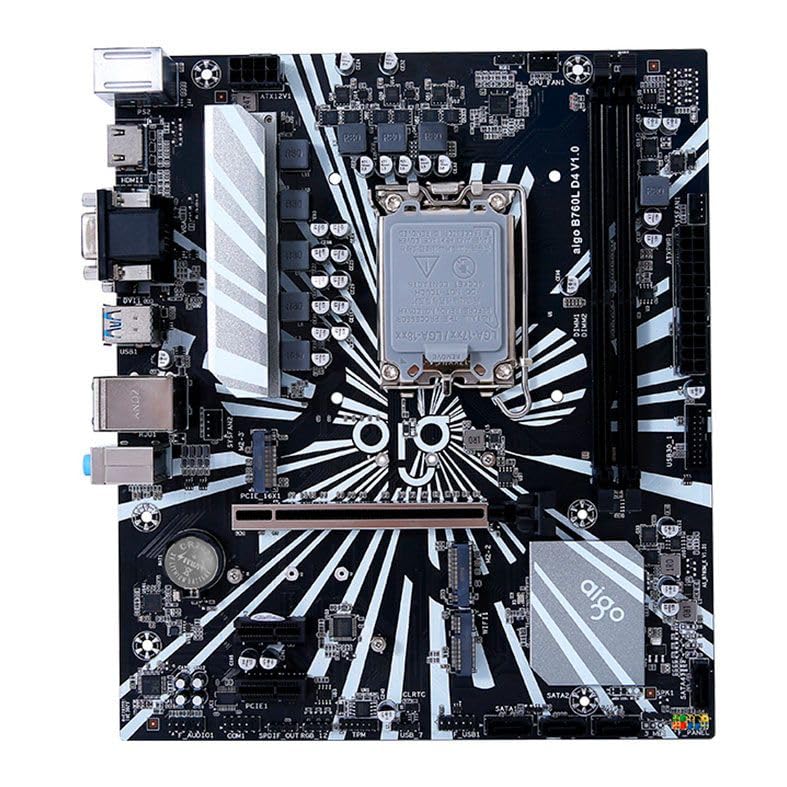
Nyocha 1: N'eluview of the Aigo B760L D4 Motherboard alongside its retail packaging.

Ọgụgụ 2: N'elu-ala view of the Aigo B760L D4 Motherboard, highlighting component placement.

Ọgụgụ 3: N'akuku view of the Aigo B760L D4 Motherboard, showing the CPU socket and memory slots.
4.2 Panel I/O n'azụ

Figure 4: Rear I/O panel of the Aigo B760L D4 Motherboard, displaying various connectivity ports.
The rear I/O panel includes:
- 1 x PS/2 Keyboard and Mouse port
- 2 x USB 2.0 ọdụ ụgbọ mmiri
- 4 x USB 3.0 ọdụ ụgbọ mmiri
- 1 x HDMI ọdụ ụgbọ mmiri
- 2 x DVI ports
- 1 x VGA ọdụ ụgbọ mmiri
- 1 x RJ45 LAN port
- Audio jacks (Line In, Line Out, Mic In)
5. Nhazi
5.1 Ịwụnye CPU
- Chọta oghere LGA 1700 CPU na motherboard.
- Mepee oghere oghere CPU wee bulie efere ibu ahụ.
- Jiri nlezianya dozie CPU na oghere, hụ na akara triangular dị na CPU dabara na akara dị na oghere.
- Jiri nwayọ tinye CPU n'ime oghere na-amanyeghị ya.
- Mechie efere ibu ahụ ma chekwaa ya na lever.
5.2 Installing DDR4 Memory
The motherboard supports up to 64GB of DDR4 memory across two slots, with speeds from 2133 MHz to 3200 MHz in dual-channel configuration.
- Mepee obere vidiyo na nsọtụ abụọ nke oghere DIMM.
- Hazie modul ebe nchekwa ahụ na oghere ahụ, hụ na ọkwa dị na modul dabara na igodo dị na oghere ahụ.
- Pịa ala na nsọtụ abụọ nke modul ebe nchekwa ruo mgbe obere vidiyo ga-adaba n'ebe.
5.3 Installing Storage Devices
The motherboard features 4 x SATA 3.0 ports and 2 x M.2 NVME Dual-Protocol slots.
5.3.1 SATA Drives
- Jikọọ otu nsọtụ nke eriri data SATA na ọdụ ụgbọ mmiri SATA na motherboard.
- Connect the other end of the SATA data cable to your SATA hard drive or SSD.
- Jikọọ eriri ọkụ SATA site na ọkụ eletrik gị na draịvụ ahụ.
5.3.2 M.2 NVME Drives
- Locate an M.2 slot on the motherboard.
- Wepụ skru M.2 nke na-egbochi ya.
- Insert the M.2 NVME drive into the slot at a 30-degree angle.
- Gently push the drive down and secure it with the standoff screw.
5.4 Ijikọ ike
Jikọọ njikọ ike ATX nke nwere pin 24 na njikọ ike ATX 12V nke nwere pin 8 site na ọkọnọ ike gị gaa na ọdụ ụgbọ mmiri kwekọrọ na motherboard.
5.5 Installing Expansion Cards
The motherboard includes 1 x PCIe x16 slot and 1 x PCIe x1 slot.
- Align your expansion card (e.g., graphics card) with the appropriate PCIe slot.
- Pịa ala nke ọma ruo mgbe kaadị ahụ ga-adị n'ọnọdụ kwesịrị ekwesị n'ime oghere ahụ.
- Jiri skru kpuchie kaadị ahụ na kọmputa ahụ.
6. .rụ ọrụ
6.1 Boot mbụ na ntọala BIOS
After assembling your system, connect a monitor, keyboard, and mouse. Power on the system. During startup, press the designated key (usually DEL or F2) to enter the BIOS/UEFI setup utility. Here you can configure boot order, system time, and other advanced settings.
6.2 Nwụnye sistemụ arụmọrụ
The Aigo B760L D4 Motherboard supports Windows 10 and Windows 11 operating systems. Insert your OS installation media (USB drive or DVD) and follow the on-screen instructions to install the operating system.
6.3 Nwụnye ọkwọ ụgbọala
After OS installation, install the necessary drivers for the chipset, audio, LAN, and other integrated components. These drivers are typically provided on a CD/USB with the motherboard or can be downloaded from the manufacturer's websaịtị.
7. Nlekọta
- Debe ya ọcha: Regularly clean dust from inside your computer case using compressed air. Dust accumulation can lead to overheating.
- Mmelite BIOS: Lelee nke onye nrụpụta oge ụfọdụ website for BIOS/UEFI updates. Updates can improve stability, compatibility, and performance. Follow update instructions carefully.
- Mmelite ọkwọ ụgbọala: Debe ndị ọkwọ ụgbọ ala gị ka emelitere iji hụ na arụmọrụ kacha mma yana ndakọrịta na ngwanrọ na ngwaike ọhụrụ.
- Njikwa gburugburu: Operate the system in a cool, dry, and well-ventilated environment.
8. Nchọpụta nsogbu
8.1 Enweghị ike
- Ensure the power supply is connected correctly to the motherboard (24-pin and 8-pin ATX 12V).
- Check if the power supply switch is in the "ON" position.
- Verify that the power button on the case is correctly connected to the motherboard's front panel header.
8.2 Enweghị ngosi
- Ensure the monitor is connected to the correct video output (either integrated graphics or a dedicated graphics card).
- Tinyegharịa kaadị eserese na modul ebe nchekwa.
- Try booting with only one memory module installed.
8.3 Akwụsịghị sistemu / mkpọka
- Check CPU and GPU temperatures to ensure they are not overheating.
- Verify that all power connectors are securely attached.
- Gbaa ngwaọrụ nyocha ebe nchekwa ka ịlele maka RAM adịghị mma.
- Ensure BIOS is updated to the latest stable version.
9. Nkọwapụta
| Njirimara | Nkọwapụta |
|---|---|
| Ụdị | Aịgo |
| Nlereanya | AIGO-B760L-D4 |
| Chipset | Intel B760 |
| Socket CPU | LGA 1700 |
| Ebe nchekwa | 2 x DDR4 DIMM oghere |
| Oke ebe nchekwa | 64GB |
| Nkwado Ọsọ Ebe Nchekwa | 2133 ~ 3200 MHz (Dual Channel) |
| Interface ọdịyo | 1 x HDMI, 2 x DVI, 1 x VGA |
| SATA Slots | 4 x SATA 3.0 |
| Oghere M.2 | 2 x M.2 NVME Dual-Protocol |
| Ọdụ ụgbọ mmiri USB (azụ) | 2 x USB 2.0, 4 x USB 3.0 |
| Oghere Mgbasawanye | 1 x PCIe x1, 1 x PCIe x16 |
| Nkwado Sistemụ arụmọrụ | Windows 10/11 |
| PS/2 Port | 1 x PS/2 Keyboard and Mouse |
| Power Phase | 8-nhazi |
| Njikọ ọkụ | 1 x ATX nke nwere pin 24, 1 x ATX nke nwere pin 8 12V |
| Njikọ WiFi | 1 x WiFi interface (PCIe compatible) |
| Ọdụ LAN | 1 x RJ45 |
| Akụkụ | 24.4 x 21 cm (M-ATX) |
10. Akwụkwọ ikike na nkwado
For warranty information and technical support, please refer to the documentation provided with your purchase or visit the official Aigo websaịtị. Debe ihe akaebe nke ịzụrụ maka akwụkwọ ikike.