1. Okwu mmalite
Thank you for choosing the Silvergear Portable Solar Charger and Power Bank. This device is designed to provide a reliable power source for your electronic devices using solar energy, making it ideal for outdoor activities, camping, hiking, and emergencies. This manual will guide you through the proper setup, operation, maintenance, and troubleshooting of your solar charger to ensure optimal performance and longevity.
2. Ozi nchekwa
Biko gụọ ntuziaka nchekwa niile nke ọma tupu iji ngwaahịa a. Ọdịda ịgbaso ntuziaka ndị a nwere ike ibute ujo ọkụ eletrik, ọkụ ma ọ bụ mmerụ ahụ dị egwu.
- Do not expose the solar charger to extreme temperatures, direct flame, or water for extended periods.
- Zere idobe ma ọ bụ idobe ngwaọrụ ahụ na mmetụta siri ike.
- Do not attempt to disassemble, repair, or modify the device yourself. Contact qualified service personnel if service is required.
- Debe ebe ụmụaka na-apụghị iru.
- Ensure proper ventilation when charging to prevent overheating.
- Ejila ngwaọrụ ahụ ma ọ bụrụ na ọ mebiri emebi.
3. Ihe ngwugwu
Chọpụta na ihe niile dị na ngwugwu gị:
- Silvergear Portable Solar Charger and Power Bank
- 2 x Carabiner Clips
- Akwụkwọ ntuziaka (akwụkwọ a)
4. Ngwaahịa gafereview
The Silvergear Portable Solar Charger is a compact and efficient device designed for on-the-go power. It features multiple solar panels that fold for easy portability and a USB output port with Quick Charge 3.0 technology for rapid device charging.

Image: The Silvergear Portable Solar Charger unfolded, showcasing its key features including 30 watts of power, Quick Charge 3.0, and its portable, foldable design.
Akụkụ ndị bụ isi:
- Portable Solar Power: Provides access to electricity even in remote areas.
- Ịrụ ọrụ dị elu: Delivers 30 watts of power for effective charging.
- Nchaji ngwa ngwa 3.0: Equipped with a USB port for fast charging of compatible devices.
- Nhazi a na-agbanwe agbanwe: Easily folds for compact storage and transport in a backpack.
- Njikọ dị iche iche: Includes 2 carabiner clips for easy attachment to backpacks, tents, or trees.
- Na-adịgide adịgide na mmiri anaghị egbochi ya: Designed to withstand outdoor conditions.

Image: A man hiking with the Silvergear solar panel clipped to his backpack, demonstrating its portability and ease of attachment for outdoor use.
5. Nhazi
Setting up your Silvergear Portable Solar Charger is straightforward:
- Mepee ogwe anyanwụ: Carefully unfold the solar panel completely to expose all solar cells.
- Position for Sunlight: Place the unfolded solar panel in direct sunlight. Ensure no shadows are cast on the panels for maximum efficiency.
- Chekwaa panel ahụ: Use the included carabiner clips to attach the solar panel to a backpack, tent, or other stable surface if needed. This prevents it from shifting and ensures continuous sun exposure.
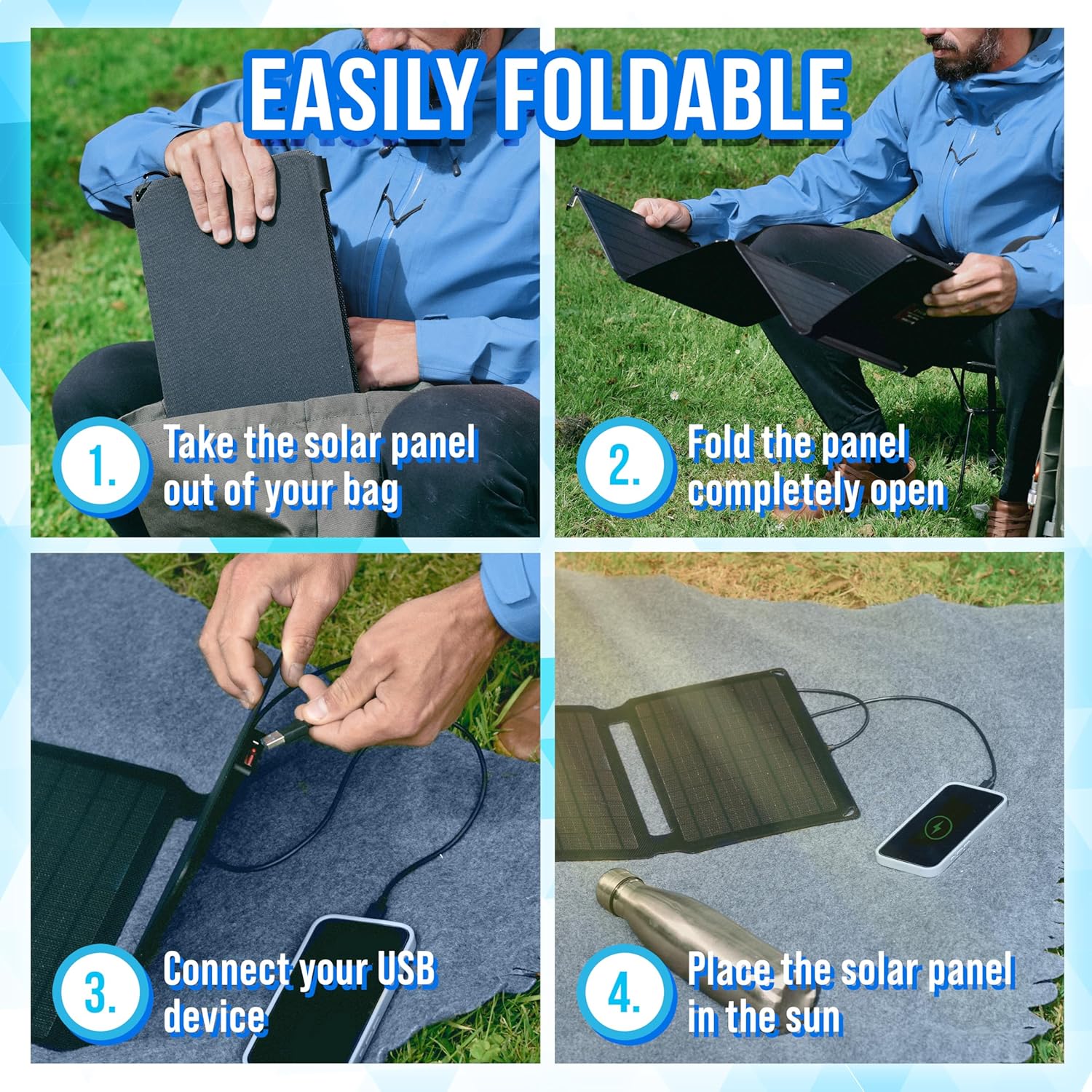
Image: A visual guide demonstrating the four steps for setting up the solar charger: taking it out of the bag, unfolding it, connecting a USB device, and placing it in the sun.
6. Ntuziaka ọrụ
Once the solar panel is set up and exposed to sunlight, you can begin charging your devices.
- Jikọọ ngwaọrụ gị: Plug your USB charging cable into the USB output port on the solar charger. Then, connect the other end of the cable to your electronic device (e.g., smartphone, tablet, power bank).
- Nleba anya: The solar charger will automatically begin charging your device when sufficient sunlight is available. Some devices may display a charging indicator.
- Welite ìhè anyanwụ: For the fastest charging, periodically adjust the angle of the solar panel to ensure it is directly facing the sun.
- Nchaji ngwa ngwa 3.0: If your device supports Quick Charge 3.0, it will benefit from faster charging speeds when connected to the compatible USB port.

Foto: A nso nso view of the Silvergear solar charger's integrated USB port, illustrating where to connect your device for charging.
7. Nlekọta
Proper maintenance will extend the life of your solar charger:
- Nhicha: Wipe the solar panels with a soft, damp cloth to remove dust or dirt. Do not use harsh chemicals or abrasive materials. Ensure the panels are dry before folding or storing.
- Nchekwa: When not in use, fold the solar charger and store it in a cool, dry place away from direct sunlight and extreme temperatures.
- Nyocha: Periodically inspect the cables and connectors for any signs of wear or damage.
8. Nchọpụta nsogbu
If you encounter issues with your Silvergear Portable Solar Charger, refer to the following common problems and solutions:
- Ngwaọrụ anaghị akwụ ụgwọ:
- Ensure the solar panel is in direct, unobstructed sunlight.
- Check that the USB cable is securely connected to both the solar charger and your device.
- Verify that your device's battery is not fully charged.
- Test with a different USB cable or device to rule out cable/device issues.
- Nchaji nwayọ:
- Ensure the solar panels are clean and free of dirt or debris.
- Adjust the angle of the solar panel to face the sun directly.
- Charging speed is dependent on sunlight intensity; cloudy conditions will result in slower charging.
- No power indicator:
- The solar charger typically does not have a separate power indicator light. Charging status is usually indicated by the connected device.
9. Nkọwapụta
| Njirimara | Nkọwapụta |
|---|---|
| Ụdị | Ngwa ọlaọcha |
| Nọmba nlereanya | 4001 |
| Ụdị ngwaahịa | chaja anyanwụ nwere ike mpịaji |
| Njikọ | USB |
| Atụmatụ pụrụ iche | Nchaji ngwa ngwa 3.0 |
| Mgbakọta ọdụ ụgbọ mmiri USB | 1 |
| Mpụta ike | 30 Watt |
| Mmepụta Voltage | 15 volts (DC) |
| Isi Iyi Ike | Ike anyanwụ |
| Ngwa gụnyere | 2 obere vidiyo |
| Enwere ike ibugharị | Ee |
10. Akwụkwọ ikike Ozi
Silvergear products are manufactured to high-quality standards. Specific warranty terms and conditions are typically provided with your purchase documentation or can be found on the official Silvergear websaịtị. Biko dowe akwụkwọ ikike ịzụrụ ihe ọ bụla.
11. Nkwado
For further assistance, technical support, or inquiries regarding your Silvergear Portable Solar Charger, please visit the official Silvergear website or contact their customer service department. Contact details can usually be found on the product packaging or the brand's websaịtị.


