Okwu mmalite
Thank you for choosing the Mesqool CR1025 Digital Alarm Clock Radio. This device combines multiple functions including a digital alarm clock, Bluetooth 5.0 speaker, FM radio, night light, and dual USB charging ports. This manual provides detailed instructions to help you set up and operate your new device effectively.
Ihe ngwugwu
- Mesqool CR1025 Digital Alarm Clock Radio
- Ihe nkwụnye ọkụ
- Akwụkwọ ntuziaka onye ọrụ
- C Battery (for backup)
Ngwaahịa gafereview
Familiarize yourself with the components and controls of your Mesqool CR1025 Digital Alarm Clock Radio.
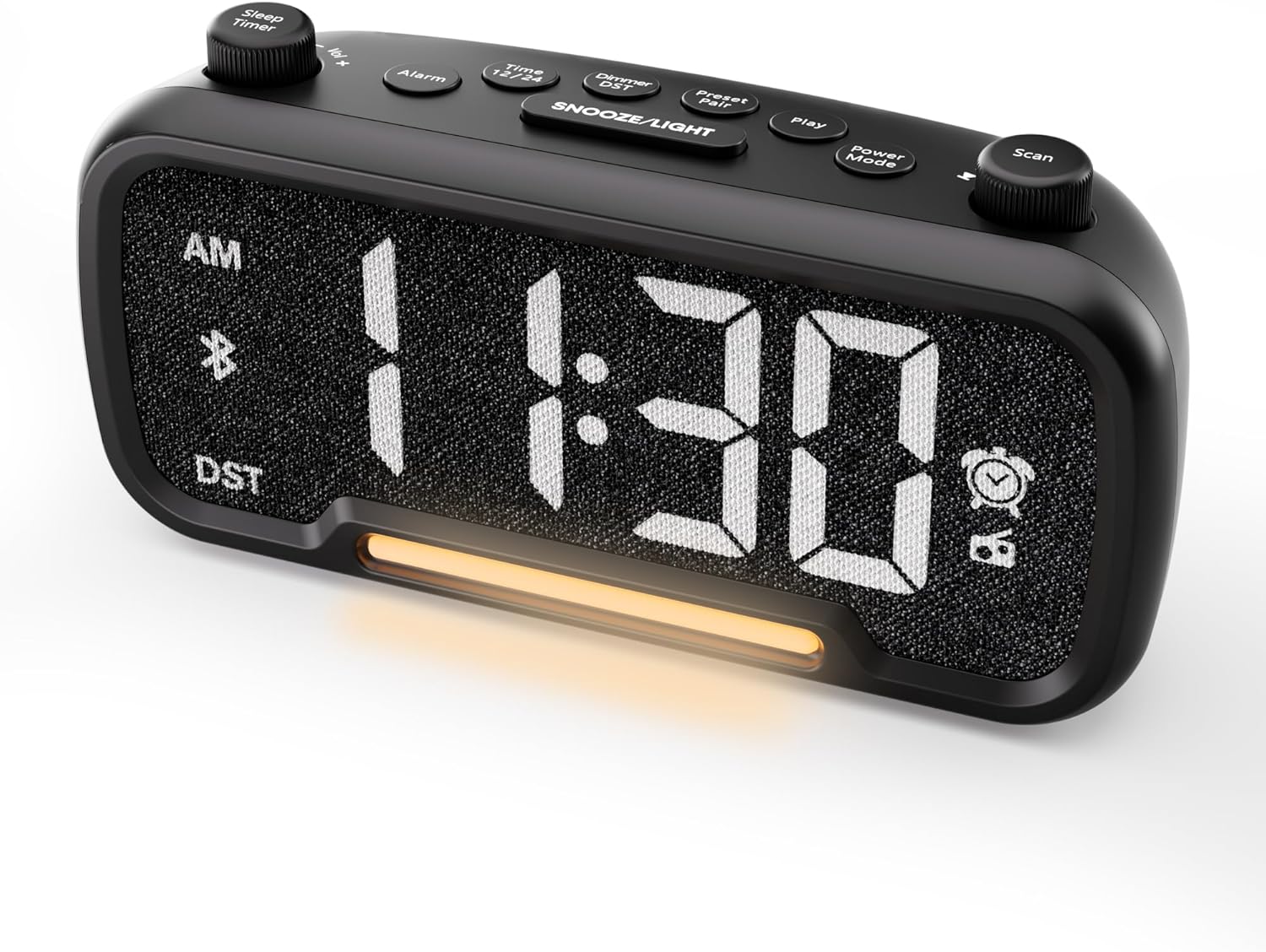

Control Buttons and Knobs:
- Sleep Timer / Vol +/- Knob (Left): Adjusts volume, sets sleep timer duration.
- Bọtịnụ mkpu: Sets and activates/deactivates alarms.
- Time 12/24 Button: Switches between 12-hour and 24-hour time formats.
- Dimmer / DST Button: Adjusts display brightness, activates/deactivates Daylight Saving Time (DST).
- Preset / Pair Button: Saves FM radio presets, initiates Bluetooth pairing.
- Bọtịnụ egwu: Plays/pauses media in Bluetooth mode.
- Bọtịnụ Ụdị Ike: Cycles through operating modes (FM, Bluetooth, AUX).
- Scan / TU +/- Knob (Right): Scans FM radio stations, manually tunes FM frequency.
- Bọtịnụ SOOZE/LIGHT: Activates snooze function, turns night light on/off.

Melite
1. Ike Mmalite
Connect the provided power adapter to the DC 5V IN port on the back of the alarm clock and plug it into a standard wall outlet. The display will light up. Ensure the C battery is installed for backup in case of power outage.

2. Nhazi oge
- Pịa ma jide Oge 12/24 bọtịnụ maka sekọnd abụọ. Nọmba awa ahụ ga-amalite ịcha ọkụ.
- Tugharia ihe Vol +/- knob (left knob) to adjust the hour.
- Pịa Oge 12/24 button again. The minute digits will begin to flash.
- Tugharia ihe Vol +/- pịa ka ịhazie nkeji.
- Pịa Oge 12/24 button once more to confirm the time setting.
Video demonstrating how to set the time on the Mesqool Digital Alarm Clock Radio.
3. Usoro Oge elekere 12/24
Iji gbanwee n'etiti usoro oge awa iri na abụọ na awa iri abụọ na anọ, pịa obere bọtịnụ Oge 12/24 button. The display will change accordingly.
4. Mgbanwe Oge Nchekwa Ehihie (DST)
To activate or deactivate DST, press and hold the Dimmer / DST button for 2 seconds. The time will adjust by one hour forward or backward, and the DST indicator will appear or disappear on the display.
Ntuziaka ọrụ
1. Ntọala mkpu
- Pịa ma jide Oti mkpu button for 2 seconds. The hour digits will flash.
- Tugharia ihe Vol +/- knob to adjust the desired alarm hour.
- Pịa Oti mkpu bọtịnụ ọzọ. Nọmba nkeji ga-enwu gbaa.
- Tugharia ihe Vol +/- knob to adjust the desired alarm minute.
- Pịa Oti mkpu button again. The alarm sound selection will flash (bell icon for buzzer, radio icon for FM radio). Rotate the Vol +/- knob to choose between buzzer or FM radio as the alarm sound.
- If FM radio is selected, press the Oti mkpu button again. The volume level will flash (L01-L16). Rotate the Vol +/- knob to set the desired alarm volume.
- Pịa Oti mkpu button once more to confirm and activate the alarm. The alarm icon will appear on the display.
To deactivate the alarm, short press the Oti mkpu button. The alarm icon will disappear from the display.

Ọrụ Sooze:
Mgbe oti mkpu dara, pịa nwuo/Ìhè button to activate the snooze function for 9 minutes. The alarm will sound again after 9 minutes. To turn off the alarm completely, press any other button except nwuo/Ìhè.

2. Ọrụ redio FM
- Pịa Ụdị ike button repeatedly until the radio icon lights up on the display, indicating FM radio mode.
- Auto-Scan and Save Presets: Pịa Scan / TU +/- knob (right knob) to automatically search for available FM stations and save them as presets (up to 20 stations). The display will show "P01", "P02", etc., as stations are saved.
- Akwụkwọ ntuziaka: Tugharia ihe Scan / TU +/- knob to manually browse frequencies.
- Cheta ihe atọrọ atọ: Mkpirisi pịa Ntọala / Mmakọ button to cycle through saved preset stations.
- Gbanwee olu: Tugharia ihe Vol +/- knob (left knob) to adjust the radio volume (L01-L16).

Video demonstrating how to set the FM radio alarm on the Mesqool Digital Alarm Clock Radio.
3. Ọrụ Igwe okwu Bluetooth
- Pịa Ụdị ike button repeatedly until the Bluetooth icon (bt) starts flashing on the display, indicating pairing mode.
- On your mobile device, enable Bluetooth and search for "CR1025" in the list of available devices.
- Select "CR1025" to pair. Once connected, the Bluetooth icon will stop flashing and remain solid.
- You can now play audio from your device through the alarm clock's speaker.
- Jiri ihe Vol +/- knob on the alarm clock or your mobile device to adjust the volume.
- Pịa Gwuo bọtịnụ iji kpọọ ma ọ bụ kwụsịtụ ọdịyo.

Video demonstrating how to set up Bluetooth on the Mesqool Digital Alarm Clock Radio.
4. Night Light Operation
The alarm clock features a gentle night light. To turn the night light on or off, short press the nwuo/Ìhè bọtịnụ.

5. Dimmer Setting
The display brightness can be adjusted to 5 levels. Short press the Dimmer / DST button to cycle through the brightness levels (L01-L05). Select the level that best suits your environment.

6. Sleep Timer Setting
The sleep timer allows you to set a duration for the FM radio or Bluetooth speaker to play before automatically turning off. This is useful for falling asleep to music or podcasts.
- While in FM radio or Bluetooth mode, press the Oge ihi ụra button. The display will show the current sleep timer duration (e.g., "30" for 30 minutes).
- Tugharia ihe Sleep Timer / Vol +/- knob to select the desired duration: 15, 30, 60, 90, or 120 minutes. You can also select "OFF" to disable the sleep timer.
- The timer will start counting down, and the device will automatically turn off after the selected duration.
7. Ọdụ ụgbọ mmiri USB Chaja
The alarm clock is equipped with two USB charging ports (Type-C and USB-A) on the back, each providing 5V/1A output. These ports can be used to conveniently charge your smartphone, tablet, or other USB-powered devices.

Nchọpụta nsogbu
| Nsogbu | Ngwọta enwere ike |
|---|---|
| Clock display is blank. | Ensure the power adapter is securely connected to both the clock and a working power outlet. Check if the power outlet is functional. |
| Oti mkpu anaghị ada ụda. | Verify that the alarm is set and activated (alarm icon visible on display). Check the alarm volume level. Ensure the correct alarm sound (buzzer or FM radio) is selected. |
| Nnabata redio FM na-adịghị mma. | Extend the FM antenna fully. Try repositioning the antenna or the clock for better signal. Perform an auto-scan again to find stronger stations. |
| Enweghị ike ijikọ ngwaọrụ Bluetooth. | Ensure the clock is in Bluetooth pairing mode (flashing 'bt' icon). Make sure Bluetooth is enabled on your mobile device and it is within range. Forget "CR1025" from your device's Bluetooth list and try pairing again. |
| Ọdụ USB chaja anaghị arụ ọrụ. | Confirm the alarm clock is powered on. Ensure the charging cables are properly connected to both the clock and your device. Try a different USB cable or device to rule out cable/device issues. |
Nkọwapụta
| Njirimara | Nkọwa |
|---|---|
| Ụdị | Mesqool |
| Nọmba nlereanya | CR1025 |
| Agba | Nwa |
| Ụdị ngosi | Igwe ọkụ dijitalụ |
| Akụkụ ngwaahịa | 6.61"L x 3.31"W x 2.32"H |
| Isi Iyi Ike | Corded Electric (AC adapter included) |
| Ndabere batrị | Batrị 1 C (gụnyere) |
| Ụdị Bluetooth | V5.0 |
| Frequency FM Igwefoto | 87.5-108MHz |
| Ntọala FM | Ruo ọdụ 20 |
| Ngosipụta Dimmer | 5 ọkwa |
| Oti mkpu | Buzzer, FM Radio |
| Ogologo oge snooze | 9 nkeji |
| Nchaji USB | Type-C & USB-A, 5V/1A each |
| Ihe onwunwe | Plastic |
| Ibu Ibu | 0.48 Pound (ihe dị ka ounces 7.7) |
Nlekọta
- Clean the device with a soft, dry cloth. Do not use liquid cleaners or abrasive materials.
- Keep the device away from direct sunlight, extreme temperatures, and high humidity.
- Gbaa mbọ hụ na ikuku ikuku dị na gburugburu ngwaọrụ iji gbochie ikpo oke ọkụ.
- If the device will not be used for an extended period, remove the backup battery.
Ozi nchekwa
- Ewepụla ngwaọrụ ahụ na mmiri ma ọ bụ mmiri.
- Anwala ịkwasa ma ọ bụ rụkwaa ngwaọrụ n'onwe gị. Rụtụ aka na ndị ọrụ ruru eru.
- Debe ngwaọrụ ahụ ka ụmụaka ghara iru ya.
- Jiri naanị ihe nkwụnye ike enyere. Iji ihe nkwụnye ikike na-enweghị ikike nwere ike imebi ngwaọrụ ahụ ma mebie akwụkwọ ikike ahụ.
- Avoid placing the device near heat sources or open flames.
Akwụkwọ ikike na nkwado
Specific warranty details are not provided in the product information. For warranty claims, technical support, or further assistance, please contact Mesqool customer service through their official website or the retailer where the product was purchased. Please retain your proof of purchase for any warranty-related inquiries.
Visit the Mesqool Store for more information: Mesqool Official Store


