Okwu mmalite
This manual provides detailed instructions for the QCOQ T60 Smart Watch. It covers setup, operation, maintenance, and troubleshooting to ensure optimal use of your device. The QCOQ T60 Smart Watch features a 1.91-inch display, Bluetooth call functionality, heart rate monitoring, and IP68 water resistance.
Ihe ngwugwu
Biko lelee ngwungwu maka ihe ndị a:
- QCOQ T60 Smart Watch (1 unit)
- Ịchaji eriri
- Akwụkwọ ntuziaka onye ọrụ
Melite
1. Ịchaji ngwaọrụ
Before first use, fully charge the smart watch. Connect the magnetic charging cable to the charging contacts on the back of the watch and plug the USB end into a standard USB power adapter (not included).

Image: The QCOQ T60 Smart Watch connected to its magnetic charging cable, illustrating the charging process. The watch display shows an 80% battery level, indicating partial charge.
- Oge Nchaji: Ihe dị ka awa 2 maka ụgwọ zuru ezu.
- Battery Life: Up to 7 days of typical usage on a full charge.
2. Ngwa nwụnye na ijikọ
To utilize all features of your QCOQ T60 Smart Watch, download and install the companion application on your smartphone.
- Scan the QR code provided in the quick start guide or search for the app name (usually indicated in the watch's initial setup screen or manual) in your smartphone's app store (App Store for iOS, Google Play Store for Android).
- Gbaa mbọ hụ na agbanyere Bluetooth na ekwentị gị.
- Open the installed app and follow the on-screen instructions to create an account or log in.
- Within the app, navigate to the device pairing section and select your QCOQ T60 Smart Watch from the list of available devices.
- Kwado arịrịọ njikọta ahụ na ekwentị gị na elekere smart.
Ntuziaka ọrụ
1. Nsoro ụzọ
The QCOQ T60 Smart Watch features a touchscreen display and a side button for navigation.
- Sịchaa elu/ala: Pịgharịa gaa na menu na ọkwa.
- Sụgharịa akaekpe/aka nri: Access quick functions or different widgets.
- Kpatụ: Họrọ otu ihe ma ọ bụ kwado ihe omume.
- Bọtịnụ akụkụ: Pịa iji laghachi na ihuenyo mbụ ma ọ bụ teta ngwaọrụ ahụ. Pịa ogologo oge maka nhọrọ ike.
2. Ọrụ oku Bluetooth
Once paired with your smartphone, the QCOQ T60 Smart Watch allows you to make and answer calls directly from your wrist.
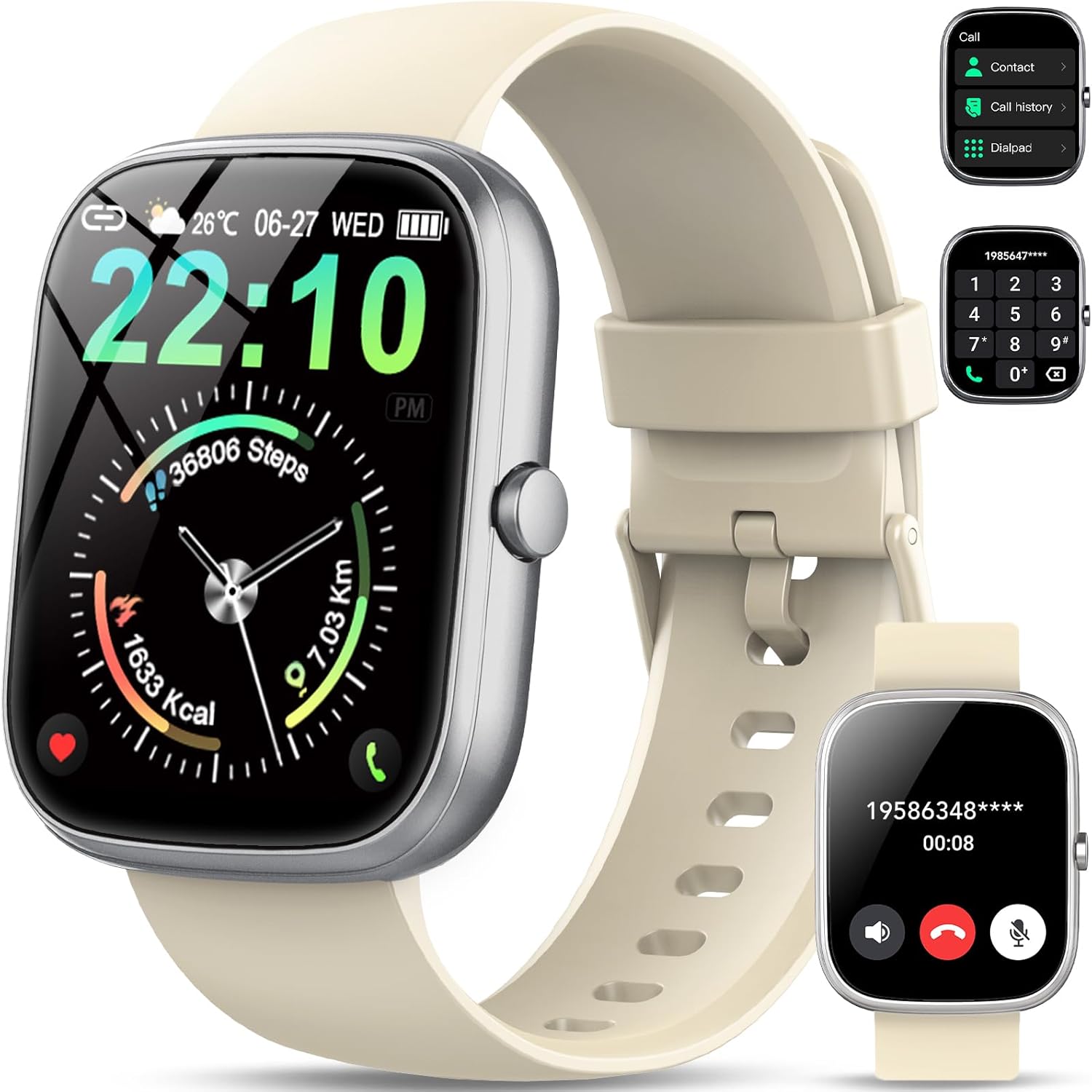
Image: The QCOQ T60 Smart Watch screen showing the call interface, including options to access contacts, view call history, and use a dialpad. A separate inset shows an incoming call notification.
- Ịza oku: When an incoming call is received, tap the green answer icon on the watch screen.
- Ịkpọ oku: Access the 'Call' menu on the watch, then select from contacts, call history, or use the dialpad to enter a number.
3. Amamọkwa
Receive notifications from your smartphone directly on your watch.

Image: The QCOQ T60 Smart Watch screen showing notifications from various social media and messaging applications. Adjacent to it, a smartphone displays an incoming call, demonstrating the watch's Bluetooth call feature.
- Ensure notification permissions are enabled for the companion app on your smartphone.
- Swipe down from the top of the watch face to view ọkwa ndị na-adịbeghị anya.
4. Nyochaa ahụike
The QCOQ T60 Smart Watch monitors various fitness metrics.

Image: A visual representation of the QCOQ T60 Smart Watch's fitness capabilities, highlighting over 110 sport modes, step counting, calorie expenditure tracking, IP68 water resistance, and comprehensive daily activity data.
- Nlekota obi obi: The watch provides real-time heart rate data. Access the heart rate function on the watch or through the app.
- Step Count & Calories: Tracks your daily steps, distance, and estimated calories burned.
- Ụdị egwuregwu: Select from over 110 sport modes to track specific activities.
5. Nlekọta ụra
The watch automatically monitors your sleep patterns.

Image: The QCOQ T60 Smart Watch screen showing detailed sleep monitoring data, including deep, light, and awake sleep stages. Another section displays a 7-day weather forecast.
- Wear the watch while sleeping for accurate data.
- View detailed sleep analysis in the companion app, including deep sleep, light sleep, and awake times.
6. Akụkụ ndị ọzọ
- Amụma ihu igwe: View current weather and a 7-day forecast.
- Njikwa egwu: Jikwaa egwu egwu na ekwentị gị (kpọọ, kwụsịtụ, wụpụ egwu).
- Ime igwefoto: Use the watch as a remote shutter for your smartphone camera.
- Enyemaka Olu: Nweta onye enyemaka olu nke ekwentị gị.
- Ncheta ịnọdụ ala: Nata ọkwa maka ịkwaga mgbe oge adịghị arụ ọrụ gasịrị.
- Mkpu: Set alarms directly from the watch.
- Nleba anya ikuku oxygen: Measure your blood oxygen levels.
- Women's Health: Track menstrual cycles and related data.
- Mgbako: Basic calculator function.
7. Ịhazi Ihu Elekere
Personalize your watch with various watch faces.

Image: A collage of various watch faces available for the QCOQ T60 Smart Watch, demonstrating the range of styles and information displays, including options for personalized backgrounds.
- Long press on the current watch face to enter the watch face selection menu.
- Swipe left or right to browse available watch faces. Tap to select.
- More watch faces and customization options (including custom backgrounds) are available through the companion app.
Nlekọta
1. Nhicha
- Jiri ákwà dị nro, nke na-enweghị ihe e ji ehicha ákwà hichaa ihuenyo elekere na ahụ ya.
- For the strap, use a mild soap and water solution if necessary, then rinse thoroughly and dry completely before wearing.
- Zere iji kemịkalụ siri ike ma ọ bụ ihe na-emebi emebi.
2. Mmiri Na-eguzogide Mmiri (IP68)
The QCOQ T60 Smart Watch is IP68 rated, meaning it is resistant to dust and can withstand immersion in water up to 1.5 meters for up to 30 minutes. It is suitable for daily use, such as hand washing or light rain.
- Do not use the watch for diving, hot showers, saunas, or in environments with high-pressure water.
- Water resistance is not a permanent condition and may decrease over time with normal wear and tear.
3. Nlekọta batrị
- Zere oke okpomọkụ, nke nwere ike imebi arụmọrụ batrị.
- Chajie elekere ahụ mgbe niile; zere ikwe ka batrị ahụ gbapụ kpamkpam ruo ogologo oge.
Nchọpụta nsogbu
- Lelee anaghị agbanye: Gbaa mbọ hụ na chajịrị elekere ahụ nke ọma. Jikọọ ya na chaja opekata mpe nkeji iri atọ.
- Enweghị ike ijikọ na smartphone:
- Gbaa mbọ hụ na agbanyere Bluetooth na ekwentị gị na elekere.
- Gbaa mbọ hụ na elekere ahụ dị n'ime oke ekwentị gị.
- Malitegharịa ma elekere ahụ ma ekwentị gị.
- Check if the companion app has necessary permissions.
- Anataghị ọkwa:
- Verify that notifications are enabled in the watch's settings and the companion app.
- Ensure the watch is properly connected via Bluetooth.
- Check your phone's notification settings for the app.
- Inaccurate heart rate/activity data: Ensure the watch is worn snugly on your wrist, not too tight or too loose. Clean the sensor regularly.
Nkọwapụta
| Njirimara | Nkọwapụta |
|---|---|
| Ụdị | QCOQ |
| Nlereanya | T60 |
| Ngosipụta nha | 1.91 sentimita asatọ |
| Ngosipụta teknụzụ | LCD |
| Mkpebi | 240 x240 |
| Njikọta | Bluetooth |
| Ngwa dakọtara | Ekwentị mkpanaaka |
| Mmiri Nguzogide | IP68 |
| Atụmatụ pụrụ iche | Heart Rate Monitor, Notifications, Camera Remote, Voice Assistant |
| Ntinye Interface mmadụ | Ihuenyo mmetụ aka |
| GPS | Enweghị GPS |
| Ụdị batrị | Lithium ion (1 chọrọ) |
| Nha (Ngwugwu) | 17.4 x 9.4 x 1.8 cm |
| Weight (Parcel) | 38.19 g |
| Agba | Ọcha ọcha |
Ozi nchekwa
- Consult your doctor before starting any new exercise regimen or if you have pre-existing health conditions.
- Anwala ịkwasa ma ọ bụ gbanwee elekere.
- Keep the device away from extreme heat or cold.
- Tụfuo ngwaọrụ ahụ na batrị ya dịka iwu obodo si dị.
Akwụkwọ ikike na nkwado
For warranty information and customer support, please refer to the documentation included with your purchase or visit the official QCOQ website. Ensure you have your purchase receipt and product model number (T60) available when contacting support.