1. Okwu mmalite
The DEWENWILS Remote Control Outlet with Magnetic Base provides a convenient solution for wirelessly controlling various household appliances. This system includes a plug-in outlet receiver and a remote control transmitter, designed for ease of use and flexible placement.
2. Ozi nchekwa
- For indoor use only. Do not expose to rain or moisture.
- Do not exceed the maximum load ratings: 125V, 60Hz, 15A, 1875W. Overloading may cause overheating and fire.
- Ensure the appliance connected to the outlet is in good working condition.
- Ewepụla ma ọ bụ gbanwee ngwaọrụ. Kpọtụrụ ndị ọrụ ruru eru ọrụ niile.
- Debe ebe ụmụaka na-apụghị iru.
3. Ihe ngwugwu
- 1 x Remote Control Outlet Receiver
- 1 x Remote Control Transmitter with Magnetic Base
- Ngwa mgbakwunye (skru na arịlịka)
- CR2032 Battery (pre-installed in remote)
4. Akụrụngwa Ngwaahịa
- Ndakọrịta sara mbara: Suitable for controlling indoor lights, fans, chargers, and other hard-to-reach appliances.
- Nkwụnye & Play arụ ọrụ: No programming or tools required for initial use.
- Nhazi kọmpat: The wireless outlet occupies only one wall socket, leaving adjacent outlets free.
- Strong RF Signal: Operates through walls and doors with a range of up to 100 feet.
- Ntọala Igwe Ọdụdọ: The remote control features a magnetic base for easy attachment to metallic surfaces or the included mounting bracket.
- Enweghị nnyonye anya: Advanced technology prevents interference with other RF remote systems.
- Sistemu enwere ike ịgbasa: Allows for the addition of more DEWENWILS outlet switches to customize your control system.
- Reliable Power Capacity: Rated for 125V, 60Hz, 15A, 1875W, compatible with most household appliances.

Figure 1: Remote control in fixed mode (mounted) and portable mode (handheld).

Figure 2: Illustration of the 100-foot RF signal range through walls and doors.

Figure 3: Maximum wattage and current capacity with examples of compatible appliances.
5. Nhazi
- Install the Outlet Receiver: Plug the DEWENWILS remote control outlet into any standard 125V wall receptacle.
- Jikọọ Ngwa: Plug your desired appliance (e.g., lamp, fan) into the side outlet of the DEWENWILS receiver.
- Kwadebe Njikwa Ime Obodo: The CR2032 battery is pre-installed in the remote. Remove any plastic insulation tab if present to activate the battery.
- Mounting the Remote (Optional):
- The remote can be attached to any metallic surface using its magnetic back.
- Alternatively, use the included mounting bracket and hardware to secure the remote to a wall. First, screw the bracket to the desired location, then magnetically attach the remote to the bracket.
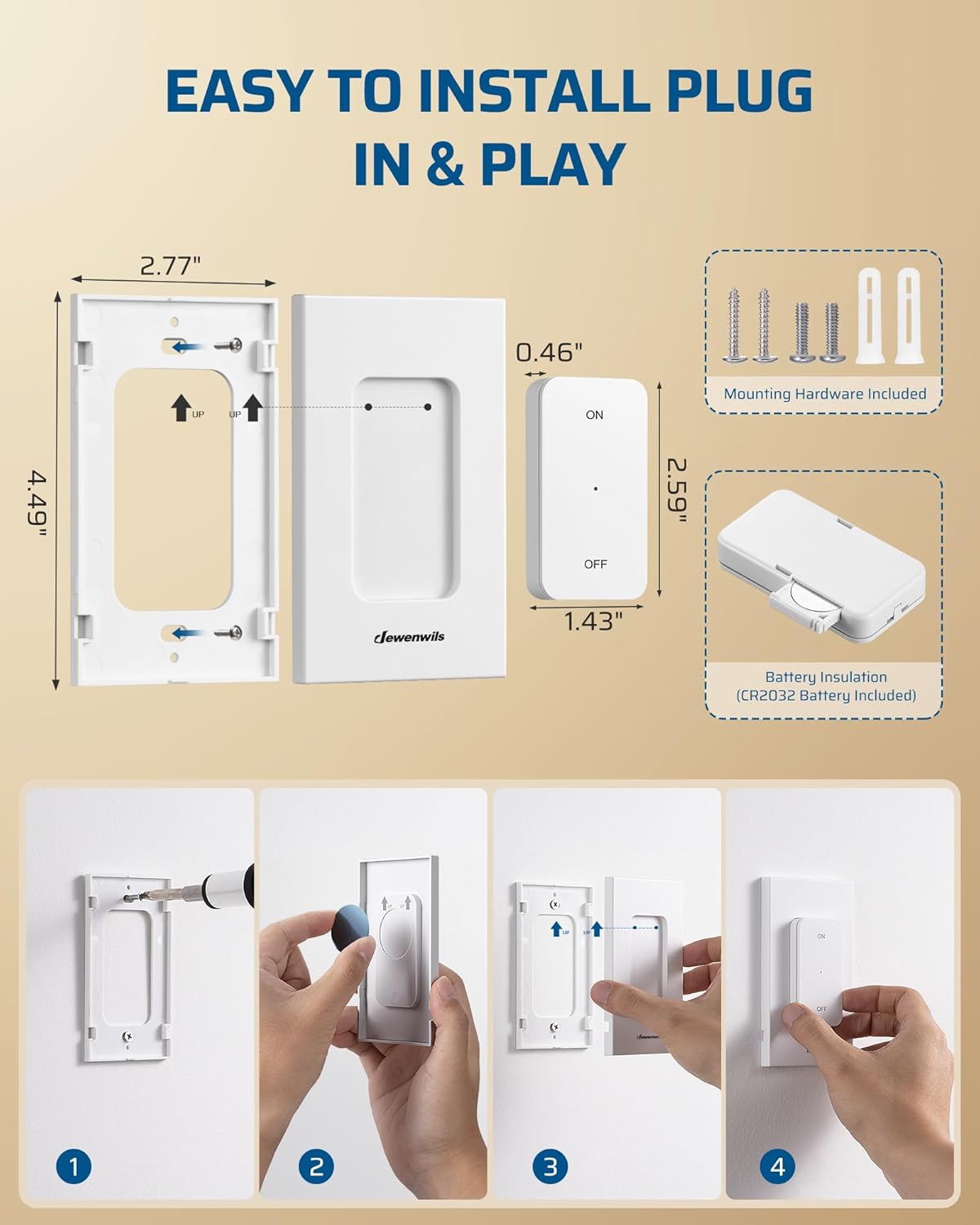
Figure 4: Installation steps for the remote control's magnetic base.
6. Ntuziaka ọrụ
The DEWENWILS Remote Control Outlet is pre-programmed for immediate use. No pairing is required for initial operation.
- Iji Remote Control:
- Press the "ON" button on the remote control to turn on the connected appliance.
- Press the "OFF" button on the remote control to turn off the connected appliance.
- Using the Manual Switch on the Outlet:
- The outlet receiver has a manual ON/OFF button. Press this button to toggle the power to the connected appliance directly at the outlet.
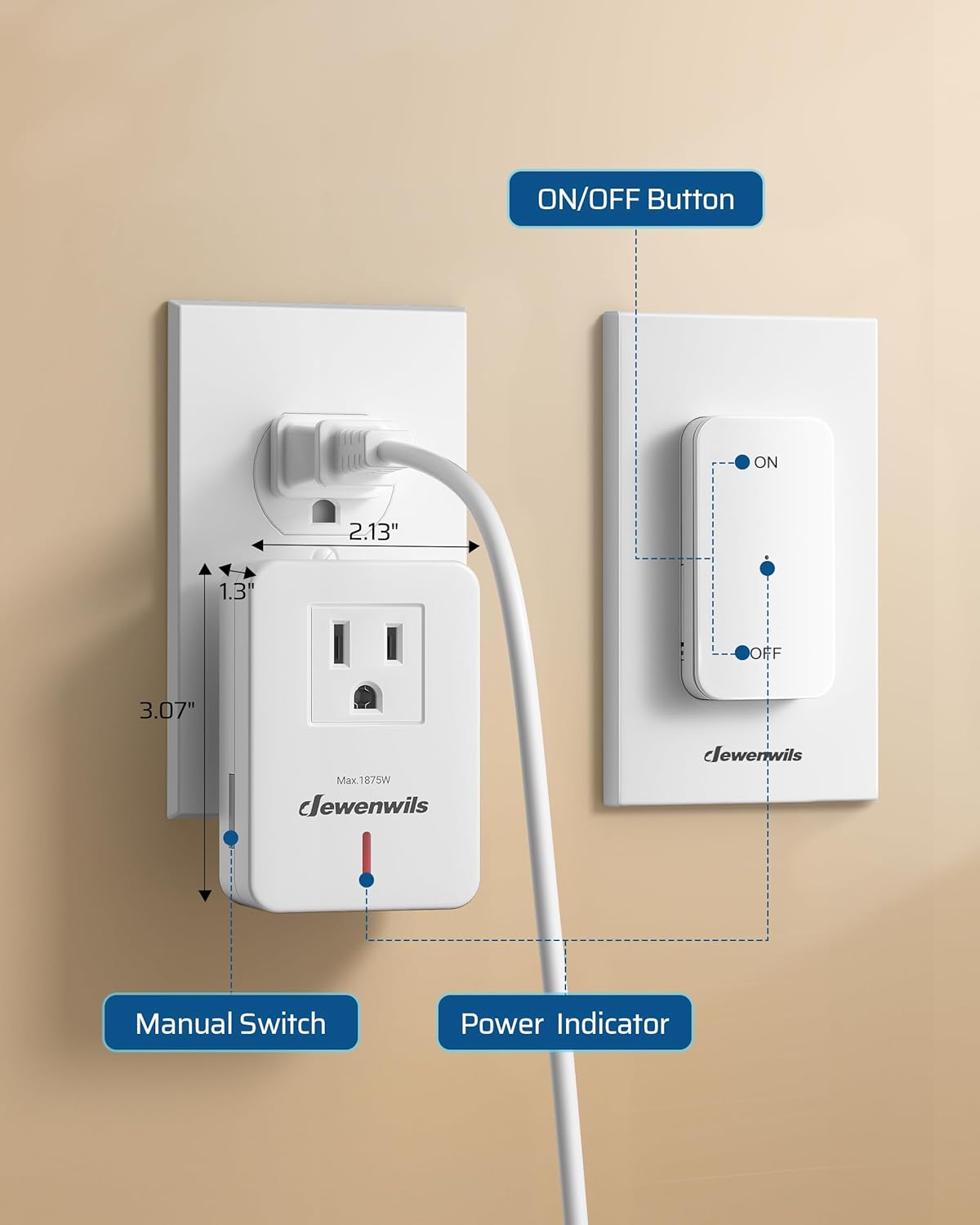
Figure 5: Remote control and outlet receiver components.
7. Nlekọta
- Clean the device with a dry, soft cloth. Do not use abrasive cleaners or solvents.
- If the remote control's range decreases or it stops responding, replace the CR2032 battery.
- Chekwaa ngwaọrụ ahụ n'ebe dị jụụ, kpọrọ nkụ mgbe ọ naghị eji ya ogologo oge.
8. Nchọpụta nsogbu
- Appliance does not turn ON/OFF:
- Ensure the outlet receiver is securely plugged into a live wall socket.
- Verify the appliance is properly plugged into the receiver and is switched ON if it has its own power switch.
- Check the battery in the remote control and replace if necessary.
- Ensure the remote control is within the 100-foot operating range and there are no excessive obstructions.
- Confirm the appliance's power consumption does not exceed the 1875W/15A limit.
- Njikwa anya anaghị aza:
- Dochie batrị CR2032 n'ime ime obodo.
- If the remote was dropped or damaged, it might require replacement.
9. Nkọwapụta

Figure 6: Key product specifications.
| Nkọwapụta | Uru |
|---|---|
| Nọmba nlereanya | BH9912U-15A+BH-23A |
| Ụdị ọrụ | Gbanyụọ-gbanyụọ |
| Ogo dị ugbu a | 15 Amps |
| Nrụ ọrụ Voltage | 125 volts |
| Ụdị njikọ | Tinye |
| Akụkụ ihe (L x W x H) | 2.77 x 2.77 x 4.51 sentimita asatọ |
| Ụdị nkwụnye | Wall Mount (for remote) |
| Usoro njikwa | Ime ime |
| Protocol Njikọta | RF |
| Wattage | 1875 Watt |
| Batrị (Ebe dị anya) | 1 Lithium Metal (CR2032) |
10. Akwụkwọ ikike na nkwado
For warranty information or technical support, please refer to the product packaging or contact DEWENWILS customer service directly. Contact details can typically be found on the manufacturer's official websaịtị ma ọ bụ site na ikpo okwu ịzụrụ ihe.


