1. Okwu mmalite
The APC Smart-UPS SMT750C is an Uninterruptible Power Supply (UPS) designed to provide reliable power and surge protection for critical electronic equipment. This unit offers 750VA/500W of line-interactive pure sine wave power, making it suitable for servers, storage systems, network closets, business VoIP setups, desktop computers, and retail POS systems. It features Automatic VoltagIwu e (AVR) iji dozie voltage fluctuations and a SmartConnect Ethernet Port for cloud-based remote monitoring. This manual provides essential information for the safe and efficient installation, operation, and maintenance of your SMT750C UPS.
2. Ozi nchekwa
WARNING: Risk of electric shock. Refer to bottom of unit for warnings.
- Gụọ ntuziaka niile nke ọma tupu echichi na arụ ọrụ.
- This UPS contains internal batteries and may present a shock hazard even when disconnected from the AC power source.
- Do not open or disassemble the UPS. There are no user-serviceable parts inside except for the battery.
- Jikọọ UPS ka ọ bụrụ naanị ebe etinyere n'ala.
- Do not use the UPS in direct sunlight, near heat sources, or in areas with excessive humidity.
- Ensure proper ventilation around the UPS. Do not block any ventilation openings.
3. Ihe ngwugwu
Chọpụta na ihe niile dị mgbe ị na-ebupụ:
- APC Smart-UPS SMT750C Unit
- 16GB USB 3.0 Drive
- Akwụkwọ ntuziaka (akwụkwọ a)
- USB nkwurịta okwu
- Ụdọ ọkụ

Image: Included 16GB USB 3.0 Drive. This USB drive provides additional storage or file ikike mbufe.
4. Ngwaahịa gafereview
Ogwe ihu
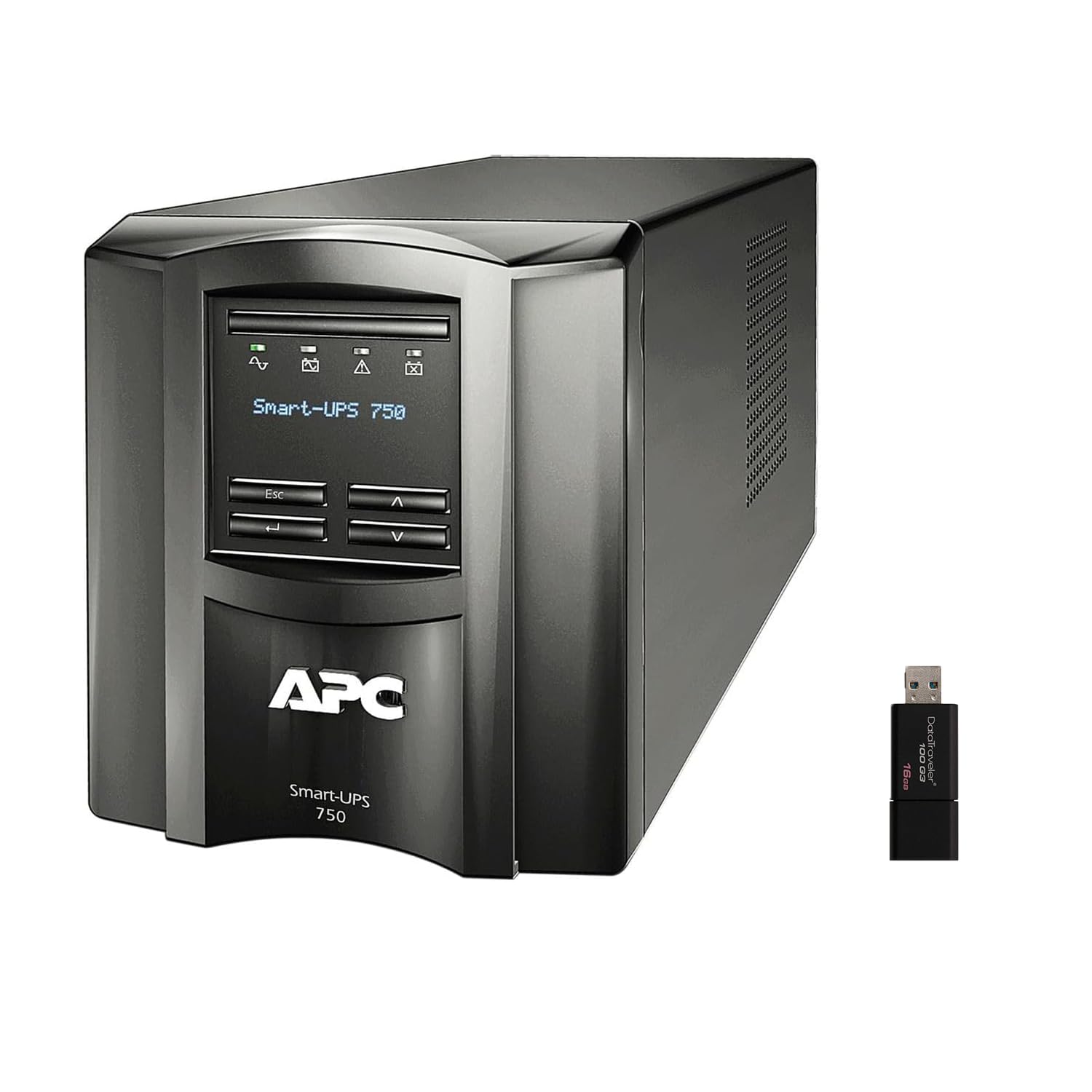
Foto: Ihu na akụkụ view of the APC Smart-UPS SMT750C. This image displays the compact tower design of the UPS unit.
- Bọtịnụ ike: Controls the main power to the UPS.
- Ngosipụta LCD: Provides real-time status information, load levels, battery charge, and estimated runtime.
- Bọtịnụ igodo nsoroụzọ: Used to scroll through display menus and adjust settings.
Ogwe azụ
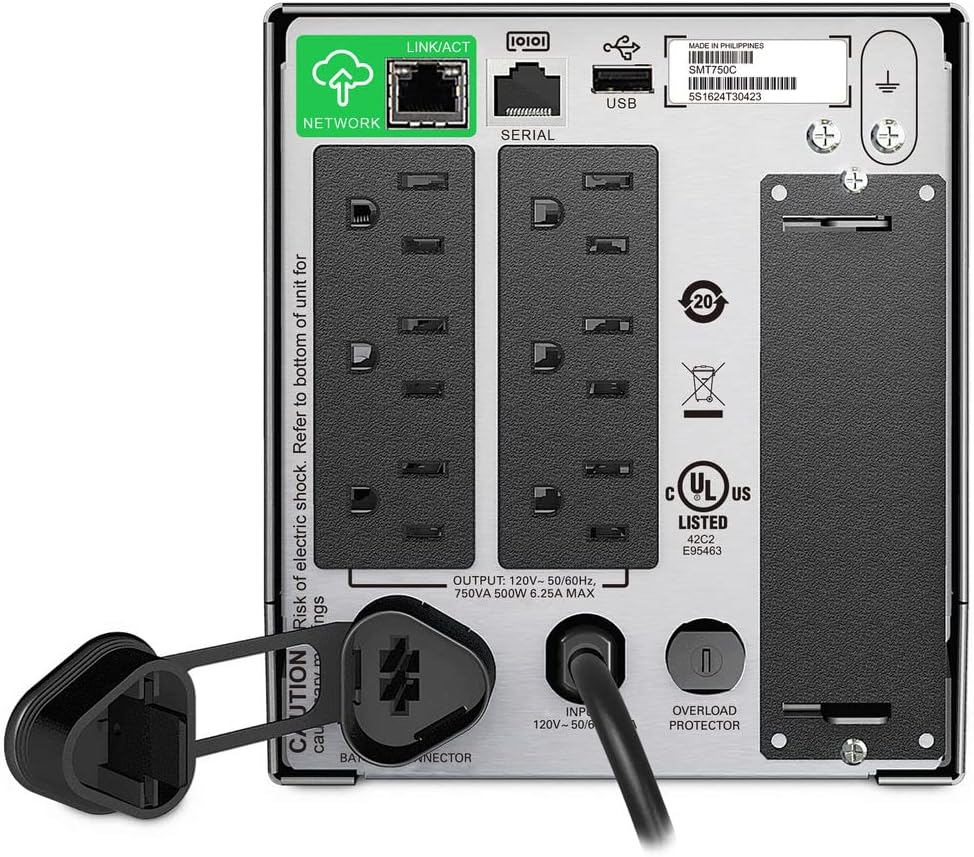
Image: Rear panel of the APC Smart-UPS SMT750C. This view highlights the various input/output ports, including NEMA 5-15R outlets, SmartConnect port, USB, and serial ports.
- NEMA 5-15R Outlets: Six outlets for connecting protected equipment.
- SmartConnect Ethernet Port: For cloud-based remote monitoring and management.
- Ọdụ ụgbọ mmiri USB: For communication with a computer for graceful shutdown via PowerChute Serial Shutdown software.
- Oghere Usoro: Alternative communication port for graceful shutdown.
- Oghere SmartSlot: For optional Network Management Card (sold separately).
- eriri ike ntinye: Connects the UPS to the utility power.
- Nchekwa ibu ibu: Resettable circuit breaker.
5. Nhazi
5.1 Initial Battery Connection
Before initial use, the internal battery must be connected. The unit is shipped with the battery disconnected for safety during transit.
- Place the UPS on a stable surface.
- Locate the battery compartment cover, typically on the bottom or rear of the unit.
- Remove the cover to access the battery.
- Connect the red battery cable to the positive (+) terminal and the black battery cable to the negative (-) terminal. Ensure a secure connection.
- Dochie mkpuchi oghere batrị.
5.2 Connecting to Utility Power
- Plug the UPS power cord into a grounded 3-prong AC outlet.
- Allow the UPS to charge for at least 24 hours before connecting critical equipment to ensure full battery capacity.
5.3 Ngwa ejiko
- Connect your critical equipment (e.g., computer, monitor, network devices) to the NEMA 5-15R outlets on the rear panel.
- For graceful shutdown capabilities, connect the provided USB cable from the UPS to your computer and install the PowerChute Serial Shutdown software (available for download from APC's websaịtị).
- For remote monitoring, connect an Ethernet cable to the SmartConnect port and follow the instructions for cloud-based setup.
6. Ọrụ
6.1 Gbanyụọ/ gbanyụọ
- To power on the UPS, press and hold the power button on the front panel until the unit beeps and the display illuminates.
- To power off the UPS, press and hold the power button until the unit beeps and the display turns off.
6.2 Akpaaka Voltage Iwu (AVR)
The SMT750C features AVR, which automatically corrects minor voltage fluctuations (sags and surges) without switching to battery power. This protects connected equipment from voltage irregularities and extends battery life.
6.3 Battery Backup Operation
N'oge a iketage, the UPS will automatically switch to battery power, providing continuous power to connected equipment. The LCD display will show the estimated remaining runtime. When utility power returns, the UPS will automatically switch back to utility power and recharge its battery.
6.4 Remote Monitoring (SmartConnect)
The SmartConnect port allows for cloud-based remote monitoring of your UPS. This feature enables IT professionals and network administrators to:
- Monitor UPS status and performance.
- Perform firmware upgrades.
- Conduct remote diagnostics.
- Receive proactive email notifications with recommended actions.
7. Nlekọta
7.1 nnọchi batrị
The internal battery is a user-replaceable component. When the battery reaches the end of its service life, the UPS will indicate a battery fault. To replace the battery:
- Ensure the UPS is powered off and disconnected from utility power.
- Wepu mkpuchi oghere batrị.
- Disconnect the battery cables (red and black).
- Carefully slide out the old battery.
- Insert a genuine APC replacement battery (model RBC154, sold separately).
- Connect the battery cables, ensuring correct polarity (red to positive, black to negative).
- Dochie mkpuchi oghere batrị.
- Recycle the old battery responsibly.
7.2 Nhicha
Periodically clean the exterior of the UPS with a soft, dry cloth. Do not use liquid or aerosol cleaners. Ensure ventilation openings are free from dust and debris.
8. Nchọpụta nsogbu
| Nsogbu | Ihe nwere ike ime | Ngwọta |
|---|---|---|
| UPS anaghị agbanyụ | Battery not connected or low charge | Ensure battery cables are connected. Plug UPS into AC outlet and allow to charge. |
| UPS na-ada ụda mgbe niile | Overload or on battery power | Reduce connected load. Check utility power. |
| Battery symbol blinking | Battery needs to be flipped (initial setup) or is failing | For new units, ensure battery is correctly oriented and connected. For older units, consider battery replacement. |
| Enweghị ike ịpụpụ | UPS is off, circuit breaker tripped, or utility power lost | Turn on UPS. Reset circuit breaker. Check utility power. |
9. Nkọwapụta
- Ụdị: SMT750C
- Ike Mpụta: 500 watts / 750 VA
- Mmepụta njikọ: 6 x NEMA 5-15R
- Njikọ ntinye: EME 5-15P
- Ebube Ebube Voltage: 120V
- Elu ọnụ mmepụta Voltage: 120V
- Ụdị batrị: Acid ndu
- Ihe kpatara ụdị: Ụlọ elu
- Akụkụ (H x W x D): 6.34 na (16.1 cm) x 5.43 na (13.8 cm) x 14.53 inch (36.9 cm)
- Nha ịbụ: 27.56 lb (12.5 n'arọ)
- Agba: Nwa
- Ihe: Ọla
- Ngwa gụnyere: 16GB USB 3.0 Drive
10. Akwụkwọ ikike na nkwado
APC provides a standard warranty for this product. For specific warranty terms and conditions, please refer to the warranty card included with your product or visit the official APC website. For technical support, product registration, or to purchase replacement parts, please visit www.apc.com or contact APC customer service.
Protection plans are available for extended coverage. For example, a 3-Year Protection Plan is available.


