1. Okwu mmalite
Daalụ maka ịzụrụasing the AFK Portable Bluetooth Wireless Speaker. This manual provides detailed instructions on how to set up, operate, and maintain your speaker to ensure optimal performance and longevity. Please read this manual thoroughly before using the product.

Image: The AFK Portable Bluetooth Wireless Speaker, showcasing its sleek black cylindrical design and top-mounted control panel.
2. Ngwaahịa gafereview
Ihe ngwugwu 2.1
Biko lelee ọdịnaya nke ngwugwu mgbe ị na-ebupụ igbe:
- AFK Portable Bluetooth Wireless Speaker (Model: BT528) with built-in microphone
- USB-C eriri USB
- Akwụkwọ ntuziaka (akwụkwọ a)
2.2 Atụmatụ
- Ọdịda dị ike: Dual speaker drivers and a powerful amplifier module deliver up to 15W room-filling sound with punchy bass, strong midranges, and crisp highs.
- Njikọ Bluetooth 5.3: Offers fast and stable wireless connections up to 100 feet (30 meters).
- Ọkụ na-agbanwe agbanwe: Features 5 colorful light colors and 6 light modes, including mixed color flashes that sync with the beat, creating an immersive audio-visual experience.
- Ogologo oge egwuregwu: Enjoy up to 18 hours of non-stop playback at 50% volume, or up to 4 hours at 100% volume. Lights can be turned off to conserve battery.
- Otutu Nhọrọ Nweghachi: Supports wireless playback via Bluetooth, TF card, or USB.
- Igwe okwu arụnyere n'ime ya: Allows for clear hands-free calls within the Bluetooth range.
- Enwere ike ibugharị: Lightweight and easy to carry for indoor and outdoor use.
- Nchaji USB-C: Ọdụ ụgbọ mmiri USB-C dị mfe ma dị ọgbara ọhụrụ maka ịchaji.
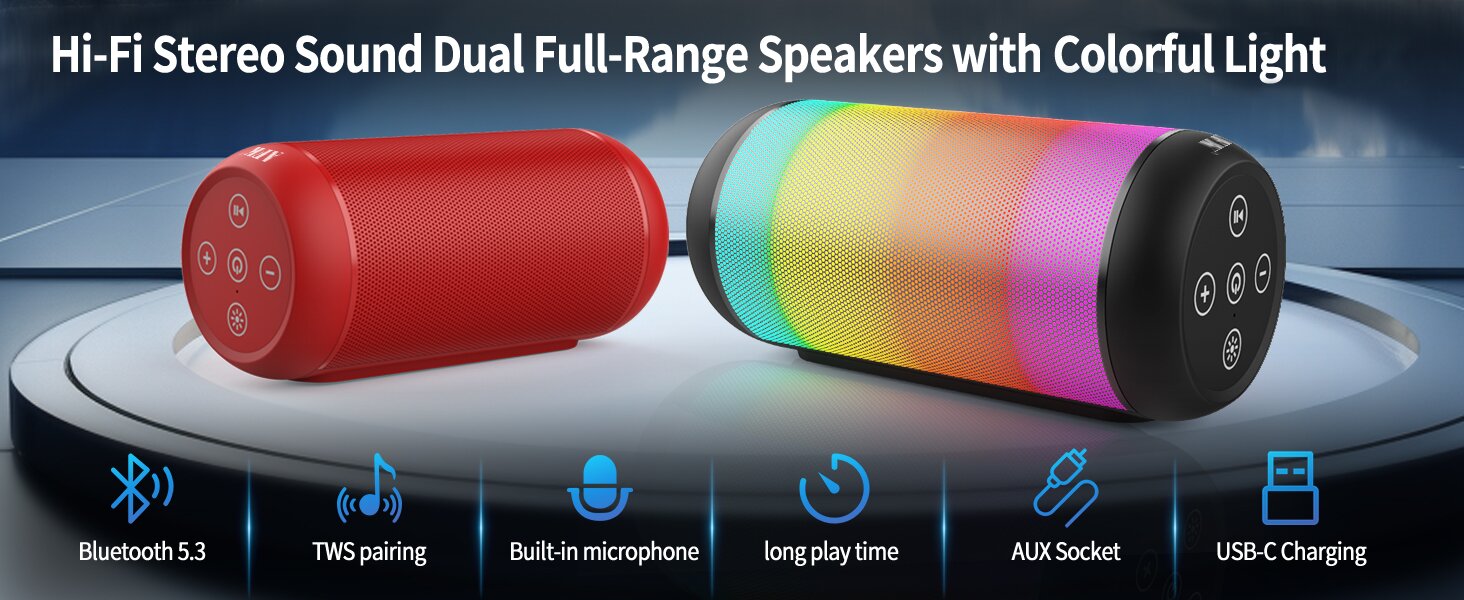
Image: An illustration highlighting key features such as Bluetooth 5.3, TWS pairing, built-in microphone, long playtime, AUX socket, and USB-C charging.

Foto: A cutaway view illustrating the dual speaker drivers responsible for deep bass stereo sound.

Image: The speaker positioned on a table, demonstrating its 360-degree stereo surround sound capability.
3. Nhazi
3.1 Ịchaji ọkà okwu
Before first use, fully charge the speaker. Connect the provided USB-C charging cable to the speaker's USB-C port and the other end to a compatible USB power adapter (not included) or a computer's USB port. The charging indicator light will show the charging status and turn off when fully charged.
3.2 Gbanyụọ/ gbanyụọ
- Iji gbanye: Pịa ma jide bọtịnụ Ike (⏻) for a few seconds until you hear an audible prompt and the indicator lights turn on.
- Iji gbanyụọ ọkụ: Pịa ma jide bọtịnụ Ike (⏻) again for a few seconds until you hear an audible prompt and the indicator lights turn off.
4. Ntuziaka ọrụ
4.1 Njikọ Bluetooth
Iji jikọọ igwe okwu gị na ngwaọrụ Bluetooth nwere ike ịrụ ọrụ:
- Ensure the speaker is powered on and in Bluetooth pairing mode (indicated by a flashing blue light, or similar).
- Na ngwaọrụ gị (smartphone, tabletị, kọmpụta), mee ka Bluetooth nwee ike wee chọọ ngwaọrụ dị.
- Select "AFK Speaker" (or similar name) from the list of found devices.
- Once paired, the speaker will indicate a successful connection (e.g., a solid blue light or an audible prompt).
The speaker will automatically attempt to reconnect to the last paired device when powered on, if the device is within range and Bluetooth is enabled.

Image: The speaker in an outdoor setting, demonstrating its stable Bluetooth connection range of up to 100 feet.
4.2 Nghaghachi egwu
- Ọnọdụ Bluetooth: Once paired, play music from your connected device. Use the speaker's control buttons or your device to control playback (play/pause, next/previous track, volume).
- Kaadị TF/USB: Insert a TF card or USB drive containing audio files into the respective port on the speaker. The speaker will automatically switch to the corresponding mode and begin playback. Use the speaker's control buttons for navigation.
4.3 Controlling Lights
The speaker features dynamic lighting modes. Press the Light button (💡) to cycle through the available light modes:
- Tarry Sky Light
- Iku ume
- Na-asọ asọ
- Mwụ elu ngwa ngwa
- Rhythm Jump
- Gbanyụọ ọkụ

Foto: Ofeview of the six dynamic light modes available on the speaker, including options to turn the lights off.
4.4 Njikwa oku
With the built-in microphone, you can manage calls when connected via Bluetooth:
- Azịza/Kwụsị Oku: Pịa bọtịnụ Play/kwụsịtụ (⏸) otu ugboro.
- Jụ oku: Pịa ma jide bọtịnụ Play/Pause (⏸) maka 2 sekọnd.

Image: The speaker being used for a hands-free call, demonstrating the functionality of its built-in microphone.
5. Nlekọta
5.1 Nhicha
To clean your speaker, use a soft, dry, lint-free cloth. Do not use abrasive cleaners, alcohol, or chemical solvents, as these may damage the surface or internal components. Avoid getting moisture into any openings.
5.2 Nchekwa
Store the speaker in a cool, dry place away from direct sunlight, extreme temperatures, and humidity. If storing for an extended period, charge the battery periodically (e.g., every 3 months) to maintain battery health.
6. Nchọpụta nsogbu
If you encounter issues with your AFK Portable Bluetooth Wireless Speaker, please refer to the following common problems and solutions:
| Nsogbu | Ihe nwere ike ime | Ngwọta |
|---|---|---|
| Ọkà okwu anaghị agba ọkụ. | Batrị dị ala; Apịghị bọtịnụ ike nke ọma. | Charge the speaker fully. Press and hold the Power button for a few seconds. |
| Enweghị ụda. | Volume too low; Device not connected; Incorrect input mode. | Increase speaker and device volume. Ensure Bluetooth is connected or TF/USB is inserted correctly. |
| Enweghị ike ijikọ site na Bluetooth. | Speaker not in pairing mode; Device Bluetooth off; Too far from speaker; Interference. | Ensure speaker is in pairing mode. Turn device Bluetooth off/on. Move device closer to speaker. Avoid strong electromagnetic interference. |
| Ndụ batrị dị mkpụmkpụ. | High volume usage; Lights constantly on; Battery degradation. | Reduce volume. Turn off lights when not needed. Battery life naturally decreases over time. |
7. Nkọwapụta
| Njirimara | Nkọwa |
|---|---|
| Aha Nlereanya | BT528-BLK-US |
| Ụdị Ọkà Okwu | Ọkà Okwu Dual |
| Teknụzụ Njikọta | Bluetooth 5.3 |
| Teknụzụ nzikọrịta ozi ikuku | Bluetooth |
| Oke kacha | 30 Mita (100 ụkwụ) |
| Ike Nwepu kacha elu | 11 Watts (RMS) / 15 Watts (Peak) |
| Nzaghachi ugboro ugboro | 20 KHz (Note: This is likely the upper limit, typical range is 20Hz-20kHz) |
| Ọnọdụ mmepụta ọdịyo | Stereo |
| Nhazi ọwa ụda gburugburu | 2.0 |
| Njirimara Pụrụ Iche | Built-in Microphone, Dynamic LED Lights |
| Eji akwadoro | Indoor/Outdoor, Sport, Outdoor Events, Parties, Camping, Hiking |
| Ngwa dakọtara | Desktop, Smartphone, Tablet, Television |
| Isi Iyi Ike | Akwadoro batrị (1 batrị lithium ion gụnyere) |
| Usoro njikwa | Pịa bọtịnụ |
| Agba | Nwa |
| Akụkụ ngwaahịa | 2.6"D x 6.1"W x 2.6"H (6.6cm D x 15.5cm W x 6.6cm H) |
| Ibu Ibu | 1.26 pound (0.57 Kilogram) |
| Enweghị mmiri | Ụgha |
8. Akwụkwọ ikike na nkwado
8.1 Akwụkwọ ikike nwere oke
This AFK Portable Bluetooth Wireless Speaker comes with a limited warranty. Please refer to the warranty card included in your package or contact AFK customer support for specific terms and conditions. The warranty typically covers manufacturing defects and malfunctions under normal use.
8.2 Nkwado ndị ahịa
For further assistance, technical support, or warranty claims, please contact AFK customer service. Contact information can usually be found on the product packaging, the official AFK websaịtị, ma ọ bụ site na ọwa nkwado nke onye na-ere ahịa gị.


