Ozi nchekwa dị mkpa
Please read all safety instructions carefully before using this product. Failure to follow these instructions may result in injury or damage.
- Do not expose the earbuds or charging case to extreme temperatures, direct sunlight, or fire.
- Avoid using the product in environments with high humidity or water, beyond its IP7 waterproof rating.
- Emela ka ngwaahịa ahụ gbawaa, rụzie, ma ọ bụ gbanwee ya. Nke a ga-eme ka akwụkwọ ikike ahụ ghara ịdị irè.
- Debe ngwaahịa ahụ ka ụmụaka na anụ ụlọ ghara iru.
- Use only the provided charging cable or a certified standard charger (5V/1A; 5V/2A) to charge the case.
- Zere ige ntị n'ogo dị elu ruo ogologo oge iji gbochie mmebi ntị.
Ihe ngwugwu
Chọpụta na ihe niile dị na ngwugwu gị:
- 2x Bluetooth Earbuds (Left and Right)
- 1x Akpa Nchaji ebugharị
- 1x Ụdị-C eriri USB
- 1x Akwụkwọ ntuziaka onye ọrụ
Ngwaahịa gafereview
Familiarize yourself with the components of your Cillso H97 Wireless Earbuds.
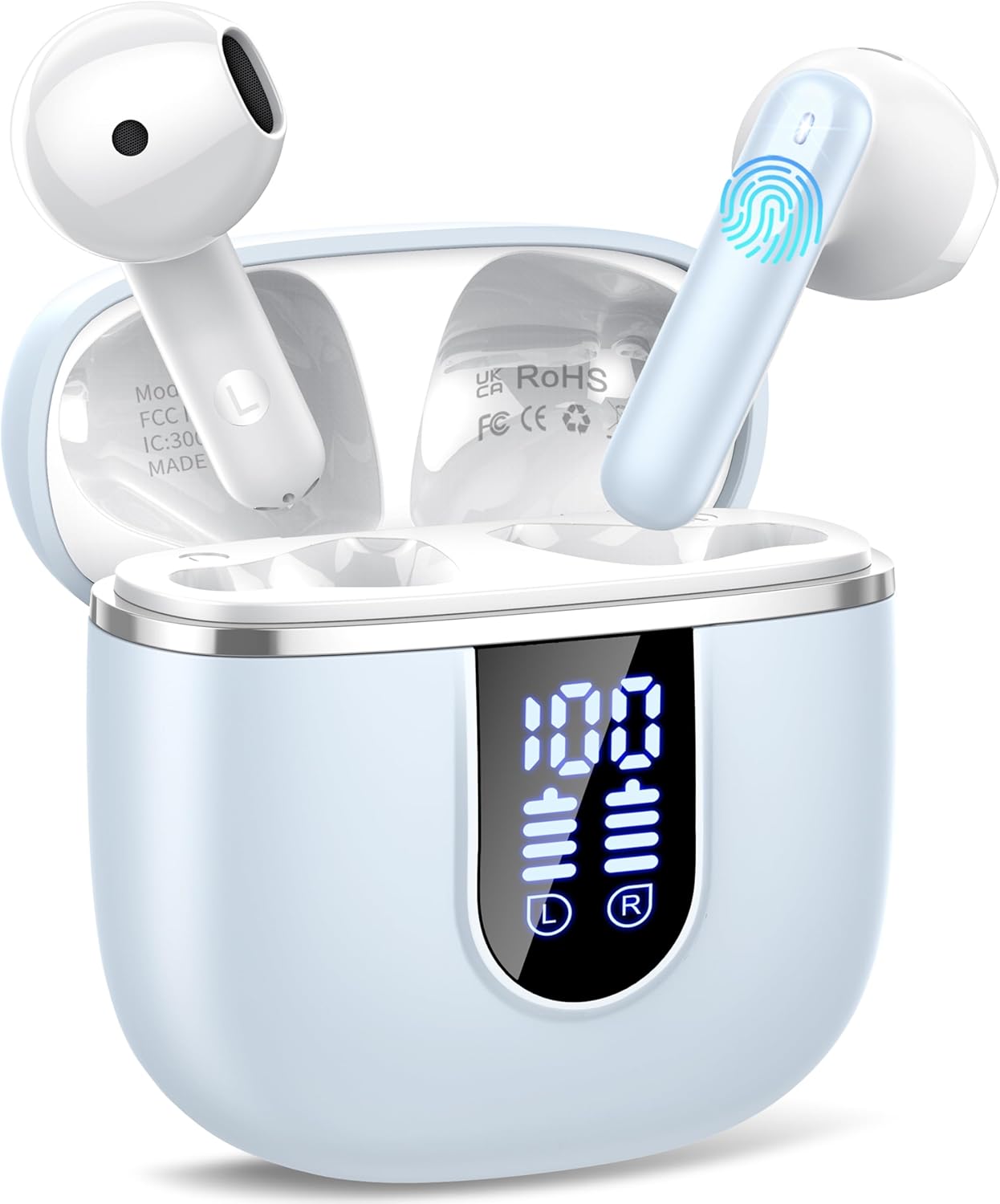
Image: The Cillso H97 Wireless Earbuds are shown inside their open charging case. The case features a dual LED display indicating battery percentages for the case and individual earbuds. The earbuds are white with a sleek design, and the charging case is a light azure color.
The image above displays the earbuds within their charging case. Key features include the dual LED display on the charging case, which shows the battery status for both the case and each earbud. The earbuds themselves are designed for in-ear comfort and feature touch control areas.
Melite
1. Ịchaji ihe ntị na akpa
Tupu ojiji nke mbụ, chajie nke ọma ntị na akpa nchaji.
- Connect the provided Type-C charging cable to the charging port on the case and to a standard USB power adapter (5V/1A or 5V/2A).
- The dual LED display on the charging case will show the charging progress. A full charge for the case takes approximately 1.5 hours.
- Place the earbuds into the charging case. They will automatically begin charging. The LED display will indicate their charging status.
- The earbuds provide up to 8 hours of playback on a single charge, and the charging case provides an additional 32 hours of playtime.
2. Ijikọ na ngwaọrụ gị
The H97 earbuds utilize Bluetooth 5.4 for a stable and efficient connection.
- Mmakọ izizi:
- Gbaa mbọ hụ na agbanyere Bluetooth ngwaọrụ gị.
- Mepee mkpuchi nke ihe nchaji. Igwe ntị ga-agbanye na-akpaghị aka wee banye ọnọdụ njikọta.
- On your device, search for Bluetooth devices and select "H97" from the list.
- Ozugbo ejikọrọ, ị ga-anụ ngwa ngwa nkwenye, na ntị ntị ga-adị njikere maka ojiji.
- Njikọta akpaaka: After the initial pairing, the earbuds will automatically connect to the last paired device when the charging case lid is opened.
- Ụkpụrụ Ụrọ Nanị: Either earbud can be used independently. Simply take one out of the case, and it will connect.
Ntuziaka ọrụ
1. Yiri ekwe ntị
The H97 earbuds are designed for an ergonomic and secure fit.

Image: A diagram illustrating the correct angle and position for wearing the earbud in the ear canal for optimal comfort and sound.
- Jiri nwayọọ tinye ihe ntị ntị ọ bụla n'ime ọwa ntị gị.
- Adjust the earbud until it feels snug and comfortable. A proper fit ensures optimal sound quality and noise isolation.
- Each earbud weighs only 3.5 grams, providing lightweight comfort for extended wear.
2. Aka njikwa
The earbuds feature sensitive touch sensors for easy control of various functions:
| Omume | Ọrụ |
|---|---|
| Otu mgbata (aka ekpe/aka nri) | Kpọọ/Kwụsịtụ egwu, zaa/Kwụsị oku |
| Pịa ugboro abụọ (aka ekpe) | Abụ gara aga |
| Pịa ugboro abụọ (aka nri) | Abụ na-abịa |
| Pịa ugboro atọ (aka ekpe) | Mpịakọta ọnụ |
| Pịa ugboro atọ (aka nri) | Elu elu |
| Pịa ogologo (2 sekọnd) | Jụ oku, mee ka onye enyemaka olu rụọ ọrụ |
3. Gbanyụọ / gbanyụọ
- Ike Na: Open the charging case lid, or long-press the touch area on both earbuds for 3 seconds if they are outside the case and off.
- Gbanyụọ: Tinyeghachi ekweisi n'ime akpa chaja ma mechie mkpuchi ahụ. Ma ọ bụghị ya, pịa ebe aka dị na ekweisi abụọ ahụ ruo sekọnd ise.
4. Ịkpọ na ịnata oku
The H97 earbuds are equipped with 4 ENC (Environmental Noise Cancelling) microphones to ensure clear call quality.
- Oku azaa: Otu pịa ma ọ bụ ekwe ntị.
- Oku ngwụcha: Single tap either earbud during a call.
- Jụ oku: Ogologo pịa otu ntị ntị maka sekọnd 2.
5. Ngwugharị ọdịyo
Experience immersive HiFi stereo sound with deep bass, delivered by 14.2mm diaphragm drivers and AAC/SBC audio encoding.
- Gwuo/kwụsịtụ: Otu pịa ma ọ bụ ekwe ntị.
- Abụ na-esote: Kpatụ ntị ntị aka nri ugboro abụọ.
- Abụ gara aga: Kpatụ ntị ntị aka ekpe ugboro abụọ.
Nlekọta
Proper care will extend the lifespan of your earbuds.
- Nhicha: Jiri akwa dị nro, kpọrọ nkụ, akwa enweghị lint iji hichaa ntị ntị na akpa chaja. Ejila kemịkalụ siri ike ma ọ bụ ihe abrasive.
- Nchekwa: Mgbe ejighị ya, chekwaa earbuds n'ime akpa nchaji ha iji chebe ha ma debe ha ebubo. Chekwaa n'ebe dị jụụ, kpọrọ nkụ.
- Nguzogide mmiri: The earbuds feature IP7 nano-coating technology, protecting them from daily splashes, sweat, and rain. Do not submerge them in water or expose them to strong jets of water. Ensure they are dry before placing them back in the charging case.
Nchọpụta nsogbu
Ọ bụrụ na ị na-enwe nsogbu ọ bụla, rụtụ aka na nsogbu na ngwọta ndị a na-emekarị:
| Nsogbu | Ngwọta enwere ike |
|---|---|
| Igwe ntị anaghị ejikọta ya na ngwaọrụ |
|
| Naanị otu earbud na-arụ ọrụ |
|
| Nchaji anaghị akwụ ụgwọ |
|
| Poor sound quality or intermittent connection |
|
Nkọwapụta
Key technical details of the Cillso H97 Wireless Earbuds:
- Ụdị: H97
- Ụdị Bluetooth: 5.4
- Ihe ntinye ederede: CAA/SBC
- Nha ọkwọ ụgbọ ala: 14.2mm Diaphragm Driver
- Oge egwu ntị: Ruo awa 8 (ụgwọ otu)
- Total Playtime (with charging case): Ruo awa iri abụọ
- Oge Njikere (Ikpe): Approximately 1.5 hours (Type-C)
- Ọnụọgụ enweghị mmiri: IP7
- Ibu ihe ntị ntị: 3.5 grams (nke ọ bụla)
- Ịchajị arọ nke ikpe: 32 grams
- Akụkụ ngwaahịa: 0.79 x 0.79 x 0.79 inches (earbuds, approximate)
- Ibu ihe: 3.2 ounces (total package weight)
- Batrị: 2 batrị achọrọ (gụnyere)
- ndakọrịta: Most Bluetooth devices (Android 4.4+, iOS 8.0+, Bluetooth 4.0+)
Akwụkwọ ikike na nkwado
Cillso products are designed for reliability and performance. This product comes with a standard manufacturer's warranty against defects in materials and workmanship.
- For warranty claims or technical support, please refer to the contact information provided with your purchase or visit the official Cillso websaịtị.
- Biko debe ihe akaebe nke ịzụrụ ihe gị maka ọrụ akwụkwọ ikike.


