Okwu mmalite
The Xtorm FS405 Fuel Series Solar Powerbank 20W – 10.000 mAh is designed to provide portable power for your electronic devices, offering the flexibility to charge via USB-C or its integrated solar panel. This power bank is built for outdoor adventures, featuring a durable, splash-resistant design and a powerful LED flashlight.
Ozi nchekwa
- Do not expose the power bank to extreme temperatures (above 45°C or below -10°C).
- Avoid dropping, disassembling, or attempting to repair the device yourself.
- Keep away from water, except for the specified splash resistance (IPX4). Do not submerge.
- Jiri naanị eriri nchaji na nkwụnye ọkụ gbaara agbamu.
- Debe ebe ụmụaka na-apụghị iru.
- Tụfuo ngwaahịa ahụ nke ọma dịka iwu mpaghara siri dị.
Ihe ngwugwu
Biko lelee ngwungwu maka ihe ndị a:
- Xtorm FS405 Solar Powerbank
- USB-C eriri USB (0.30m)
- Akwụkwọ ntuziaka onye ọrụ
Ngwaahịa gafereview

N'ihu View: Shows the main solar charging panel and the Xtorm logo. The robust casing is visible around the edges.

Azu View (LED Off): Displays the textured back casing and the integrated LED light panel in its off state.
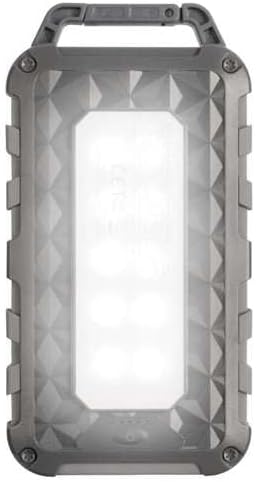
Azu View (LED On): Shows the powerful LED light panel fully illuminated, indicating the flashlight function is active.

N'elu View: Highlights the sturdy integrated carabiner handle, designed for easy attachment to bags or gear.
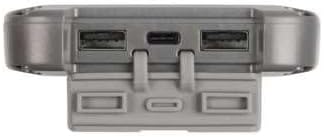
N'okpuru View: Displays the USB-C PD input/output port and two USB-A Quick Charge 3.0 output ports, protected by a cover.
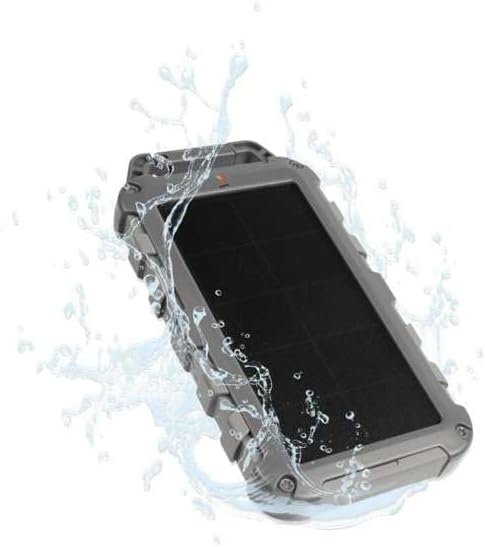
Durability Feature: Illustrates the power bank's splash-resistant design, suitable for outdoor conditions (IPX4 rated).
Melite
Ebo mbụ
Before first use, it is recommended to fully charge the Xtorm FS405 Solar Powerbank via the USB-C port for optimal performance.
- Connect the provided USB-C cable to the USB-C port on the power bank.
- Connect the other end of the USB-C cable to a compatible USB wall adapter (not included) or a computer's USB port.
- The LED indicators on the power bank will show the charging status. A full charge via USB-C typically takes approximately 2 hours.
Ntuziaka ọrụ
Ịchaji Power Bank
The Xtorm FS405 can be charged using two methods:
1. Via USB-C (Recommended for Fast Charging)
- Connect the power bank to a USB-C power source using the included cable.
- The power bank will begin charging. This method provides the fastest charging speed for the power bank itself.
2. Via Solar Panel
The integrated solar panel allows for convenient charging when outdoors. For best results, place the power bank directly under strong sunlight.
- Place the solar panel facing direct sunlight.
- A small indicator light (usually green) will illuminate when solar charging is active.
- Note on Solar Charging Speed: Solar charging is a supplementary method and is significantly slower than USB-C charging. Factors like season, location, time of day, and cloud cover heavily influence charging speed.
Approximate solar charging times for a full charge:
- Spring/Summer (mostly sunny day): Ihe dị ka ụbọchị 10
- Autumn/Winter (mostly sunny day): Ihe dị ka ụbọchị 20
Solar charging is not effective on mostly cloudy days.
Ịchaji ngwaọrụ mpụga
The power bank features one USB-C PD (Power Delivery) output and two USB-A Quick Charge 3.0 outputs.

Ike Nchaji ngwa ngwa: The power bank can charge compatible smartphones, such as an iPhone 14 or 12/13, up to 50% in approximately 30 minutes using the 20W USB-C PD output.
- Connect your device's charging cable to one of the available output ports (USB-C or USB-A) on the power bank.
- Jikọọ nsọtụ nke ọzọ nke eriri na ngwaọrụ gị.
- Ụlọ akụ ọkụ ga-amalite chajị ngwaọrụ gị ozugbo.
- The LED indicators on the power bank will show the remaining battery level.
The 10,000mAh capacity is sufficient to charge most smartphones at least 2 times.
Iji ọkụ ọkụ ọkụ
The Xtorm FS405 includes a powerful integrated LED flashlight on its back.
- Locate the power button (usually on the side or near the ports).
- Press and hold the power button for a few seconds to turn the flashlight ON.
- Press and hold the power button again to turn the flashlight OFF.
Nlekọta
- Jiri akwa dị nro hichaa ụlọ akụ ike. Ejila kemịkalụ siri ike ma ọ bụ ihe abrasive.
- Chekwaa ụlọ akụ ike n'ebe dị jụụ, kpọrọ nkụ mgbe ọ naghị eji ya.
- For long-term storage, charge the power bank to about 50-70% every 3-6 months to preserve battery health.
- Ensure the port covers are properly sealed when exposed to water splashes.
Nchọpụta nsogbu
Ụlọ akụ Power anaghị akwụ ụgwọ
- Lelee eriri: Ensure the USB-C cable is securely connected to both the power bank and the power source. Try a different cable.
- Lelee isi iyi ike: Verify that the wall adapter or USB port is functioning correctly.
- Ịchaji anyanwụ: For solar charging, ensure the panel is in direct, strong sunlight. Remember solar charging is slow and not effective in low light or cloudy conditions.
Ngwaọrụ anaghị agbacha chaja site na Power Bank
- Lelee ụgwọ ụlọ akụ Power: Gbaa mbọ hụ na ụlọ akụ ọkụ nwere ụgwọ zuru oke.
- Lelee eriri: Use the original charging cable for your device and ensure it's properly connected to both the power bank and your device. Try a different cable.
- ndakọrịta: Verify that your device is compatible with USB charging.
- Malitegharịa: Disconnect and reconnect the device.
Igwe ọkụ anaghị arụ ọrụ
- Lelee ụgwọ ụlọ akụ Power: Ensure the power bank has some charge remaining.
- Ọrụ ziri ezi: Ensure you are pressing and holding the power button correctly to activate the flashlight.
Nkọwapụta
| Njirimara | Nkọwa |
|---|---|
| Nlereanya | FS405 |
| Ụdị | Xtorm |
| Usoro | Fuel Series 4 |
| Ike batrị | 10,000 mAh (Lithium Polymer) |
| Mpụta ike kacha | 20 W |
| Output 1 (USB-C PD) | 20 W |
| Output 2 (USB-A QC 3.0) | 18 W |
| Output 3 (USB-A QC 3.0) | 18 W |
| Ọnụọgụ nke mmepụta | 3 |
| Ụdị ntinye | USB-C PD |
| Ike panel ike anyanwụ | 1 W (SunPower cells) |
| Akụkụ (L x W x H) | 17 cm x 9 cm x 2 cm |
| Ibu | 289 g |
| Ihe onwunwe | PC, ABS |
| Mmiri Nguzogide | IPX4 (Ihe Na-eguzogide Mkpọsa) |
| Igwe ọkụ agbakwunyere | Ee |
| Battery Charge Time (USB-C) | Ihe ruru. awa 2 |
Akwụkwọ ikike na nkwado
For warranty information and customer support, please refer to the Xtorm official webma ọ bụ kpọtụrụ onye na-ere ahịa mpaghara gị. Debe ihe akaebe nke ịzụrụ ihe maka akwụkwọ ikike ọ bụla.
Nkwado n'ịntanetị: www.xtorm.eu


