1. Okwu mmalite
This manual provides detailed instructions for the installation, operation, and maintenance of your PNI House WiFi800 NVR and PNI IP840 Outdoor Camera Wireless Surveillance Kit. Please read this manual thoroughly before using the product to ensure proper setup and functionality. Keep this manual for future reference.
2. Ozi nchekwa
- Ensure all power connections are secure and meet the specified voltage (12V DC).
- Do not expose the NVR to moisture or extreme temperatures.
- The PNI IP840 cameras are IP65 rated for outdoor use; however, avoid submerging them in water.
- Installation should be performed by qualified personnel if you are unsure about electrical connections or mounting procedures.
- Debe ngwaahịa ahụ ka ọ ghara ịdị ike magnetik.
- Use only original or certified replacement parts and accessories.
3. Ihe ngwugwu
Chọpụta na ihe niile edepụtara n'okpuru dị na ngwugwu gị:
- PNI House WiFi800 NVR (1 unit)
- PNI IP840 Outdoor Cameras (2 units)
- Power Adapters (for NVR and cameras)
- USB Mouse (for NVR)
- Fixing Screws and Wall Plugs (for cameras)
- User Manuals (for NVR and cameras)

Image: PNI House WiFi800 NVR with included USB mouse and power adapter.

Image: PNI IP840 Outdoor Camera with its power adapter and mounting hardware.
4. Ngwaahịa gafereview
4.1 PNI IP840 Outdoor Camera
The PNI IP840 camera is a high-resolution wireless outdoor surveillance camera featuring 8MP 4K video, pan/tilt functionality, and advanced night vision. It is designed for robust performance in various weather conditions.
- Ihe mmetụta: 1/2.7" CMOS, 8MP
- Mkpebi: 3840x2160 (4K)
- oghere: 3.6mm, 90° viewakụkụ n'akuku
- Pan/Tit: Kehoraizin 355°, vetikal 90°
- Ọhụụ abalị: 4 IR LEDs and 4 White LEDs, up to 15m
- Nchekwa: MicroSD card slot (up to 256GB, card not included)
- Njikọta: WiFi 2.4GHz, ONVIF support
- Atụmatụ: Motion Detection, Human Shape Detection, Rotation after movement, ICSee app support
- Nguzogide ihu igwe: IP65 kwadoro

Foto: N'ihu view of the PNI IP840 outdoor camera, showing the lens, LEDs, and antennas.

Image: Close-up of the PNI IP840 camera's connection cables for power and wired network.
4.2 PNI House WiFi800 NVR
The PNI House WiFi800 NVR (Network Video Recorder) is the central unit for managing and recording video from your surveillance cameras. It supports up to 8 channels at 5MP or 4 channels at 4K (8MP) resolution.
- Video Channels: 8 channels (5MP) / 4 channels (4K/8MP)
- Mkpakọ vidiyo: H.265AI/H.265+
- Mkpebi ọkpụkpọghachi: 1080P (HDMI output)
- Nchekwa: Supports 1x 2.5" HDD (up to 14TB) or 1x MicroSD card (up to 128GB)
- Ngwa netwọkụ: RJ45 10/100/1000 Mbit/s
- Ugboro ikuku: 2.4 GHz (for NVR-camera communication)
- Nsonaazụ: 1x HDMI, 1x USB 2.0
- Atụmatụ: Mobile/PC viewing (Android, iOS, Windows), ICSee/XMEye app support, Integrated voice prompt speaker

Image: Rear panel of the PNI House WiFi800 NVR, displaying its various ports including power, HDMI, Ethernet, USB, and reset button.

Foto: Akụkụ view of the PNI House WiFi800 NVR, showing its antennas and port layout.
5. Nhazi
5.1 NVR Initial Setup
- Njikọ Ike: Connect the NVR to its power adapter and plug it into an electrical outlet.
- Ngosipụta Jikọọ: Connect the NVR to a monitor or TV using an HDMI cable.
- Jikọọ òké: Plug the USB mouse into the NVR's USB port for navigation.
- Njikọ netwọkụ (Nhọrọ): For remote access and firmware updates, connect the NVR to your router using an Ethernet cable.
- Storage Installation (Optional): If using an HDD, open the NVR casing and install a 2.5" SATA HDD. Alternatively, insert a MicroSD card into the designated slot.
5.2 Ntinye igwefoto
- Họrọ ebe: Select a suitable outdoor location for each camera, ensuring good Wi-Fi signal strength and an unobstructed view. The IP65 rating allows for outdoor exposure.
- Igwefoto ugwu: Use the provided screws and wall plugs to securely mount the camera to a wall or ceiling.
- Njikọ Ike: Connect the camera to its power adapter and plug it into an electrical outlet. Ensure the power cable is protected from the elements.
5.3 Pairing Cameras with NVR
The cameras are typically pre-paired with the NVR in the kit. If not, or if adding new cameras:
- Ensure both the NVR and cameras are powered on.
- On the NVR interface (connected to a monitor), navigate to the camera management or channel settings.
- Select the option to add or search for wireless cameras. The NVR will scan for available PNI IP840 cameras.
- Soro mkpali na ihuenyo iji mezue usoro njikọta.
5.4 Mobile App Configuration (ICSee / XMEye)
- Budata ngwa: Download the ICSee or XMEye app from your smartphone's app store (Android or iOS).
- Ndebanye aha akaụntụ: Create a new user account or log in if you already have one.
- Tinye ngwaọrụ: In the app, select "Add Device" or scan the QR code displayed on the NVR's monitor (if available) or the NVR itself.
- Soro ngwa ngwa: Follow the in-app instructions to connect your NVR and cameras to your mobile device for remote viewing na njikwa.
6. Ntuziaka ọrụ
6.1 Ndụ View
Access live video feeds from your cameras via the NVR's connected monitor or through the ICSee/XMEye mobile application. The NVR interface allows for multi-channel display.
6.2 Ndekọ
- Ndekọ na-aga n'ihu: Configure the NVR to record continuously to the installed HDD or MicroSD card.
- Motion-Activated Recording: Set up recording to trigger only when motion is detected by the cameras.
- Ndekọ ahaziri: Define specific time periods for recording.
6.3 Nghaghachi
Maka review edekọ footage:
- On the NVR interface, select the "Playback" option.
- Choose the desired camera, date, and time range.
- Use the controls to play, pause, fast forward, or rewind footage.
- Mobile app playback functions similarly, allowing remote access to recorded video.
6.4 Motion Detection and AI Functions
The PNI IP840 cameras feature advanced detection capabilities:
- Nchọpụta ngagharị: Configurable sensitivity to detect movement within the camera's field of view.
- Nchọpụta ọdịdị mmadụ: Intelligent analysis to differentiate human figures from other moving objects, reducing false alarms.
- Rotation After Movement: The camera can be set to automatically track detected movement within its pan/tilt range.
- Ọkwa mkpu: Enable push notifications to your mobile phone when an alarm event (e.g., motion detection) occurs.
Access these settings through the NVR menu or the mobile application to customize detection zones, sensitivity, and notification preferences.
6.5 Pan/Tilt/Zoom (PTZ) Control
For PNI IP840 cameras, you can remotely control the camera's orientation:
- Use the PTZ controls available in the NVR interface or the ICSee/XMEye mobile app.
- Drag your finger on the live view screen in the app to pan (horizontal 355°) and tilt (vertical 90°) the camera.
- Digital zoom functionality may be available through the app.
7. Nlekọta
- Nhicha: Regularly clean the camera lenses with a soft, dry cloth to ensure clear image quality. Do not use harsh chemicals.
- Mmelite femụwe: Periodically check for firmware updates for both the NVR and cameras through the mobile app or NVR interface. Updates can improve performance and add new features.
- Lelee njikọ: Ensure all power and network cables are securely connected and free from damage.
- Njikwa nchekwa: Regularly back up important recordings and manage storage space on your HDD or MicroSD card.
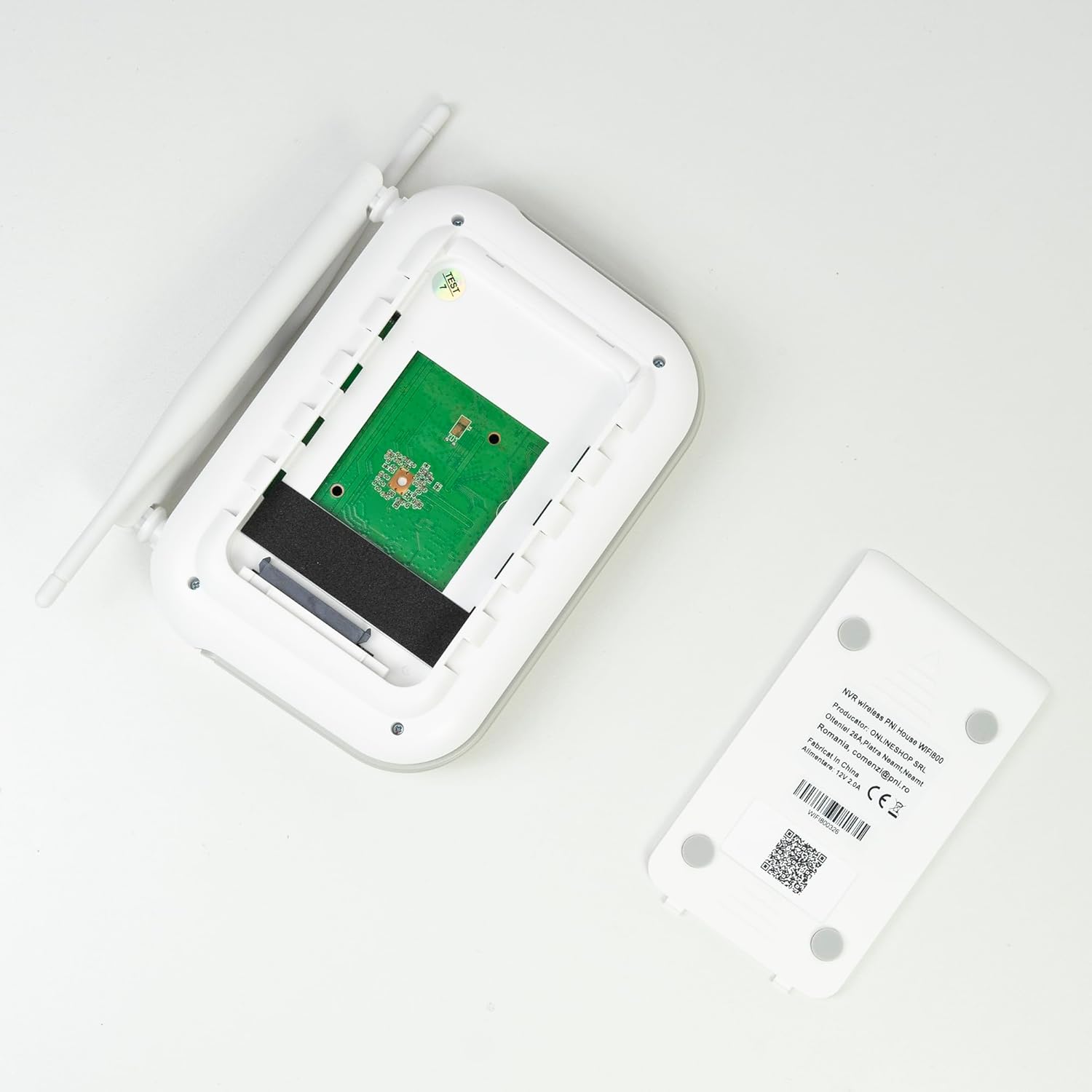
Foto: Ime view of the PNI House WiFi800 NVR, illustrating the circuit board and the bay for HDD installation.
8. Nchọpụta nsogbu
- Enweghị onyonyo na ihe nlele:
- Check NVR power supply and HDMI cable connection to the monitor.
- Gbaa mbọ hụ na edobere nleba anya na isi mmalite ntinye ziri ezi.
- Igwefoto anaghị ejikọta:
- Verify cameras are powered on.
- Check Wi-Fi signal strength at camera locations.
- Re-pair cameras with the NVR if necessary (refer to Section 5.3).
- No Remote Access via App:
- Ensure the NVR is connected to the internet via Ethernet.
- Lelee njikọ ịntanetị nke ekwentị gị.
- Verify NVR is correctly added to the ICSee/XMEye app.
- Ogo onyonyo adịghị mma:
- Clean camera lenses.
- Lelee maka ihe mgbochi n'ọhịa igwefoto nke view.
- Ensure adequate lighting for night vision.
- Okwu ndekọ:
- Check if an HDD or MicroSD card is properly installed and formatted.
- Verify recording schedules and motion detection settings.
- Hụ na e nwere ebe nchekwa zuru oke.
9. Nkọwapụta
9.1 PNI IP840 Outdoor Camera Specifications
| Njirimara | Nkọwa |
|---|---|
| Ihe mmetụta onyonyo | 1/2.7" CMOS |
| Mkpuchi mmetụta | 8MP |
| Mkpebi vidiyo | 3840x2160 (4K) |
| Ụdị oghere | 3.6mm |
| Viewna n'akuku | 90° |
| Pan/Tit | Kehoraizin: 355°, vetikal: 90° |
| Infrared ọkụ | 4x IR LEDs, 4x White LEDs |
| Ogologo IR | Ruo 15m |
| Mkpakọ vidiyo | H.265X (compatible with H.264+/H.264) |
| Audio | Integrated Microphone and Speaker |
| Ugboro ikuku | 2.4 GHz |
| Protocol akwadoro | ONVIF |
| Nchekwa | Oghere MicroSD kaadị (max 256GB) |
| Ịnye ọkụ | 12V/1A |
| Klas nchekwa | IP65 |
| Okpomọkụ na-arụ ọrụ | -26°C ~ +80°C |
| Akụkụ | 86x135x146mm |
| Ibu | 371 grams |
9.2 PNI House WiFi800 NVR Specifications
| Njirimara | Nkọwa |
|---|---|
| Video Channels | 8 ọwa 5MP / 4 ọwa 4K (8MP) |
| Mkpakọ vidiyo | H.265AI/H.265+ |
| Mkpebi ịkpọghachi | 1080P (HDMI) |
| Ike nchekwa | 1x 2.5" HDD (max 14TB) / 1x MicroSD card (max 128GB) |
| Nweta netwok | RJ45 - 10/100/1000 Mbit/s |
| Mmepụta vidiyo | 1x HDMI |
| USB Interface | 1x USB 2.0 |
| Nhazi | MSR621Q |
| Ịnye ọkụ | 12V/2A |
| Akụkụ | 170x120x35mm |
| Ibu | 245 grams |
| Wi-Fi Frequency (NVR-Camera) | 2.4 GHz |
| Ngwa ngwa | Yes, integrated speaker |
10. Akwụkwọ ikike na nkwado
For warranty information, please refer to the documentation provided at the time of purchase or contact your retailer. For technical support, product inquiries, or assistance with troubleshooting, please visit the official PNI website or contact PNI customer service directly. Keep your purchase receipt as proof of purchase.
Onye nrụpụta: Ụlọ Ahịa Ntanetị
Nọmba nlereanya: PNI-WF8-840-2


