1. Ngwaahịa gafereview
This BrickSoul LED lighting kit is designed to enhance your Lego Camera 43230 building bricks set by adding illumination. It transforms your model into a vibrant display piece, suitable for showcasing in various settings. This kit includes only the lighting components; the Lego Camera 43230 model is not included and must be purchased separately.
The kit features high-quality LED lights and is engineered for a seamless fit, ensuring that the wiring integrates neatly without cluttering your display. It is constructed from durable and safe ABS plastic and copper wire materials.
2. Ihe ngwugwu
Chọpụta na akụrụngwa niile dị na ngwugwu gị:
- LED Light Kit components (various lights, wires, connectors)
- Numbered bags for organized installation
- USB ike eriri USB
- Akwụkwọ ntuziaka (akwụkwọ a)
Mara: AAA batteries are not included and must be supplied by the user if battery power is preferred over USB.
3. Ntọala na nwụnye
Installation of the BrickSoul LED kit is designed to be straightforward. Follow the steps below and refer to the provided online video or PDF guides for detailed visual instructions.
- Nkwadebe: Ensure your Lego Camera 43230 model is fully assembled and stable. Clear a well-lit workspace.
- Ntuziaka nnweta: Scan the QR code on the packaging or visit the BrickSoul website to access the latest online video and PDF installation guides. These guides provide step-by-step visual instructions tailored to your specific model.
- njirimara akụrụngwa: The light kit components are organized in numbered bags. Match the bag numbers with the steps in the installation guide.
- Disassembly (Partial): The installation guide will instruct you to carefully remove specific bricks from your Lego model to integrate the lighting components. Only remove bricks as directed.
- Ndokwa ọkụ: Position the LED lights and wires according to the guide. Ensure wires are routed neatly and do not interfere with the model's structure or stability. The design allows for a clean, integrated look.
- Nchikota: Carefully reattach the removed bricks, ensuring that all wires are securely tucked away and not pinched.
- Njikọ ike: Connect the USB power cable to the main control board of the light kit. You can power the kit via a USB port (e.g., power bank, computer, USB wall adapter) or by inserting 3 AAA batteries (not included) into the designated battery box. The recommended input voltage bụ 3-5V.

Image 3.1: Visual comparison of the Lego Camera 43230 model before and after the BrickSoul light kit installation.
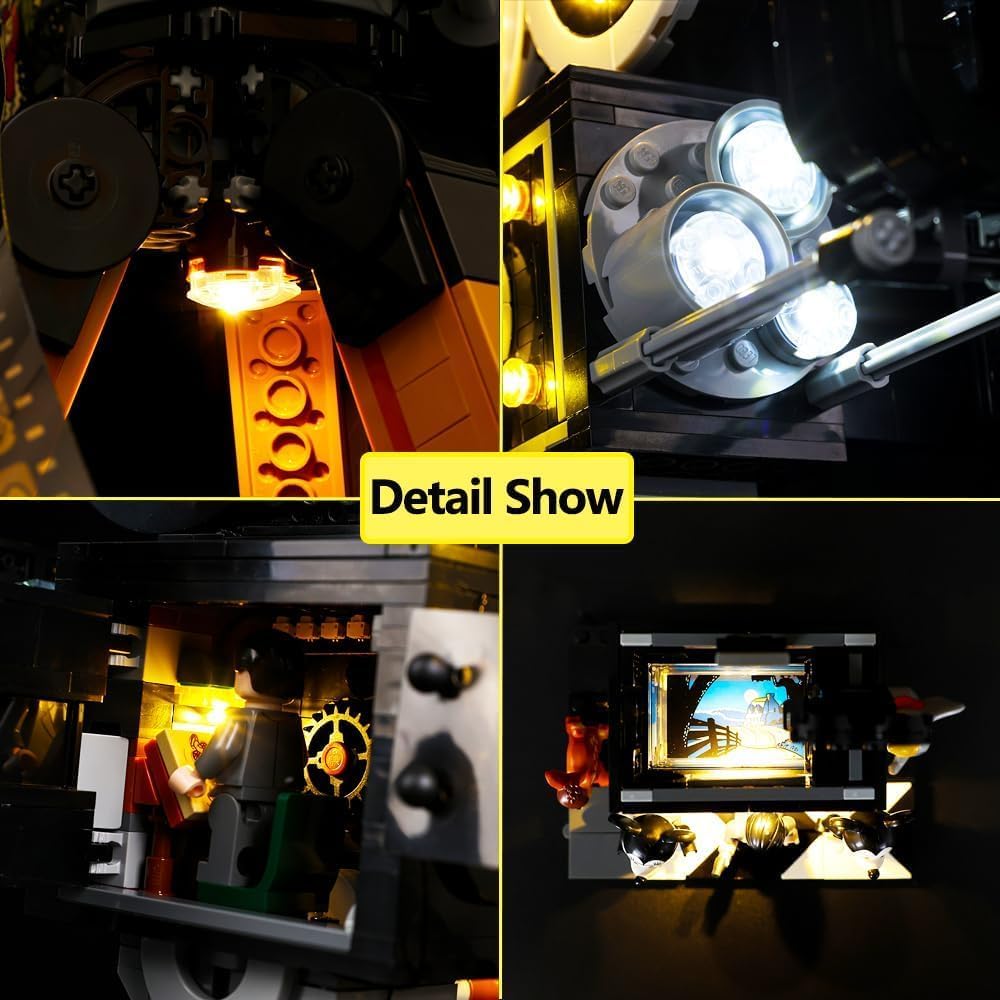
Foto 3.2: Zuru ezu view of light placement within the model.

Image 3.3: Close-up of the illuminated '100' detail on the model.
4. Ntuziaka ọrụ
Once the BrickSoul light kit is fully installed and connected to a power source (USB or AAA batteries), the lights will activate. There are no complex controls for this classic version; the lights are designed for continuous illumination when powered.
- Ike Na: Connect the USB cable to a power source or ensure fresh AAA batteries are installed. The lights will turn on automatically.
- Gbanyụọ: Disconnect the USB cable from the power source or remove the AAA batteries to turn off the lights.
5. Nlekọta
To ensure the longevity and optimal performance of your BrickSoul light kit, follow these maintenance guidelines:
- Nhicha: Gently dust the illuminated model and light components with a soft, dry cloth. Avoid using liquid cleaners directly on the lights or wiring.
- Nlekọta waya: Avoid pulling or bending the wires excessively, as this can damage the connections. Ensure wires are not pinched by Lego bricks.
- Ngbanwe batrị: If using AAA batteries, replace all batteries simultaneously when the lights dim or cease to function. Use high-quality alkaline batteries for best performance.
- Nchekwa: If storing the model for an extended period, disconnect the power source (remove batteries or unplug USB) to prevent drainage or potential damage.
6. Nchọpụta nsogbu
If you encounter any issues with your BrickSoul light kit, refer to the following troubleshooting tips:
| Nsogbu | Ihe nwere ike ime | Ngwọta |
|---|---|---|
| Ọkụ anaghị agbanwu. | No power, loose connection, or faulty component. | Check USB power source or replace AAA batteries. Ensure all connectors are firmly seated. Verify the USB cable is not damaged. |
| Some lights are dim or flickering. | Low battery power, unstable USB power, or loose connection. | Replace batteries or try a different USB power source. Re-check connections for the affected lights. |
| Wires are visible or not fitting correctly. | Incorrect routing during installation. | Refer to the online installation guide and carefully re-route the wires to ensure they are hidden within the model's structure. |
| Bent connector or broken wire. | Accidental damage during installation or handling. | Contact BrickSoul customer support for assistance and potential replacement parts under warranty. |
7. Nkọwapụta
| Njirimara | Nkọwa |
|---|---|
| Nọmba nlereanya | 43230-cv |
| Akụkụ ngwugwu | 5.87 x 5.2 x 1.26 sentimita asatọ |
| Ibu Ibu | 4.6 ounces |
| Ntinye ike | USB (3-5V) or 3x AAA Batteries (not included) |
| Onye nrụpụta tụrụ aro afọ | Afọ 14 na karịa |
| Akụrụngwa | ABS Plastic, Copper Wire |
8. Akwụkwọ ikike na nkwado
BrickSoul offers a worry-free warranty for its products. If you experience issues such as bent connectors or broken wires due to accidental damage, BrickSoul provides quick and hassle-free replacements.
For any questions, technical assistance, or warranty claims, please contact the BrickSoul support team. Our team is dedicated to ensuring a smooth and stress-free experience with your lighting kit.
You can find more information and contact details by visiting the official BrickSoul store: BrickSoul Store on Amazon.


