1. Okwu mmalite na gafereview
The Infinity Smart Watch for Women is designed to seamlessly integrate into your daily life, offering a blend of elegance and advanced functionality. Featuring a vibrant AMOLED 1.1" screen, this smartwatch provides comprehensive health and fitness tracking, communication features, and smart notifications. It is compatible with both iOS and Android phones.

Foto 1: N'ihu view of the Infinity Smart Watch for Women, showcasing its elegant design and vibrant AMOLED display.
2. Kedu ihe dị na Igbe ahụ
- Infinity Smart Watch (Model WS_BLK)
- Ịchaji eriri
- Akwụkwọ ntuziaka onye ọrụ
3. Nhazi
3.1 Nchaji izizi
Before first use, fully charge your smartwatch. Connect the magnetic charging cable to the charging points on the back of the watch and plug the USB end into a compatible power adapter (not included) or computer USB port. The watch display will indicate charging status.

Figure 2: The smartwatch connected to its magnetic charging cable, showing the battery charging indicator.
3.2 Ngwa nwụnye na ijikọ
- Scan the QR code provided in the manual or on the watch screen (if available) to download the companion app. Alternatively, search for the app name (e.g., 'VeryFit' or 'FitCloudPro' as seen in related videos) in your smartphone's app store (iOS App Store or Google Play Store).
- Wụnye ngwa na ama gị.
- Open the app and follow the on-screen instructions to create an account and set up your profile.
- Gbaa mbọ hụ na agbanyere Bluetooth na ekwentị gị.
- In the app, navigate to the device pairing section and select your Infinity Smart Watch from the list of available devices.
- Kwenye arịrịọ njikọta na ma ekwentị gị ma smartwatch.
Video 1: Official product video demonstrating the Infinity Smart Watch for Women, including its features and design. This video provides a visual guide to the watch's capabilities.
4. Ntuziaka ọrụ
4.1 Nsoro ụzọ
- Swipe elu: View recent notifications/messages.
- Mkpu ala: Access quick settings (brightness, Do Not Disturb, flashlight, phone finder, settings).
- Sụgharịa akaekpe/aka nri: Scroll through main features like activity data, heart rate, sleep tracking, and weather.
- Pịa bọtịnụ akụkụ: Return to the watch face or access the main menu.
4.2 Makingkpọ oku na ịza Oku
Once paired with your smartphone, you can make and answer calls directly from your smartwatch.
- Ka ịkpọ oku: Access the phone function from the main menu, use the dial pad or select a contact from your synced phonebook.
- Iji zaa oku: When a call comes in, the watch will display the caller ID. Tap the green icon to answer or the red icon to reject.
4.3 Smart Ọkwa
Receive alerts for incoming calls, text messages, and app notifications directly on your wrist. Configure notification preferences within the companion app.

Figure 3: The smartwatch interface showing options for Bluetooth calls, smart notifications, and voice assistant.
4.4 Hazie ihu nche
The smartwatch offers a variety of customizable watch faces to suit your style. You can change them directly on the watch or through the companion app, which provides over 200 options.
5. Health Monitoring Features
The Infinity Smart Watch is equipped with a comprehensive suite of health and fitness tracking features:
- Nlekota obi obi: Na-aga n'ihu na-enyocha ọnụọgụ obi gị ụbọchị niile.
- Nyochaa Ọbara Ọbara: Provides on-demand blood pressure readings.
- Nleba anya ụra: Na-enyocha usoro ụra gị, gụnyere ụra miri emi, ụra dị mfe, na oge ịmụrụ anya.
- Ntughari: Counts your steps, distance traveled, and calories burned.
- Ụdị egwuregwu ọtụtụ: Supports over 100 sports modes, allowing you to track specific workouts like walking, running, cycling, and swimming.
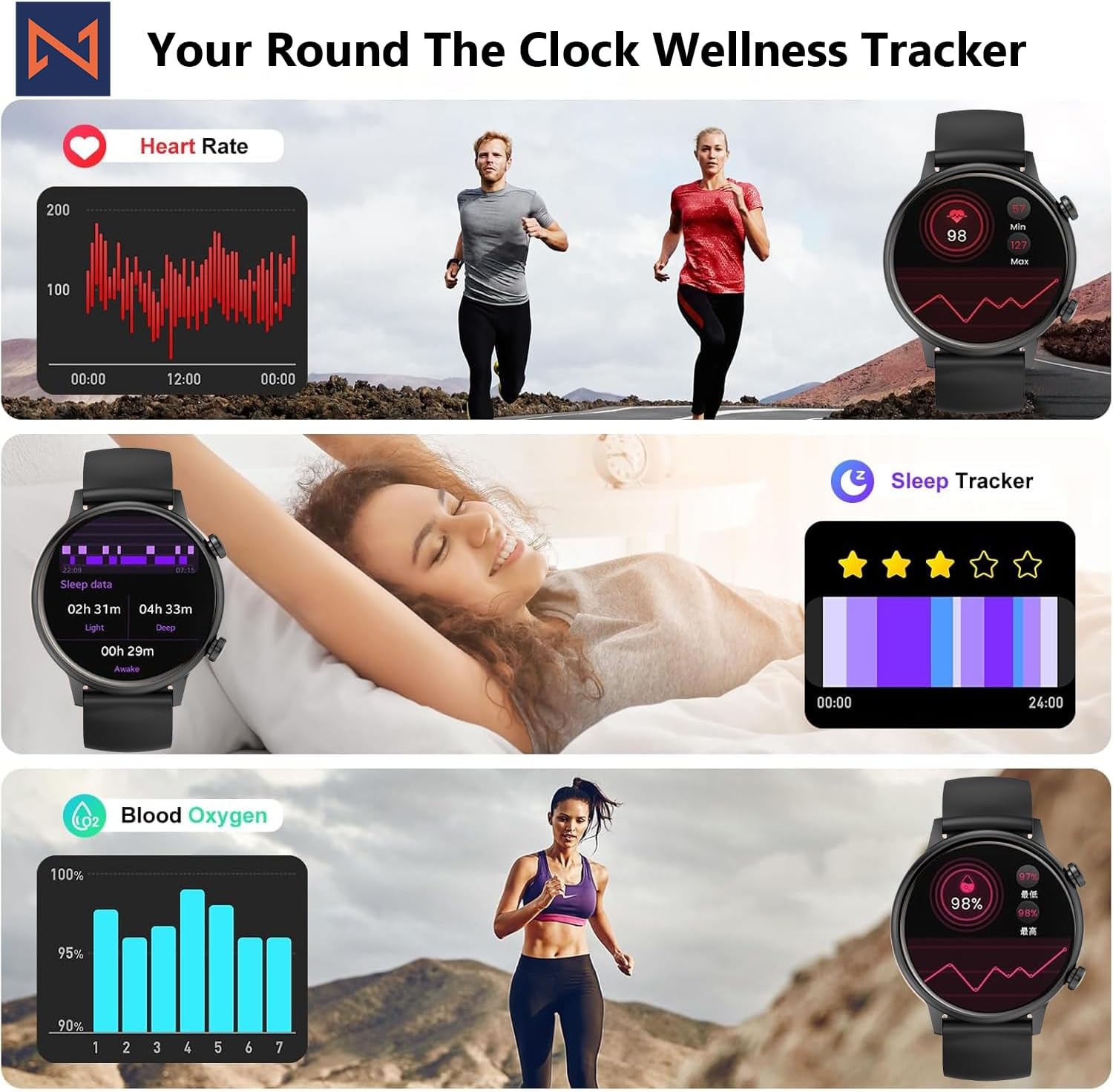
Figure 4: The smartwatch interface showing real-time heart rate, sleep tracking, and blood oxygen levels.

Figure 5: The smartwatch showing a selection of its multiple sports tracking modes.
6. Mmiri Nguzogide
The Infinity Smart Watch has an IP68 waterproof rating, making it resistant to dust, sweat, and water. It is suitable for daily wear, including hand washing, face washing, and swimming. Mara: Avoid using the watch in hot water (e.g., hot showers, saunas) or for deep-sea diving, as extreme temperatures or high-pressure water may compromise its water resistance.

Figure 6: The smartwatch demonstrating its IP68 waterproof capability during water exposure.
7. Batrị na Nchaji
The smartwatch features a 200 mAh Lithium Polymer battery. A full charge typically takes approximately 2 hours, providing 3-5 days of working time and up to 30 days of standby time, depending on usage.
8. Nkọwapụta
| Njirimara | Nkọwa |
|---|---|
| Nọmba nlereanya | WS_BLK |
| Nha ihuenyo | 1.1 inch AMOLED |
| Ngosi nke enweghị mmiri | IP68 |
| Ike batrị | 200 ndeamp Awa (Lithium Polymer) |
| Njikọta | Bluetooth |
| Sistemụ nrụọrụ | Android (compatible with iOS) |
| Ike Nchekwa ebe nchekwa | 128 MB |
| Ibu Ibu | 5 ounces |
| Onye nrụpụta | Kizzy Enterprises Inc |
9. Nchọpụta nsogbu
- Lelee anaghị agbanye: Ensure the watch is fully charged. Long-press the side button to power on.
- Enweghị ike ijikọ ya na ekwentị: Ensure Bluetooth is enabled on your phone and the watch is within range. Restart both devices and try pairing again through the app.
- Anataghị ọkwa: Check app settings on your phone to ensure notification permissions are granted for the smartwatch app. Also, verify that 'Do Not Disturb' mode is not active on the watch.
- Ọgụgụ ahụike na-ezighi ezi: Ensure the watch is worn snugly on your wrist, not too tight or too loose. Clean the sensors regularly. Note that the blood pressure monitor may not be medically accurate and is for reference only.
- Ikiri ihuenyo: Restart the smartwatch by long-pressing the side button until it powers off, then power it back on. If the issue persists, check for app updates.
10. Akwụkwọ ikike na nkwado
For warranty information, technical support, or service inquiries, please refer to the contact details provided on the product packaging or the manufacturer's official websaịtị. Debe nnata nzụta gị dị ka ihe akaebe nke ịzụrụ maka nkwupụta ikike.


