1. Okwu mmalite
This manual provides detailed instructions for the installation, operation, and maintenance of your Reobiux D20-1P 2K Outdoor Surveillance Camera. Please read this manual thoroughly before using the product to ensure proper functionality and safety.
2. Ihe ngwugwu
Nyochaa na etinyere ihe niile edepụtara n'okpuru na ngwugwu gị. Ọ bụrụ na ihe ọ bụla na-efu ma ọ bụ mebie, biko kpọtụrụ nkwado ndị ahịa.
- 1x Reobiux D20-1P Solar PTZ Camera
- 1x Solar Collector
- 1x Akwụkwọ ntuziaka onye ọrụ
- 1x Nkwalite ntọala
- 1x Power Supply (for initial charging)
- 1x Screws Bag (for installation)
- 1x Type-C Charging Line
3. Ngwaahịa gafereview
The Reobiux D20-1P is a 2K outdoor surveillance camera designed for comprehensive home security. It features dual lenses, 360° Pan-Tilt-Zoom (PTZ) capabilities, and operates wirelessly via Wi-Fi. Key features include PIR motion detection, color night vision, two-way audio, and an IP66 weatherproof rating, powered by a solar panel and rechargeable battery.
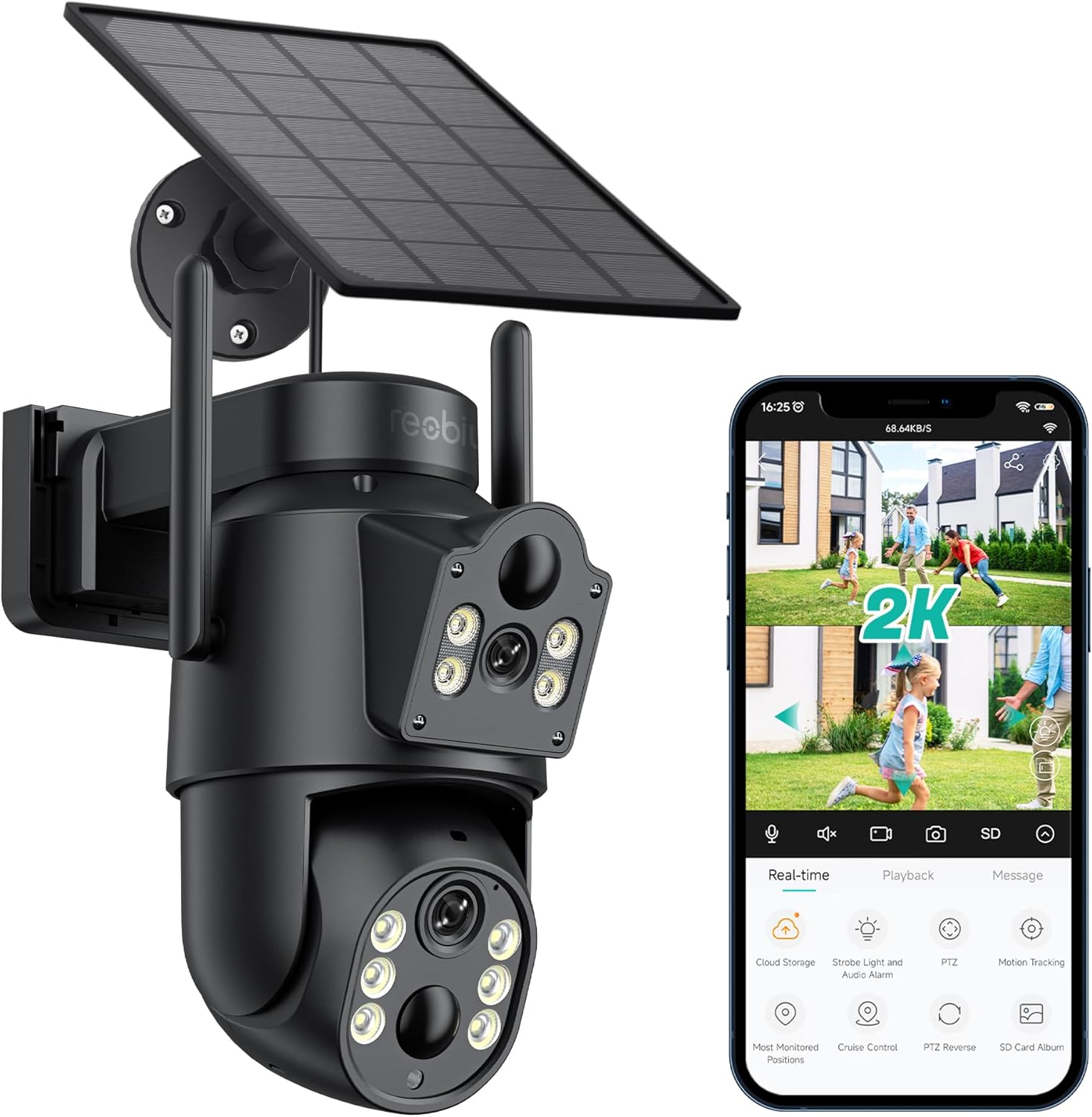
Foto 3.1: Reobiux D20-1P Solar PTZ Camera and its mobile application interface showing real-time monitoring, playback, and various control options.
Akụkụ ndị bụ isi:
- 2K QHD High Resolution: Na-enye foo vidiyo doro anya na zuru ezutage.
- Dual-Lens Design: Combines a fixed lens with a rotating lens for comprehensive coverage.
- 360° PTZ Functionality: Allows remote control of pan, tilt, and zoom for flexible viewakụkụ .
- Solar Powered with Rechargeable Battery: Ensures continuous operation with minimal manual charging.
- Nchọpụta ngagharị PIR: Intelligently detects human movement to reduce false alarms.
- Agba Ọhụụ abalị: Offers full-color video even in low-light conditions, alongside infrared night vision.
- Audio Ụzọ Abụọ: Enables communication with visitors or deterrence of intruders.
- IP66 mkpuchi ihu igwe: Designed to withstand various outdoor weather conditions.
- Wireless Wi-Fi Connectivity: Easy setup and remote access via smartphone.
4. Ntuziaka Nhazi
4.1 Nchaji izizi
Before first use, fully charge the camera's internal battery using the provided Type-C charging line and power supply. This ensures the camera has sufficient power for initial setup and operation, especially if solar charging conditions are not optimal immediately after installation.
4.2 Ntinye na Mmepụta Akaụntụ Ngwa
- Budata ya iCSee app from your smartphone's app store (iOS App Store or Google Play Store).
- Wụnye ngwa ahụ wee mepee ya.
- Soro ntuziaka na ihuenyo ka ịmepụta akaụntụ ọhụrụ ma ọ bụ banye ma ọ bụrụ na ị nwere otu.
4.3 Camera Connection to Wi-Fi
- Ensure your camera is powered on.
- In the iCSee app, tap the "+" icon to add a new device.
- Select the option for "Wi-Fi Camera" or "Add Device by AP Hotspot" (refer to app for exact wording).
- Follow the app's instructions to connect the camera to your 2.4GHz Wi-Fi network. You may need to scan a QR code displayed on your phone with the camera, or listen for a sound prompt.
- Once connected, you can name your camera and begin monitoring.
4.4 na -arịgo igwefoto
Choose a location that provides optimal surveillance coverage and receives direct sunlight for the solar panel. Ensure the camera is within range of your Wi-Fi network.
- Họrọ ebe: Identify a suitable wall or surface for mounting. Consider the camera's viewing angle (355° pan, 90° tilt) and the solar panel's exposure to sunlight.
- Kaa akara ebe a na-egwupụta ihe: Use the mounting base as a template to mark the screw holes on the wall.
- Oghere egwu egwu: Drill pilot holes at the marked positions. Insert wall anchors if necessary.
- Attach Mounting Base: Secure the mounting base to the wall using the provided screws.
- Tinye igwefoto: Mount the camera onto the secured base.
- Gbanwee ogwe anyanwụ: Position the solar panel to maximize sunlight exposure throughout the day.

Foto 4.1: Illustration of the camera mounted with its solar panel, highlighting the fixed and rotating lenses and the benefit of continuous solar power.
5. Ntuziaka ọrụ
5.1 Ndụ View na Playback
Open the iCSee app and select your camera to access the live view. From here, you can:
- Nleba anya oge: View ihe nkiri vidio dị ndụ.
- Njikwa PTZ: Use the on-screen joystick to pan (355°) and tilt (90°) the camera.
- Mbugharị dijitalụ: Pinch to zoom on the live feed.
- Nkpọghachi: Nweta ndekọ footage stored on the SD card or cloud storage.

Foto 5.1: Demonstrates the superior clarity of 2K QHD resolution compared to 1080P, providing more details for monitoring.
5.2 Nchọpụta na Ịdọ Aka Ná Ntị
The camera utilizes PIR (Passive Infrared) intelligent detection to identify human movement, minimizing false alarms from pets or swaying branches.
- Kwado/ Gbanyụọ: Activate or deactivate motion detection in the app settings.
- Ndozi mmetụta uche: Adjust the PIR sensor's sensitivity to suit your environment.
- Ọkwa mkpu: Receive instant push notifications on your smartphone when motion is detected.
- Oti mkpu na ụda: Configure the camera to trigger a strobe light and audible alarm upon detection.

Foto 5.2: The camera's PIR intelligent detection distinguishes human movement from other objects, reducing unnecessary alerts.

Foto 5.3: When motion is detected, the camera can send real-time push notifications and activate a sound and light alarm to deter intruders.
Ụdị ọhụụ abalị 5.3
The camera offers two night vision modes for clear visibility in the dark:
- Spotlight Full Color Night Vision: Utilizes built-in spotlights to provide full-color video in low-light conditions.
- Spotlight Infrared Night Vision: Uses infrared LEDs for black-and-white video in complete darkness, with a range of up to 30 meters.
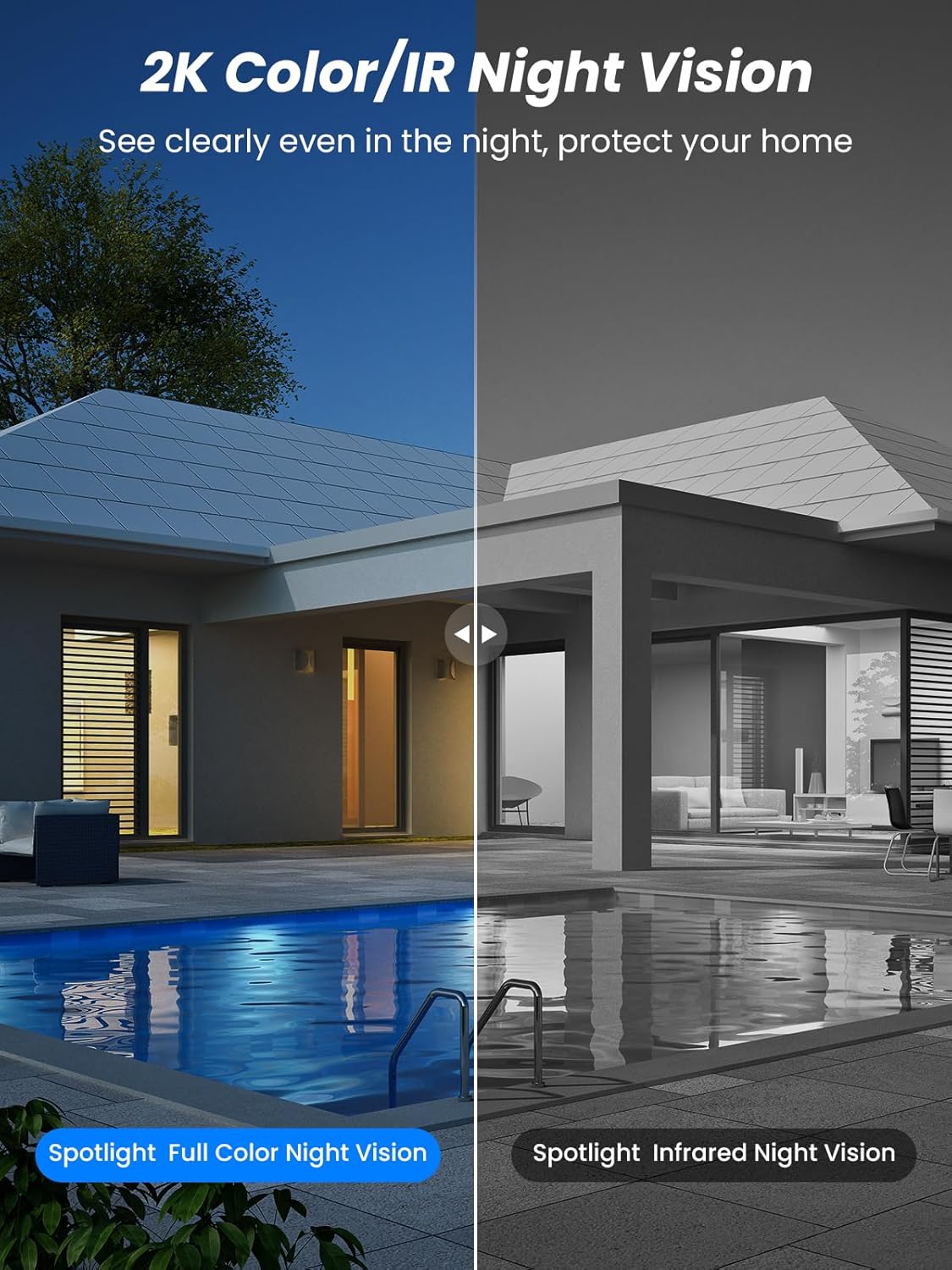
Foto 5.4: Illustrates the difference between full-color night vision, enabled by spotlights, and traditional infrared night vision.
5.4 Audio ụzọ abụọ
The integrated microphone and speaker allow for two-way communication.
- Kwuo okwu: Pịa akara ngosi igwe okwu dị na ngwa ahụ iji kwuo okwu site na igwe okwu igwefoto ahụ.
- Gee ntị: The camera's microphone captures audio from its surroundings.

Foto 5.5: The two-way audio function allows for direct communication through the camera, useful for interacting with visitors or delivery personnel.
6. Nlekọta
- Nhicha: Jiri ihe dị nro hichaa oghere igwefoto na panel anyanwụ mgbe niile.amp ákwà iji hụ na arụmọrụ ya kacha mma ma doo anya na onyonyo ahụ. Zere iji ihe nhicha na-emebi ihe.
- Ahụike batrị: While solar-powered, extreme weather or prolonged periods of low sunlight may require manual charging. Monitor battery levels via the app.
- Mmelite femụwe: Check the iCSee app regularly for available firmware updates to ensure your camera has the latest features and security enhancements.
- Nchekwa ihu igwe: The camera is IP66 weatherproof, designed to withstand rain, snow, and sun. However, ensure all connections are secure to maintain water resistance.

Foto 6.1: The IP66 rating ensures the camera's durability and functionality in various outdoor weather conditions, including snow, rain, and direct sunlight.
7. Nchọpụta nsogbu
- Igwefoto anaghị ejikọta na Wi-Fi:
- Ensure the camera is within range of your 2.4GHz Wi-Fi network. 5GHz networks are not supported.
- Nyochaa paswọọdụ Wi-Fi gị ziri ezi.
- Malitegharịa ekwentị gị na igwefoto.
- If issues persist, try resetting the camera (refer to app or product for reset button location).
- Battery not charging or draining quickly:
- Ensure the solar panel is clean and receives direct sunlight for several hours daily.
- Lelee njikọ dị n'etiti panel anyanwụ na igwefoto.
- If in a low-light environment, manually charge the camera using the Type-C cable.
- Frequent motion detection events or live view streaming can consume battery faster. Adjust settings if needed.
- False motion detection alarms:
- Adjust the PIR motion detection sensitivity in the iCSee app.
- Ensure the camera is not pointed at areas with constant movement (e.g., busy roads, swaying trees) if not intended for monitoring.
- Ogo onyonyo adịghị mma:
- Hichaa oghere igwefoto.
- Ensure sufficient lighting for optimal image capture, especially at night.
- Check your Wi-Fi signal strength; a weak signal can affect video streaming quality.
8. Nkọwapụta
| Njirimara | Nkọwa |
|---|---|
| Aha Nlereanya | D20-1P |
| Mkpebi ịse vidiyo | 2.5K |
| Mkpebi vidiyo dị irè | 2K QHD |
| Teknụzụ nzikọrịta ozi ikuku | Wi-Fi (2.4GHz) |
| Ụdị Ihe | Dome |
| Viewna n'akuku | Ogo ogo 355 (Pan), ogo 90 (Tilt) |
| Ụdị nwụnye | Agbakwasịrị mgbidi |
| Oke ọhụụ abalị | 30 mita |
| Ọnụego Frame | 25fps |
| Ihe onwunwe | Plastic |
| Voltage | 12 volts (DC) |
| Wattage | 5 watt |
| Isi Iyi Ike | Batrị na-arụ ọrụ, ike anyanwụ na-arụ ọrụ |
| Batrị | 3 batrị lithium ion (gụnyere) |
| Protocol Njikọta | Wi-Fi |
| Ụdị njikwa | iCSee ngwa |
| Atụmatụ pụrụ iche | Night Vision (Color/IR), PIR Motion Detection, Two-Way Audio, IP66 Weatherproof |
| Ibu Ibu | 1.06 n'arọ |
| Akụkụ akụkụ | 21.7 x 19.5 x 13.8 cm |
9. Akwụkwọ ikike na nkwado
Reobiux offers a 1-afọ akwụkwọ ikike for this product. For any issues or inquiries, please do not hesitate to reach out to our customer service. We provide 20 hours of online service to assist you.
For support, please refer to the contact information provided with your purchase or within the iCSee application.