1. Okwu mmalite
This manual provides detailed instructions for the MESWAO 15.6 Inch Android 14 Tablet, model MES-B3. It covers essential information regarding product features, setup, operation, maintenance, and troubleshooting to ensure optimal performance and user experience. Please read this manual thoroughly before using your device.
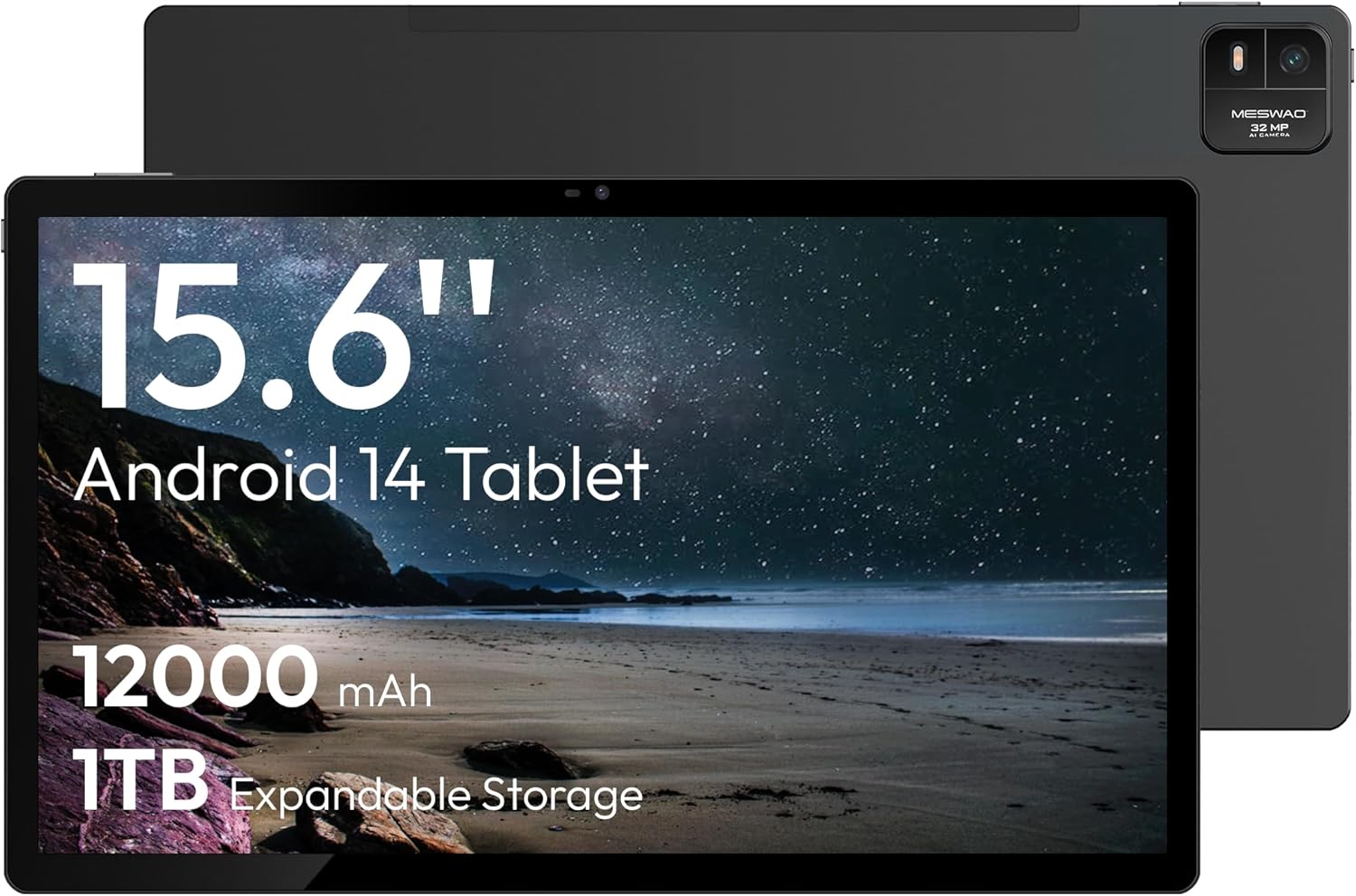
Figure 1.1: MESWAO 15.6 Inch Android 14 Tablet. This image displays the front and back view of the tablet, highlighting its large screen and rear camera module.
2. Ozi nchekwa
Iji gbochie mmebi ngwaọrụ gị ma ọ bụ mmerụ ahụ nye onwe gị ma ọ bụ ndị ọzọ, biko lezie anya na ihe ndị a:
- Etinyela mbadamba ahụ n'ebe okpomọkụ dị oke elu, anwụ kpọmkwem, ma ọ bụ oke iru mmiri dị elu.
- Zere ịda ma ọ bụ itinye mbadamba ahụ n'ihe ike dị ukwuu.
- Jiri naanị chaja na ihe ndị ọzọ akwadoro.
- Anwala ịkwasa ma ọ bụ rụkwaa mbadamba ihe n'onwe gị.
- Debe mbadamba ihe ahụ ka ọ ghara ịbanye na mmiri na ihe ndị ọzọ dị na mmiri.
- Observe all local regulations regarding the use of electronic devices.
3. Ihe ngwugwu
Chọpụta na ihe niile dị na ngwugwu:
- 15.6-inch Tablet x1
- 15W Charger x1
- Type-C to 3.5mm Adapter x1
- USB-A to Type-C Adapter x1
- Stuck Pin x1 (for SIM/TF card tray)
4. Ngwaọrụ gafereview
Familiarize yourself with the physical components of your MESWAO tablet.
4.1. Akụkụ anụ ahụ
- Igwefoto ihu: Located at the top center of the screen when held horizontally.
- Igwefoto azụ nwere Flash: Located on the back, typically in a corner.
- Bọtịnụ ike: Usually on the side, used to power on/off or wake/sleep the device.
- Bọtịnụ olu: Hazie ọkwa ọdịyo.
- Ọdụ USB-C: Maka ịchaji na ịnyefe data.
- Oghere TF Kaadị: For expandable storage.
- Ndị na-ekwu okwu: Quad speakers with 8 sound chambers for audio output.

Nyocha 4.1: N'eluview of MESWAO Tablet's physical features. This image illustrates the location of stereo speakers, power and volume buttons, front camera, rear camera with flashlight, Type-C port, and TF card slot.
5. Nhazi
5.1. Nchaji mbụ
Before first use, fully charge the tablet using the provided 15W charger and USB-C cable. Connect the charger to the USB-C port on the tablet and plug it into a power outlet. The battery indicator on the screen will show charging progress.

Figure 5.1: Tablet charging illustration. This image shows the tablet connected to a charger, displaying a charging icon and indicating 100% charge in 3.5 hours.
5.2. Ịgbanye / gbanyụọ
- Iji gbanye: Press and hold the Power button until the MESWAO logo appears.
- Iji gbanyụọ: Pịa ma jide bọtịnụ Ike ruo mgbe menu nhọrọ ike pụtara, wee họrọ "Gbanyụọ."
- Ịrahụ Ụra/Teta: Jiri nwayọ pịa bọtịnụ Ike.
5.3. Nhazi mmalite
Mgbe agbanyere nke mbụ, soro ntuziaka na ihuenyo ka ịtọlite mbadamba gị:
- Họrọ asụsụ ọkacha mmasị gị.
- Jikọọ na netwọk Wi-Fi.
- Jiri akaụntụ Google gị banye ma ọ bụ mepụta nke ọhụrụ.
- Review ma nabata usoro na ọnọdụ.
- Tọọ mkpọchi ihuenyo (PIN, ụkpụrụ, ma ọ bụ paswọọdụ).
5.4. Inserting a TF Card
To expand storage, insert a TF (microSD) card:
- Locate the TF card slot on the side of the tablet.
- Use the provided stuck pin to gently eject the card tray.
- Place the TF card into the tray with the gold contacts facing down.
- Jiri nlezianya tinyegharịa traị ahụ n'ime mbadamba ihe.

Figure 5.2: Tablet storage capabilities. This image highlights the 128GB ROM and support for up to 1TB expandable storage via TF card.
6. Ntuziaka ọrụ
6.1. Nsoro ụzọ
The MESWAO tablet uses Android 14, offering intuitive touch-based navigation:
- Kpatụ: Họrọ otu ihe ma ọ bụ mepee ngwa.
- Mịpụta: Pịgharịa gaa na ihuenyo ma ọ bụ ndepụta.
- Tụọ-gaa-mbugharị: Enlarge or reduce content on the screen.
- Ogologo Pịa: Nweta menu onodu okirikiri ma ọ bụ bugharịa akara ngosi.

Figure 6.1: Android 14 operating system interface. This image displays various application icons and highlights features like smooth multitasking, parental control, and enhanced privacy.
6.2. Ijikọ na Wi-Fi
- Gaa na Ntọala > Netwọk & ịntanetị > Wi-Fi.
- Gbanwee Wi-Fi On.
- Họrọ netwọk nke ịchọrọ na listi ahụ.
- Tinye paswọọdụ ma ọ bụrụ kpaliri, wee pịa Jikọọ.
6.3. Ijikwa Ngwa
- Wụnye ngwa: Download from the Google Play Store.
- Wepụ ngwa: Long-press an app icon, then drag it to "Uninstall" or go to Ntọala > Ngwa.
- Close Apps: Swipe up from the bottom of the screen and swipe away the app card.
6.4. Ojiji igwefoto
The tablet features a 32MP rear camera with flash and a 5MP front camera.
- Mepee Igwefoto ngwa.
- Pịa bọtịnụ mkpuchi ka ịsee foto.
- Gbanwee n'etiti igwefoto n'ihu na n'azụ site na iji akara ngosi mgbanwe igwefoto.
- Access settings for flash, modes, and other options.
6.5. Njikwa batrị
Batrị 12000mAh na-enye ojiji ogologo oge. Iji mee ka ndụ batrị ka mma:
- Gbanwee nchapụta ihuenyo.
- Mechie ngwa ejighi ya.
- Enable battery saver mode in Ntọala > Batrị.
6.6. Njikọta
- Bluetooth: Pair with wireless headphones, speakers, or other devices via Ntọala > Ngwa ejikọrọ > Bluetooth.
- USB-C: Connect to a computer for file transfer or use with compatible USB-C accessories.
- Ihuenyo Ikuku: Share your tablet's screen to a compatible smart TV or monitor. Access this feature from the Quick Settings panel or Ntọala > Ngwa ejikọrọ > Nkedo.
6.7. Ntọala ụda
Adjust volume and audio output options:
- Use the physical volume buttons on the side of the tablet.
- Access detailed settings in Ntọala > Ụda & ịma jijiji.
- The tablet supports multiple audio options, including USB-C audio and 3.5mm via the provided adapter.
7. Nlekọta
7.1. Nhicha Mbadamba Gị
To clean the tablet, use a soft, lint-free cloth. For stubborn smudges, slightly dampJiri mmiri ma ọ bụ ihe nhicha ihuenyo nke e mere maka ngwa eletrọniki mee ka ákwà ahụ dị nro. Zere kemịkalụ siri ike ma ọ bụ ihe ndị na-emebi emebi.
7.2. Mmelite ngwanrọ
Lelee ma wụnye mmelite ngwanrọ mgbe niile iji hụ na arụmọrụ kacha mma, nchekwa na ịnweta njirimara ọhụrụ. Gaa na Ntọala > Sistemu > Mmelite sistemụ.
7.3. Njikwa nchekwa
To maintain performance, periodically manage your tablet's storage:
- Delete unnecessary apps and files.
- Bugharịa buru ibu files to the TF card or cloud storage.
- Hichapụ data cache maka ngwa dị na Ntọala > Ngwa > [Aha ngwa] > Nchekwa & cache.
8. Nchọpụta nsogbu
Rụtụ aka na nsogbu na azịza ndị a na-ahụkarị:
| Nsogbu | Ngwọta |
|---|---|
| Mbadamba anaghị agba ọkụ. | Gbaa mbọ hụ na agbagoro batrị. Jikọọ chaja wee chere nkeji ole na ole tupu ị nwaa ịgbanye ọzọ. |
| Enweghị ike ijikọ na Wi-Fi. | Check if Wi-Fi is enabled. Verify the Wi-Fi password. Restart your router and the tablet. |
| Ngwa na-akụ ma ọ bụ na-ajụ oyi. | Close background apps. Clear the app's cache. Restart the tablet. Ensure the app is updated. |
| Ịrụ ọrụ nwayọ. | Free up storage space. Close unused apps. Restart the tablet. |
| Batrị na-agbapụ ngwa ngwa. | Reduce screen brightness. Disable unused features like Bluetooth or GPS. Close background apps. Check battery usage in settings. |
9. Nkọwapụta
Key technical specifications for the MESWAO 15.6 Inch Android 14 Tablet (MES-B3):
| Njirimara | Nkọwa |
|---|---|
| Ụdị | MESWAO |
| Aha Nlereanya | MES-B3 |
| Sistemụ nrụọrụ | Android 14 |
| Nha ihuenyo | 15.6 sentimita asatọ |
| Mkpebi ihuenyo | Pikselụ 1920 x 1080 (IPS HD) |
| Nhazi | Octa-Core (MediaTek Helio G99, up to 2.2 GHz) |
| Ihe eserese eserese | Mali-G57 |
| RAM (Memory Storage Capacity) | 6GB (DDR3 SDRAM) |
| Internal Storage (Flash Memory Size) | 128 GB |
| Nchekwa enwere ike ịgbasa | Ruo 1TB site na kaadị TF |
| Mkpebi igwefoto azụ | 32 MP |
| Mkpebi igwefoto n'ihu | 5 MP |
| Ike batrị | 12000mAh |
| Nkezi Ndụ batrị | Awa 12 |
| Ụdị ikuku | 802.11a/b/g/n/ac (Wi-Fi 5) |
| Agba | Agba ntụ |
| Ibu Ibu | 2.35 pound |
| Akụkụ ngwaahịa (LxWxH) | 14.53 x 8.78 x 0.43 sentimita asatọ |

Figure 9.1: Processor and performance details. This image highlights the Helio G99 Octa-Core chipset, 6nm process, 950MHz GPU, and smooth gaming/streaming capabilities.
10. Akwụkwọ ikike na nkwado
10.1. Akwụkwọ ikike Ozi
The MESWAO 15.6 Inch Android 14 Tablet comes with a Akwụkwọ ikike nke ọnwa 12 covering manufacturing defects. Please retain your proof of purchase for warranty claims.
10.2. Nkwado ndị ahịa
For technical assistance, troubleshooting, or warranty inquiries, please contact MESWAO customer support. They offer Nkwado ndị ahịa 24-hour ma nwee local service centers in the US, EU, and Japan.
- Ụzọ kọntaktị: Refer to the contact information provided with your product packaging or visit the official MESWAO websaịtị.
- Mkpebi okwu: Issues reported are typically responded to within 24 hours, with problems resolved or replaced according to policy.

Figure 10.1: MESWAO customer support and warranty details. This image highlights the 12-month warranty, 24-hour customer support, local after-sales centers, and quick response flow.


