1. Okwu mmalite
This user manual provides detailed instructions for the Baseus 17-in-1 Docking Station (Model: B0D78WFLST). This versatile docking station is designed to expand the connectivity of your laptop or compatible device, offering multiple ports for display, data transfer, networking, and power delivery. Please read this manual thoroughly before using the product to ensure proper operation and to maximize its capabilities.
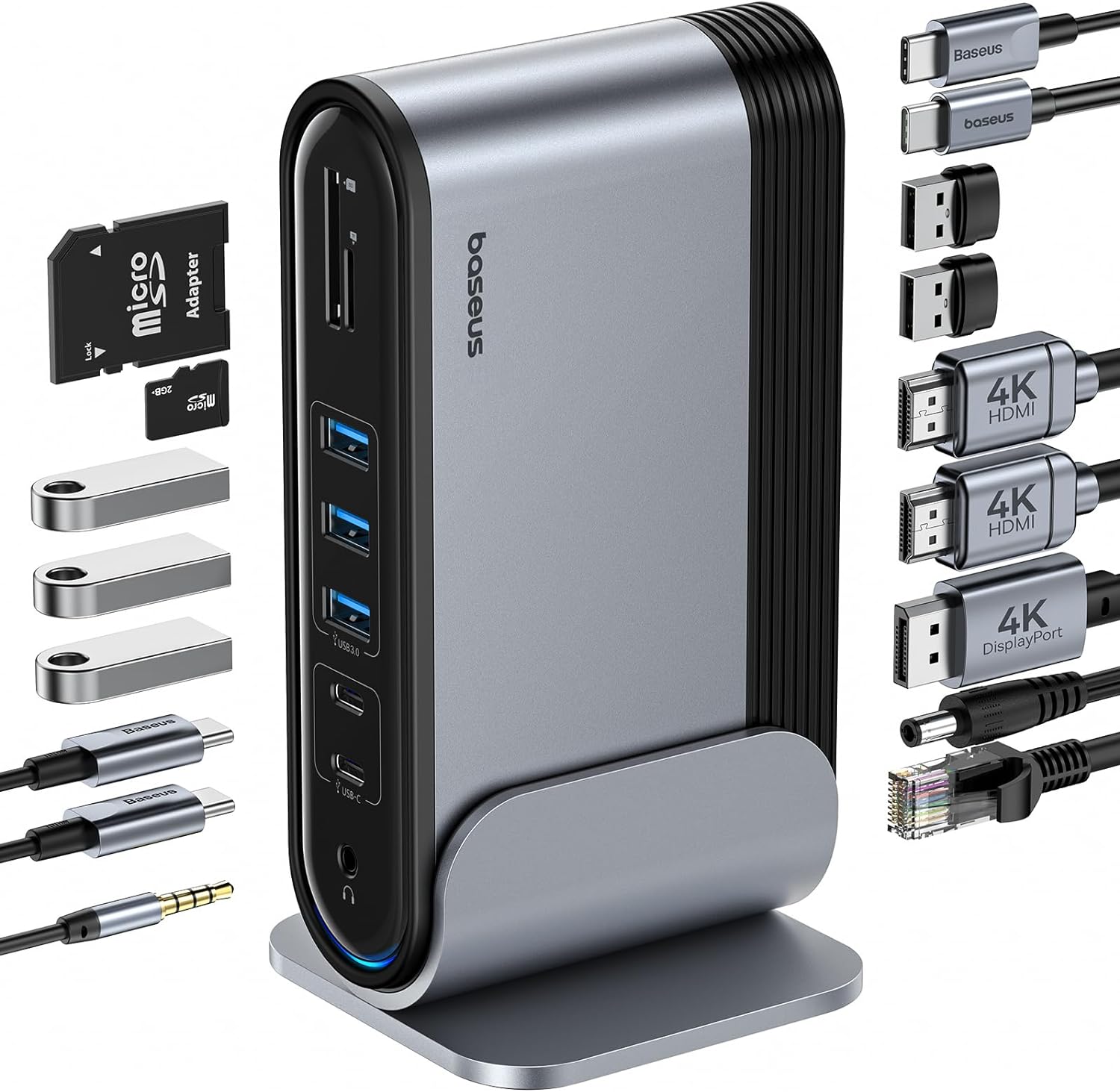
Figure 1: Baseus 17-in-1 Docking Station and included accessories.
2. Atụmatụ igodo
The Baseus 17-in-1 Docking Station offers comprehensive connectivity solutions:
- Mgbasawanye Ọdụ Ụgbọ Mmiri 17 n'ime 1: Integrates a wide array of ports for diverse connectivity needs.
- Triple Monitor Support: Connect up to three external monitors for enhanced productivity.
- Ngosipụta mkpebi dị elu: Supports 4K@60Hz resolution for single and dual displays, and 1080P@60Hz for triple displays on Windows systems.
- Nyefee data ngwa ngwa: Features USB 3.0 ports with 5Gbps transfer speeds and USB 2.0 ports for peripherals.
- Nnyefe ike 100W: Provides up to 85W power output to charge your laptop (100W input required).
- gigabit Ethernet: Ensures stable and high-speed wired network connection up to 1Gbps.
- Onye na-agụ kaadị SD/TF: Convenient access to memory cards with speeds up to 104 MB/s.
- Njikọ ọdịyo: Integrated 3.5mm audio jack for headphones or speakers.
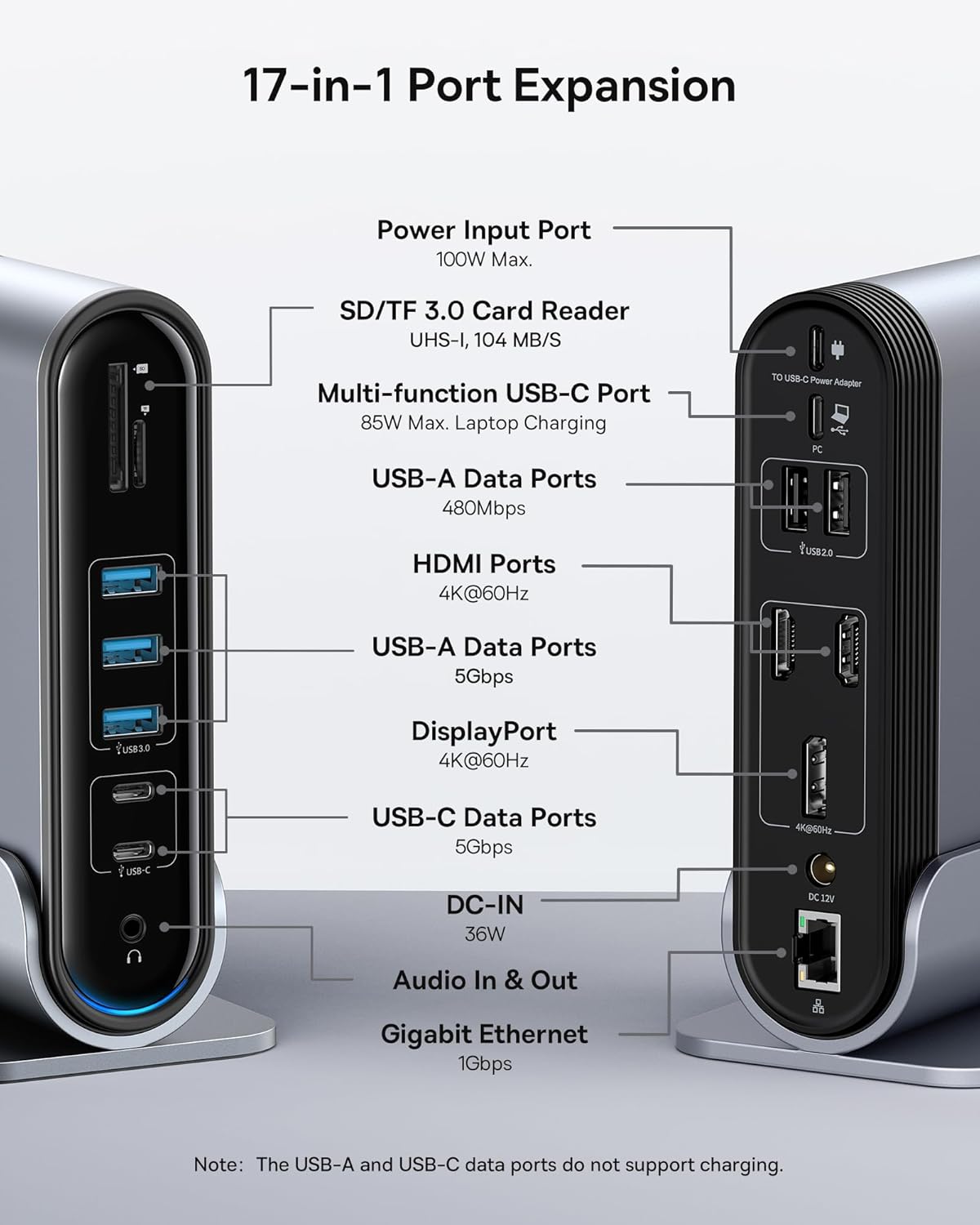
Figure 2: Detailed port layout and specifications of the docking station.
3. Ihe ngwugwu
Biko chọpụta na ihe niile dị na ngwugwu:
- Baseus UnionJoy 17-Port Triple- ngosi Docking Station
- Nkwụsị ụgbọ mmiri
- Ihe nkwụnye ọkụ
- USB-C na eriri USB-C
- US Adapter Plug
- EU nkwụnye nkwụnye
- UK Adapter Plug
- Akwụkwọ ntuziaka onye ọrụ

Ọgụgụ 3: Ihe agụnyere na igbe ahụ.
4. Nhazi ntuziaka
Follow these steps to set up your Baseus 17-in-1 Docking Station:
- Njikọ Ike:
Connect the provided power adapter to the DC-IN port (36W) on the docking station. Use the appropriate regional adapter plug (US, EU, or UK) for your power outlet. For laptop charging, ensure a 100W PD charger (not included) is connected to the Power Input Port (100W Max.) on the docking station.

Figure 4: Power connection for the docking station and laptop charging.
- Jikọọ na ngwaọrụ nnabata:
Use the included USB-C to USB-C cable to connect the docking station's Multi-function USB-C Port (85W Max. Laptop Charging) to your laptop or compatible host device.
- Jikọọ Monitors:
Connect your external monitors to the HDMI Ports (4K@60Hz) and/or DisplayPort (4K@60Hz) on the docking station using appropriate cables. Refer to the "Operating Instructions" section for display mode configurations.
- Ngwa njikọ:
Connect your USB devices (keyboard, mouse, external drives, etc.) to the available USB-A Data Ports (5Gbps or 480Mbps) and USB-C Data Ports (5Gbps). Insert SD or TF cards into the respective card reader slots.
- Jikọọ netwọk (Nhọrọ):
For a wired network connection, connect an Ethernet cable from your router/modem to the Gigabit Ethernet port (1Gbps) on the docking station.
- Jikọọ ọdịyo (Nhọrọ):
Connect headphones or speakers to the 3.5mm Audio In & Out jack.
5. Ntuziaka ọrụ
Ụdị ngosi 5.1
The docking station supports various display configurations depending on your operating system and the number of connected monitors.
Maka sistemụ arụmọrụ Windows:
- Mirror Mode (A+A+A): Displays the same content on all connected monitors and the laptop screen. Supports 1080P@60Hz.
- Extend Mode (A+B+C): Extends your desktop across multiple monitors, allowing different content on each screen. Supports 1080P@60Hz for triple display.
Maka sistemụ macOS:
- Mirror Mode (A+A+A): Displays the same content on all connected monitors and the laptop screen. Supports 4K@60Hz.
- Extend Mode (A+B+B): Extends your desktop across external monitors, but macOS typically mirrors content across multiple external displays when using a single MST hub. Supports 4K@60Hz.
- Note: macOS does not support triple extended display (A+B+C) through a single MST hub.

Figure 5: Display mode configurations for Windows and macOS.

Figure 6: Detailed resolution capabilities for various display configurations and DP versions.
5.2 Nyefee data
The docking station provides high-speed data transfer capabilities:
- USB 3.0 (5Gbps): Ideal for external hard drives, SSDs, and other high-bandwidth devices.
- USB 2.0 (480Mbps): Suitable for keyboards, mice, printers, and other standard peripherals.
- Onye na-agụ kaadị SD/TF: Quickly transfer photos and videos from memory cards.

Figure 7: Illustrating super-fast data transfer via the docking station.
5.3 Power Delivery
The docking station supports Power Delivery (PD) to charge your laptop:
- Connect a 100W PD charger (not included) to the dedicated Power Input Port on the docking station.
- The docking station will then provide up to 85W of power to your connected laptop via the USB-C host connection.
Note: The USB-A and USB-C data ports on the front of the docking station do not support charging.
6. Nlekọta na nlekọta
To ensure the longevity and optimal performance of your docking station, follow these guidelines:
- Debe ngwaọrụ ahụ ọcha site na iji akwa dị nro na-ehichapụ ya. Zere iji ihe nhicha ma ọ bụ ihe mgbaze.
- Do not expose the docking station to water, moisture, or extreme temperatures.
- Zere idobe ma ọ bụ idobe ngwaọrụ ahụ na mmetụta siri ike.
- Ensure proper ventilation around the docking station to prevent overheating.
- Disconnect all cables when the device is not in use for extended periods.
7. Nchọpụta nsogbu
If you encounter issues with your Baseus 17-in-1 Docking Station, refer to the following common problems and solutions:
7.1 No Display Output / Flickering Screen
- Lelee njikọ USB: Ensure all HDMI/DisplayPort cables are securely connected to both the docking station and the monitors.
- Verify Host Connection: Confirm the USB-C cable connecting the docking station to your laptop is firmly plugged in.
- Ịnye ọkụ: Make sure the docking station is receiving adequate power from its power adapter.
- Ntọala ngosi: Check your computer's display settings (e.g., Windows Display Settings, macOS System Preferences > Displays) to ensure the external monitors are detected and configured correctly (Extend, Mirror).
- Mmelite ọkwọ ụgbọala: Ensure your laptop's graphics drivers and USB-C drivers are up to date.
- Ndakọrịta mkpebi: Verify that the selected resolution and refresh rate are supported by your monitors and the docking station. Refer to the "Multiple Display Modes" table in Section 5.1.
- macOS Triple Display: Remember that macOS does not support triple extended display (A+B+C) through a single MST hub.
7.2 USB Devices Not Working
- Reconnect Device: Unplug and re-plug the USB device from the docking station.
- Nwaa Ọdụ Dị Iche Iche: Test the USB device in another USB port on the docking station or directly on your laptop to isolate the issue.
- Ịnye ọkụ: Ensure the docking station has sufficient power, especially for power-hungry USB devices.
- Okwu ndị ọkwọ ụgbọ ala: Check if the USB device requires specific drivers and ensure they are installed on your computer.
7.3 Laptop Not Charging
- 100W PD Charger: Confirm you are using a 100W Power Delivery charger connected to the dedicated Power Input Port on the docking station. The docking station itself does not generate power for your laptop.
- eriri USB-C: Ensure the USB-C cable connecting the docking station to your laptop supports power delivery.
- Ndakọrịta Laptọọpụ: Verify your laptop supports charging via its USB-C port.
7.4 Ethernet Connection Issues
- Nyocha USB: Ensure the Ethernet cable is securely connected to both the docking station and your router/modem.
- Ntọala netwọkụ: Check your computer's network settings to ensure the Ethernet adapter is enabled and configured correctly.
- Rawụta/Modem: Verify your router/modem is functioning properly.
8. Nkọwapụta
| Njirimara | Nkọwapụta |
|---|---|
| Nlereanya | B0D78WFLST |
| Ụdị | Baseus |
| Mgbakọta ọdụ ụgbọ mmiri | 17 |
| ọdụ ụgbọ mmiri HDMI | 2 (4K@60Hz) |
| DisplayPort | 1 (4K@60Hz) |
| ọdụ ụgbọ mmiri USB-A | 7 (3x 5Gbps, 4x 480Mbps) |
| ọdụ ụgbọ mmiri USB-C | 2 (5Gbps) |
| Power Delivery (Input) | 100W Max (via dedicated PD port) |
| Power Output (to Laptop) | 85W Max (via Multi-function USB-C Port) |
| Ọdụ ụgbọ mmiri Ethernet | 1 (1Gbps Gigabit Ethernet) |
| Onye na-agụ kaadị | SD/TF (UHS-I, 104 MB/s) |
| Jack ọdịyo | 3.5mm Audio In & Out |
| Ngwa dakọtara | Dell, HP, Mac, Lenovo, Steam Deck, etc. |
| Akụkụ | 9.29 x 8.27 x 2.28 sentimita asatọ |
| Ibu Ibu | 1.9 pound |
9. Akwụkwọ ikike na nkwado
For warranty information and technical support, please refer to the official Baseus website or contact Baseus customer service directly. Keep your purchase receipt as proof of purchase for warranty claims.
Onye ọrụ gọọmentị Baseus Websaịtị: www.baseus.com
For further assistance, you may also contact the seller through the platform where you purchased the product.


