Okwu mmalite
Welcome to the user manual for your new boAt Stone 352 Pro Bluetooth Speaker. This guide provides detailed instructions on how to set up, operate, and maintain your speaker, ensuring you get the best audio experience. Please read this manual thoroughly before using the product.
Kedu ihe dị na Igbe ahụ
Upon unboxing your boAt Stone 352 Pro, you should find the following items:
- 1 x boAt Stone 352 Pro Bluetooth Speaker
- 1 x eriri chaja (ụdị-C)
- Akwụkwọ ntuziaka onye ọrụ 1 x (akwụkwọ a)
- 1 x kaadị ikike
- 1 x katalọgụ

Image: The boAt Stone 352 Pro speaker, a USB Type-C charging cable, and the warranty card/user manual are shown, representing the contents of the product box.
Video: An unboxing demonstration of the boAt Stone 352 Pro Bluetooth Speaker, showing the speaker, charging cable, and documentation included in the package.
Ngwaahịa gafereview
The boAt Stone 352 Pro is a portable Bluetooth speaker designed to deliver powerful audio with enhanced features. Key highlights include:
- Ụda mbinye aka 14W ụgbọ mmiri: Experience clear and powerful audio output.
- Dynamic RGB LEDs: Enhance your listening experience with vibrant lighting effects.
- Ịgbagharị ruo awa asatọ: Nwee egwu a na-akpọgharị n'otu oge.
- Njirimara TWS: Connect two Stone 352 Pro speakers for a stereo sound experience.
- Igwe okwu arụnyere n'ime ya: Facilitates hands-free calling.
- Bluetooth v5.3: Na-eme ka njikọ ikuku kwụsiri ike ma dị irè.
- IPX5 Mgbochi mmiri: Na-echebe megide mmiri ozuzo na ọsụsọ.
- Multiple Connectivity Modes: Supports Bluetooth, AUX, and TF Card playback.
- Nchaji ụdị-C: Nhazi chaja nke oge a na nke dị mfe.

Image: A black boAt Stone 352 Pro speaker, showcasing its cylindrical design and the illuminated RGB LED strip on the front.
Njikwa na egosi
Familiarize yourself with the speaker's controls and indicators for optimal use.

Image: The side panel of the boAt Stone 352 Pro speaker, highlighting the power button, volume up/down buttons, and mode selection button.
- Bọtịnụ ike: Press and hold to power on/off. Short press to play/pause music.
- Elu elu (+): Obere pịa ka iwelie olu. Pịa ogologo maka egwu ọzọ.
- Mpịakọta ọnụ (-): Obere pịa ka ibelata olu. Pịa ogologo maka egwu gara aga.
- Bọtịnụ Ụdị (M): Pịa obere oge iji gbanwee n'etiti ụdị Bluetooth, AUX, na TF Card.
- Mpempe ọkụ RGB LED: Indicates power status, charging, and provides dynamic lighting effects.
Na-amalite
Ịchaji Ọkà Okwu
Before first use, fully charge your speaker. The boAt Stone 352 Pro features a Type-C charging port.
- Connect the Type-C end of the charging cable to the speaker's charging port.
- Connect the USB-A end of the cable to a compatible USB power adapter (5V/1A recommended).
- The RGB LED strip will indicate charging status. It typically takes approximately 2 hours for a full charge.
- Ozugbo chajịrị chaja zuru oke, kwụpụ eriri nchaji.

Foto: nkọwa zuru ezu view of the boAt Stone 352 Pro's side panel, illustrating the Type-C charging interface and the various connectivity ports (Bluetooth, AUX, TF Card).
Ịgbanyụ/ Gbanyụọ
- To power on, press and hold the Power button until you hear an audible prompt and the RGB LEDs illuminate.
- To power off, press and hold the Power button again until you hear an audible prompt and the RGB LEDs turn off.
Ntuziaka ọrụ
Njikọ Bluetooth
- Ensure the speaker is powered on and in Bluetooth mode (indicated by a specific LED pattern or audible prompt).
- Na ekwentị gị ma ọ bụ ngwaọrụ ọnụnụ, mee ka Bluetooth nwee ike wee chọọ ngwaọrụ dị.
- Select "boAt Stone 352 Pro" from the list of devices.
- Once paired, you will hear a confirmation tone, and the speaker's LED will indicate a successful connection.
- Ọkà okwu ahụ ga-ejikọghachi na ngwaọrụ ikpeazụ ejikọtara na akpaghị aka mgbe ejiri ya, ọ bụrụ na ngwaọrụ ahụ dị n'ime oke.
Ọnọdụ AUX
For wired connections, use the AUX port.
- Connect one end of a 3.5mm AUX cable (not included) to the speaker's AUX port.
- Connect the other end to your audio device's 3.5mm audio output.
- Press the 'M' (Mode) button on the speaker to switch to AUX mode.
- Ọdịda ga-akpọ ugbu a site na ọkà okwu sitere na ngwaọrụ ejikọrọ gị.
TF Kaadị ịkpọghachi
Play music directly from a TF (microSD) card.
- Fanye kaadị TF nwere ọdịyo MP3 files into the speaker's TF card slot.
- Press the 'M' (Mode) button to switch to TF Card mode.
- The speaker will automatically begin playing music from the card.
TWS (Ezigbo stereo ikuku ikuku) arụ ọrụ
Connect two boAt Stone 352 Pro speakers wirelessly for a true stereo sound experience.
- Hụ na ejiri igwe okwu abụọ ahụ rụọ ọrụ ma ghara ijikọ ha na ngwaọrụ Bluetooth ọ bụla ọzọ.
- On one speaker (this will be the primary speaker), long press the 'M' (Mode) button until you hear a TWS pairing prompt.
- The two speakers will automatically search and pair with each other. A confirmation tone will indicate successful TWS pairing.
- Now, connect your audio device to the primary speaker via Bluetooth as described above.
- Both speakers will play audio in stereo.

Image: Two boAt Stone 352 Pro speakers, one black and one blue, operating in TWS mode, demonstrating synchronized audio playback from a connected smartphone.
Ịkpọ oku na-enweghị aka
The built-in microphone allows for convenient hands-free calls when connected via Bluetooth.
- When an incoming call is received, press the Power button once to answer.
- To end a call, press the Power button once again.
- To reject an incoming call, long press the Power button.
RGB LED Functionality
The boAt Stone 352 Pro features dynamic RGB LEDs that add a visual element to your audio experience.

Foto: A nso nso view of the boAt Stone 352 Pro's RGB LED strip, displaying a gradient of colors from blue to green to orange, highlighting its dynamic lighting feature.
- The RGB LEDs automatically cycle through various colors, synchronizing with the music or providing ambient lighting.
- Specific button presses may allow for changing LED modes or turning them off (refer to product-specific quick start guide for advanced controls if available).
Nlekọta na nlekọta
- Nhicha: Jiri akwa dị nro dị nro hichaa ọkà okwu. Ejila ihe nchacha abrasive ma ọ bụ ihe mgbaze.
- Nguzogide mmiri (IPX5): The speaker is IPX5 rated, meaning it is protected against low-pressure water jets from any direction. It is not designed for submersion in water. Ensure the charging port cover is securely closed to maintain water resistance.
- Nchekwa: Chekwaa ọkà okwu n'ebe dị jụụ, kpọrọ nkụ na-adịghị na ìhè anyanwụ kpọmkwem na oke okpomọkụ.
- Nlekọta batrị: Ka ịgbatị ndụ batrị ogologo, zere ịchaji ọkà okwu ugboro ugboro. Na-ana ya ụgwọ oge niile, ọbụlagodi ma ọ bụrụ na ejighị ya ogologo oge.

Image: The boAt Stone 352 Pro speaker with water droplets on its surface, emphasizing its IPX5 splash and sweat resistance feature.
Nchọpụta nsogbu
| Nsogbu | Ngwọta enwere ike |
|---|---|
| Ọkà okwu anaghị agba ọkụ. | Ensure the speaker is charged. Connect it to a power source and try again. |
| Enweghị ike ijikọ site na Bluetooth. |
|
| Enweghị ụda ma ọ bụ obere olu. |
|
| Njikọ TWS dara. |
|
| Ogo oku adịghị mma. |
|
Nkọwapụta
| Njirimara | Nkọwa |
|---|---|
| Aha Nlereanya | Nkume 352 Pro |
| Ụdị Ọkà Okwu | Ọkà Okwu Nwere Ike |
| Ike mmepụta okwu | 14 Watt |
| Ụdị Bluetooth | v5.3 |
| Oke Bluetooth | 10 mita |
| Nkezi Ndụ batrị | Awa 12 |
| Oge Nchaji | Awa 2 |
| Ike batrị | 3600 ndeamp Oge awa |
| Mmiri Nguzogide | IPX5 |
| Teknụzụ Njikọta | Bluetooth, USB, Wi-Fi (Note: While Wi-Fi is listed, primary connectivity is Bluetooth, AUX, and TF Card as per product features.) |
| Usoro njikwa | Pịa bọtịnụ |
| Akụkụ ngwaahịa | 15.8D x 9.4W x 9.4H centimita |
| Ibu Ibu | 20 grams |
| Ngwa gụnyere | Speaker, Cable, User Manual, Warranty Card, Catalogue |
Akwụkwọ ikike na nkwado
Your boAt Stone 352 Pro Bluetooth Speaker comes with a standard brand warranty. Please refer to the included Warranty Card for specific terms and conditions.
- Oge ikike: Typically 1 year from the date of purchase.
- Usoro nzọrọ: For warranty claims or technical support, please contact boAt customer service or visit their official website. Keep your purchase receipt and warranty card handy.
- Akwụkwọ ikike agbatịkwuru: An optional 1 Year Extended Warranty by OneAssist is available for purchase.
Maka enyemaka ọzọ, ị nwekwara ike zoo aka na ya boAt Hearables App for additional user help guides and support resources.
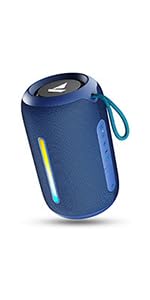
Image: A QR code for the boAt Hearables App, which provides additional support and features for the speaker.


