Okwu mmalite
Thank you for choosing the Edifier STAX Spirit S5 Wireless Planar Magnetic Headphones. These headphones are engineered to deliver an exceptional audio experience, featuring advanced planar magnetic drivers with EqualMass diaphragms for precise sound reproduction and minimal distortion. With Qualcomm Snapdragon Sound technology, LDAC, and LHDC codec support, the S5 provides high-resolution wireless audio. This manual provides detailed instructions for setup, operation, maintenance, and troubleshooting to ensure you get the most out of your new headphones.
Ihe ngwugwu
Biko chọpụta na agụnyere ihe niile edepụtara n'okpuru na ngwugwu gị:
- 1 x Edifier STAX Spirit S5 Headset
- 2 x Cooling Mesh Earpads (pre-installed or spare)
- 1 x USB Ụdị-C eriri USB
- 1 x Earpad Pick Tool
- 1 x 3.5mm AUX eriri ọdịyo
- 1 x 3.5mm to 6.35mm Adapter
- 1 x Headphone Carrying Case
- 2 x Earpad Pouches
- 1 x Akwụkwọ ntuziaka onye ọrụ
Ngwaahịa gafereview
Familiarize yourself with the components and controls of your Edifier STAX Spirit S5 headphones.

N'ihu view of the Edifier STAX Spirit S5 headphones, showcasing their sleek black design and over-ear cups.

A user wearing the Edifier STAX Spirit S5 headphones, demonstrating their comfortable fit and profile n'oge eji.
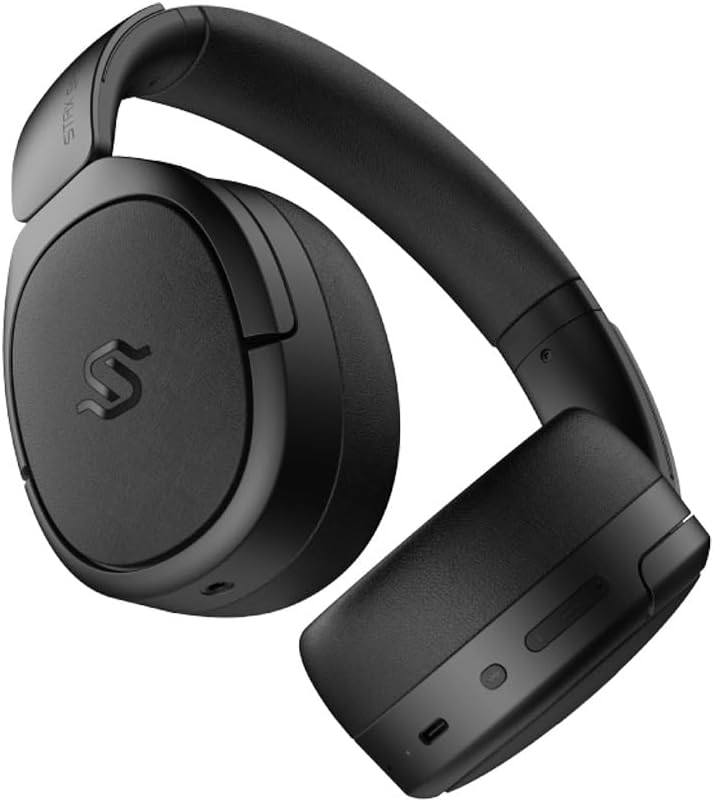
Akụkụ view of the headphones, highlighting the control buttons and ports located on the right earcup, including the USB-C port.

A detailed close-up of the control buttons on the earcup, showing the power button, volume controls, and the USB-C charging port.

The Edifier STAX Spirit S5 headphones folded compactly, illustrating their portability and ease of storage in the included carrying case.
Melite
Ịchaji ekweisi
Before first use, fully charge your Edifier STAX Spirit S5 headphones.
- Connect the supplied USB Type-C cable to the charging port on the headphones and the other end to a USB power adapter (not included) or a computer's USB port.
- The LED indicator will show charging status. It typically takes approximately 10 minutes for a quick charge, providing extended playback. A full charge can provide up to 80 hours of battery life.
- Once fully charged, the LED indicator will change (refer to the specific indicator behavior in your quick start guide, if available).
Ịgbanyụ/ Gbanyụọ
- Ike Na: Press and hold the Power button for approximately 3 seconds until the indicator light illuminates.
- Gbanyụọ: Pịa ma jide bọtịnụ Ike ruo ihe dị ka sekọnd atọ ruo mgbe ọkụ ngosi ahụ gbanyụrụ.
Njikọ Bluetooth
The STAX Spirit S5 uses Bluetooth V5.4 for stable and fast transmission.
- Gbaa mbọ hụ na agbanyụrụ ekweisi.
- Pịa ma jide bọtịnụ Ike ruo ihe dị ka sekọnd 5-7 ruo mgbe ìhè ihe ngosi ahụ na-enwu ngwa ngwa, na-egosi ụdị njikọ.
- On your device (smartphone, tablet, computer), enable Bluetooth and search for "Edifier STAX Spirit S5" in the list of available devices.
- Select the headphones to connect. Once successfully paired, the indicator light will stop flashing and remain solid or turn off, depending on the model's specific behavior.
- Mmakọ ngwa ngwa Google: For Android devices, the headphones support Google Fast Pair for quick and seamless connection. Simply power on the headphones near your Android device, and a pairing prompt will appear.
- Multi-device Connection: The S5 can connect to two audio devices simultaneously. After pairing with the first device, put the headphones back into pairing mode and connect to the second device. The headphones will intelligently switch between the two.
Njikọ Ahịrị
The headphones support both USB-C and 3.5mm AUX wired connections.
- USB-C Audio: Connect the USB Type-C cable from the headphones to a compatible USB-C port on your device for digital audio playback and charging.
- 3.5mm AUX Audio: Connect the 3.5mm AUX cable to the audio input port on the headphones and the other end to your audio source's 3.5mm output. Use the included 3.5mm to 6.35mm adapter for devices with a 6.35mm jack. Note that the headphones must be powered on for passive wired mode.
Ntuziaka ọrụ
Njikwa ntọala
The main controls are located on the earcup:
- Bọtịnụ ike:
- Press and hold for 3 seconds to Power On.
- Press and hold for 5 seconds to Power Off.
- Press and hold for 5-7 seconds (from off) to enter Bluetooth pairing mode.
- Elu elu (+): Obere pịa ka iwelie olu.
- Mpịakọta ọnụ (-): Obere pịa ka ibelata olu.
- Multi-function Button (often between volume buttons):
- Mkpirisi pịa: Kpọọ/Kwụsị egwu.
- Short press: Answer/End call.
- Long press: Reject call.
- Double press: Next track.
- Triple press: Previous track.
Teknụzụ ọdịyo
The STAX Spirit S5 supports various high-fidelity audio codecs for an optimal listening experience:
- Qualcomm Snapdragon Sound: Ensures stable RF connection and efficient power consumption for extended listening.
- LDAC & LHDC: Compatible with Hi-Res Audio and Wireless Hi-Res Audio, delivering exceptional detail and clarity.
- aptX HD, aptX Adaptive, aptX Lossless: Part of the Snapdragon Audio technology, providing high-resolution audio with ultra-low latency (as low as 89ms with aptX Adaptive).
Ọrụ oku
The headphones are equipped with dual microphones and Qualcomm cVc technology for clear calls.
- Ịkagbu mkpọtụ: Integrated Qualcomm cVc actively suppresses ambient noise, enhancing voice clarity during calls.
- Nzuzo: The closed-back design helps ensure conversation privacy.
Nlekọta
Nlekọta kwesịrị ekwesị na-eme ka ekweisi gị dị ogologo ma rụọ ọrụ nke ọma.
- Nhicha:
- Jiri akwa dị nro hichaa ekweisi.
- For earpads, use a slightly damp cloth if necessary, but avoid excessive moisture.
- Ejila kemịkalụ siri ike, ihe mgbaze, ma ọ bụ ncha siri ike.
- Earpad Replacement:
- The STAX Spirit S5 comes with two sets of earpads (mesh and leather).
- To replace, gently pull off the existing earpad. Use the included earpad pick tool if needed to carefully detach it from the earcup.
- Align the new earpad with the earcup and press firmly around the edges until it clicks securely into place.
- Nchekwa:
- When not in use, store the headphones in the provided carrying case to protect them from dust, scratches, and impacts.
- Zere ịchekwa na oke okpomọkụ ma ọ bụ oke iru mmiri.
- Nlekọta batrị:
- To preserve battery life, avoid fully discharging the headphones frequently.
- Ọ bụrụ na echekwara ya ruo ogologo oge, chajie batrị ahụ ruo ihe dịka 50% tupu echekwa ya.
Nchọpụta nsogbu
Ọ bụrụ na ị hụ nsogbu na ekweisi gị, lee nsogbu na ngwọta ndị a na-ahụkarị:
| Nsogbu | Ihe nwere ike ime | Ngwọta |
|---|---|---|
| Igwe ekweisi anaghị agba ọkụ. | Batrị dị ala. | Chajie ekweisi ahụ site na iji eriri USB-C. |
| Enweghị ike ijikọ site na Bluetooth. | Ekweisi anaghị adị n'ụdị njikọta; Bluetooth agbanyụrụ ngwaọrụ; ndabichi. | Ensure headphones are in pairing mode (flashing light). Turn Bluetooth off/on on your device. Move closer to the device. Clear previous pairings on your device. |
| Enweghị ụda ma ọ bụ obere olu. | Volume too low; incorrect audio source; loose cable (wired mode). | Increase volume on headphones and source device. Ensure correct audio output is selected on your device. Check wired connections. |
| Poor audio quality (wireless). | Distance from device; interference; low-quality audio source. | Reduce distance to your device. Avoid strong electromagnetic interference. Use high-quality audio files/streaming services. |
| Igwe okwu anaghị arụ ọrụ n'oge oku. | Incorrect input device selected; microphone muted. | Ensure the headphones are selected as the input device in your call application settings. Check if the microphone is muted. |
Ọ bụrụ na nsogbu ahụ anọgide, biko kpọtụrụ ndị ahịa Edifier.
Nkọwapụta
Key technical specifications for the Edifier STAX Spirit S5 headphones:
| Ụdị | Edifier |
| Aha Nlereanya | S5 |
| Nọmba nlereanya | S5spaceblack |
| Agba | Nwa |
| Teknụzụ Njikọta | Waya, Igwe na-enweghị eriri (Bluetooth) |
| Teknụzụ nzikọrịta ozi ikuku | Bluetooth |
| Ụdị Bluetooth | V5.4 (implied from feature bullets) |
| Jack ekweisi | 3.5mm Jack, USB-C |
| Mgbochi | 120 ohm |
| Ntinye ntị | Ntị karịa |
| Ụdị Ihe | Circum-Aural |
| Ibu Ibu | 420 grams |
| Ngwakọta batrị | Lithium-ion |
| Batrị enwere ike ịchaji | Ee |
| Oge Nchaji | Approx. 10 minutes (for quick charge) |
| Atụmatụ pụrụ iche | Nchaji ngwa ngwa |
| Ngwa dakọtara | Computer, Laptop, Mobile Phone |
| Ihe eji eme ihe maka ngwaahịa | Music, Professional, Studio Listening |
Akwụkwọ ikike na nkwado
The Edifier STAX Spirit S5 headphones come with a two-year warranty, ensuring reliable performance and support.
For technical assistance, warranty claims, or further inquiries, please contact Edifier customer support through their official website or the retailer from whom you purchased the product. Please retain your proof of purchase for warranty validation.


