Okwu mmalite
Daalụ maka ịzụrụasing the KOKKO KMF-1 Multi-Effects Guitar Pedal. This versatile pedal combines 18 speaker models, a drum machine, and a looper, offering a comprehensive solution for guitarists. Please read this manual carefully to ensure proper operation and to fully utilize all features.
Atụmatụ igodo
- 18 Speaker Models: Features 18 high-fidelity speaker models, developed with advanced DSP algorithms and IR technology for world-renowned speaker simulations.
- IR Cabinet Simulation: Ensures superior sound quality with high-fidelity cabinet modeling.
- Drum Machine & Looper: Includes a drum machine with 6 styles and over 40 rhythms, and a looper with 30 seconds of non-overdub recording capability, enabling one-man band performances.
- Nhọrọ ike na-agbanwe agbanwe: Can be powered by AA batteries or an adapter.
- Otutu interface: Equipped with external signal input, USB output, and headphone output for easy plug-and-play use.
Ihe ngwugwu
Mgbe ebupuchara, biko hụ na ihe niile edepụtara n'okpuru nọ na ọ dị mma:
- 1 x KOKKO KMF-1 Multi-Effects Pedal
- (Note: Power adapter and AA batteries are typically sold separately and not included in the standard package.)
Ngwaahịa gafereview
Familiarize yourself with the various parts and controls of your KMF-1 pedal.

Foto 1: Si elu gbadata view of the KOKKO KMF-1 Multi-Effects Pedal, showing the expression pedal on the left and the control panel with display, knobs, and footswitches on the right.
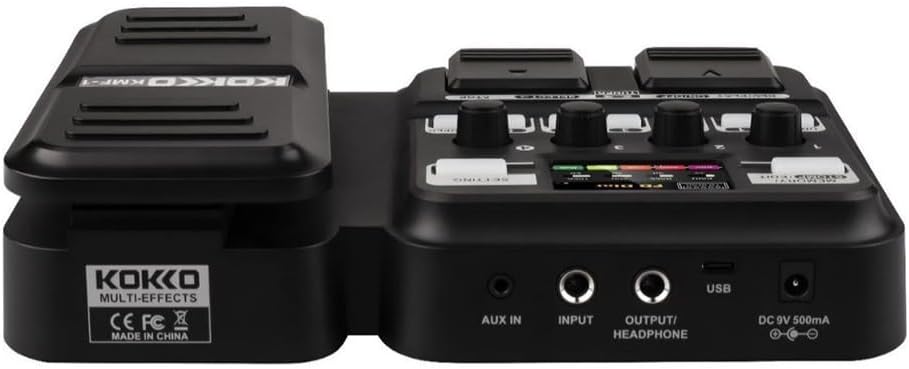
Foto 2: N'azụ view of the KOKKO KMF-1 Multi-Effects Pedal, highlighting the AUX IN, INPUT, OUTPUT/HEADPHONE, USB, and DC 9V power input ports.
Njikwa na Njikọ:
- Pedal nkwupụta: Used for volume control or wah effects.
- Ngosipụta ihuenyo: Shows current settings, effects, and modes.
- Knobs (1-4): Control various parameters depending on the selected effect or mode.
- Footswitches (DRUM, REC/PLAY ON/OFF, TUNER, SELECT, STOP, LOOPER): For activating/deactivating functions and navigating presets.
- MEMORY/STOMP EDIT Button: Toggles between memory and stompbox modes, or enters edit mode.
- SETTING Button: Nweta ntọala sistemụ.
- Nkeji oge: 3.5mm input for connecting external audio sources (e.g., MP3 player).
- Ntinye: 1/4" input for connecting your guitar.
- OUTPUT/HEADPHONE: 1/4" output for connecting to an amplifier ma ọ bụ ekweisi.
- Ọdụ ụgbọ mmiri USB: For connecting to a computer for recording or software updates.
- Ntinye ike DC 9V: For connecting a 9V DC power adapter (center negative).
Melite
Na-agbanye ike:
- Ike batrị: Open the battery compartment on the underside of the pedal and insert 4 x AA batteries (not included), ensuring correct polarity.
- Ike nkwụnye AC: Connect a 9V DC (center negative) power adapter (not included) to the DC 9V input jack.
Connecting Your Gear:
- Jikọọ guitar gị na ya Ntinye jack using a 1/4" instrument cable.
- Jikọọ OUTPUT/HEADPHONE jack to your guitar amplifier's input or to headphones using a 1/4" cable.
- (Optional) Connect an external audio source (e.g., smartphone, MP3 player) to the ỌXụ IN jack using a 3.5mm stereo cable.
- (Nhọrọ) Jikọọ USB port to your computer for direct recording or firmware updates.
Ntuziaka ọrụ
Nrụ ọrụ bụ isi:
- Gbanyụọ/ Gbanyụọ: The unit powers on automatically when connected to power. Disconnect power to turn off.
- Njikwa olu: Use the expression pedal to control the overall output volume.
- Navigating Presets: Use the SELECT footswitch to cycle through different presets or effects.
Using Speaker Models:
The KMF-1 features 18 high-quality speaker models. These models simulate the sound characteristics of various guitar cabinets.
- Enter the speaker model selection mode (refer to display).
- Use the SELECT footswitch or corresponding knobs to browse and choose your desired speaker model.
- Adjust parameters like gain, tone, and volume using the numbered knobs (1-4) as indicated on the display.
Igwe ịgbà
The built-in drum machine offers 6 styles and over 40 rhythms to practice or jam along with.
- Pịa DRUM footswitch to activate the drum machine.
- Use the SELECT footswitch or knobs to choose a drum style and rhythm.
- Adjust the drum volume using the appropriate knob.
- Pịa DRUM again to stop the drum machine.
Looper Function:
The looper allows you to record up to 30 seconds of audio without overdubbing, perfect for creating backing tracks.
- Pịa REC/PLAY ON/OFF footswitch once to start recording. The display will indicate recording status.
- Play your guitar part.
- Pịa REC/PLAY ON/OFF again to stop recording and immediately start playback of the recorded loop.
- Iji kwụsị igwu egwu, pịa KWỤSỊ ụkwụ ụkwụ.
- To clear the loop, press and hold the KWỤSỊ ụkwụ ụkwụ.
Tuner Function:
The integrated tuner allows for accurate guitar tuning.
- Pịa EGO footswitch to activate the tuner. The output signal will be muted.
- Play a single note on your guitar. The display will show the note and indicate if it is sharp, flat, or in tune.
- Adjust your guitar's tuning until the display indicates the note is in tune.
- Pịa EGO footswitch again to exit the tuner and unmute the output.
Memory/Stomp Edit Mode:
This mode allows you to switch between saved presets (Memory mode) and individual stompbox effects (Stomp mode), as well as edit parameters.
- Pịa MEMORY/STOMP EDIT button to toggle between Memory and Stomp modes.
- In Stomp mode, individual effects can be turned on/off using their dedicated footswitches or by selecting them.
- To edit parameters, press and hold the MEMORY/STOMP EDIT button to enter edit mode. Use the knobs and footswitches to adjust settings as displayed.
- Save your changes by following the on-screen prompts (usually by pressing a specific footswitch or button).
Ntọala sistemụ:
Access system settings to configure global parameters.
- Pịa Nhazi button to enter the system settings menu.
- Use the footswitches or knobs to navigate through the menu options.
- Adjust settings such as display brightness, factory reset, etc.
- Pịa Nhazi button again to exit the menu.
Nlekọta
- Nhicha: Use a soft, dry cloth to clean the pedal. Do not use abrasive cleaners or solvents.
- Nchekwa: Debe pedal ahụ n'ebe dị jụụ ma kpọọ nkụ, ebe anwụ na-anaghị anwụ kpọmkwem na oke okpomọkụ dị oke njọ.
- Ngbanwe batrị: If using batteries, replace them when the low battery indicator appears or when the pedal's performance degrades. Remove batteries if the pedal will not be used for an extended period.
- Zere mmiri mmiri: Keep the pedal away from water and other liquids.
- Jiri Nlekọta Aka: Zere idobe ma ọ bụ idobe pedal ahụ na mmetụta siri ike.
Nchọpụta nsogbu
| Nsogbu | Ihe nwere ike ime | Ngwọta |
|---|---|---|
| Enweghị mmepụta ụda. | Incorrect cable connections; Low battery; Tuner is active; Ampagbanyụrụ ọkụ. | Check all cables are securely connected. Replace batteries or use AC adapter. Deactivate tuner. Ensure amplifier dị na olu na-arị elu. |
| Ụda gbagọrọ agbagọ ma ọ bụ nke na-adịghị mma. | Input level too high; Incorrect effect settings; Damaged cable. | Adjust guitar volume or pedal input level. Check and adjust effect parameters. Try a different cable. |
| Pedal does not power on. | No power source; Dead batteries; Faulty adapter. | Ensure power adapter is connected or batteries are inserted correctly. Replace batteries. Try a different compatible power adapter. |
| Looper not recording. | Incorrect looper mode; Memory full. | Ensure you are in the correct looper recording mode. Clear previous loops if memory is full. |
Nkọwapụta
| Njirimara | Nkọwa |
|---|---|
| Aha Nlereanya | KMF-1 |
| Akụkụ ngwaahịa (L x W x H) | 31 x 20 x 7 cm (12.2 x 7.9 x 2.8 inch) |
| Ibu Ibu | 900g (1.98 lbs) |
| Ịnye ọkụ | 9V DC (center negative) adapter or 4 x AA batteries |
| Ngwaọrụ Akụrụngwa | USB |
| Ụdị Ọkà Okwu | 18 (IR technology) |
| Oge Ndekọ Looper | 30 seconds (non-overdub) |
| Rhythms Drum | Over 40 rhythms across 6 styles |
| Nọmba Nlereanya Onye nrụpụta | 43ST9NRST131F1P8K5GRJ7 |
Akwụkwọ ikike na nkwado
KOKKO products are designed and manufactured to the highest quality standards. For information regarding warranty coverage, technical support, or service, please refer to the warranty card included with your product or visit the official KOKKO websaịtị. Biko dowe akwụkwọ ikike ịzụrụ ihe ọ bụla.
For further assistance, please contact our customer support team.


