Okwu mmalite
This manual provides instructions for the safe and efficient use of your Eagle Heavy Duty Long Reach Stapler, Model 950L. Please read this manual thoroughly before operating the device and retain it for future reference.

Image: The Eagle Heavy Duty Long Reach Stapler, Model 950L, in its entirety. This stapler features a long arm for extended reach stapling.
Melite
1. Na-ebunye Staples
- Flip the Stapler Throat: Turn the stapler throat upside down to expose the staple channel.
- Pull the Magazine Pusher: Gently pull the magazine pusher out to fully expose the staple channel.
- Tinye ihe ndị dị mkpa: Drop the staples into the magazine channel with the points (legs) facing up. Ensure staples are 1/4 inch leg length.
- Mechie Magazin ahụ: Push the magazine closed until it clicks into place. Return the stapler throat to its upright position.

Image: A four-panel illustration demonstrating the process of loading staples: 1. Flipping the stapler, 2. Pulling the magazine, 3. Dropping staples, and 4. Closing the magazine.

Foto: A nso nso view of the stapler's staple loading area, indicating where the staple magazine can be pushed open for refilling.
2. Adjusting the Paper Guide
The stapler features an adjustable paper guide and an integrated ruler to ensure accurate stapling depth.
- Slide the paper guide along the long arm to the desired stapling depth.
- Align the edge of your document with the paper guide for consistent staple placement.

Foto: nkọwa zuru ezu view of the stapler's long arm, highlighting the adjustable paper guide and integrated ruler for precise document alignment.
Ntuziaka ọrụ
1. Stapling Documents
- Kwadebe Akwụkwọ: Gather the pages to be stapled, ensuring they are neatly aligned.
- Position Document: Place the document under the stapler head, aligning it with the adjustable paper guide for the desired staple position. The 12-inch throat depth allows for stapling in the center of large documents, booklets, or magazines.
- Tinye nrụgide: Press down firmly on the stapler head to insert the staple. The design allows for easy operation.

Image: A hand pressing down on the stapler head, illustrating the ease of operation, labeled "ONE FINGER".

Image: The stapler positioned on a desk next to an open notebook, demonstrating its long reach capability for stapling documents.
2. Rota-Table Anvil for Stapling Options
The stapler is equipped with a rota-table anvil, allowing you to choose between two stapling modes:
- Permanent Stapling: The standard setting, where staple legs are folded inward for a secure, permanent bind.
- Temporary Stapling: Rotate the anvil to fold staple legs outward, creating a temporary bind that is easier to remove without tearing paper.
To change the stapling mode, simply rotate the small metal anvil located on the base of the stapler.
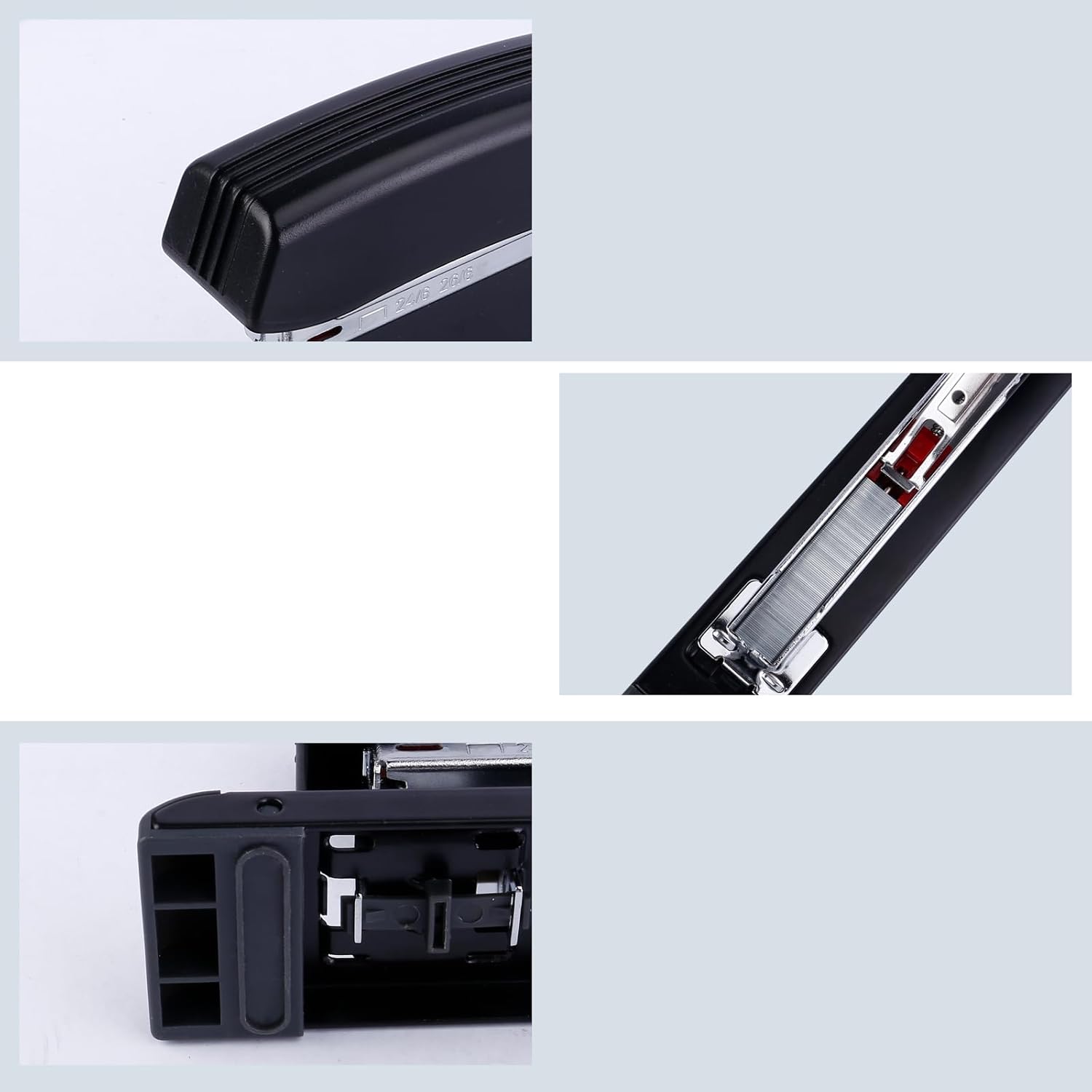
Image: Multiple close-up views of the stapler's components, including the anvil mechanism which can be rotated for different stapling types.
Nlekọta
- Nhicha: Periodically wipe the stapler with a dry, soft cloth to remove dust and debris. Avoid using harsh chemicals or abrasive cleaners.
- mmanu mmanu: No regular lubrication is required for this stapler.
- Nchekwa: Store the stapler in a dry environment away from extreme temperatures.
Nchọpụta nsogbu
- Staples not feeding:
- Ensure the staple magazine is fully loaded and the pusher is correctly engaged. Check that the staples are the correct size (1/4 inch leg length) and are inserted with the points facing up.
- Staples bending or not piercing paper:
- Verify that you are not exceeding the stapler's maximum sheet capacity (10 sheets). Ensure the paper is properly aligned and flat. Check for any bent or damaged staples in the magazine and replace if necessary.
- Stapler feels stiff or difficult to operate:
- Check for any obstructions in the stapling mechanism. Ensure the stapler is clean and free from debris. If the issue persists, ensure the stapler is not being used beyond its intended capacity.
Nkọwapụta
| Njirimara | Nkọwa |
|---|---|
| Ụdị | Ugo |
| Nọmba nlereanya | 950l |
| Omimi akpịrị | 12 sentimita (300 mm) |
| Ikike mpempe akwụkwọ | Up to 10 sheets (using 1/4 inch leg staples) |
| Staples dakọtara | 1/4 inch leg staples |
| Ihe onwunwe | Metal base, Plastic handle |
| Agba | Nwa |
| Ibu Ibu | 1.08 pound |
| Akụkụ ngwugwu | 15.27 x 2.99 x 1.93 sentimita asatọ |

Image: An illustration showing the key dimensions of the Eagle Long Reach Stapler, including its overall length and height.
Akwụkwọ ikike na nkwado
For warranty information, please refer to the documentation provided at the time of purchase or contact your retailer. For product support, please reach out to the retailer or the manufacturer, Eagle, directly.


