1. Okwu mmalite
This manual provides essential information for setting up, operating, maintaining, and troubleshooting your Blackview Color 8 Android smartphone. Please read this manual thoroughly to ensure proper use and to maximize the device's capabilities.
2. Kedu ihe dị na Igbe ahụ
Chọpụta na ihe niile dị na nkwakọ ngwaahịa gị:
- Nwaview Color 8 Smartphone
- Akpa ekwentị
- Ihe nkwụnye ọkụ
- SIM Tray Ejector
- Screen Protector (pre-applied or included)

Foto: Ojiiview Color 8 smartphone shown with its standard accessories, including a clear phone case and a gift box representing other items.
3. Ngwaọrụ gafereview
Mara onwe gị nke ọma na akụkụ anụ ahụ nke ojii gịview Color 8 smartphone.

Foto: Zuru ezu view nke ndị ojiiview Color 8's side, highlighting the 3-card slot for SIM and MicroSD, the 3.5mm audio jack, and the Smart-K box speaker. Icons also indicate GPS, Face ID, and Fingerprint ID features.
4. Nhazi
4.1 SIM Card & MicroSD Installation
Nwa ojiiview Color 8 supports dual Nano SIM cards and one MicroSD/TF card for expanded storage. Use the provided SIM tray ejector tool to open the tray.
- Locate the SIM tray slot on the side of your phone.
- Fanye ngwaọrụ mkpagharị SIM tray n'ime obere oghere dị n'akụkụ tray ahụ wee pịa nwayọ ruo mgbe tray ahụ pụtara.
- Place your Nano SIM cards and/or MicroSD card into the designated slots on the tray, ensuring correct orientation.
- Jiri nlezianya tinyegharịa traị ahụ n'ime ekwentị ruo mgbe ọ batara n'ime ya.

Image: Illustration of the three-card slot, demonstrating how to insert two SIM cards and one TF (MicroSD) card into the Blackview Color 8.
4.2 Mgbanye na Ịchaji Ike Mmalite
Tupu ojiji mbụ, a na-atụ aro ka ị chajịa ngwaọrụ gị nke ọma.
- Connect the provided power adapter to your phone's USB Type-C port.
- Plug the adapter into a power outlet. The charging indicator will appear on the screen.
- To power on, press and hold the Power button (located on the side) until the Blackview akara ngosi pụtara.
- Soro mkpali na ihuenyo iji mechaa nhazi mbụ, gụnyere nhọrọ asụsụ, njikọ Wi-Fi, na nhazi akaụntụ Google.

Foto: Ime view nke ndị ojiiview Color 8, emphasizing the large 6000mAh battery and the 18W fast charging feature. Also shows the phone's slim profile and OTG support.
5. Ijikwa ngwaọrụ gị
5.1 Nsoro ụzọ
Nwa ojiiview Color 8 operates on Android 13 with Doke OS 4.0, offering intuitive navigation through gestures or on-screen buttons.
- Ihuenyo ụlọ: Swipe left or right to access different pages of apps and widgets.
- Drawer ngwa: Si na ala ihuenyo pịgharịa gaa view ngwa niile arụnyere.
- Amamọkwa & Ntọala ngwa ngwa: Mịpụ ala site n'elu ihuenyo ahụ iji nweta ọkwa na mgbanwe ntọala ngwa ngwa.
5.2 Ngosipụta atụmatụ
The device features a large 6.75-inch HD+ display with a 90Hz refresh rate for a smooth visual experience.
- Nha ihuenyo: 6.75 sentimita asatọ
- Ọnụego ume ọhụrụ: 90Hz for fluid scrolling and animations.
- Icha ọkụ: Up to 450 nits for clear visibility in various lighting conditions.
- Agba: Supports 16.7 million colors for vibrant visuals.

Foto: Ojii ahụview Color 8's display, illustrating its 6.75-inch size, 90Hz refresh rate, 450 nits brightness, and 16.7 million color support.
5.3 Ọrụ igwefoto
Capture high-quality photos and videos with the 50MP main camera and 8MP front camera.
- Igwefoto isi: 50MP resolution with JN1 sensor and Smart ISO for optimal color reproduction and low-light performance.
- Igwefoto ihu: 8MP for clear selfies.
- Ụdị foto: Includes 360° Panorama Capture, Beauty Mode, Night Mode, HDR, Portrait, and Pro Mode.
- Ndekọ vidiyo: Supports 1080P video recording.

Image: Visual representation of the Blackview Color 8's ArcSoft camera modes, including HDR for brilliance, Super Night for noise-less low-light shots, Portrait for subject focus, and Beauty for enhanced selfies.
5.4 Arụmọrụ na Nchekwa
Nwa ojiiview Color 8 is equipped with an Octa-core processor and ample memory for smooth operation.
- Ihe nhazi: Octa-core processor for efficient multitasking and gaming.
- RAM: 8GB RAM, expandable to 16GB with virtual memory.
- Nchekwa ime: 256GB ROM.
- Nchekwa enwere ike ịgbasa: Supports Micro SD cards up to 2TB.

Image: A visual breakdown of the Blackview Color 8's processing power, showing the Octa-core CPU, 16GB RAM (expandable from 8GB), 256GB ROM, and up to 1TB expandable storage.
5.5 Operating System Features (Android 13 & Doke OS 4.0)
Experience enhanced privacy, improved UI, and additional functionalities with Android 13 and Doke OS 4.0.
- Nchedo nzuzo: Enhanced features to prevent privacy leakage.
- Per-App Language Preferences: Customize language settings for individual applications.
- Ngwa EasyShare: Faster data transfer than wireless Bluetooth.
- Call Recording: Built-in functionality for recording calls.
- Exercise Index Tracking: Monitor your physical activity.
- Ndepụta Okwu n'oge a: Provides live captions for videos.
- Dynamic Live View: Quick access to alerts and ongoing activities.

Foto: Ofeview of DokeOS 4.0 features on Android 13, showcasing the Health APP, real-time subtitle function, screen attention, and various privacy controls.

Image: The EasyShare App interface on the Blackview Color 8, demonstrating its capability for quick and easy file transfer between devices without relying on network connectivity.
5.6 Njikọta
The Color 8 offers robust connectivity options for communication and navigation.
- Netwọk: Supports 4G FDD (B1/B2/B3/B4/B5/B7/B8/B12/B17/B20/B26/B28A/B28B/B66), 3G WCDMA (B1/B2/B4/B5/B8), and 2G GSM (850/900/1800/1900).
- Wi-Fi: Maka ohere ịntanetị ikuku.
- Ntugharị: Integrated GPS, Beidou, GLONASS, and Galileo for precise location services.

Image: A map graphic illustrating the multi-system navigation support (GPS, Glonass, Galileo, Beidou) for accurate positioning on the Blackview Color 8.
5.7 Atụmatụ nchekwa
Unlock your phone securely and conveniently.
- NJ Mkpisiaka: Integrated into the power button for quick and secure access.
- Mmeghe ID Ihu: Uses the front camera for facial recognition.

Image: A close-up of the Blackview Color 8's side, highlighting the power button which also functions as a fingerprint sensor for quick and secure unlocking.
6. Nlekọta
6.1 Njikwa batrị
Batrị 6000mAh na-enye ojiji ogologo oge. Iji mee ka ndụ batrị ka mma:
- Zere oke okpomọkụ.
- Use the provided 18W fast charger for efficient charging.
- Enable battery saver modes when needed.
- Mechie ngwa ndabere ndị a na-ejighị.
6.2 Mmelite ngwanrọ
Regularly check for and install software updates to ensure optimal performance, security, and access to new features. Updates are typically found in the device's Settings menu under 'System' or 'About phone'.
6.3 Nhicha na Nlekọta
- Jiri akwa dị nro na-enweghị lint hichaa ihuenyo na ahụ.
- Zere iji kemịkalụ siri ike ma ọ bụ ihe na-emebi emebi.
- Keep the device away from excessive dust and moisture.
7. Nchọpụta nsogbu
Nkebi a na-eleba anya na nsogbu ndị ị na-enwekarị na Black gị.view Color 8.
7.1 Ngwaọrụ anaghị agba ọkụ
- Ensure the battery is charged. Connect the phone to the charger for at least 15 minutes.
- Pịa ma jide bọtịnụ Ike maka sekọnd 10-15 iji mee ka ọ malitegharịa.
7.2 Poor Network Signal
- Lelee ma etinyere kaadị SIM gị nke ọma.
- Gaa na mpaghara nwere mkpuchi netwọkụ ka mma.
- Malitegharịa ngwaọrụ ahụ.
- Verify that your carrier supports the phone's 4G bands (refer to specifications).
7.3 Ngwa ndị na-akụda ma ọ bụ na-ajụ oyi
- Clear the cache and data for the problematic app in Settings > Apps.
- Gbaa mbọ hụ na emelitere ngwa ahụ ka ọ bụrụ ụdị kachasị ọhụrụ.
- Free up storage space if your device is running low.
7.4 Fingerprint/Face ID Not Working
- Ensure your finger is clean and dry for fingerprint recognition.
- Ensure your face is well-lit and unobstructed for Face ID.
- Re-register your fingerprint or face in the Security settings.
8. Nkọwapụta
Key technical specifications for the Blackview Color 8 smartphone:
| Nọmba nlereanya | TB-2024 |
| Sistemụ nrụọrụ | Android 13 (Doke OS 4.0) |
| Nhazi | Octa-core (Unisoc T616) |
| RAM | 8GB (expandable to 16GB virtual RAM) |
| Nchekwa nke ime | 256GB ROM |
| Nchekwa enwere ike ịgbasa | Up to 2TB MicroSD/TF card |
| Ngosipụta | 6.75-inch HD+ (1600 x 720), 90Hz Refresh Rate, 450 nits brightness |
| Igwefoto azụ | 50MP |
| Igwefoto ihu | 8MP |
| Batrị | 6000mAh, 18W Nchaji ngwa ngwa |
| Oghere kaadi SIM | 3 (2 Nano SIM + 1 MicroSD) |
| Njikọta | 4G LTE, Wi-Fi, Bluetooth, GPS, GLONASS, Beidou, Galileo |
| Nchekwa | NJ Mkpisiaka, NJ Ihu |
| Jack ọdịyo | 3.5 mm |
| Akụkụ | 9.1mm Slim |
| Ibu | 214g |
9. Akwụkwọ ikike na nkwado
Nwaview offers a comprehensive warranty for its products.
- Oge ikike: Black niileview cellphones are guaranteed for 2 years from the date of purchase.
- Ọrụ: This includes a 24-month free repair warranty and lifetime technician support.
- Kpọtụrụ: For any issues or support inquiries, please contact Blackview customer service or the official flagship store.
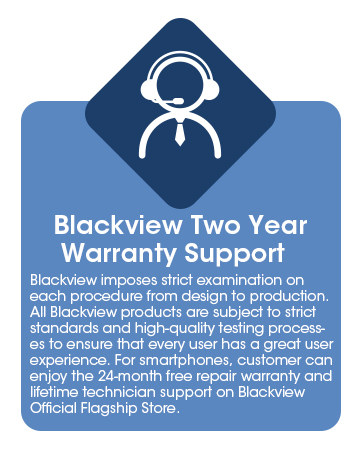
Image: Information graphic detailing Blackview's two-year warranty support, emphasizing strict quality examination and 24-month free repair service.


