Okwu mmalite
This manual provides essential instructions for the safe and efficient use of your Sencor SRV 1550WH Robot Vacuum Cleaner and Mop. Please read this manual thoroughly before operating the device and keep it for future reference.
Ngwaahịa gafereview
The Sencor SRV 1550WH is a robot vacuum cleaner and mop designed for autonomous cleaning. It vacuums dirt and simultaneously mops dust from hard floors. Equipped with two side brushes, it effectively cleans along walls and in corners. Its ultra-slim design allows it to navigate under furniture and around obstacles. The SENCOR Smart Room technology ensures efficient movement, and the device features intelligent impact and fall sensors for safe operation.
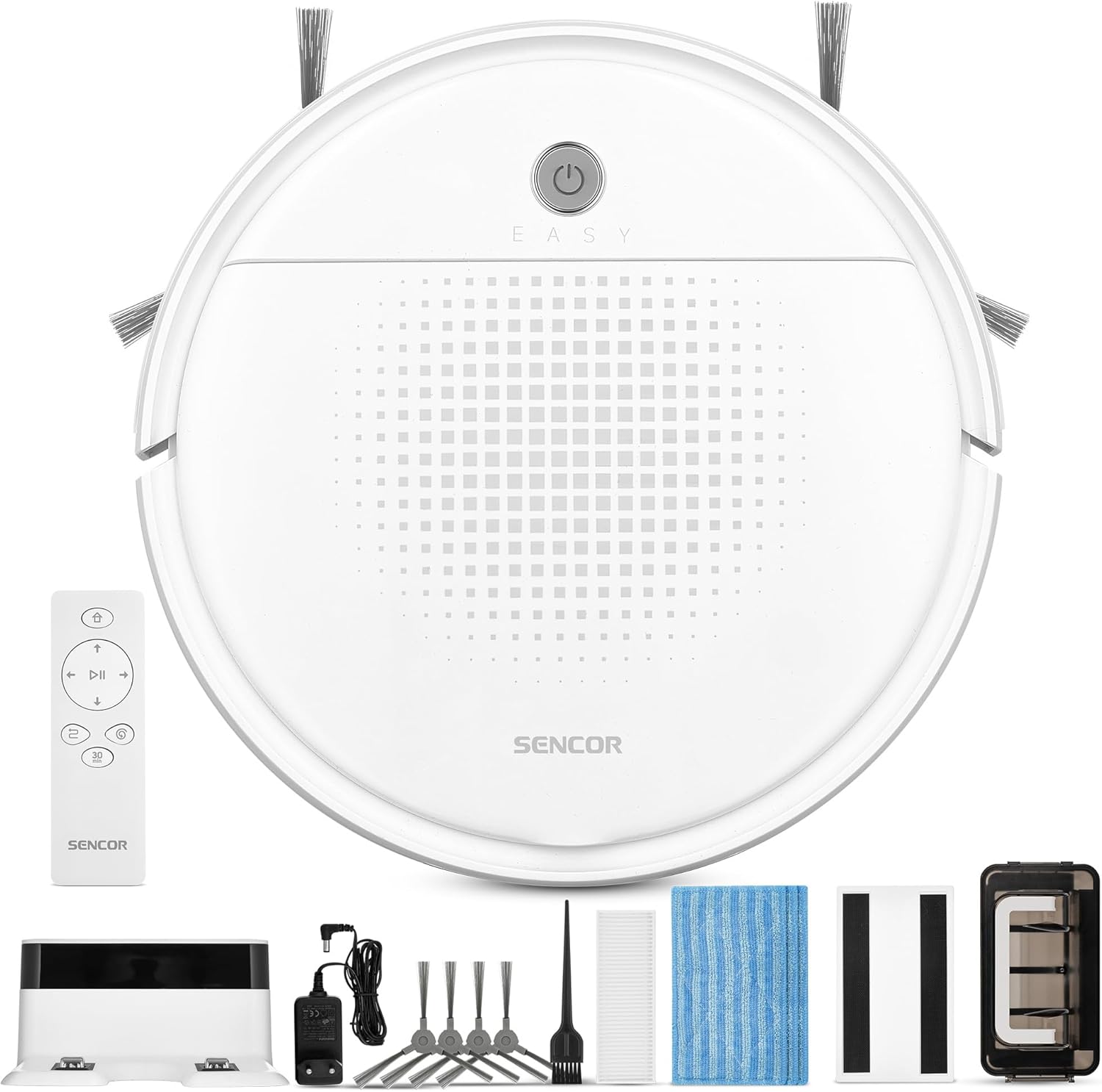
Foto nke 1: Sencor SRV 1550WH Robot Vacuum Cleaner and Mop with its included accessories, including the charging station, remote control, side brushes, mop pads, and cleaning tools.
Ihe ngwugwu
- Robot vacuum cleaner (including two side brushes and filters)
- Ebe nchaji batrị
- Ngwa nhicha
- 3x textile mop sleeves
- Njikwa anya
- 2x AAA batteries (for remote control)
- 2x spare rotating side brushes
- Ihe nkwụnye ọkụ
- 1x spare HEPA filter
- Nhicha ahịhịa
Ntuziaka nchekwa
Before using the appliance, please read all safety warnings and instructions. Failure to follow these instructions may result in electric shock, fire, or serious injury. Keep this manual in a safe place for future reference.
- Enwere ike iji ngwa a ụmụaka ndị gbara afọ 8 na karịa yana ndị nwere ike anụ ahụ, mmetụta uche ma ọ bụ nke uche ma ọ bụ enweghị ahụmahụ na ihe ọmụma ma ọ bụrụ na enyerela ha nlekọta ma ọ bụ ntụziaka gbasara iji ngwa ahụ n'ụzọ dị nchebe ma ghọta ihe egwu dị na ya. .
- Ụmụaka agaghị eji ngwa eji egwu egwu egwu. Ụmụaka agaghị eme nhicha na nlekọta onye ọrụ na-enweghị nlekọta.
- Only use the original power adapter and charging station provided by the manufacturer.
- Ejila ngwa ahụ n'ebe mmiri dị ma ọ bụ n'akụkụ mmiri.
- Ensure the charging station is placed on a flat, stable surface against a wall, with clear space around it.
- Remove any loose cables, small objects, or fragile items from the cleaning area before operation.
- Do not operate the robot over open flames or hot ashes.
- Do not allow the robot to pick up large objects, liquids, or burning/smoking materials.
- Regularly clean the brushes and filters to maintain optimal performance.
Melite
1. Mwepu na nyocha izizi
Carefully remove all components from the packaging. Check for any signs of damage. Retain the packaging for future transport or storage.
2. Ebe a na-etinye ọdụ chaja
Place the charging station against a wall in an open area. Ensure there is at least 1 meter (3 feet) of clear space on both sides and 2 meters (6 feet) in front of the charging station for the robot to easily dock. Connect the power adapter to the charging station and plug it into a power outlet.
3. Installing Side Brushes
Turn the robot upside down. Align the side brushes with the corresponding posts on the bottom of the robot and press them down until they click into place. Ensure they are securely attached.
4. Ụgwọ mbụ
Place the robot onto the charging station. Ensure the charging contacts on the robot align with those on the station. The indicator light on the robot will show its charging status. For first-time use, charge the robot for at least 5-6 hours to ensure the battery is fully conditioned.
Ịrụ ọrụ nke Robot Vacuum
1. Ịgbanye / gbanyụọ
Press and hold the power button on the robot for a few seconds to turn it on or off. Alternatively, use the power button on the remote control.

Foto nke 2: A hand holding the remote control for the Sencor robot vacuum, with the robot and charging station visible in the background, illustrating remote operation.
2. Ịmalite usoro nhicha
Pịa "Dị ọcha" button on the robot or the remote control to start a cleaning cycle. The robot will automatically select a cleaning path using SENCOR Smart Room technology.
3. Ụdị nhicha
- Nhicha akpaaka: The robot navigates and cleans the entire accessible area.
- 30-Minute Program: Ideal for smaller areas or a single room, the robot cleans for approximately 30 minutes before returning to the charging station. Activate this mode via the remote control.
4. Mop Function
To use the mop function, attach a clean textile mop sleeve to the bottom of the robot. The robot will vacuum and mop simultaneously. Ensure the water tank (if applicable, though not explicitly mentioned for this model, it's implied by "laveur") is filled if a wet mop is desired. For this model, it uses an antistatic mop for dust wiping.
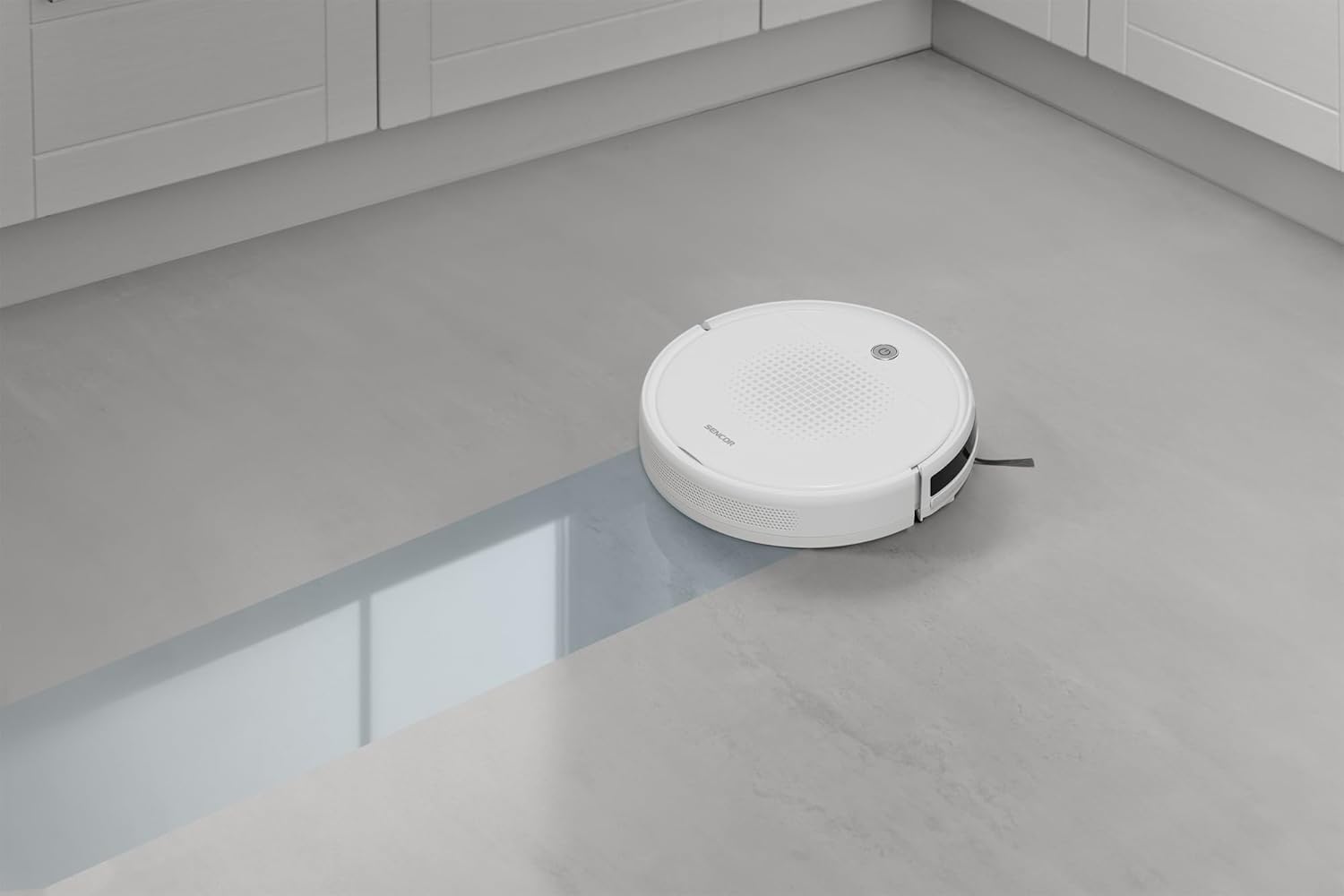
Foto nke 3: The Sencor robot vacuum cleaner actively mopping a hard floor, leaving a clean path behind it.
5. Automatic Docking and Charging
When the battery is low or a cleaning cycle is complete, the robot will automatically return to its charging station. Ensure the charging station is accessible and powered on.

Foto nke 4: The Sencor robot vacuum cleaner moving from a carpeted area to a hard floor, demonstrating its ability to clean different surfaces and pick up debris.

Foto nke 5: The Sencor robot vacuum cleaner operating under a sofa, highlighting its ultra-slim 7 cm design for accessing hard-to-reach areas.
Nlekọta
Nlekọta anya mgbe niile na-eme ka arụ ọrụ kacha mma ma gbasaa ogologo ndụ nke oghere robot gị.
1. Ịwụpụ ihe mkpofu uzuzu
Press the release button to remove the dust bin. Open the dust bin cover and empty its contents into a trash can. It is recommended to empty the dust bin after each cleaning cycle.
2. Nchacha/Dochie ihe nzacha
Remove the HEPA filter and primary filter from the dust bin. Tap the filters gently to remove dust. The HEPA filter is not washable; replace it every 3-6 months depending on usage. The primary filter can be rinsed with water and air-dried completely before reinstallation.
3. Nhicha akụkụ ahịhịa
Periodically remove the side brushes by pulling them upwards. Use the provided cleaning brush or a pair of scissors to remove any tangled hair or debris. Reinstall them securely.
4. Ịsacha Pad Mop
Remove the textile mop sleeve after each use. Rinse it thoroughly with water and allow it to air dry. Replace mop sleeves when they show signs of wear or reduced effectiveness.
5. Ihe Nzacha na Kọntaktị Nchaji
Wipe the anti-drop sensors, bumper sensors, and charging contacts on both the robot and the charging station with a clean, dry cloth to ensure proper function.
Nchọpụta nsogbu
If your robot vacuum encounters an issue, refer to the following common problems and solutions:
| Nsogbu | Ihe nwere ike ime | Ngwọta |
|---|---|---|
| Robot anaghị agbanye. | Batrị dị ala; anaghị agbacha ya. | Place the robot on the charging station and ensure it is fully charged. |
| Robot anaghị akwụ ụgwọ. | Charging contacts are dirty; charging station not powered. | Clean charging contacts on both robot and station. Ensure charging station is plugged in and powered. |
| Robot na-arapara ọtụtụ oge. | Obstacles in cleaning path; tangled brushes. | Clear the cleaning area of loose cables, small objects. Clean side brushes for tangled hair. |
| Arụmọrụ nhicha na-adịghị mma. | Full dust bin; dirty filters; worn brushes. | Empty dust bin. Clean or replace filters. Clean or replace side brushes. |
| Robot does not return to charging station. | Charging station is blocked or not powered; robot too far from station. | Ensure charging station is accessible and powered. Manually place robot near station to assist docking. |
Nkọwapụta
| Ụdị | Mmetụta |
| Nọmba nlereanya | SRV 1550WH |
| Agba | Ọcha |
| Akụkụ (L x W x H) | 29 x 29 x 7 cm (11.4 x 11.4 x 2.7 inch) |
| Ibu | 1.9 Kilogram (4.19 lbs) |
| Uzuzu Bin Ike | 200 milliliters |
| Voltage | 220 volts |
| Ihe onwunwe | Plastic |
| Ọkwa mkpọtụ | 60 decibel |
| Ndụ batrị (oge ọ na-agba ọsọ) | Up to 60 minutes (1 hour) |
| Atụmatụ pụrụ iche | Automatic docking, Anti-fall, Anti-collision, Automatic stop, Continuous suction, Simultaneous suction and cleaning, Dirt detection sensor, Logical navigation, Programmable, Pet hair pickup, Easy-to-empty dirt container, Cordless, Bagless, Low noise level, Washable primary filter, HEPA filter. |
| Ụdị nzacha | HEPA |
| Ụdị njikwa | Njikwa anya |
Akwụkwọ ikike na nkwado
Sencor offers a satisfaction guarantee for this product. Please refer to your purchase documentation for specific warranty terms and conditions.
- Nkwa afọ ojuju: A 30-day satisfaction guarantee is offered.
- Akụkụ mapụtara: Ozi gbasara nnweta akụkụ mapụtara adịghị ugbu a.
- For further assistance or technical support, please contact Sencor customer service through their official websaịtị ma ọ bụ ozi kọntaktị enyere na ịzụrụ gị.