1. Okwu mmalite
Thank you for choosing the Mibro Earbuds AC1 Wireless Earbuds. These earbuds combine an elegant design with exceptional audio performance, offering clear, immersive sound for your favorite music. With stable Bluetooth connectivity and a comfortable ergonomic fit, they are designed for convenience and quality audio on the go. This manual provides detailed instructions to help you get the most out of your new earbuds.
2. Ozi nchekwa
Biko gụọ ntuziaka nchekwa niile tupu i jiri ngwaahịa a.
- Ekpughela ihe mkpuchi ntị ma ọ bụ ihe mkpuchi chaja n'ebe okpomọkụ dị oke elu, iru mmiri, ma ọ bụ mmiri mmiri dị.
- Zere ịda, ime ka ihe ghara ịdị mma, ma ọ bụ ịgbasa ngwaọrụ ahụ.
- Wepụ ụmụaka na anụ ụlọ.
- Jiri naanị eriri chaja enyere maọbụ nke akwadoro.
- Ịge ntị ogologo oge n'ogo dị elu nwere ike imebi ihe ntị.
3. Ihe ngwugwu
Gbaa mbọ hụ na ihe niile dị na ngwugwu gị:
- Mibro Earbuds AC1 (Left and Right)
- Nchaji case
- Ịchaji eriri
- Akwụkwọ ntuziaka (akwụkwọ a)
4. Ngwaahịa gafereview
Familiarize yourself with the components of your Mibro Earbuds AC1.

Foto 4.1: Mibro Earbuds AC1 removed from their open charging case, displaying the earbuds and the case.
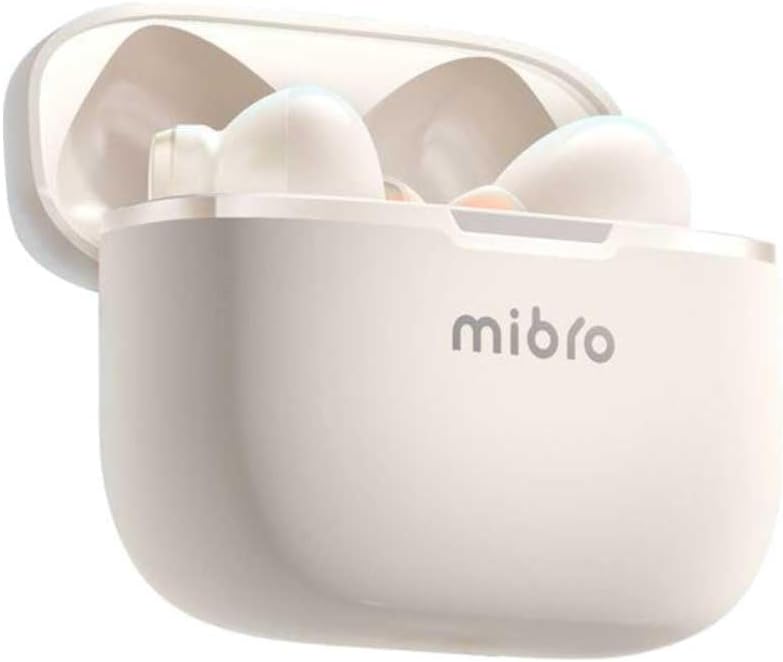
Foto 4.2: Mibro Earbuds AC1 placed inside their open charging case, showing the compact design.
The earbuds feature an ergonomic design for a secure and comfortable fit. The charging case protects the earbuds and recharges them on the go.
5. Nhazi
5.1 Ịchaji ntị na akpa
Tupu ojiji nke mbụ, chajie nke ọma ekwe ntị na akpa nchaji.
- Tinye ntị ntị n'ime akpa nchaji.
- Connect the charging cable to the charging port on the case and to a USB power source.
- The indicator light on the case will show charging status. A full charge may take up to 1 day (Note: This is an unusual specification, typically measured in hours. Please refer to product packaging for precise charging time).
- Ozugbo chachara chajịrị, kwụpụ eriri ahụ.
5.2 Ijikọ na ngwaọrụ Bluetooth
To connect your Mibro Earbuds AC1 to your smartphone or other Bluetooth-enabled device:
- Gbaa mbọ hụ na a na-akwụ ụgwọ ekwe ntị ma tinye ya n'ihe nchaji.
- Mepee mkpuchi mkpuchi nchaji. Igwe ntị ga-abanye na ọnọdụ njikọta na-akpaghị aka (ọkụ ọkụ ga-enwu).
- Na ngwaọrụ gị, gaa na ntọala Bluetooth wee gbanye Bluetooth.
- Chọọ maka available devices and select "Mibro AC1" from the list.
- Ozugbo ejikọrọ, ọkụ egosi na ntị ntị ga-akwụsị ịcha ọkụ.
- Ekwe ntị ndị a ga-ejikọghachi na ngwaọrụ ikpeazụ ejikọtara na akpa ahụ ozugbo ewepụrụ ha na akpa ahụ, ọ bụrụ na Bluetooth agbanyere na ngwaọrụ ahụ.
6. Ntuziaka ọrụ
6.1 Gbanyụọ ma ọ bụ gbanyụọ
- Ike Na: Mepee mkpuchi mkpuchi chaja, ma ọ bụ wepụ ekweisi n'ime akpa ahụ. Ha ga-agbanyụ na akpaghị aka.
- Gbanyụọ: Place the earbuds back into the charging case and close the lid. They will power off automatically and begin charging.
6.2 Nghaghachi egwu
Use the touch controls on the earbuds to manage music:
- Gwuo/kwụsịtụ: Otu mgbata na ntị ntị.
- Track na-esote: Pịa bọtịnụ ntị aka nri ugboro abụọ.
- Gara aga Track: Kpatụ ntị ugboro abụọ n'akụkụ aka ekpe.
6.3 Njikwa oku
Manage phone calls with the touch controls:
- Azịza/Kwụsị Oku: Otu mgbata na ntị ntị.
- Jụ oku: Pịa ma jide otu ntị ntị maka sekọnd 2.
6.4 Nkagbu mkpọtụ
The Mibro AC1 Earbuds feature noise cancellation. Specific controls for activating or deactivating this feature are typically managed via a long press or a specific tap sequence. Refer to the quick start guide included in your package for precise instructions, as these can vary.
7. Nlekọta
7.1 Nhicha
- Jiri akwa dị nro, kpọrọ nkụ, hichaa akpa ntị na ihe nchaji.
- Ejila ihe mkpocha abrasive, mmanya, ma ọ bụ ihe mgbaze kemịkal.
- Hụ na kọntaktị chaja dị ọcha ma kpọọ nkụ.
7.2 Nchekwa
When not in use, store the earbuds in their charging case to protect them and keep them charged. Store in a cool, dry place away from direct sunlight.
8. Nchọpụta nsogbu
If you encounter issues with your Mibro Earbuds AC1, try the following solutions:
| Nsogbu | Ngwọta |
|---|---|
| Igwe ntị anaghị ejikọta ọnụ |
|
| Enweghị ụda sitere na ntị ntị |
|
| Earbuds anaghị akwụ ụgwọ |
|
9. Nkọwapụta
| Njirimara | Nkọwa |
|---|---|
| Aha Nlereanya | XPEJ010WW (AC1) |
| Ụdị | Mibro |
| Teknụzụ Njikọta | Ikuku (Bluetooth) |
| Atụmatụ pụrụ iche | Nkagbu mkpọtụ |
| Agba | Ọcha na-ekpo ọkụ |
| Ụdị Ihe | N'ime ntị |
| Ihe onwunwe | Plastic |
| Ọkwa Nguzogide mmiri | Ọ bụghị ihe mgbochi mmiri |
| Oge Nchaji | Up to 1 day (Note: This is an unusual specification, typically measured in hours. Please refer to product packaging for precise charging time.) |
10. Akwụkwọ ikike na nkwado
Mibro products are designed and manufactured to the highest quality standards. For detailed warranty information, please refer to the warranty card included with your purchase or visit the official Mibro websaịtị.
For further assistance, technical support, or to explore other Mibro products, please visit the Mibro Store on Amazon.