Okwu mmalite
This manual provides detailed instructions for the safe and efficient operation, maintenance, and troubleshooting of your LEVOIT 36" Bladeless Tower Fan and LEVOIT Core Mini-P Air Purifier. Please read this manual thoroughly before use and retain it for future reference.
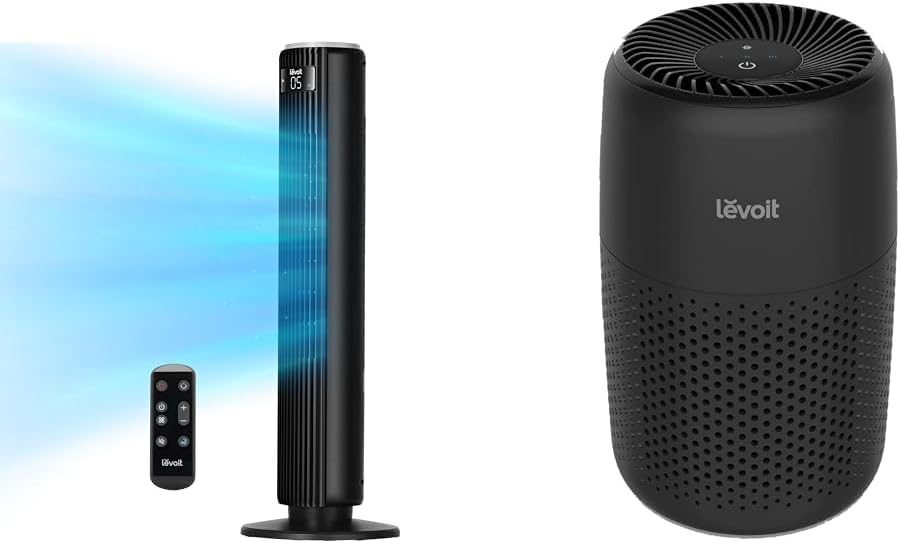
Image: The LEVOIT 36-inch Bladeless Tower Fan and the LEVOIT Core Mini-P Air Purifier shown together, highlighting their compact and modern design.
Ozi nchekwa dị mkpa
Iji belata ihe egwu nke ọkụ, ujo eletriki, ma ọ bụ mmerụ ahụ, biko lelee ihe ndị a na-eme iji chebe onwe gị:
- Wepụ ihe mkpuchi ahụ mgbe niile tupu ị sachaa ma ọ bụ rụzie ihe ọ bụla.
- Ejila eriri ma ọ bụ plọg mebiri emebi rụọ ọrụ fan ọ bụla. Tufuo fan ma ọ bụ laghachi na ebe ọrụ enyere ikike maka nyocha na/ma ọ bụ nrụzi.
- Ejila eriri n'okpuru kapeeti. Ejila akwa akwa, ndị na-agba ọsọ, ma ọ bụ ihe mkpuchi yiri ya kpuchie eriri. Hazie eriri pụọ na mpaghara okporo ụzọ yana ebe ọ na-agaghị akwụsị.
- Do not insert or allow fingers or foreign objects to enter any ventilation or exhaust opening as this may cause an electric shock or damage the appliance.
- Egbochila ikuku ikuku ma ọ bụ iyuzucha n'ụzọ ọ bụla.
- Jiri ngwa a naanị dịka akọwara n'akwụkwọ ntuziaka a. Ojiji ọ bụla onye nrụpụta akwadoghị nwere ike ibute ọkụ, ujo eletrik ma ọ bụ mmerụ ahụ n'ime mmadụ.
- Ejila n'èzí.
- Ngwa a nwere plọọkụ polarized (otu agụba sara mbara karịa nke ọzọ). Iji belata ihe ize ndụ nke ujo ọkụ eletrik, a na-ezube plọg a ka ọ dabara na oghere polarịpụtara naanị otu ụzọ. Ọ bụrụ na plọg ahụ adabaghị nke ọma na ntinye, tụgharịa plọg ahụ. Ọ bụrụ na ọ ka adabaghị, kpọtụrụ onye ọrụ ọkụ eletrik tozuru oke. Anwala imeri atụmatụ nchekwa a.
Ihe ngwugwu
- LEVOIT 36" Bladeless Tower Fan
- Njikwa anya maka Tower Fan
- LEVOIT Core Mini-P Air Purifier
- 3-in-1 Filtration Filter (Pre-installed in Air Purifier)
- Aroma Pad (Pre-installed in Air Purifier)
- Power Adapter for Air Purifier
- Akwụkwọ ntuziaka onye ọrụ
Ngwaahịa gafereview
LEVOIT 36" Bladeless Tower Fan

Image: The LEVOIT 36-inch Bladeless Tower Fan standing upright with its remote control. Blue lines illustrate the powerful airflow emanating from the fan's vertical vent.
The tower fan features a sleek, bladeless design for safety and easy cleaning. It includes a digital display on top, indicating settings such as speed and timer. The base provides stability, and the unit comes with a remote control for convenient operation.
LEVOIT Core Mini-P Air Purifier

Foto: A nso nso view of the LEVOIT Core Mini-P Air Purifier. It is a compact, cylindrical device with a matte black finish and perforated sides for air intake, featuring control buttons on its top surface.
The Core Mini-P Air Purifier is a compact, cylindrical device designed for small to medium-sized rooms. It features a 3-stage filtration system and a fragrance sponge for aromatherapy. Control buttons are located on the top panel.
Melite
Setting up the Tower Fan
- Carefully remove the tower fan from its packaging.
- Ensure the base is securely attached. If not, align the base with the fan body and twist clockwise until it locks into place.
- Debe fan ahụ n'elu ala siri ike, dịkwa larịị.
- Tinye eriri ọkụ n'ime oghere eletrik ọkọlọtọ.
Ịtọlite ikuku purifier
- Wepu ihe nchacha ikuku na nkwakọ ngwaahịa ya.
- Turn the air purifier upside down and twist the base cover counter-clockwise to unlock and remove it.
- Remove the plastic packaging from the 3-in-1 filtration filter.
- Place the filter back into the air purifier, ensuring it is seated correctly.
- Replace the base cover and twist clockwise to lock it.
- Connect the power adapter to the air purifier and then plug it into a standard electrical outlet.
- To use the aromatherapy feature, add 2-3 drops of essential oil (not included) onto the aroma pad located at the bottom of the air purifier.
Ntuziaka ọrụ
Na-arụ ọrụ Tower Fan
The tower fan can be operated using the control panel on top of the unit or the included remote control.
- Bọtịnụ ike: Pịa ka ịgbanwuo ma ọ bụ gbanyụọ fan.
- Bọtịnụ ụkpụrụ: Cycle through 4 modes: Normal, Turbo, Sleep, and Auto.
- Ụdị nkịtị: Ọkụ ikuku na-aga n'ihu na ọsọ ahọpụtara.
- Ụdị Turbo: Maximum airflow for quick cooling.
- Modera Modera: Gradually decreases fan speed for quiet operation.
- Nchekwa onwe na ọnọdụ: Adjusts fan speed based on ambient room temperature (detected by smart sensors).
- Ndozi ọsọ ọsọ: Use the '+' and '-' buttons to select from 5 speed settings.
- Bọtịnụ oscillation: Press to activate or deactivate 90° oscillation, allowing the fan to sweep air across a wider area.
- Bọtịnụ ngụ oge: Set the fan to automatically turn off after a specified period (up to 12 hours). Each press adds 1 hour.
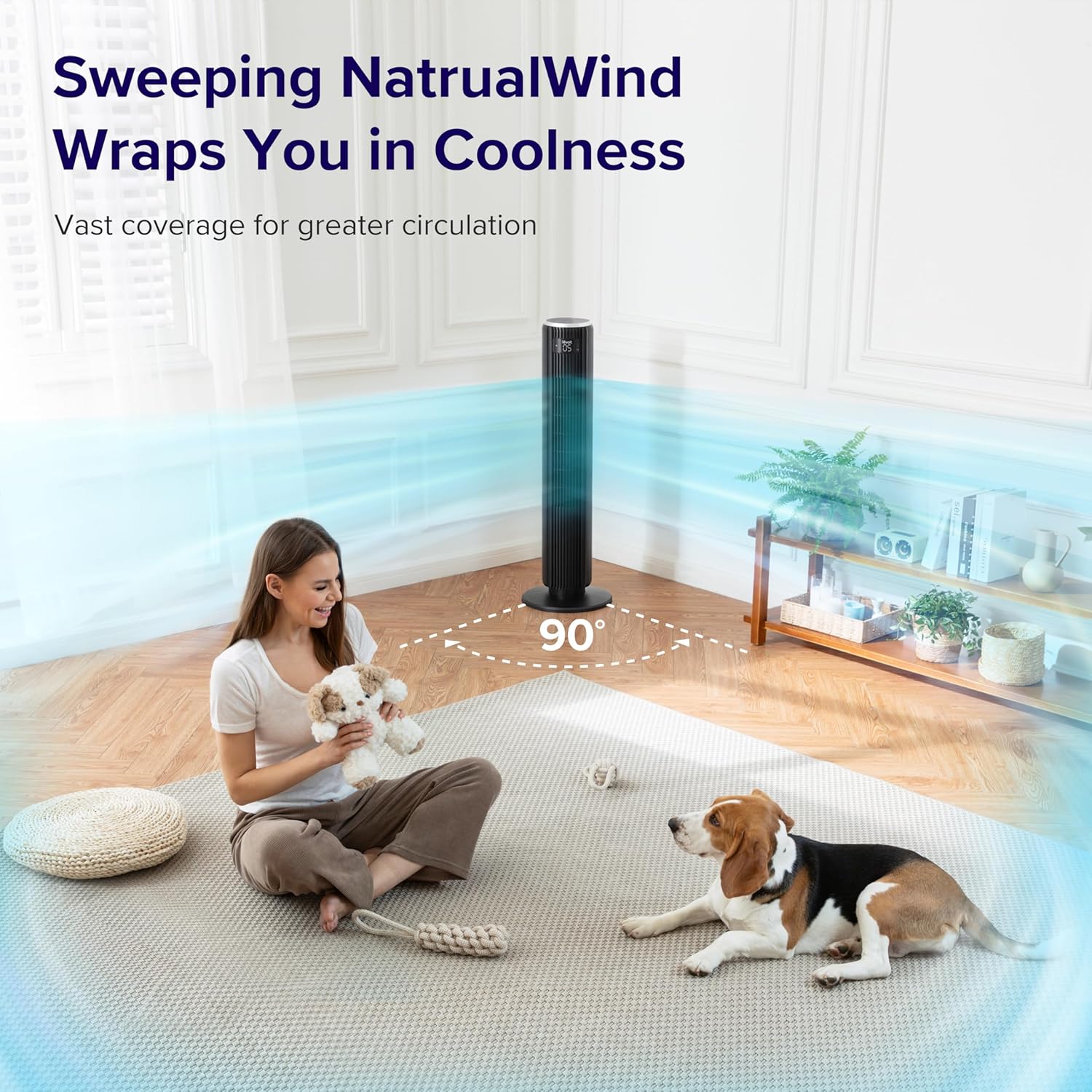
Image: The LEVOIT 36-inch Bladeless Tower Fan is shown oscillating 90 degrees, indicated by blue airflow lines covering a wide area in a living room setting. A person and a dog are comfortably within the fan's cooling range.

Image: The LEVOIT 36-inch Bladeless Tower Fan is positioned in a bedroom, emitting a gentle, natural-feeling breeze, illustrated by light blue airflow lines. A person is meditating peacefully in the background, emphasizing the fan's quiet operation and comfortable airflow.
Na-arụ ọrụ nchacha ikuku
The air purifier is controlled via the touch buttons on its top panel.
- Bọtịnụ ike: Press to turn the air purifier on or off.
- Bọtịnụ Ọsọ Ọsọ: Cycle through 3 quiet fan speeds (Low, Medium, High).
- Aroma Feature: The aroma pad allows for the diffusion of essential oils. Add 2-3 drops of essential oil to the pad located at the bottom of the unit. The fan will then circulate the scent.

Image: The LEVOIT Core Mini-P Air Purifier is shown on a nightstand in a bedroom, with a mother and child in the background. Text overlays emphasize "Multi-Layered Protection" including Pre-Filter, Efficient Filter, and Activated Carbon Filter, illustrating its air purification capabilities.

Image: The LEVOIT Core Mini-P Air Purifier is placed on a table in a living room. A hand is shown adding essential oil drops to the aroma pad, demonstrating the "Refresh With Fragrance" feature for destressing and staying focused.
Nlekọta
Na-ehicha ụlọ elu Tower
- Kwupuo fan mgbe niile tupu ihicha ya.
- Jiri nwayọọ, damp akwa iji hichaa elu elu nke fan.
- Ejila ihe nchacha abrasive ma ọ bụ ihe mgbaze.
- For dust accumulation in the air inlet/outlet, use a vacuum cleaner with a brush attachment to gently remove dust.
Cleaning and Filter Replacement for Air Purifier
- Unplug the air purifier before cleaning or replacing the filter.
- Jiri akwa dị nro hichaa mpụta.
- The 3-in-1 filtration filter should be replaced every 6-8 months, or sooner depending on air quality and usage.
- Iji dochie nzacha:
- Turn the air purifier upside down and twist the base cover counter-clockwise to unlock.
- Wepu nzacha ochie wee tụfuo ya nke ọma.
- Insert a new LEVOIT Core Mini-P replacement filter (ensure plastic packaging is removed).
- Replace the base cover and twist clockwise to lock.
- Clean the aroma pad as needed with a damp cloth and allow it to dry completely before reapplying essential oils.
Nchọpụta nsogbu
| Nsogbu | Ihe nwere ike ime | Ngwọta |
|---|---|---|
| Fan/Purifier does not turn on. | Akwụnyeghị ya; ebe a na-esi ike anaghị arụ ọrụ; apịghị bọtịnụ ike. | Ensure unit is securely plugged in. Test outlet with another device. Press the power button firmly. |
| Weak airflow from fan. | Fan speed too low; air inlet/outlet blocked. | Increase fan speed. Check for obstructions and clean air inlets/outlets. |
| Air purifier not effectively cleaning air. | Filter is dirty or expired; plastic packaging not removed from filter. | Replace the filter. Ensure all plastic packaging is removed from the new filter before installation. |
| Onye ofufe na-eme mkpọtụ. | Unit not on a level surface; internal obstruction. | Place the fan on a flat, stable surface. Check for any foreign objects inside the fan. |
| Njikwa anya anaghị arụ ọrụ. | Batteries are dead or incorrectly inserted; remote too far from fan. | Replace batteries. Ensure correct polarity. Use remote within range and point towards the fan's receiver. |
Nkọwapụta
LEVOIT 36" Bladeless Tower Fan
- Ụdị: 5ddce951-f1e5-4fc2-b790-0e25bd06f240
- Isi mmalite ike: Igwe ọkụ eletrik
- Ikike mbugharị ikuku: 1062 Cubic Feet kwa nkeji (CFM)
- Ọsọ ikuku: Ruo 25 ft/s
- Mgbanwe: 90°
- Ọkwa mkpọtụ: Dị ala dịka 28dB
- Ụdịdị: Normal, Turbo, Sleep, Auto
- Ọsọ ọsọ: 5
- Ngụ oge: 1-12 awa
- Usoro njikwa: Remote, Touch Panel
- Atụmatụ pụrụ iche: Bladeless, Temperature Sensor
LEVOIT Core Mini-P Air Purifier
- Ụdị: Core Mini-P (part of bundle)
- nzacha: 3-in-1 (Pre-Filter, Efficient Filter, Activated Carbon Filter)
- Mpaghara mkpuchi: Ruo 129 ft²
- Ọkwa mkpọtụ: 25-44dB
- Ọsọ ọsọ: 3
- Atụmatụ pụrụ iche: Fragrance Sponge for Aromatherapy, Portable
Akwụkwọ ikike na nkwado
LEVOIT provides a limited warranty for this product. For detailed warranty information, including duration and coverage, please refer to the warranty card included in your product packaging or visit the official LEVOIT websaịtị.
For technical support, troubleshooting assistance, or to inquire about replacement parts (such as air purifier filters), please contact LEVOIT Customer Support:
- Websaịtị: www.levoit.com
- Email: nkwado@levoit.com
- Ekwentị: (Refer to LEVOIT websaịtị maka nọmba kọntaktị mpaghara)
Please have your model number (5ddce951-f1e5-4fc2-b790-0e25bd06f240) and purchase information ready when contacting support.


