1. Ozi nchekwa
Biko gụọ ntuziaka nchekwa niile nke ọma tupu ị rụọ ngwa ahụ. Ọdịda ịgbaso ntuziaka ndị a nwere ike ibute ujo ọkụ eletrik, ọkụ ma ọ bụ mmerụ ahụ dị egwu.
- Gbaa mbọ hụ na ọkọnọ ọkụ voltage kwekọrọ na nkọwapụta nke ngwa ahụ.
- Eminyela ngwa ahụ n'ime mmiri ma ọ bụ ihe mmiri ndị ọzọ.
- Debe oghere ikuku na ihe mgbochi.
- Ejila ngwa ma ọ bụrụ na eriri ọkụ ma ọ bụ plọg mebiri emebi.
- Avoid touching internal components while the appliance is powered on.
- Ebubeghi ngwa a maka ndị nwere ike anụ ahụ, mmetụta uche, ma ọ bụ nke uche dị ntakịrị, ọ gwụla ma elebara ya ma ọ bụ nye ya ntụziaka.
- Gbanyụọ ike tupu ị sachaa ma ọ bụ rụzie ya.
2. Ngwaahịa gafereview
The ICECO VL35+PB1000 is a portable fridge freezer designed for various applications, including automotive, camping, and travel. It features a SECOP compressor for efficient cooling and comes bundled with a 1075Wh PB1000 portable power station for extended off-grid use.
Akụkụ ndị bụ isi:
- 35L ike: Na-enye ample storage for food and beverages.
- SECOP Compressor: Ensures reliable and efficient cooling performance.
- Multi-opening Lid Design: Allows for flexible lid opening direction without reassembly, convenient for tight spaces.
- Ntinye Ike Abụọ: Operates on 12/24V DC and 110-240V AC.
- Integrated PB1000 Power Station: 1075Wh capacity with 1200W AC output and 9 outlets for powering various devices.
- Ọdụ ụgbọ mmiri USB: Two USB outlets (USB-C PD100W Max, USB-A 18W Max) for mobile devices (available under DC power).
- Nhazi nke mmadụ: Includes a drain hole, waterproof baffle, LED lights, and removable handles.
- Ọrụ UPS: The PB1000 offers Uninterruptible Power Supply (UPS) with instant switching for emergency power.
Ọdịnaya ngwugwu:
- ICECO 35L Portable Fridge Freezer
- ICECO PB1000 Portable Power Station
- Nkata mbughari
- Aka ngbanwe
- Ndị nchekwa akụkụ
- Nkwụnye mmiri
- AC Power USB
- Igwe ọkụ DC


3. Nhazi
3.1 Mwepu na nyocha izizi
- Jiri nlezianya wepụ ihe niile dị na nkwakọ ngwaahịa.
- Inspect the fridge freezer and power station for any signs of damage during transit. Contact customer support if any damage is found.
- Clean the interior of the fridge freezer with a damp ákwà tupu ojiji mbụ.
3.2 Ijikọ ike
The fridge freezer can be powered by either AC (home socket) or DC (car 12/24V) power. The PB1000 power station provides additional power options and portability.
AC Power Connection (110-240V):
- Locate the AC power input port on the fridge freezer.
- Connect the provided AC power cable to the fridge freezer and then to a standard wall outlet.
- The built-in AC transformer allows for direct connection to pre-cool the fridge.
DC Power Connection (12/24V):
- The fridge freezer has 12/24V DC ports on both sides.
- Connect the provided DC power cable to one of the DC ports on the fridge freezer and to your vehicle's 12V or 24V power outlet.

3.3 PB1000 Power Station Setup
The PB1000 power station can be used to power the fridge freezer or other electronic devices.
Charging the PB1000:
- Connect the PB1000 to an AC wall outlet using the provided charging cable for fast charging.
- The PB1000 supports 800W AC fast charging, achieving 0-100% in approximately 1.6 hours.

3.4 Multi-opening Lid Adjustment
The lid can be adjusted to open from different directions to suit your space requirements. No tools or reassembly are required for this adjustment.

4. Ọrụ
4.1 Powering On/Off and Temperature Control
- Connect the fridge freezer to a power source (AC or DC).
- Press the power button on the control panel to turn the unit on.
- Use the temperature adjustment buttons (usually '+' and '-') to set the desired temperature between 0℉ and 50℉ (approximately -18℃ to 10℃).
- The display will show the current internal temperature and the set temperature.
- Iji gbanyụọ, pịa ma jide bọtịnụ ike.
4.2 Using the PB1000 Power Station
The PB1000 power station can be used independently or in conjunction with the fridge freezer.
Ngwaọrụ na-enye ike:
- The PB1000 features multiple output ports: 1x Car Outlet (12V-10A), 2x DC Outlets (12V-5A), 2x USB-C (PD100W Max), 2x USB-A (18W Max), and 2x AC Wall Outlets (Total Output Power 2400W).
- Jikọọ ngwaọrụ gị na ọdụ ụgbọ mmiri mmepụta kwesịrị ekwesị.
- The power display on the PB1000 clearly shows charging and power status.
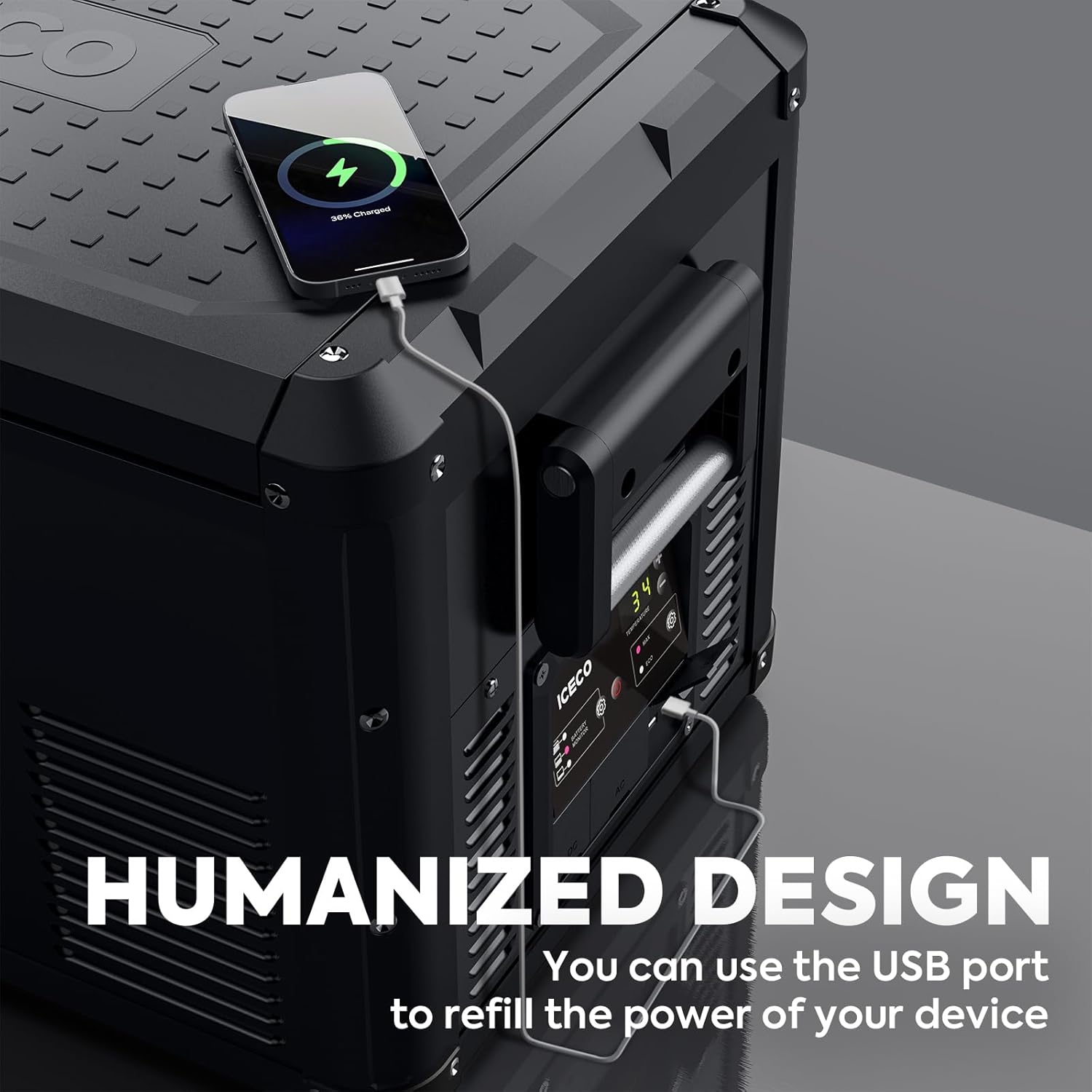
USB Charging from Fridge Freezer:
- The fridge freezer itself includes 2 USB outlets for charging mobile devices.
- These USB outlets are only available when the fridge freezer is powered by DC.

Ọrụ inye ike na-adịghị akwụsị akwụsị (UPS):
- The PB1000 can function as a UPS, providing seamless emergency power.
- Power switches instantly (within 0.01s) when the main power source is interrupted.
- Ịkpachara anya: Test this function thoroughly before relying on it for sensitive data or medical equipment to prevent potential damage.

5. Nlekọta
5.1 Cleaning the Fridge Freezer
- Kwụpụ ike: Always unplug the appliance from all power sources before cleaning.
- Ime nhicha: Jiri akwa dị nro dampened with mild detergent and warm water to clean the interior surfaces. Avoid abrasive cleaners.
- Igbapu onu: The integrated drain hole allows for easy removal of melted ice or spilled liquids. Ensure the drain plug is securely in place during operation and removed for draining.
- Nchacha mpụta: Jiri mgbasa ozi hichaa mpụtaamp cloth. Do not spray water directly onto the unit.
- Waterproof Baffle: The waterproof baffle helps protect internal components. Ensure it is properly seated after cleaning.
- ihicha: Allow the interior to air dry completely before closing the lid or reconnecting power.
5.2 Nlekọta n'ozuzu
- Regularly check power cables for any signs of wear or damage.
- Keep the ventilation grilles clear of dust and debris to ensure proper airflow for the compressor.
- When not in use for extended periods, clean the unit, leave the lid slightly ajar to prevent odors, and store it in a dry, well-ventilated area.
6. Nchọpụta nsogbu
If you encounter issues with your ICECO fridge freezer or PB1000 power station, refer to the following common troubleshooting steps:
| Nsogbu | Ihe nwere ike ime | Ngwọta |
|---|---|---|
| Ngwa anaghị agbanye | No power supply; Damaged power cable; Blown fuse in vehicle | Check power connection; Inspect cable; Check vehicle fuse; Try different power source |
| Ezughi oke jụrụ oyi | Ventilation blocked; Door not sealed properly; Ambient temperature too high; Overloaded with warm items | Clear vents; Ensure lid is closed tightly; Move to cooler area; Allow time to cool |
| Mkpọtụ na-adịghị ahụkebe | Appliance not level; Fan obstruction; Normal compressor operation | Place on a flat surface; Check for obstructions; Some noise is normal for compressors |
| PB1000 not charging devices | PB1000 battery low; Output port not activated; Device incompatible | Recharge PB1000; Ensure output port is turned on; Check device power requirements |
| Koodu mperi na ngosi | Internal fault; Sensor issue | Refer to specific error code in a more detailed manual (if available) or contact customer support. |
If the problem persists after attempting these solutions, please contact ICECO customer support for further assistance.
7. Nkọwapụta
Detailed technical specifications for the ICECO VL35+PB1000 unit:
| Njirimara | Nkọwapụta |
|---|---|
| Ụdị | ICECO |
| Nọmba nlereanya | VL35+PB1000 |
| Ike | 35 lita (37 nkeji) |
| Akụkụ ngwaahịa | 28.1 x 15.9 x 15.7 sentimita (71.4 x 40.4 x 39.9 cm) |
| Ụdị nwụnye | Ntighari |
| Njirimara Pụrụ Iche | Enwere ike ibugharị |
| Agba | Nwa |
| Usoro Ntughari | Akwụkwọ ntuziaka |
| Ọnụọgụ ọnụ ụzọ | 1 |
| PB1000 Battery Capacity | 1075Wh |
| PB1000 AC Output | 1200W (Total Output Power 2400W) |
| PB1000 AC Fast Charging | 800W (0-100% in 1.6 hours) |
| Oke okpomọkụ | 0℉ - 50℉ (approximately -18℃ - 10℃) |
| Power Consumption (Max mode at 0℉) | ~0.43 kWh/24h |
8. Akwụkwọ ikike na nkwado
8.1 Ozi akwụkwọ ikike
The ICECO VL35+PB1000 comes with a 5-year warranty on the SECOP compressor. For specific details regarding the full product warranty, please refer to the warranty card included with your purchase or visit the official ICECO websaịtị.

8.2 Nkwado ndị ahịa
For technical assistance, warranty claims, or general inquiries, please contact ICECO customer support through their official website or the contact information provided in your product packaging. Please have your model number (VL35+PB1000) and purchase date ready when contacting support.


