1. Okwu mmalite
The Quark-Elec QK-A026-plus is an advanced NMEA 2000 AIS receiver designed for marine navigation systems. This versatile device integrates multiple functionalities including an AIS receiver, NMEA multiplexer, NMEA 0183 to NMEA 2000 converter, WiFi connectivity, and a built-in GPS receiver. It provides a comprehensive solution for receiving and distributing marine data to various display devices, chart plotters, and PCs.
The A026-plus is engineered for reliability and ease of use, making it an essential component for modern marine electronics setups. Its robust design ensures seamless operation in demanding maritime environments.
2. Atụmatụ igodo
- Dual-channel AIS receiver for monitoring Class A and Class B AIS targets.
- Built-in GPS receiver for accurate position, speed, and course data.
- NMEA 2000 output for direct integration into NMEA 2000 backbone networks.
- NMEA 0183 input and output for connecting to legacy marine devices.
- SeaTalk to NMEA 0183 converter for compatibility with Raymarine SeaTalk networks.
- WiFi connectivity for wireless data streaming to PCs, tablets, and smartphones.
- USB output for direct connection to a computer.
- Multiplexing of NMEA 0183, AIS, GPS, and SeaTalk data into a single stream.
- Robust and compact design suitable for marine environments.
3. Ihe ngwugwu
Biko lelee ihe dị n'ime ngwugwu mgbe ị natachara ya ka ị hụ na ihe niile dị na enweghị mmebi:
- QK-A026-plus NMEA 2000 AIS Receiver Unit
- NMEA 2000 Drop Cable (M12 connector)
- eriri USB (ụdị A ruo ụdị B)
- Antenna WiFi
- Quick Start Guide (or link to online manual)
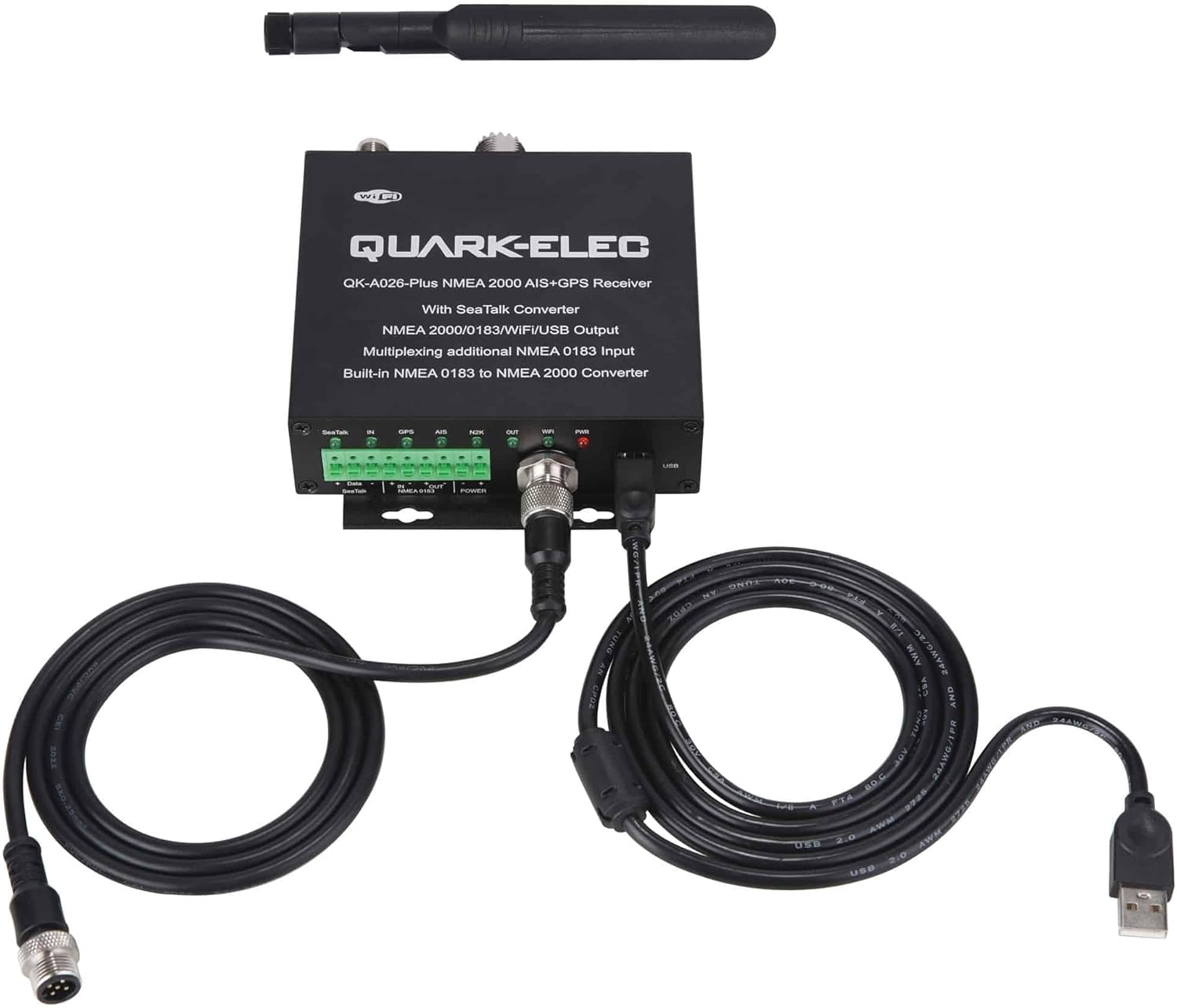
Image: QK-A026-plus receiver unit shown with the included NMEA 2000 drop cable and USB cable.

Image: Close-up of the NMEA 2000 drop cable, featuring its standard M12 connectors for marine network integration.
4. Ntọala na nwụnye
Proper installation is crucial for the optimal performance of your QK-A026-plus. Ensure the device is mounted in a dry, protected location away from direct sunlight and excessive heat. Refer to the connection diagram for wiring details.
4.1 Physical Connections Overview

Foto: N'ihu view of the QK-A026-plus unit, showing the terminal block for SeaTalk, NMEA 0183, and Power, along with the NMEA 2000 and USB ports.
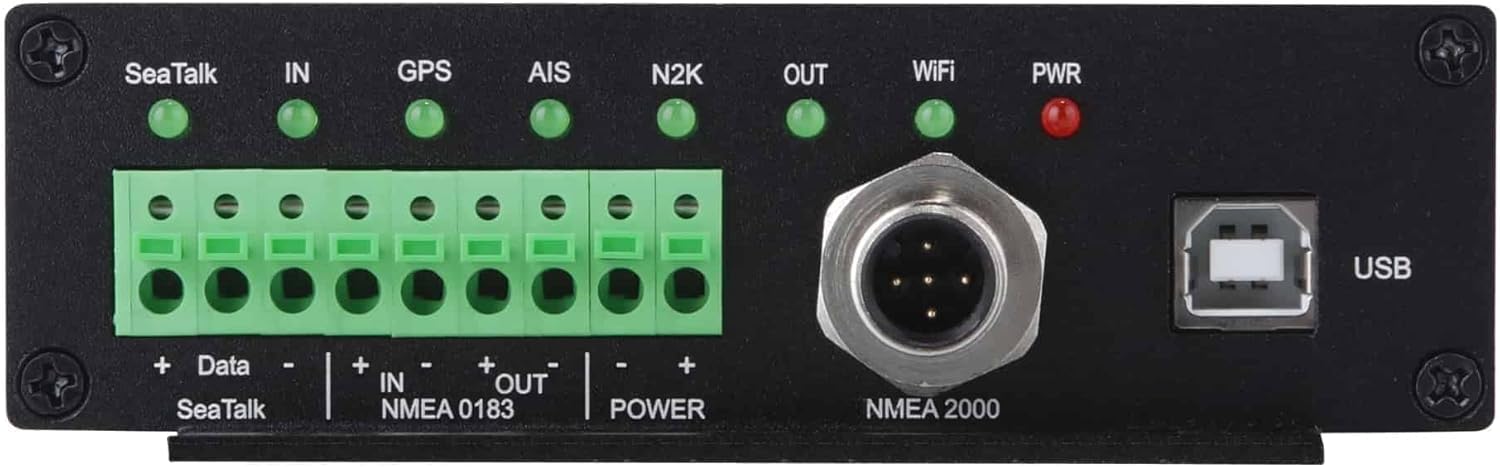
Foto: Azụ zuru ezu view of the QK-A026-plus, highlighting the SeaTalk, NMEA 0183, and Power terminal block, as well as the NMEA 2000 and USB connectors.

Foto: Top view of the QK-A026-plus, displaying the connectors for the WiFi antenna, AIS antenna, and GPS antenna.
4.2 System Integration Diagram
The following diagram illustrates how the QK-A026-plus integrates into a typical marine electronics system, connecting various sensors, displays, and networks.

Image: Comprehensive system diagram showing the QK-A026-plus connected to GPS antenna, AIS/VHF antenna (via splitter), SeaTalk data, NMEA 0183 sensors, NMEA 2000 network, and wireless devices/laptops via WiFi and USB.
4.3 Nzọụkwụ Njikọ
- Njikọ ike: Connect the device to a 12V DC power source using the provided power terminals. Ensure correct polarity.
- AIS Antenna: Connect a dedicated AIS antenna (or a VHF antenna via a splitter) to the AIS antenna connector on the unit.
- Antenna GPS: Connect an external GPS antenna to the GPS antenna connector.
- NMEA 2000 Network: Connect the NMEA 2000 drop cable from the A026-plus to your existing NMEA 2000 backbone.
- NMEA 0183 Devices: Connect NMEA 0183 input devices (e.g., depth sounder, wind sensor) to the NMEA 0183 IN terminals. Connect NMEA 0183 output devices (e.g., chart plotter) to the NMEA 0183 OUT terminals.
- SeaTalk Devices: Connect SeaTalk data input to the SeaTalk terminals. The A026-plus will convert SeaTalk data to NMEA 0183.
- Antenna WiFi: Screw the provided WiFi antenna onto the WiFi connector.
- Njikọ USB (Nhọrọ): For direct PC connection, use the USB cable to connect the A026-plus to your computer.
5. Ntuziaka ọrụ
Once all connections are made and power is supplied, the QK-A026-plus will power on. The LED indicators on the unit provide status information:
- PWR (Red): Indicates power is supplied to the unit.
- WiFi (Green): Indicates WiFi module status (flashing for activity).
- OUT (Green): Indicates NMEA 0183 output activity.
- N2K (Green): Indicates NMEA 2000 data activity.
- AIS (Green): Indicates AIS data reception.
- GPS (Green): Indicates GPS signal reception and fix.
- IN (Green): Indicates NMEA 0183 input activity.
- SeaTalk (Green): Indicates SeaTalk data input activity.
5.1 Data nnabata
The A026-plus will automatically begin receiving AIS and GPS data once connected to their respective antennas and powered on. This data is then multiplexed and outputted via NMEA 2000, NMEA 0183, USB, and WiFi.
Njikọ WiFi 5.2
The A026-plus supports two WiFi modes for connecting to your devices:
- Ad-hoc / Direct Option (Default): The A026-plus creates its own WiFi network (SSID: QK-A026-plus_xxxx). You can connect your PC, tablet, or smartphone directly to this network. This is ideal for a simple, direct connection without an existing router.
- Station Mode Option: The A026-plus connects to an existing WiFi router or access point on your vessel. This allows multiple devices to access the data through your vessel's main network, and the A026-plus can still access the internet if the router is connected.
- Standby (Disable) Option: The WiFi module can be disabled if not required, saving power.
Configuration of WiFi modes is typically done via a configuration tool provided by Quark-Elec, accessible via the USB connection.

Image: Diagram showing the three WiFi operating modes: Ad-hoc (direct connection to devices), Station mode (connecting to an existing Access Point/Router), and Standby (WiFi disabled).
6. Nchọpụta nsogbu
If you encounter issues with your QK-A026-plus, please refer to the following common troubleshooting steps:
- Enweghị Ike (PWR LED gbanyụrụ): Check power connections, fuse, and ensure the 12V DC supply is active.
- No AIS Data (AIS LED off/no flashing): Verify AIS antenna connection. Ensure the antenna is properly installed and unobstructed. Check for nearby interference.
- No GPS Fix (GPS LED off/no flashing): Ensure GPS antenna is connected and has a clear view of the sky. Allow several minutes for initial fix.
- No NMEA 2000 Data (N2K LED off/no flashing): Check NMEA 2000 backbone termination and power. Ensure the drop cable is securely connected.
- Okwu njikọ WiFi:
- Ensure WiFi antenna is securely attached.
- If in Ad-hoc mode, ensure your device is connecting to the correct SSID.
- If in Station mode, verify the A026-plus is configured with the correct network name (SSID) and password for your router.
- Try restarting the A026-plus and your connecting device.
- Data Not Displaying on Chart Plotter/PC:
- Verify correct baud rates and port settings on your display device or software.
- Ensure the correct input/output connections are made (NMEA 0183, NMEA 2000, USB, WiFi).
- Check if the display device is configured to receive the specific NMEA sentences (e.g., AIS, GPS).
For further assistance, please consult the Quark-Elec support resources or contact their customer service.
7. Nkọwapụta
| Njirimara | Nkọwa |
|---|---|
| Ụdị | Quark-Elec |
| Aha Nlereanya | A026 gbakwunyere |
| Servicedị Ọrụ hicgbọ | Ụgbọ mmiri |
| Teknụzụ Njikọta | USB, Wi-Fi |
| Ụdị map | Gburugburu ụwa |
| Ngwa gụnyere | N2K Cable, USB Cable |
| Ọnọdụ mmepụta ọdịyo | Dijitalụ |
| Ụdị nkwụnye | Ugwu Dashboard |
| Akụkụ ngwaahịa | 12L x 6W x 4.5H centimita |
| Ibu Ibu | 260 grams |
8. Nlekọta
The QK-A026-plus is designed for low maintenance. To ensure its longevity and optimal performance:
- Keep the unit clean and free from dust and moisture. Use a soft, dry cloth for cleaning.
- Ensure all cable connections are secure and free from corrosion.
- Zere ikpughe akụkụ ahụ na oke okpomọkụ ma ọ bụ ìhè anyanwụ kpọmkwem maka ogologo oge.
- Anwala imepe casing, as this will void the warranty.
9. Akwụkwọ ikike na nkwado
Quark-Elec products typically come with a standard manufacturer's warranty. For specific warranty terms and conditions, please refer to the documentation included with your purchase or visit the official Quark-Elec websaịtị.
For technical support, troubleshooting assistance, or to inquire about repairs, please contact Quark-Elec customer support directly. Their contact information can usually be found on their official websaịtị ma ọ bụ na nkwakọ ngwaahịa.
Note: Always refer to the latest information provided by the manufacturer for the most accurate and up-to-date warranty and support details.