Okwu mmalite
This manual provides detailed instructions for the safe and efficient operation of your DEWENWILS 24 Hour Programmable Digital Timer Outlet. This device is designed to automate the on/off cycles of your indoor electrical appliances, enhancing convenience and energy efficiency. Please read this manual thoroughly before use and retain it for future reference.
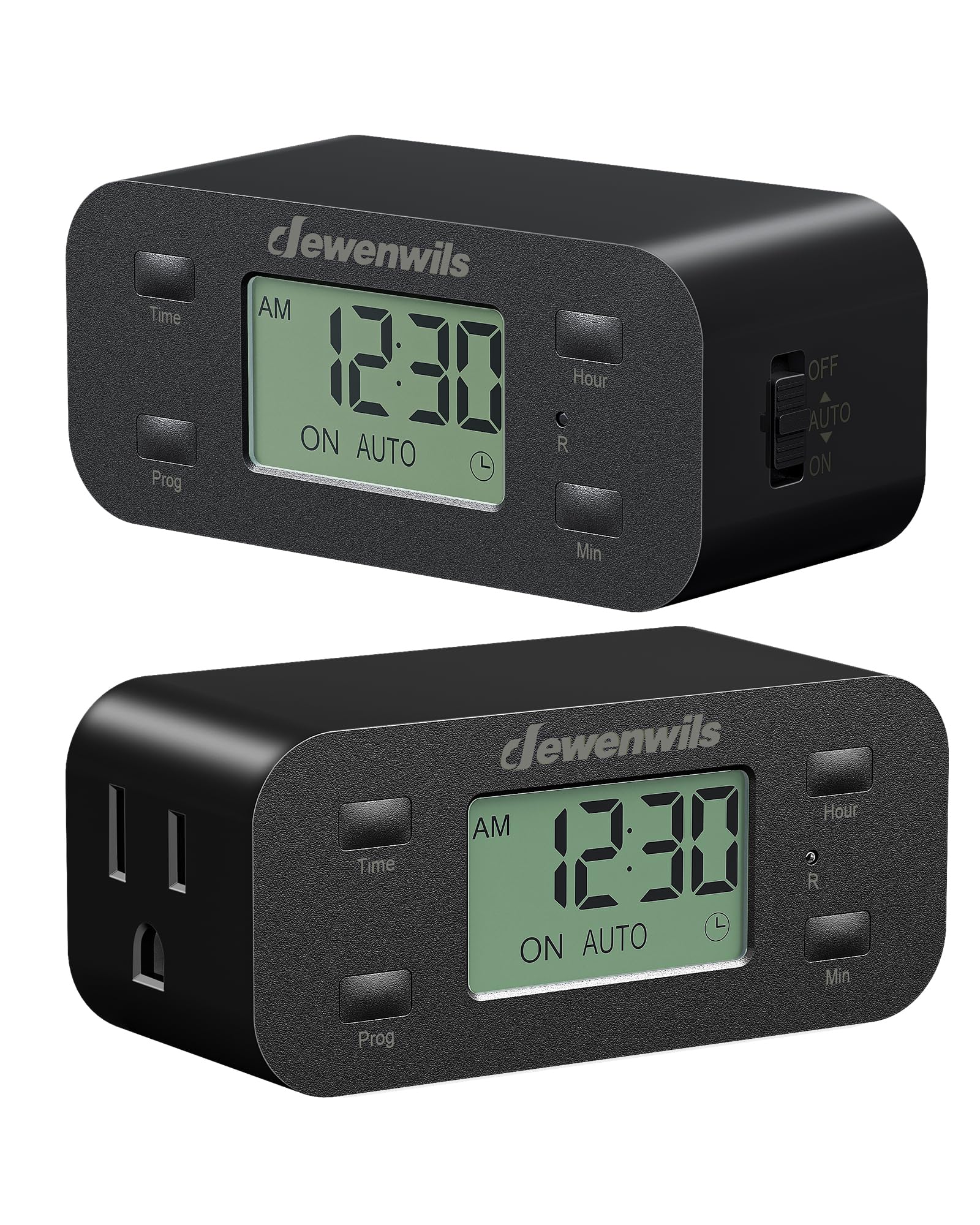
Foto: N'ihu view of the DEWENWILS Digital Timer Outlet.
Ozi nchekwa
- For indoor use only. Do not expose to rain or moisture.
- Do not exceed the maximum load rating of 125V/15A/1000W.
- Hụ na etinyere ihe nhazi oge ahụ nke ọma n'ime oghere dị n'ala.
- Do not use with devices that require continuous supervision, such as power tools or heating appliances without safety cut-offs.
- Debe ebe ụmụaka na-apụghị iru.
- Do not disassemble or attempt to repair the device. Contact customer support if service is required.
Njirimara ngwaahịa
- 3 Group Daily Repeat Program: Set up to three daily on/off schedules.
- Minimalist & Functional Design: Slim profile ensures other outlets remain accessible.
- Batrị ndabere: Retains programmed settings for up to 3 months during power interruptions.
- Arụmọrụ dị jụụ: Operates silently, suitable for bedrooms and quiet environments.
- Ike dị irè: Automates device operation to save time and energy.
- Ngwa sara mbara: Kwesịrị ekwesị maka lamps, fans, aquariums, plant lights, and holiday decorations.
Ihe ngwugwu
- 2 x DEWENWILS 24 Hour Programmable Digital Timer Outlets
- 1 x Akwụkwọ ntuziaka onye ọrụ
Ngwaahịa gafereview
Familiarize yourself with the components of your DEWENWILS Digital Timer Outlet.

Image: The large LCD screen display for easy reading of time and settings.

Image: Side switch for manual control (OFF, AUTO, ON).

Image: Space-saving design allows access to the second wall outlet.
Melite
Follow these steps to set up your DEWENWILS Digital Timer Outlet:
- Initial Reset: Before first use or after a long period of inactivity, use a small pin or paperclip to press the 'R' (Reset) button located on the front of the timer. This clears all previous settings.
- Tọọ oge ugbu a:
- Press and hold the 'Time' button.
- While holding 'Time', press 'Hour' to adjust the hour.
- While holding 'Time', press 'Min' to adjust the minute.
- Release 'Time' when the correct time is set.
- Set a Program: The timer allows for up to 3 ON/OFF programs daily.
- Press the 'Prog' button once to enter Program 1 ON setting. The display will show '1 ON'.
- Use 'Hour' and 'Min' buttons to set the desired ON time for Program 1.
- Press 'Prog' again to enter Program 1 OFF setting. The display will show '1 OFF'.
- Use 'Hour' and 'Min' buttons to set the desired OFF time for Program 1.
- Repeat for Program 2 and Program 3 if needed.
- After setting all desired programs, press the 'Time' button to exit programming mode.

Image: Visual guide for resetting, setting the current time, and programming schedules.
Ntuziaka ọrụ
Once programmed, select the desired operating mode using the side switch:
- Ụdị AUTO: Slide the side switch to 'AUTO'. In this mode, the timer will automatically turn the connected device ON and OFF according to your programmed schedules. The display will show 'ON AUTO' or 'OFF AUTO'.
- N'Ụdị: Slide the side switch to 'ON'. The connected device will remain continuously ON, overriding any programmed schedules. The display will show 'ON'.
- Gbanyụọ ọnọdụ: Slide the side switch to 'OFF'. The connected device will remain continuously OFF, overriding any programmed schedules. The display will show 'OFF'.

Foto: Example of three daily repeat programs set on the timer.
Video Guide: Setup and Operation
Vidiyo: Efereview of the DEWENWILS 24 Hour Programmable Digital Timer Outlet, including unboxing, setting the time, programming schedules, and using the manual switch.
Nlekọta
- Clean the timer with a dry, soft cloth. Do not use liquid cleaners or sprays.
- Chekwaa n'ebe dị jụụ, kpọrọ nkụ mgbe ọ naghị eji ya.
- Periodically check the timer and connected devices for any signs of damage or wear.
Nchọpụta nsogbu
- Device not turning ON/OFF as programmed:
- Ensure the side switch is set to 'AUTO'.
- Verify that the current time is set correctly.
- Check that the ON and OFF times for your programs are correctly entered and do not overlap unintentionally.
- Confirm the connected device is functioning properly when plugged directly into a wall outlet.
- Ngosipụta ahụ tọgbọ chakoo ma ọ bụ gbaa ọchịchịrị:
- Ensure the timer is securely plugged into a live electrical outlet.
- The backup battery may be low. Plug the timer into an outlet for several hours to charge the internal battery.
- Settings lost after power outage:
- The internal backup battery may be depleted. The battery retains settings for up to 3 months. If the outage exceeds this, settings may need to be re-entered.
Nkọwapụta
- Voltage: 125V AC
- Ugboro: 60Hz
- Ibu kacha: 15A / 1000W
- Ihe: Plastic
- Akụkụ ngwaahịa: 4.21"D x 1.85"W x 3.62"H
- Ibu ihe: 7.4 ounces
- Ọnụọgụ nke Ntọala: 3 daily ON/OFF programs
- Agba: Nwa
Akwụkwọ ikike na nkwado
DEWENWILS products are designed for reliability and performance. For warranty information, technical support, or assistance with your product, please refer to the contact details provided on the product packaging or visit the official DEWENWILS website. Please have your model number (B0D2RM248G) ready when contacting support.


