Okwu mmalite
The FREEWOLF M96 Wireless Gaming Keyboard is designed for versatile use, offering both Bluetooth and 2.4G wireless connectivity. It features a mechanical feel, RGB LED backlighting, a digital display screen, and durable PBT keycaps. This manual provides detailed instructions to help you set up, operate, and maintain your keyboard for optimal performance.
Ngwaahịa gafereview
The FREEWOLF M96 keyboard combines advanced features with a user-friendly design. Key components include:
- Njikọta abụọ: Supports Bluetooth (BT1, BT2) and 2.4G wireless modes for seamless switching between multiple devices.
- Ihuenyo ngosi dijitalụ: Provides real-time information on battery capacity, connection mode, and charging status.
- Multimedia Control Knob: Allows for easy adjustment of volume and backlight settings.
- Igodo PBT: Durable, spherical keycaps designed for comfortable typing and longevity.
- RGB LED Backlight: Customizable lighting effects to enhance your gaming or typing experience.
- Batrị na-adịte aka: Ejiri batrị 3000 mAh mee ya maka ojiji ogologo oge.
- Nhazi Ergonomic: Features adjustable feet for optimal typing comfort.

Foto: Ofeview of the FREEWOLF M96 Wireless Keyboard, highlighting its 90% US layout, PBT keycaps, Bluetooth/2.4G connectivity, LED backlight, 3000 mAh battery, multimedia knob, LED screen, and compatibility with Win/Mac/Linux/iOS/Android systems.

Foto: nso nso view of the PBT color blocking keycaps, emphasizing their durability and longer lifespan.
Melite
1. Ịchaji ahụigodo
Before first use, it is recommended to fully charge the keyboard. Connect the provided USB-C cable to the charging port on the keyboard and the other end to a USB power source (e.g., computer USB port, wall adapter).
- The digital display screen will indicate the charging status.
- Ụgwọ zuru ezu na-ewekarị awa ole na ole.

Foto: Akụkụ view of the keyboard illustrating the power switch, Type-C charging port, and the 2.4G/BT1/BT2 mode switch. The Type-C port is for charging only and cannot be used for wired connection.
2. Ijikọ site na 2.4G Wireless
- Locate the 2.4G wireless receiver (USB dongle), usually stored in a compartment on the keyboard's underside.
- Tinye ihe nnata 2.4G n'ọdụ ụgbọ mmiri USB dị na kọmputa gị.
- Slide the mode switch on the keyboard to the "2.4G" position.
- The keyboard should automatically connect to your device. The display screen will show the 2.4G connection status.
3. Ijikọ site na Bluetooth
The keyboard supports two Bluetooth channels (BT1 and BT2) for connecting to multiple devices.
- Slide the mode switch on the keyboard to either "BT1" or "BT2" position.
- Na ngwaọrụ gị (kọmputa, mbadamba, ama ama), mee ka Bluetooth rụọ ọrụ ma chọọ ngwaọrụ ọhụrụ.
- Select "FREEWOLF M96" (or similar name) from the list of available devices.
- If prompted, enter the pairing code displayed on your device.
- Once connected, the digital display screen will show the active Bluetooth channel (BT1 or BT2).
To switch between connected Bluetooth devices, simply slide the mode switch to the desired BT1 or BT2 channel.
Video: Demonstrates the dual-mode connectivity of the FREEWOLF M96 Wireless Gaming Keyboard, showing how to switch between 2.4G wireless and Bluetooth connections (BT1, BT2) for seamless multi-device operation.
Ntuziaka ọrụ
1. Digital Ngosipụta ihuenyo
The integrated electronic display provides essential information at a glance:
- Ike batrị: Na-egosi pasentị batrị dị ugbu atage.
- Ụdị njikọ: Indicates whether the keyboard is in 2.4G, BT1, or BT2 mode.
- Nchaji Status: Displays an icon when the keyboard is charging.
- Ihe ngosi batrị dị ala: Alerts you when the battery is low.

Foto: Zuru ezu view of the digital display screen on the FREEWOLF M96 keyboard, showing indicators for power display, connection status (2.4G, BT1, BT2), charging, and low battery.
2. Multimedia Control Knob
The knob located on the top right of the keyboard offers dual functionality:
- Default Function (Volume Control):
- Tụgharịa n'akụkụ elekere ka iwelie olu.
- Rotate counter-clockwise to decrease volume.
- Press the knob to mute/unmute audio.
- Njikwa ọkụ azụ:
- Press and hold the knob for five seconds to switch to backlight control mode.
- In backlight control mode:
- Rotate clockwise to increase backlight brightness.
- Rotate counter-clockwise to decrease backlight brightness.
- Press the knob to switch between different backlight effects/modes.

Image: Illustration of the advanced dial control, detailing its default functions for volume (volume up, volume down, mute) and its backlight control functions (backlight brightness up, backlight brightness down, light effect switching) when pressed and held for 5 seconds.
3. Backlight Control (Function Keys)
In addition to the knob, you can control the backlight using function key combinations:
- FN + N: Gbanwee ọnọdụ ọkụ azụ
- FN + Up Arrow / Down Arrow: Gbanwee ọkụ azụ azụ
- FN + Left Arrow / Right Arrow: Gbanwee ọsọ ọkụ azụ
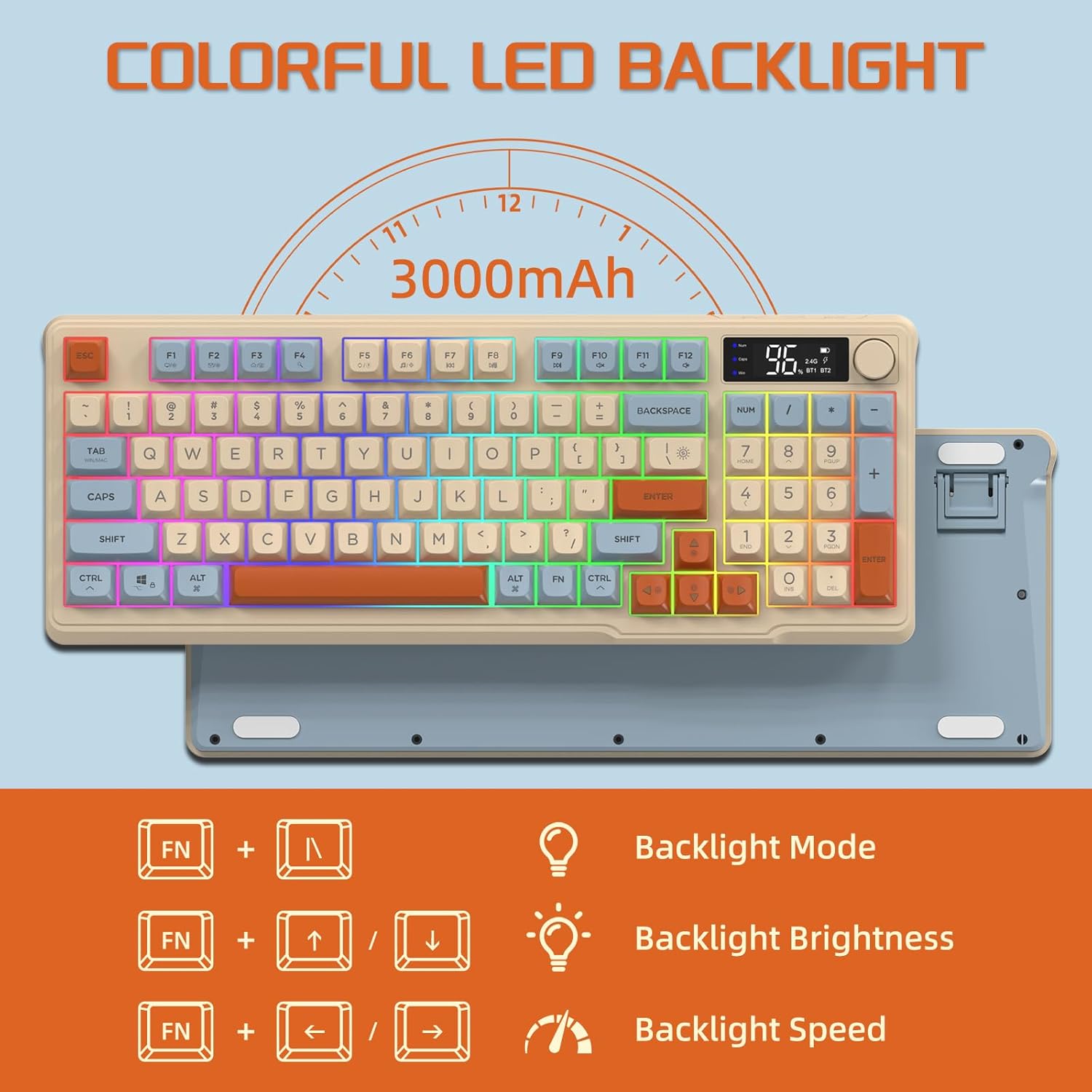
Image: The keyboard displaying the key combinations for controlling the colorful LED backlight, including changing backlight mode, brightness, and speed using the FN key with N, arrow keys.
4. Power Saving Modes
The keyboard is designed with power-saving features to extend battery life:
- Sleep Mode (3 minutes inactivity): After 3 minutes of inactivity, the keyboard enters sleep mode, and the backlight turns off.
- Deep Sleep Mode (10 minutes inactivity): After 10 minutes in sleep mode, the keyboard enters deep sleep. The first key press will be ignored to wake the keyboard, and the second key press will activate it.
5. Ndakọrịta
The FREEWOLF M96 keyboard is compatible with a wide range of operating systems, including Windows, Mac, and Linux, ensuring broad usability.
Nlekọta
1. Nhicha
- Gbanyụọ ahụigodo ahụ tupu ị hichaa ya.
- Jiri akwa dị nro na-enweghị ntụpọ dampejiri mmiri ma ọ bụ ihe nhicha dị nro hichaa elu ahụ.
- Maka ihicha n'etiti mkpuchi igodo, jiri ikuku a kpọchiri akpọchi ma ọ bụ obere ahịhịa.
- Zere iji kemịkalụ siri ike ma ọ bụ ihe na-emebi emebi.
2. Nlekọta batrị
- Zere ịchaji batrị ugboro ugboro.
- Chekwaa ahụigodo ahụ n'ebe dị jụụ, kpọrọ nkụ mgbe ọ naghị eji ya ogologo oge.
- Use only the provided charging cable or a compatible USB-C cable.
Nchọpụta nsogbu
| Nsogbu | Ihe nwere ike ime | Ngwọta |
|---|---|---|
| Ahụigodo anaghị aza. | Low battery; incorrect connection mode; receiver not plugged in (2.4G); Bluetooth not paired. | Charge the keyboard; switch to correct mode (2.4G/BT1/BT2); ensure 2.4G receiver is connected; re-pair Bluetooth. |
| Ìhè azụ anaghị arụ ọrụ. | Backlight turned off; low battery; brightness set to minimum. | Check backlight settings using the knob or FN key combinations; charge the keyboard. |
| Keys not registering or ghosting. | Software conflict; low battery; interference. | Restart your device; charge the keyboard; move closer to the receiver/device; check for driver updates. |
| Njikọ Bluetooth adịghị akwụsi ike. | Interference; distance from device; low battery. | Reduce interference (other wireless devices); move keyboard closer to device; charge keyboard. |
Nkọwapụta
| Njirimara | Nkọwa |
|---|---|
| Ụdị | FREEWOLF |
| Nọmba nlereanya | M96 |
| Teknụzụ Njikọta | Bluetooth, 2.4G Wireless |
| Nkọwa ahụigodo | Mechanical feel with PBT keycaps |
| Ọnụọgụ igodo | 94 keys (US Layout) |
| Ìhè azụ | RGB LED backlight |
| Ike batrị | 3000 mAh |
| Atụmatụ pụrụ iche | Electronic display, multimedia control knob, power saving modes |
| Ngwa dakọtara | PC (Windows, Mac, Linux), iOS, Android |
| Agba | Blueberry (Myrtille) |
| Akụkụ ngwaahịa | 385mm (15.16 inch) x 145mm (5.71 inch) x 40mm (1.57 inch) |

Image: Diagram illustrating the product dimensions of the FREEWOLF M96 keyboard: 385mm (15.16 inches) length, 145mm (5.71 inches) width, and 40mm (1.57 inches) height.
Akwụkwọ ikike na nkwado
This FREEWOLF M96 Wireless Gaming Keyboard comes with a standard manufacturer's warranty. Please refer to the product packaging or the seller's information for specific warranty terms and conditions. For technical support or further assistance, please contact the retailer or manufacturer directly.
For the latest information and support, visit the official FREEWOLF websaịtị ma ọ bụ kpọtụrụ ndị ahịa ha ọrụ.


