1. Okwu mmalite
Daalụ maka ịzụrụasing the Bobtot K701S 5.1/2.1 Channel Surround Sound System. This system is designed to provide a powerful and immersive audio experience for your home entertainment. With 800W peak power and a 6.5-inch subwoofer, it delivers clear, dynamic sound. This manual will guide you through the setup, operation, and maintenance of your new sound system.

Image 1.1: Bobtot K701S 5.1/2.1 Channel Surround Sound System with subwoofer, satellite speakers, and remote control.
2. Ntuziaka nchekwa dị mkpa
Please read and follow these safety instructions carefully before operating the system to prevent electric shock, fire, or damage to the unit.
- Ewepụla ngwa a na mmiri ozuzo ma ọ bụ mmiri.
- Akwụsịla oghere ikuku ikuku ọ bụla. Wụnye dị ka ntuziaka onye nrụpụta si dị.
- Awụnyela n'akụkụ ebe okpomọkụ ọ bụla dị ka radiators, ndekọ okpomọkụ, stovu, ma ọ bụ ngwa ndị ọzọ (gụnyere amplifiers) nke na-emepụta okpomọkụ.
- Chebe eriri ọkụ ka ị ghara ịgagharị ma ọ bụ tuo ya, ọkachasị na plọg, ebe nchekwa dị mma, na ebe ha si na ngwa ahụ pụta.
- Jiri naanị mgbakwunye / ngwa ndị nrụpụta akọwapụtara.
- Kwupu ngwa a n'oge oke mmiri ozuzo ma ọ bụ mgbe ejighi ya ogologo oge.
- Tụtụ aka n'aka ndị ọrụ ruru eru. Achọrọ ọrụ mgbe akụrụngwa mebiri emebi n'ụzọ ọ bụla.
3. Ihe ngwugwu
Jiri nlezianya tọpụ igbe ahụ ma hụ na ihe niile dị ma dịkwa mma. Ọ bụrụ na ihe ọ bụla efuo ma ọ bụ mebie, biko kpọtụrụ ndị ọrụ nkwado ndị ahịa.
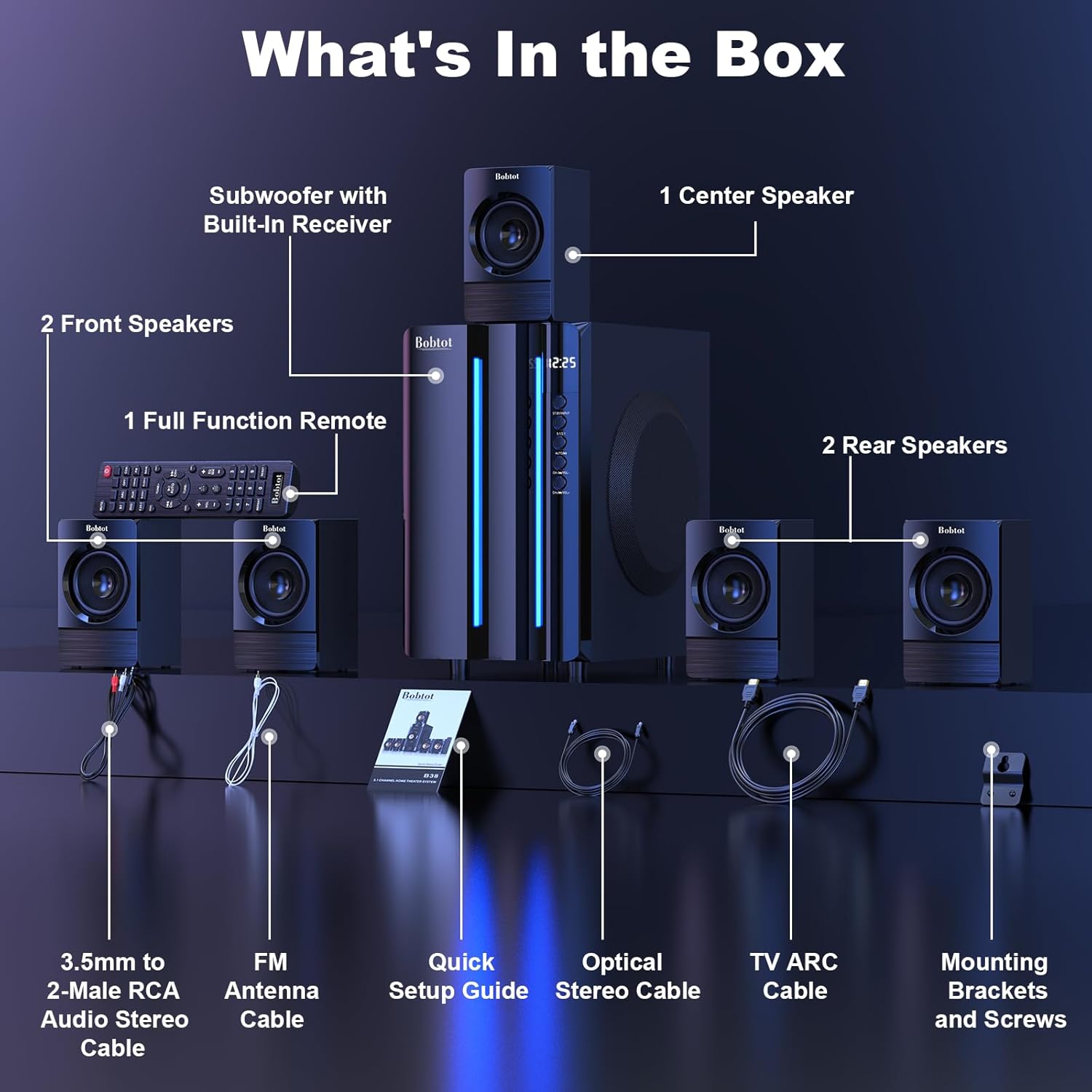
Image 3.1: Visual representation of all items included in the Bobtot K701S package.
- 1 x Subwoofer with Built-in Receiver
- 1 x Center Speaker
- 2 x Front Speakers
- 2 x Rear Speakers
- 1 x Full Function Remote Control
- 1 x 3.5mm to 2-Male RCA Audio Stereo Cable
- 1 x FM Antenna Cable
- 1 x Ntuziaka Mbido Ndenye
- 1 x Optical Stereo Cable
- 1 x TV ARC Cable (HDMI)
- 1 x Coaxial eriri
- 1 x AUX USB
- 1 x RCA USB
- Ntụnye nkwado na kposara
- Akwụkwọ ntuziaka (akwụkwọ a)
4. Ihe mejupụtaraview
4.1 Subwoofer (Main Unit)
The subwoofer houses the main receiver and amplifier for the entire system. It features a 6.5-inch driver for deep bass and includes all input/output ports.

Foto 4.1: Zuru ezu view of the 6.5-inch subwoofer, highlighting its internal components.
4.2 Satellite ọkà okwu
The system includes five satellite speakers: one center, two front (left/right), and two rear (left/right). These speakers are wired and connect directly to the subwoofer unit.
4.3 Ime Remote
The full-function remote control allows you to manage power, input modes, volume, channel selection, and other settings from a distance.
5. Ntọala Sistemu
Follow these steps to set up your Bobtot K701S surround sound system.
5.1 Njikọ Ọkà Okwu
The five satellite speakers come with integrated cables. Connect each speaker to the corresponding "Audio Output" slot on the rear of the subwoofer unit. The cables are color-coded or labeled for easy identification (e.g., FL for Front Left, FR for Front Right, CEN for Center, SL for Surround Left, SR for Surround Right).
- Front Center and L/R speakers: Cables are approximately 13 feet long.
- Rear L/R speakers: Cables are approximately 31 feet long.
Place all speakers in the same room for optimal surround sound performance.

Image 5.1: Recommended speaker placement for a 5.1 channel surround sound experience.
5.2 Power On and Initial Test
- Connect the subwoofer to a power outlet using the provided power cable.
- Gbanwuo subwoofer site na iji mgba ọkụ.
- Press the power button on the remote control or the front panel.
- Nwalee ọrụ njikwa dị anya.
- Switch to "BT" (Bluetooth) mode and connect your mobile device to "B701D" via Bluetooth to ensure audio playback.
5.3 Ijikọ ngwaọrụ mpụga
Choose the appropriate input mode and connect your external device (e.g., TV, projector, DVD player, game console) to the subwoofer using the corresponding audio cables provided.
- Ensure the cable is securely plugged into the correct input slot on the subwoofer.
- Select the matching input mode on the system (e.g., HDMI ARC, OPT, COA, AUX, USB, DVD).

Foto 5.2: Ofeview of the rear panel connections and supported multimedia inputs.
6. Ntuziaka ọrụ
6.1 Ọrụ njikwa anya
The remote control provides full command over your sound system. Always press the power button before selecting an input mode when turning on the unit.

Image 6.1: Detailed diagram of the remote control buttons and their functions.
- Gbanyụọ/ Gbanyụọ: Gbanyụọ ma ọ bụ gbanyụọ sistemụ ahụ.
- Input Mode Select: Buttons for BT, ARC, OPT, COA, DVD, AUX, USB/SD, FM to switch between audio sources.
- 5.1/2.1 Channel Select: Toggles between 5.1 surround sound and 2.1 stereo mode (in 2.1 mode, only the two front speakers play).
- Njikwa Olu (VOL +/-): Na-edozi olu usoro n'ozuzu ya.
- Mic Volume Adjustment (MIC +/-): Adjusts the volume for connected microphones (supports wireless/wired microphones).
- Echo Control (ECHO +/-): Na-agbanwe mmetụta echo maka igwe okwu.
- TUNE +/-: For FM radio tuning.
- CH +/-: For FM radio channel selection.
- IHE: Mebie ma ọ bụ mebie mmepụta ọdịyo.
6.2 Input Modes
The Bobtot K701S supports various input methods:
- Bluetooth (BT): Maka njikọ ikuku na ekwentị mkpanaaka, mbadamba, na ngwaọrụ ndị ọzọ nwere Bluetooth.
- HDMI AKA: Connects to your TV's HDMI ARC port for high-quality audio transmission and TV remote control integration.
- Optical (OPT): Digital audio input for TVs, game consoles, and other devices with an optical output.
- Coaxial (COA): Digital audio input, similar to optical, for compatible devices.
- AUX: Analog audio input using a 3.5mm or RCA cable for a wide range of devices.
- USB/SD: Kpọọ ọdịyo files directly from USB drives or SD cards.
- Igwe Redio: Built-in FM tuner for listening to radio stations.
- DVD: Dedicated input for DVD players.
6.3 Channel Configuration (5.1 / 2.1)
The system offers two channel modes: 5.1 and 2.1. You can switch between these modes using the remote control or the front panel. In 5.1 mode, all five satellite speakers and the subwoofer are active, providing a full surround sound experience. In 2.1 mode, only the two front speakers and the subwoofer are active, suitable for stereo audio.
7. Connectivity Guide
This section details how to connect various devices to your sound system.
7.1 Njikọ Bluetooth
- Press the "BT" button on the remote control or front panel to select Bluetooth mode. The display will show "BT".
- Na ekwentị mkpanaaka gị, gbanye Bluetooth wee chọọ ngwaọrụ dị.
- Select "B701D" from the list to pair. Once connected, you will hear a confirmation sound.
7.2 HDMI ARC Connection
- Connect one end of the HDMI ARC cable to the "HDMI ARC" port on the subwoofer.
- Connect the other end to the "HDMI ARC" port on your TV.
- Select "ARC" input mode on the sound system.
- Hụ na a na-ahazi ihe na-esi na TV gị apụta ka ọ bụrụ HDMI ARC ma ọ bụ ọkà okwu dị n'èzí.
7.3 Optical/Coaxial Connection
- Connect an optical or coaxial cable from your device's digital audio output to the corresponding "OPT" or "COA" input on the subwoofer.
- Select "OPT" or "COA" input mode on the sound system.
- Ensure your device's audio output is set to PCM (Pulse-code modulation) for optical/coaxial connections, as some devices may default to other formats not supported by the system.
7.4 Njikọ AUX
- Use the provided 3.5mm to 2-Male RCA cable or a standard RCA cable.
- Connect the cable from your device's audio output (e.g., headphone jack, RCA L/R output) to the "AUX" input on the subwoofer.
- Select "AUX" input mode on the sound system.
7.5 Igwe ọkpụkpọ USB/SD
- Insert a USB flash drive or SD card containing audio files into the respective port on the subwoofer.
- Select "USB/SD" input mode. The system will automatically begin playing compatible audio files.
Igwe redio FM 7.6
- Connect the FM antenna cable to the "FM ANTENNA" port on the subwoofer. Extend the antenna for better reception.
- Select "FM" input mode.
- Use the "TUNE +/-" or "CH +/-" buttons on the remote to scan for and select radio stations.
8. Nkọwapụta
| Njirimara | Nkọwapụta |
|---|---|
| Nọmba nlereanya | K701S |
| Ụdị Ọkà Okwu | Satellite |
| Nhazi ọwa ụda gburugburu | 5.1 |
| Ike kacha elu | 800 Watt |
| Dayameta nke subwoofer | 6.5 sentimita asatọ |
| Nzaghachi ugboro ugboro | 20 kHz |
| Teknụzụ nzikọrịta ozi ikuku | Bluetooth 5.0 |
| Teknụzụ Njikọta | Bluetooth, HDMI ARC, Optical, Coaxial, AUX, USB, DVD, FM |
| Usoro njikwa | Njikwa anya |
| Isi Iyi Ike | Igwe ọkụ eletrik |
| Ntinye Voltage | 120 volts |
| Akụkụ ngwaahịa (L x W x H) | 31.8 x 19.8 x 33 cm |
| Ibu Ibu | 6.56 kilogram |
| Ihe onwunwe | Wood (MDF), Acrylonitrile Butadiene Styrene (ABS) |
| Njirimara Pụrụ Iche | Bass Ampntughari |
9. Nchọpụta nsogbu
If you encounter issues with your Bobtot K701S system, refer to the following common problems and solutions:
9.1 Enweghị ụda
- Lelee Ike: Ensure the system is powered on and the power cable is securely connected.
- Ọkwa olu: Increase the master volume on the system and your connected device.
- Ụdị ntinye: Verify that the correct input mode is selected on the system (e.g., BT, ARC, OPT).
- Njikọ eriri: Ensure all audio cables are securely connected to both the system and the source device.
- Source Device Output: Check the audio output settings on your source device (e.g., TV, DVD player) to ensure it's sending audio to the correct output port and format (e.g., PCM for optical/coaxial).
9.2 Poor Sound Quality / Distortion
- Ọkwa olu: Reduce the volume if it's too high, causing distortion.
- Ịdị n'ezi nke eriri USB: Nyochaa eriri ọdịyo maka mmebi ma ọ bụ njikọ rụrụ arụ.
- Nkwanye ọkà okwu: Ensure speakers are placed correctly and not obstructed.
- Ogo isi mmalite: Nwalee site na isi iyi ọdịyo dị iche ma ọ bụ file to rule out issues with the original content.
9.3 Remote Control anaghị arụ ọrụ
- Batrị: Dochie batrị ndị dị na njikwa anya.
- Ahịrị nke anya: Ensure there is a clear line of sight between the remote and the system's IR receiver.
- Ogologo: Operate the remote within its effective range.
9.4 Okwu Njikọ Bluetooth
- Mmakọ Mmakọ: Hụ na sistemụ ahụ dị na ọnọdụ njikọta Bluetooth.
- Device Proximity: Keep your Bluetooth device within a few meters of the system.
- Ntinye aka: Wepụ na ngwaọrụ ikuku ndị ọzọ nwere ike ịkpata ndabichi.
- Echefu Ngwaọrụ: On your mobile device, "forget" or "unpair" the "B701D" and attempt to reconnect.
10. Nlekọta na nlekọta
- Nhicha: Use a soft, dry cloth to clean the surfaces of the system. Do not use liquid cleaners or aerosols.
- Igwe ikuku: Ensure the subwoofer has adequate ventilation and is not placed in an enclosed space that could restrict airflow.
- Nkwanye: Zere itinye usoro ahụ n'ebe anwụ na-acha kpọmkwem, nso ebe okpomọkụ, ma ọ bụ n'ebe nwere oke iru mmiri.
- Gbanyụọ: Turn off and unplug the system when not in use for extended periods.
11. Akwụkwọ ikike na nkwado ndị ahịa
Bobtot is committed to providing a positive customer experience. If you encounter any issues with your B701D Home Surround Sound System, please refer to this user manual for initial troubleshooting.
For further assistance, please contact Bobtot customer support through the Amazon buyer-seller messaging service. Our support team is available to help you with any questions or concerns you may have.


