Okwu mmalite
This manual provides essential information for setting up, operating, maintaining, and troubleshooting your Tecno CAMON 30 5G smartphone. Please read this manual carefully to ensure proper use and to maximize the device's capabilities.
1. Nhazi
1.1 Unboxing na nlele mbụ
Upon opening the package, verify that all components are present and undamaged. The standard package contents include:
- Tecno CAMON 30 5G Smartphone
- 70W Flash Charger
- eriri USB
- SIM Tray Ejector
- Ikpe Nchedo (nwere ike ịdị iche site na mpaghara)
- Ntuziaka mmalite ngwa ngwa
- Akwụkwọ ikike kaadị

Figure 1.1: Tecno CAMON 30 5G smartphone, showcasing ngosipụta ihu ya na modulu igwefoto azụ ya.
1.2 Ịtinye kaadị SIM
To ensure network connectivity, insert your Nano-SIM card(s) into the device. The Tecno CAMON 30 5G supports dual SIM functionality.
- Chọta tray kaadị SIM n'akụkụ ngwaọrụ ahụ.
- Insert the provided SIM tray ejector tool into the small hole next to the tray and press gently until the tray pops out.
- Jiri nlezianya dọpụta tray SIM ahụ.
- Place your Nano-SIM card(s) into the designated slots on the tray, ensuring the gold contacts face downwards and the cut corner aligns correctly.
- Gently push the SIM tray back into the device until it clicks into place.

Figure 1.2: The SIM tray ejector tool, used for accessing the SIM card slot.
1.3 Ịchaji ngwaọrụ
Before first use, it is recommended to fully charge your device. The Tecno CAMON 30 5G supports 70W Flash Charging.
- Connect the USB cable to the 70W Flash Charger.
- Tinye chaja n'ime oghere ọkụ.
- Connect the other end of the USB cable to the USB-C port at the bottom of your phone.
- The charging indicator will appear on the screen. A full charge from 0-50% can be achieved in approximately 19 minutes.

Figure 1.3: The bottom of the Tecno CAMON 30 5G, featuring the USB-C port for charging and data transfer.
1.4 Ịgbanye na Mbido Mbụ
Press and hold the Power button (located on the right side of the device) until the Tecno logo appears. Follow the on-screen instructions to complete the initial setup, which includes selecting your language, connecting to Wi-Fi, and setting up your Google account.
2. Ijikwa ngwaọrụ
2.1 Nsoro ụzọ
The Tecno CAMON 30 5G operates on Android 14 with HiOS. Navigation is primarily touch-based:
- Kpatụ: Họrọ otu ihe ma ọ bụ mepee ngwa.
- Mịpụta: Pịgharịa na ihuenyo, ndepụta ma ọ bụ ọdịnaya.
- Tuo-na-mbugharị: Enlarge or reduce content on the screen.
- Pịa ogologo: Nweta menu onodu okirikiri ma ọ bụ bugharịa akara ngosi.
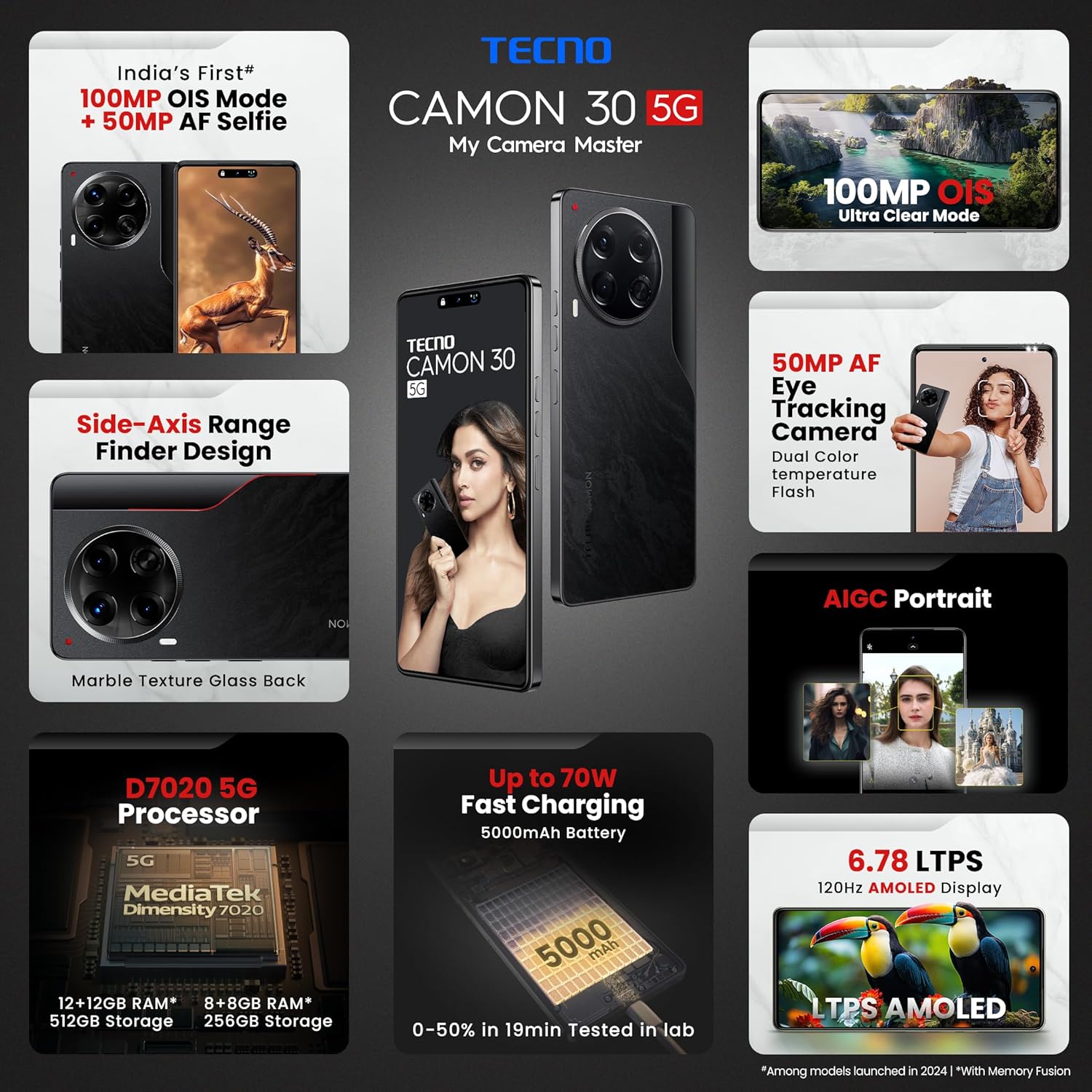
Figure 2.1: The Tecno CAMON 30 5G's vibrant LTPS AMOLED display.
2.2 Ngosipụta atụmatụ
The device features a 6.78-inch FHD+ LTPS AMOLED Dot-in display with a resolution of 1080 x 2436 pixels. Key display features include:
- 1300 nits Peak Brightness: Ensures clear visibility even in bright outdoor conditions.
- 120Hz Adaptive Refresh Rate: Automatically adjusts between 120Hz, 90Hz, and 60Hz for smooth scrolling and power efficiency.
- 2160Hz High-Frequency PWM Dimming: Reduces screen flicker for improved eye comfort.
- TÜV Rheinland Low Blue Light Emission Certified: Protects your eyes from harmful blue light.
- Wet Hand Touch Technology: Allows for smooth navigation even with wet hands.
Sistemụ igwefoto 2.3
The Tecno CAMON 30 5G is equipped with an advanced camera system for high-quality photography and videography.
- Igwefoto azụ: 100MP OIS (Optical Image Stabilization) main sensor with a 2MP Depth Sensor. Features include Ultra Steady videos (OIS + EIS), 10X Zoom, Twinkle Portrait Filter, Super Night Photography Mode, Sky Shop, and Slow Motion Videos.
- Igwefoto ihu: 50MP Auto Focus Selfie camera with Dual Color Temperature Front Flash. Supports DSLR-level portrait system and Video HDR.
- AIGC Portrait (OTA): AI Generative Content for enhanced portrait photography.

Figure 2.2: The distinctive rear camera module of the Tecno CAMON 30 5G.
2.4 Arụmọrụ na Nchekwa
Powered by the MediaTek Dimensity 7020 chipset with a 6nm processor, the device offers robust performance for gaming and multitasking.
- Ihe nhazi: MediaTek Dimensity 7020 (6nm) for Ultra 5G Performance.
- RAM: Up to 24GB* (12GB physical + 12GB Memory Fusion) LPDDR4x RAM.
- Nchekwa ime: 512GB UFS 3.1 Storage.
2.5 Audio and Smart Features
- Dolby Atmos: Provides immersive audio experience.
- Ella with ChatGPT: Integrated AI assistant for various tasks.
- AI Eraser (OTA): Allows for intelligent object removal from photos.
- Njikwa anya infrared: Supports control of up to 15 types of home appliances.
- Dynamic Pet AOD: Customizable Always-On Display with dynamic pet animations.
3. Nlekọta
3.1 Na-ehicha ngwaọrụ gị
Ka idowe ọdịdị na ịrụ ọrụ nke ngwaọrụ gị:
- Jiri akwa dị nro na-enweghị lint hichapụ ihuenyo na ahụ.
- Zere iji kemịkalụ siri ike, ihe nhicha ihe na-emebi emebi, ma ọ bụ ikuku a na-eme ka ọ dị njọ.
- Mee ka ọdụ ụgbọ mmiri ghara ịdị na uzuzu na irighiri ihe.
3.2 Mmelite ngwanrọ
Lelee ma wụnye mmelite ngwanrọ mgbe niile iji hụ na arụmọrụ kacha mma, nchekwa na ịnweta njirimara ọhụrụ. Gaa na Ntọala> Sistemu> Mmelite sistemụ ịlele maka mmelite.
3.3 Nlekọta batrị
The device is equipped with a 5000mAh battery. To prolong battery life:
- Zere oke okpomọkụ.
- Use only the official Tecno charger and cable.
- Zere igbapu batrị kpamkpam ugboro ugboro.
3.4 Njikwa nchekwa
Regularly manage your device's storage to ensure smooth operation. Delete unnecessary files, clear app caches, and uninstall unused applications. You can check storage usage in Ntọala > Nchekwa.
4. Nchọpụta nsogbu
This section addresses common issues you might encounter with your Tecno CAMON 30 5G.
4.1 Ngwaọrụ anaghị agbanwu
- Gbaa mbọ hụ na agbagoro batrị. Jikọọ chaja wee chere nkeji ole na ole tupu ị nwaa ịgbanye.
- Pịa ma jide bọtịnụ Ike maka opekata mpe sekọnd 10-15 iji mee ka ọ malitegharịa.
4.2 Okwu nchaji
- Hụ na chaja na eriri USB ejikọtara na ekwentị na ebe a na-ere ọkụ.
- Gbalịa iji ụzọ ọkụ dị iche.
- Lelee ọdụ ụgbọ mmiri ịchaji maka irighiri ma ọ bụ mmebi ọ bụla.
4.3 Nsogbu Njikọta Netwọk
- Check if Airplane Mode is enabled (swipe down from the top of the screen to access Quick Settings).
- Hụ na etinyere kaadị SIM gị nke ọma.
- Malitegharịa ngwaọrụ ahụ.
- Gaa na Ntọala> Netwọk & ịntanetị> Netwọk mkpanaka and ensure mobile data is enabled.
4.4 Ngwa ndị na-akụda ma ọ bụ na-ajụ oyi
- Mechie ngwa nsogbu ahụ wee meghee ya ọzọ.
- Hichapụ cache ngwa ahụ (Ntọala> Ngwa> [Aha ngwa]> Nchekwa & cache> Kpochapụ cache).
- Gbaa mbọ hụ na emelitere ngwa ahụ ka ọ bụrụ ụdị kachasị ọhụrụ.
- Ọ bụrụ na nsogbu ahụ anọgide, tụlee iwepụ ma tinyegharịa ngwa ahụ.
4.5 nrụpụta nrụpụta
Ọ bụrụ na ị na-enwe nsogbu ngwanrọ na-aga n'ihu, nrụpụta ụlọ ọrụ nwere ike idozi ha. Ịdọ aka ná ntị: Nke a ga-ehichapụ data niile dị na ekwentị gị. Kwado data dị mkpa tupu ịga n'ihu.
- Gaa na Ntọala> Sistemu> Tọgharia nhọrọ.
- Họrọ Hichapụ data niile (ntọgharị ụlọ ọrụ).
- Kwenye mkpebi gị ma tinye PIN/ụkpụrụ/paswọọdụ gị ma ọ bụrụ na achọrọ ya.
5. Nkọwapụta
Below are the detailed technical specifications for the Tecno CAMON 30 5G (Model: CL7 512+12).
| Njirimara | Nkọwapụta |
|---|---|
| Sistemụ nrụọrụ | Android 14 (HiOS) |
| Nhazi | MediaTek Dimensity 7020 (6nm) |
| RAM | 12GB (enwere ike ịgbasa ruo 24GB site na ijikọta ebe nchekwa) |
| Nchekwa nke ime | 512GB UFS 3.1 |
| Ngosipụta | 6.78" FHD+ LTPS AMOLED Dot-in Display, 1080 x 2436 resolution, 120Hz Adaptive Refresh Rate, 1300 nits Peak Brightness, 2160Hz PWM Dimming |
| Igwefoto azụ | 100MP OIS Main Camera + 2MP Depth Sensor |
| Igwefoto ihu | 50MP Auto Focus Selfie Camera |
| Batrị | 5000mAh |
| Ịchaji | 70W Flash Charging, 10W Reverse Charging |
| Akụkụ | 16.54 x 0.76 x 0.78 cm |
| Ibu | 199 g |
| Njikọta | 5G, Wi-Fi, Bluetooth, USB Type-C |
| Ihe mmetụta | In-display Fingerprint Sensor, Accelerometer, Gyroscope, Proximity, Compass |
| Kedu ihe dị na Igbe ahụ | SIM Tray Ejector (other accessories like charger and cable are typically included but not explicitly listed in 'Whats in the box' field) |
6. Akwụkwọ ikike na nkwado
6.1 Ozi akwụkwọ ikike
Your Tecno CAMON 30 5G comes with a limited manufacturer's warranty. Please refer to the warranty card included in your product package for specific terms, conditions, and duration of coverage. Keep your proof of purchase for warranty claims.
6.2 Nkwado ndị ahịa
For technical assistance, service, or any inquiries regarding your device, please contact Tecno customer support:
- Nọmba na-anaghị akwụ ụgwọ: 18004190525
- Email: Service.india@carlcare.com
- Onye nrụpụta: G mobiles, Ismartu India Private Limited, D-197 and 198, Sector 63, Noida, Gautam Buddha Nagar, Uttar Pradesh 201301, India.
Tecno provides a robust after-sales service network with over 1300 service centers across more than 1000 towns in India.


