Okwu mmalite
Thank you for choosing the SETTY 20000 mAh Power Bank. This portable charger is designed to provide reliable power for your mobile devices, ensuring you stay connected on the go. With its high capacity and versatile charging options, it is an essential companion for travel and daily use. Please read this manual carefully before using the device to ensure proper operation and longevity.
Ngwaahịa gafereview
The SETTY 20000 mAh Power Bank (Model PB1-201) features a compact design with multiple input and output ports for universal compatibility.

Figure 1: SETTY 20000 mAh Power Bank with its retail packaging, highlighting its capacity and port types.
Akụkụ ndị bụ isi:
- Ike dị elu: 20000 mAh provides multiple charges for smartphones and other devices.
- Mpụta USB abụọ: Two USB-A output ports allow simultaneous charging of two devices.
- Ntinye zuru ụwa ọnụ: Equipped with both microUSB and USB-C input ports for convenient recharging of the power bank.
- Ihe ngosi LED: Integrated LED lights display the remaining battery level of the power bank.
- Kọmpat na ibugharị: Designed for easy carrying in a pocket or bag.
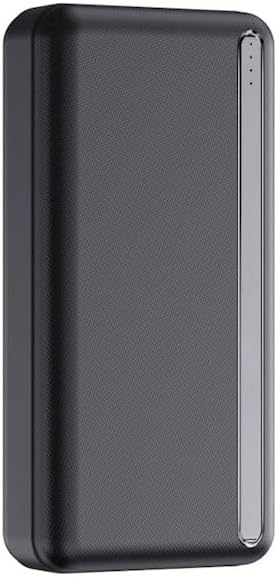
Foto 2: Top view of the power bank, showing the USB-A output ports, USB-C input/output port, microUSB input port, and LED battery indicators.
Melite
First Use & Charging the Power Bank:
Before initial use, it is recommended to fully charge your SETTY Power Bank.
- Connect the power bank to a power source (e.g., wall adapter, computer USB port) using either a microUSB cable or a USB-C cable.
- The LED indicators on the power bank will illuminate, showing the charging progress. Each lit LED typically represents approximately 25% of the battery capacity.
- Once all LED indicators are solid and no longer blinking, the power bank is fully charged and ready for use.
Ntuziaka ọrụ
Ịchaji ngwaọrụ gị:
The SETTY Power Bank can charge two devices simultaneously.
- Connect your device's charging cable (USB-A or USB-C, depending on your device and the power bank's output ports) to one of the power bank's output ports.
- Jikọọ nsọtụ nke ọzọ nke eriri na ngwaọrụ gị.
- The power bank will automatically begin charging your device. The LED indicators will show the remaining power level of the power bank.
- To stop charging, simply disconnect the cable from your device or the power bank.

Figure 3: The power bank actively charging a smartphone, demonstrating its use in a typical scenario.
Na-enyocha ọkwa batrị:
Press the power button (if available, or simply connect a device) to activate the LED indicators and check the current battery level of the power bank.
- 4 LED: 75% - 100% a na-akwụ ụgwọ
- 3 LED: 50% - 75% a na-akwụ ụgwọ
- 2 LED: 25% - 50% a na-akwụ ụgwọ
- 1 LED: A na-akwụ ụgwọ 0% - 25% (a na-akwụghachi gị ụgwọ n'oge adịghị anya)
Nlekọta
To ensure the longevity and optimal performance of your SETTY Power Bank, follow these maintenance guidelines:
- Debe ụlọ akụ ike akọrọ ma pụọ na mmiri mmiri.
- Zere oke okpomọkụ (ọkụ ma ọ bụ oyi).
- Do not drop, disassemble, or attempt to repair the device yourself.
- Clean the surface with a soft, dry cloth. Do not use harsh chemicals or abrasive cleaners.
- For long-term storage, charge the power bank to about 50-75% and recharge it every 3-6 months to prevent deep discharge.
Nchọpụta nsogbu
If you encounter issues with your SETTY Power Bank, refer to the following common problems and solutions:
| Nsogbu | Ihe nwere ike ime | Ngwọta |
|---|---|---|
| Ụlọ akụ ọkụ anaghị akwụ ụgwọ | Cable issue, power source issue, power bank fully charged. | Try a different charging cable. Ensure the wall adapter/USB port is functional. Check LED indicators; it might already be full. |
| Ngwaọrụ anaghị akwụ ụgwọ site na ụlọ akụ ọkụ | Power bank low on charge, cable issue, device issue, incorrect port. | Recharge the power bank. Try a different charging cable. Ensure your device is compatible. Use the correct output port (USB-A or USB-C). |
| Nchaji nwayọ | Cable quality, device input limit, multiple devices charging. | Use a high-quality charging cable. Ensure your device supports faster charging. Charging two devices simultaneously may reduce individual charging speed. |
| LEDs anaghị agba ọkụ | Power bank completely discharged, malfunction. | Attempt to charge the power bank for several hours. If still unresponsive, contact customer support. |
Nkọwapụta
Detailed technical specifications for the SETTY 20000 mAh Power Bank (Model PB1-201):
| Njirimara | Nkọwa |
|---|---|
| Nlereanya | PB1-201 |
| Ike batrị | 20000 mAh |
| Ngwakọta batrị | Lithium-polymer |
| Ntinye ọdụ ụgbọ mmiri | MicroUSB, USB-C |
| Ọdụ ụgbọ mmiri mmepụta | 2 x USB-A, 1 x USB-C |
| Voltage | 5 volts |
| Akụkụ (L x W x H) | 16L x 8l x 4Ép centimeters (approx. 16 x 8 x 4 cm) |
| Ngwa dakọtara | Smartphones, Tablets, Smartwatches, Earbuds, etc. |

Figure 4: Visual representation of the power bank highlighting its 20000 mAh capacity, 22.5W output, and various input/output ports.
Akwụkwọ ikike na nkwado
This SETTY Power Bank comes with a standard manufacturer's warranty. Please refer to the product packaging or the retailer's websaịtị maka usoro na ọnọdụ akwụkwọ ikike akọwapụtara.
For technical support, warranty claims, or further assistance, please contact the customer service of your point of purchase or visit the official SETTY websaịtị.
Ihe dị mkpa: Do not attempt to open or modify the device. This may void the warranty and pose safety risks.


