1. Okwu mmalite
This manual provides essential information for the setup, operation, maintenance, and troubleshooting of your COROS VERTIX 2S Adventure GPS Watch. Please read this manual thoroughly to ensure proper use and to maximize the performance and longevity of your device.
2. Kedu ihe dị na Igbe ahụ
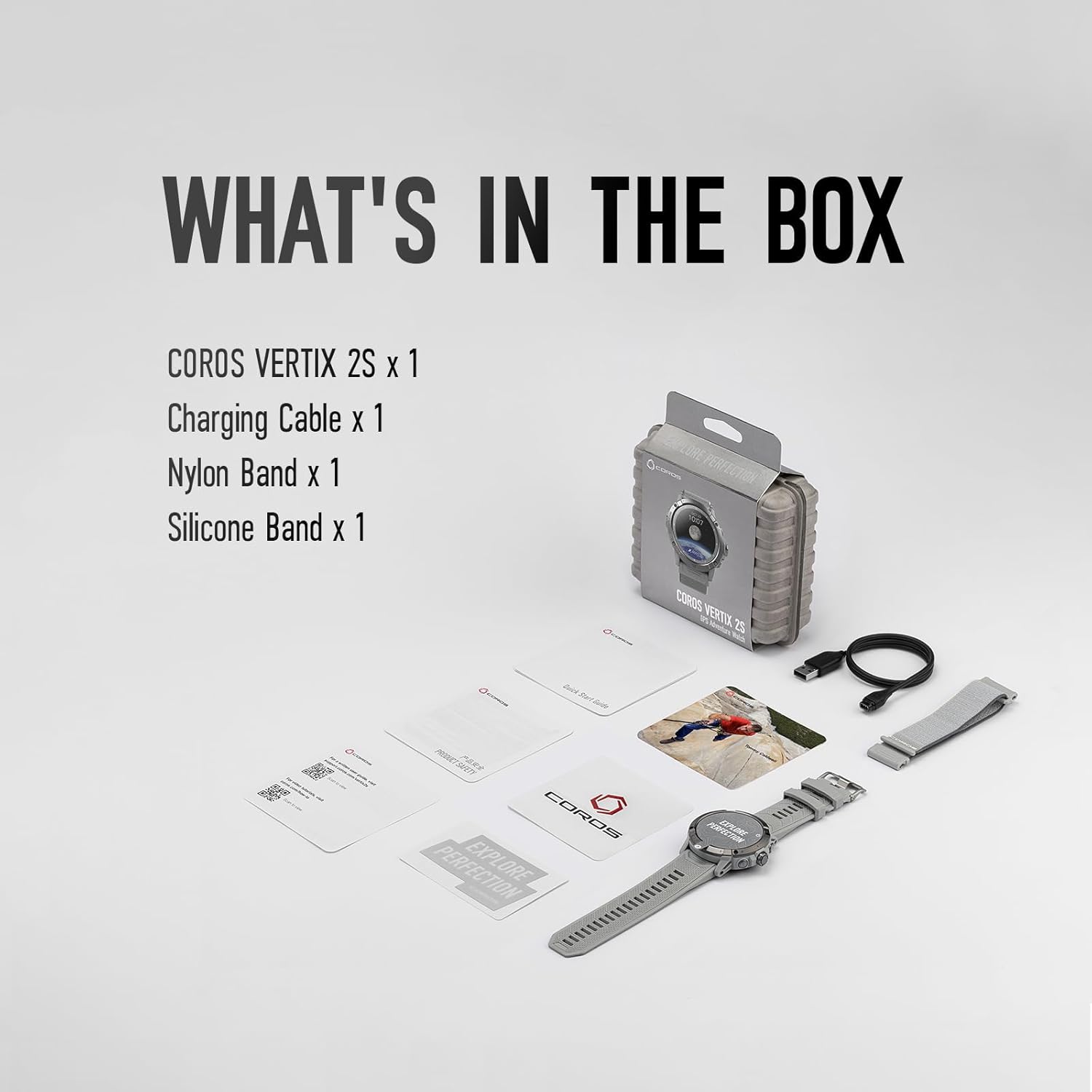
The COROS VERTIX 2S package includes the following items:
- COROS VERTIX 2S GPS Watch (1)
- Ịchaji USB (1)
- Nylon Band (1)
- Silicone Band (1)
- Akwụkwọ ntuziaka (1)
Ensure all components are present upon unboxing. The compact packaging is made from recycled materials and can be reused for storage.
3. Nhazi
3.1 Nchaji izizi
Before first use, fully charge your COROS VERTIX 2S. Connect the included charging cable to the watch's charging port and a USB power source. A full charge typically takes a few hours.

The watch features a Pogo-style charging port on its rear. Ensure the charging cable is securely connected to initiate charging. The watch's display will indicate charging status.
3.2 Pairing with COROS App
Download the COROS app from your smartphone's app store. Open the app and follow the on-screen instructions to pair your watch. This enables data synchronization, map downloads, and personalized settings.
3.3 Band Installation
The COROS VERTIX 2S comes with both nylon and silicone bands. To change bands, locate the quick-release pins on the underside of the band where it connects to the watch body. Slide the pin to detach the band and attach the desired band by aligning the pin with the watch lugs and releasing ya.

The quick-release mechanism allows for easy and secure band changes, adapting the watch to different activities or personal style preferences.
4. Ịrụ ọrụ elekere gị
4.1 Nsoro ụzọ
The VERTIX 2S features tactile buttons and a large digital dial for easy operation, even with gloves. The 1.4-inch touchscreen also allows for intuitive interaction.

The digital dial and tactile buttons are designed for ease of use in various conditions, including cold weather or when wearing thick gloves, ensuring full functionality during outdoor adventures.
4.2 GPS Navigation and Route Planning
Utilize the dual-frequency GPS technology for precise location data. Global offline maps are available on-wrist, and you can create, follow, and return along your path using the COROS app. Navigation Mirroring allows complex routes to be followed from both your phone and watch.

The watch's display clearly shows navigation routes, ensuring users can stay on track even in challenging or remote environments. The detailed maps provide essential guidance for outdoor activities.
4.3 Nleba anya ọnụego obi
The next-gen optical sensor provides accurate heart rate tracking for precise training and recovery data. Monitor your progress and gain actionable insights through the COROS app.

The advanced optical sensor on the back of the watch continuously monitors heart rate, providing critical data for optimizing workouts and understanding recovery needs.
4.4 Recovery and Sleep Tracking
The watch monitors sleep quality and tracks sleep stages. It also offers real-time stress analysis and wellness checks, including heart rate variability and breathing rate.
4.5 Activity Modes and Alerts
The VERTIX 2S supports various activity modes for sports like rock climbing, skiing, running, and biking. It also provides essential alerts such as nutrition, sun movements, storm, safety, night mode, and altitude mode to keep you informed and safe in the wilderness.
The watch's interface provides quick access to critical environmental data and alerts, helping users stay prepared for changing conditions during outdoor activities.
4.6 Video karịrịview: GPS Adventure Watch
This official product video from COROS Wearables provides a comprehensive overview of the VERTIX 2S GPS Adventure Watch, highlighting its key features and capabilities for outdoor enthusiasts.
5. Nlekọta
5.1 Na-ehicha elekere gị
Regularly clean your watch and bands with a soft, damp cloth. Avoid using harsh chemicals or abrasive materials that could damage the sapphire screen or PVD-coated titanium bezel.
5.2 Mmiri Nguzogide
The COROS VERTIX 2S is designed to endure harsh environments with 10 ATM water resistance (up to 100 meters). It is suitable for swimming and other water activities, but avoid operating buttons underwater to prevent water ingress.
5.3 Nlekọta batrị
To prolong battery life, avoid extreme temperatures and store the watch in a cool, dry place when not in use for extended periods. The watch boasts an impressive battery life of 40 days of regular use or 118 hours of full GPS tracking.

The robust battery performance is designed to support multi-day adventures without the need for frequent recharging, making it ideal for extended outdoor activities.
6. Nchọpụta nsogbu
6.1 GPS Accuracy Issues
If you experience issues with GPS accuracy, ensure you are in an open area with a clear view of the sky. Syncing your watch with the COROS app regularly can also improve GPS performance by updating satellite data. Dual-frequency GPS technology is designed to provide precise location data even in challenging terrains like mountains or narrow canyons.
6.2 Nsogbu Njikọta
If the watch fails to connect to your phone via Bluetooth, try restarting both devices. Ensure Bluetooth is enabled on your phone and the watch is within range. Re-pairing the devices in the COROS app may also resolve the issue.
6.3 Watch Not Responding
If the watch becomes unresponsive, perform a soft reset by holding down the digital dial and back button simultaneously until the COROS logo appears. If the issue persists, ensure the watch is charged.
7. Nkọwapụta
| Njirimara | Nkọwa |
|---|---|
| Aha Nlereanya | B19S |
| Ngosipụta nha | 1.4 sentimita asatọ |
| Mkpebi | 480 x272 |
| Battery Life (Regular Use) | Ụbọchị 40 |
| Battery Life (Full GPS) | Awa 118 |
| Mmiri Nguzogide | 10 ATM (100m) |
| Ihe Bezel | PVD-coated Titanium |
| Ihe ihuenyo | Glass sapphire |
| Njikọta | Bluetooth |
| Teknụzụ GPS | Dual-frequency GPS |
| Ihe mmetụta anya | Next-gen optical heart rate sensor |
| Ibu Ibu | 8.4 ounces |
| Akụkụ ngwaahịa | 4.13 x 4.13 x 4.13 sentimita asatọ |
| Mba onye si | China |
8. Akwụkwọ ikike na nkwado
8.1 Ozi akwụkwọ ikike
The COROS VERTIX 2S comes with a 2-year manufacturer's warranty. Please retain your proof of purchase for warranty claims. For detailed warranty terms and conditions, refer to the official COROS websaịtị ma ọ bụ kpọtụrụ nkwado ndị ahịa.
8.2 Nkwado ndị ahịa
For further assistance, technical support, or service inquiries, please visit the official COROS website or contact their customer support team. You can also find additional resources and FAQs on the COROS Store on Amazon.


