1. Okwu mmalite
Welcome to the user manual for your new realme 12x 5G smartphone. This guide provides essential information on setting up, operating, maintaining, and troubleshooting your device. The realme 12x 5G is designed to offer a seamless mobile experience with its advanced features and robust performance.
This smartphone features a Dimensity 6100+ 6nm chipset for 5G connectivity, a 45W SUPERVOOC Charge with a 5000 mAh battery, a 12.07 cm (6.72 inch) 120 Hz FHD+ Display, a 50 MP AI camera, and dual stereo speakers. Its ultra-slim 7.69 mm profile and lightweight 188g body ensure portability and comfort.
2. Ihe ngwugwu
Biko lelee igbe maka ihe ndị a:
- Ekwentị
- chaja
- USB data USB
- Ngwaọrụ SIM Ejector
- Ntuziaka nchekwa
- Ntuziaka ngwa ngwa
- TPU Protective Case
3. Ngwaọrụ gafereview
The realme 12x 5G features a sleek design with an ultra-slim 7.69 mm profile and a lightweight 188g body, making it comfortable to hold and carry. The device is equipped with a 12.07 cm (6.72 inch) 120 Hz FHD+ Display for clear and smooth visuals.
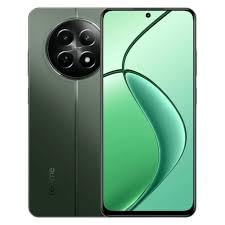
Image: realme 12x 5G Smartphone, showcasing its design and display. Note: This image is a small thumbnail and may not show full detail.
Maka ihe nlele anyaview of the realme 12x 5G, please watch the official product video below:
Vidiyo: Emechara ọrụ gọọmentịview of the realme 12x 5G, highlighting its key features and design.
4. Ntuziaka Nhazi
4.1 Itinye Kaadị SIM
- Chọta tray kaadị SIM n'akụkụ ngwaọrụ gị.
- Fanye ngwaọrụ ejector SIM n'ime obere oghere dị n'akụkụ traị ahụ wee pịa nwayọ ruo mgbe tray ahụ pụtara.
- Tinye kaadị Nano-SIM gị na/ma ọ bụ kaadị microSD gị n'ime tray ahụ ka ihe ndị e ji ọlaedo mee wee chee ihu ala. Hụ na ha nọ n'ọnọdụ kwesịrị ekwesị.
- Jiri nlezianya tụgharịa traị ahụ azụ n'ime ngwaọrụ ahụ ruo mgbe ọ pịrị na ya.
4.2 Gbanyụọ/ gbanyụọ
- Iji gbanye: Press and hold the Power button (usually on the right side) until the realme logo appears on the screen.
- Iji gbanyụọ: Pịa ma jide bọtịnụ Ike, wee họrọ 'Gbanyụọ' site na nhọrọ ndị na-apụta na ihuenyo.
- Ka Malitegharịa ekwentị: Pịa ma jide Ike bọtịnụ, wee họrọ 'Malitegharịa ekwentị' site na nhọrọ.
4.3 Nhazi izizi
Upon first power-on, follow the on-screen prompts to set up your device:
- Họrọ asụsụ na mpaghara ọkacha mmasị gị.
- Jikọọ na netwọk Wi-Fi maka ịnweta ịntanetị.
- Jiri akaụntụ Google gị banye ma ọ bụ mepụta nke ọhụrụ.
- Set up screen lock (PIN, pattern, password, fingerprint, or face unlock).
- Review ma nabata usoro na ọnọdụ.
5. Basic Ọrụ
5.1 Nsoro ụzọ
Your realme 12x 5G supports both gesture navigation and traditional navigation buttons. You can customize your preferred navigation method in the device settings.
- Ihuenyo ụlọ: Swipe up from the bottom (gesture) or tap the Home button.
- Azu: Swipe from the left or right edge (gesture) or tap the Back button.
- Ngwa ọhụrụ: Swipe up from the bottom and hold (gesture) or tap the Recent Apps button.
5.2 Ịchaji
The device supports 45W SUPERVOOC Charge. Use the provided charger and USB data cable for optimal charging speed. The 5000 mAh battery provides extended usage time.
5.3 Njikọta
The realme 12x 5G is equipped with a Dimensity 6100+ 6nm chipset, enabling fast 5G connectivity. It also supports Wi-Fi for internet access and Cellular for mobile data and calls.
5.4 Performance and Cooling
With 6GB RAM, the device offers seamless multitasking. A vapour chamber cooling system is integrated to maintain optimal performance during intensive use, preventing overheating.
6. Akụkụ igwefoto
The realme 12x 5G features a versatile camera system to capture various moments:
- Igwefoto azụ: 50 MP AI camera for detailed photos.
- Secondary Rear Camera: 2 MP camera for additional imaging capabilities.
- Igwefoto ihu: 8 MP selfie shooter for clear self-portraits and video calls.
Access the Camera app from your home screen or app drawer. Explore various modes such as Photo, Video, Portrait, Night, and more to enhance your photography.
7. Nka na ụzụ nkọwa
Below are the detailed technical specifications for the realme 12x 5G:
| Njirimara | Nkọwapụta |
|---|---|
| Sistemụ nrụọrụ | Android |
| RAM | 6 GB |
| Akụkụ ngwugwu | 25.1 x 17.8 x 6.7 cm |
| Batrị | 1 batrị lithium ion (gụnyere) |
| Nọmba Nlereanya ihe | 12X |
| Teknụzụ nzikọrịta ozi ikuku | Cellular, Wi-Fi |
| Teknụzụ Njikọta | Wi-Fi |
| Atụmatụ pụrụ iche | (6.72 inch) Full HD+ Display, 5000 mAh Battery, 50MP + 2MP | 8MP Front Camera, Dimensity 6100+ Processor |
| Akụkụ ngosi ndị ọzọ | Ikuku |
| Njikọ ngwaọrụ - Nke mbụ | Ihuenyo mmetụ aka |
| Mkpebi | 1080 x2400 |
| Atụmatụ igwefoto ndị ọzọ | N'ihu, azụ |
| Jack ọdịyo | USB |
| Ụdị Ihe | Ekwentị mkpanaaka |
| Agba | Akwụkwọ ndụ akwụkwọ ndụ |
| Ogo ike batrị | 5000 ndeamp Oge awa |
| Oge Okwu Ekwentị | Awa 6 |
| Ibu Ibu | 188 g |
| Ụdị CPU | Snapdragon (Note: Description mentions Dimensity 6100+ 6nm chipset, please refer to device for exact CPU) |
| Ọsọ CPU | 2.2 GHz |
8. Nchọpụta nsogbu
If you encounter issues with your realme 12x 5G, try the following basic troubleshooting steps:
- Ngwaọrụ anaghị agba ọkụ: Gbaa mbọ hụ na agbagoro batrị. Jikọọ chaja wee chere nkeji ole na ole tupu ị nwaa ịgbanye ọzọ.
- Ngwa ndị na-emebi/na-eme ka oyi gbụpụta: Close the app and reopen it. If the issue persists, clear the app's cache and data in Settings > Apps. As a last resort, uninstall and reinstall the app.
- Okwu Njikọta netwọkụ: Check if Airplane Mode is off. Restart your device. Verify your SIM card is properly inserted. Reset network settings in Settings > System > Reset options.
- Ịrụ ngwa ngwa: Close unnecessary background apps. Clear cache regularly. Ensure your device software is up to date.
- Na-agbapụ batrị ọsọ ọsọ: Reduce screen brightness, disable unnecessary features like GPS or Bluetooth when not in use, and identify power-hungry apps in battery settings.
For more complex issues, refer to the official realme support websaịtị ma ọ bụ kpọtụrụ ndị ahịa.
9. Akwụkwọ ikike na nkwado
Your realme 12x 5G smartphone comes with a manufacturer's warranty. Please refer to the warranty card included in your package for specific terms and conditions, including warranty period and coverage details.
For technical support, service, or further inquiries, please visit the official realme support website or contact their customer service helpline. Keep your proof of purchase handy when seeking support.


