1. Okwu mmalite
Thank you for choosing the ALGAM LIGHTING MB100 Lyre Beam LED 100W Moving Head. This professional lighting fixture is designed for dynamic stage and event illumination, featuring a powerful 100W LED, gobo wheel, color wheel, and dual rotating prisms. To ensure safe operation and optimal performance, please read this instruction manual thoroughly before installation and use. Keep this manual for future reference.

Foto 1: N'ihu view of the ALGAM LIGHTING MB100 Moving Head fixture.
2. Ozi nchekwa
Always observe the following safety precautions to prevent electric shock, fire, or injury.
- Ịdọ aka ná ntị! Before use and installation, read this user manual and follow all safety precautions.
- CAUTION! RISK OF ELECTRIC SHOCK. DO NOT OPEN. Kpọtụrụ ndị ọrụ ruru eru ọrụ niile.
- Ensure a minimum distance of 0.5 meters (1.64 feet) from the fixture to combustible materials.
- This product is designed for indoor use only. Do not expose to rain or moisture.
- Always connect the fixture to a grounded power outlet.
- Disconnect from mains power before cleaning or servicing.
- Do not operate the fixture if the power cord is damaged.
- Gbaa mbọ hụ na ikuku ikuku dị na gburugburu unit ahụ iji gbochie ikpo oke ọkụ.
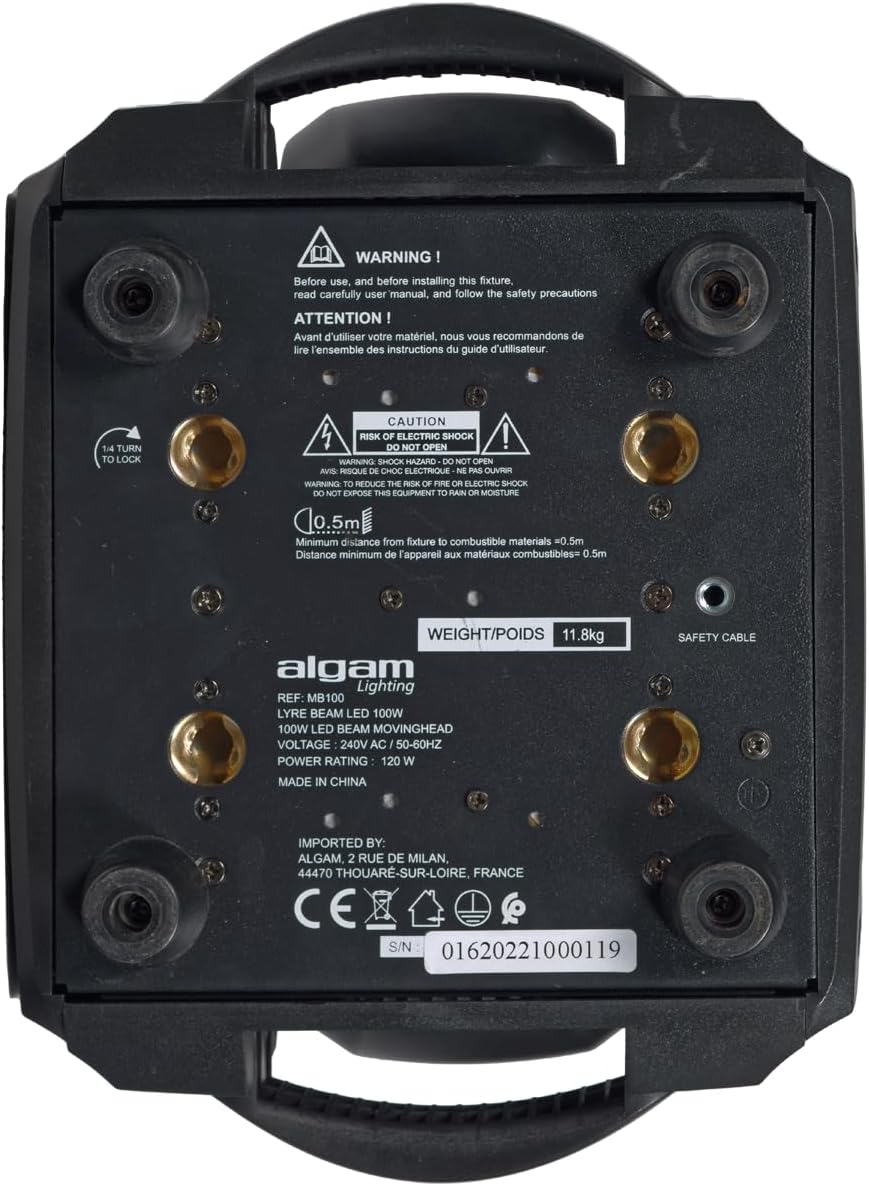
Onyonyo 2: N'okpuru view of the MB100, showing safety warnings and product identification labels.
3. Ngwaahịa gafereview
3.1. Atụmatụ igodo
- Powerful 100W LED light source.
- PAN movement up to 540° and TILT movement up to 270°.
- Fixed Gobo Wheel with 15 gobos + open, featuring wheel rotation and SHAKE effect.
- Color Wheel with 9 colors + white, offering continuous rotation with variable speed and direction.
- Dual rotating prism system: 8-facet and 16-facet prisms with variable speed and direction.
- DMX control via 16 or 20 channels.
- 3-pin XLR DMX input/output connectors.
- Locking powerCON input/output connectors for power.
- Integrated LCD display for menu navigation and settings.
3.2. Components and Connections
The MB100 fixture includes various components for power, data, and mounting.
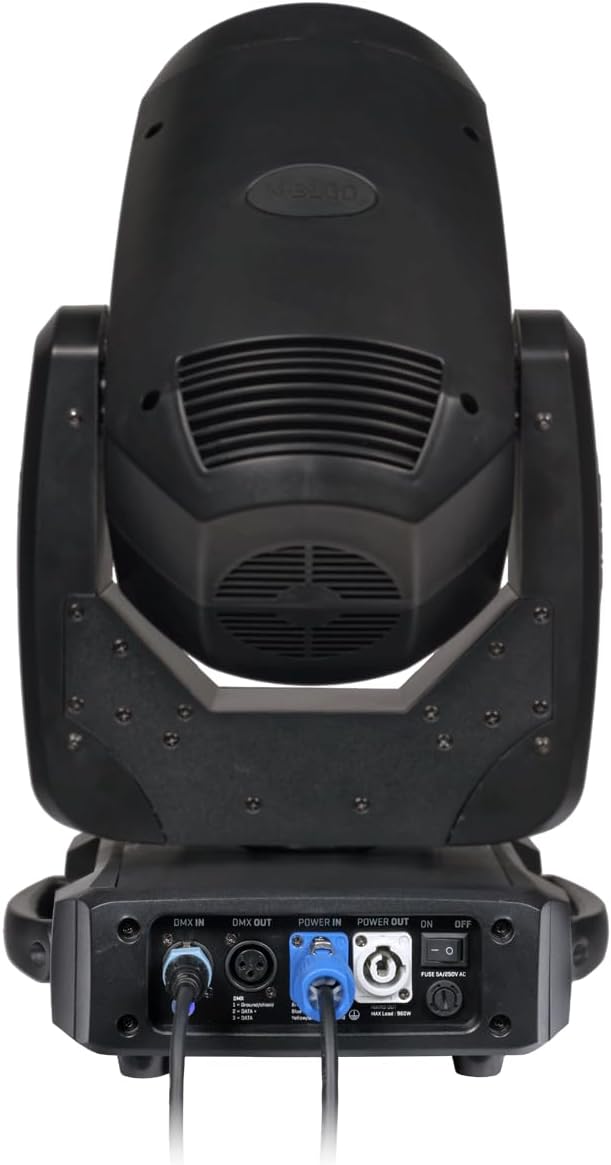
Ọgụgụ 3: N'azụ view of the MB100, highlighting the connection panel.
- DMX N'ime: 3-pin XLR connector for DMX signal input.
- DMX pụọ: 3-pin XLR connector for DMX signal output to other fixtures.
- IKE NA: Locking powerCON connector for main power input (100-240V AC, 50/60 Hz).
- IKE: Locking powerCON connector for daisy-chaining power to other fixtures (Max load: 960W).
- Gbanyụọ/gbanyụọ Main power switch for the fixture.
- Ngosipụta LCD: For menu navigation and setting adjustments.
- bọtịnụ njikwa: Menu, Up, Down, Enter buttons for display interaction.
- Hanging Bracket (Lyre d'accroche): Included for secure mounting.
- Safety Sling: Included for additional safety when rigging.
4. Nhazi
4.1. Ịkwanye
The MB100 can be mounted in various orientations (e.g., truss, floor) using the supplied hanging bracket. Always ensure the mounting surface or truss is capable of supporting the fixture's weight (11.8 kg) and any additional equipment. Use the provided safety sling as a secondary attachment point to prevent accidental drops.
- Attach the hanging bracket securely to the fixture using the designated mounting points.
- Mount the fixture to a truss or other suitable structure.
- Always attach the safety sling to a separate, secure point on the truss or structure.
4.2. Njikọ ike
Jikọọ eriri ọkụ enyere na Ike IN connector on the fixture and then to a grounded power outlet (100-240V AC, 50/60 Hz). If daisy-chaining power to other fixtures, use the IWU connector, ensuring the total load does not exceed 960W.
4.3. Njikọ DMX
For DMX control, connect a 3-pin XLR cable from your DMX controller's output to the DMX n'ime connector on the MB100. To control multiple fixtures, connect a DMX cable from the DMX pụọ nke mbụ nkwuputa ka DMX n'ime of the next, and so on. Ensure the last fixture in the chain has a DMX terminator installed.
5. Ntuziaka ọrụ
5.1. LCD Display and Menu Navigation
The MB100 features an LCD display and control buttons (Menu, Up, Down, Enter) for configuring settings. Use the 'Menu' button to cycle through main menu options, 'Up' and 'Down' to navigate within a menu or adjust values, and 'Enter' to confirm selections.
5.2. DMX Channel Modes
The MB100 supports 16 or 20 DMX channels. Select the desired channel mode via the LCD menu to match your DMX controller's configuration. Set the DMX start address for each fixture to ensure independent control.
5.3. Movement (PAN/TILT)
The fixture offers a wide range of motion:
- PAN: Up to 540° horizontal movement.
- TILT: Up to 270° vertical movement.
These movements are controlled via dedicated DMX channels, allowing for precise positioning and dynamic effects.
5.4. Gobo Wheel
The fixed gobo wheel contains 15 distinct gobos plus an open position. DMX control allows for selection of individual gobos, continuous wheel rotation, and a 'SHAKE' effect for added visual interest.
5.5. Agba agba
The color wheel features 9 vibrant colors plus white. It supports continuous rotation with variable speed and direction, enabling smooth color changes, split colors, and rainbow effects.
5.6. Prism Effects
The MB100 is equipped with a double rotating prism system: an 8-facet prism and a 16-facet prism. These can be engaged and rotated independently or together, with variable speed and direction, to multiply the beam and create stunning aerial effects.
6. Nlekọta
Regular maintenance ensures the longevity and optimal performance of your MB100 fixture.
- Nhicha: Na-ehicha anya na mpụta ya mgbe niileasing with a soft, lint-free cloth. For stubborn dirt, use a mild glass cleaner. Ensure the fixture is powered off and disconnected from the mains before cleaning.
- Igwe ikuku: Hụ na oghere ikuku dị n'èzí enweghị uzuzu na ihe ruru unyi iji gbochie oke okpomọkụ.
- Nyocha USB: Na-enyocha waya ike na DMX mgbe niile maka ihe ịrịba ama ọ bụla nke mmebi. Dochie waya ndị mebiri emebi ozugbo.
- Nyocha izugbe: Periodically check all screws and mounting hardware to ensure they are secure.
7. Nchọpụta nsogbu
If you encounter issues with your MB100, refer to the following common troubleshooting steps:
- Enweghị ike:
- Check if the power cable is securely connected to both the fixture and the power outlet.
- Ensure the main ON/OFF switch on the fixture is in the 'ON' position.
- Nyochaa na ntinye ọkụ na-arụ ọrụ.
- Enweghị njikwa DMX:
- Check DMX cable connections between the controller and the fixture(s).
- Ensure the DMX start address on the fixture matches your controller's settings.
- Verify the DMX channel mode (16 or 20 channels) is correctly set on the fixture.
- Ensure a DMX terminator is used on the last fixture in the chain.
- Test with a different DMX cable or controller if possible.
- Fixture Not Responding / Erratic Behavior:
- Power cycle the fixture (turn off, wait 10 seconds, turn on).
- Check for any error messages on the LCD display.
- Ensure the fixture is not overheating; check ventilation.
If problems persist after attempting these steps, contact ALGAM LIGHTING customer support or a qualified service technician.
8. Nkọwapụta
| Ụdị | Ọkụ ALGAM |
| Aha Nlereanya | MB100 (LAL MB100) |
| Isi Iyi Ìhè | 100W LED |
| Ọwa DMX | 16 ma ọ bụ 20 |
| Njikọ DMX | 3-pin XLR banye/mpụ |
| Ike Voltage | 100-240V AC, 50/60 Hz |
| Njikọ ọkụ | Locking powerCON In/Out |
| Max Power Out Load | 960W |
| Ntugharị PAN | Ruo 540 ° |
| Ntugharị TILT | Ruo 270 ° |
| Gobo Wheel | 15 fixed gobos + open, rotation, shake effect |
| Agba agba | 9 colors + white, continuous rotation |
| Prism | Double rotating prism (8-facet + 16-facet) |
| Akụkụ (L x W x H) | 280 x 215 x 510 mm |
| Ibu | 11.8 n'arọ |
| Ogo IP | IP20 (Ojiji ime ụlọ) |
| Agba | Nwa |
9. Akwụkwọ ikike na nkwado
Information regarding specific warranty terms and spare parts availability is not provided in the product details. For warranty claims, technical support, or inquiries about spare parts, please contact your ALGAM LIGHTING dealer or visit the official ALGAM LIGHTING websaịtị maka ozi kọntaktị ọrụ ndị ahịa.
Onye nrụpụta: ALGAM LIGHTING, 2 RUE DE MILAN, 44470 THOUARE-SUR-LOIRE, FRANCE


