Okwu mmalite
The Paulmann Batuno LED Cabinet Light Set provides efficient and versatile lighting for your kitchen or other cabinet areas. This set of three lights offers adjustable light color temperatures from warm white to neutral white (2200 K to 4000 K) and dimming capabilities, all controlled via an included remote. The lights are designed for easy installation with a direct 230 V connection via a plug-in transformer, ensuring uniform illumination of work surfaces.

Paulmann Batuno LED cabinet lights installed under kitchen cabinets, illuminating a countertop.
Ozi nchekwa
- Gụọ ntuziaka niile nke ọma tupu echichi na iji.
- Hụ na ewepụla ọkụ eletrik tupu nrụnye ma ọ bụ ọrụ mmezi ọ bụla.
- Emebere ngwaahịa a maka naanị ime ụlọ.
- Ewepụla ọkụ ka ọ bụrụ oke mmiri ma ọ bụ oke okpomọkụ.
- Only use the provided power adapter and components. Using unauthorized parts may void the warranty and pose a safety risk.
- Keep the remote control and small parts out of reach of children.
Ihe ngwugwu
Nyochaa na etinyere ihe niile edepụtara n'okpuru na ngwugwu gị:
- 3 x Batuno LED Cabinet Lights
- 1 x Njikwa anya
- 1 x Wall Mount for Remote Control
- 1 x Plug-in Transformer (230V)
- Njikọ eriri
- Mounting Screws and Adhesive Pads
- Ntuziaka mgbakọ (akwụkwọ ntuziaka a)
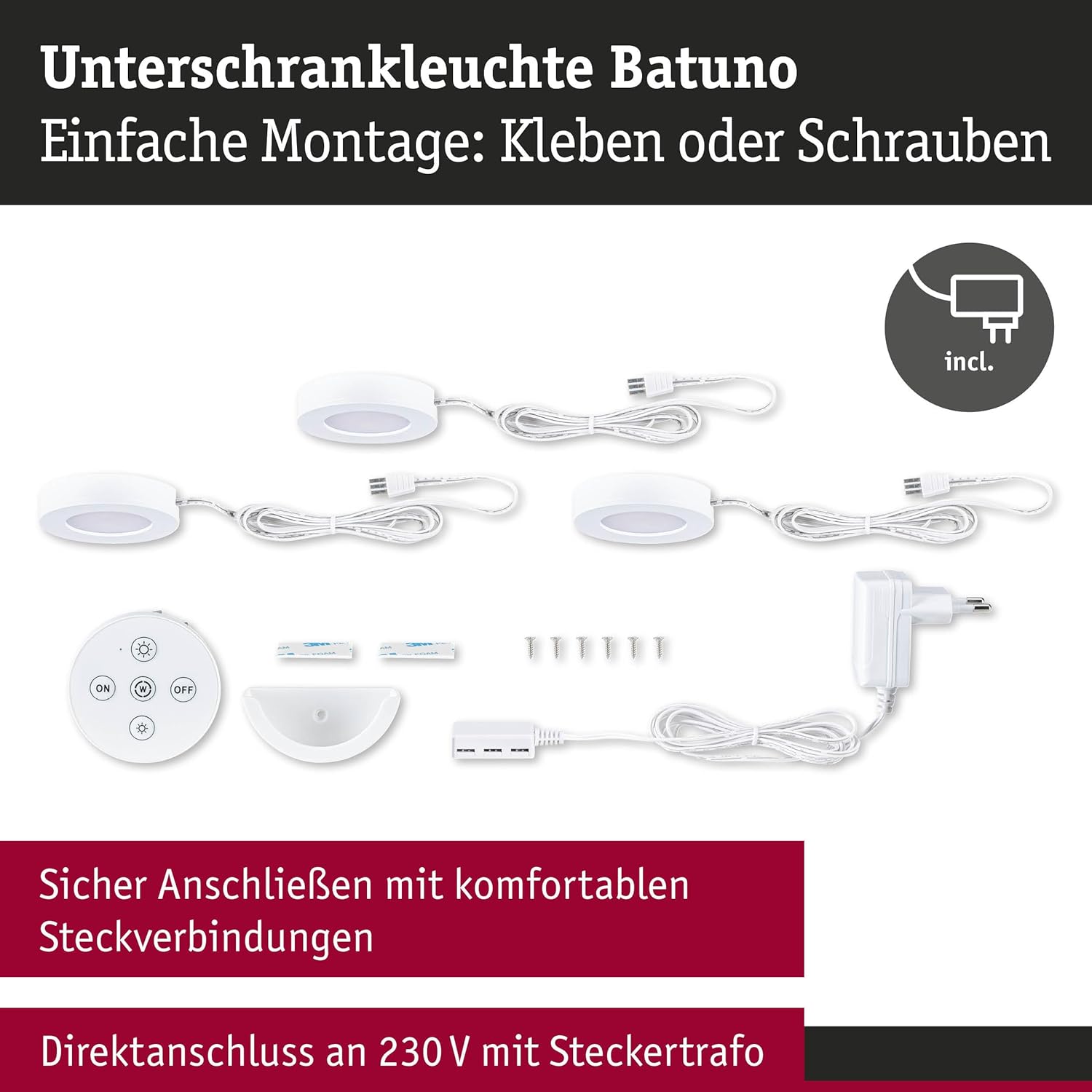
All components included in the Paulmann Batuno LED cabinet light set.
Nwụnye
The Batuno LED cabinet lights offer flexible installation options, either by screwing or using adhesive pads.
Step 1: Plan Placement
Determine the desired locations for your three cabinet lights. Ensure they are evenly spaced for optimal illumination of your work surface.
Nzọụkwụ 2: Ịkwanye ọkụ
Choose your preferred mounting method:
- Ịkwanye Screw: Mark the screw positions for each light. Drill small pilot holes if necessary. Secure each light using the provided screws.
- Nrikwa nrapado: Clean the mounting surface thoroughly to ensure it is dry and free of dust or grease. Apply the adhesive pads to the back of each light and firmly press the lights into position.
Step 3: Connecting the Lights
- Connect the individual LED lights to the provided connection cables.
- Connect the cables from the lights to the plug-in transformer.
- Plug the transformer into a standard 230V wall outlet.
Step 4: Remote Control Wall Mount
The remote control can be stored in its wall mount for easy access. Choose a convenient location near your lights and secure the wall mount using either screws or adhesive pads.
Ntuziaka ọrụ
The Batuno LED cabinet lights are controlled using the included remote control.
Ọrụ njikwa anya:
- Bọtịnụ ngbanwu/ Gbanyụọ: Pịa ka ịgbanwuo ma ọ bụ gbanyụọ ọkụ.
- Dimming Buttons (Sun icon with + / -): Use these buttons to increase or decrease the brightness of the lights. There are ten dimming levels available.
- White Switch Button (W icon): Press this button to cycle through the four available light color temperatures: warm white (2200 K) to neutral white (4000 K).

Lights set to warm white using the remote control.

Lights set to neutral white using the remote control.
Nlekọta
To ensure the longevity and optimal performance of your Paulmann Batuno LED cabinet lights, follow these simple maintenance guidelines:
- Nhicha: Disconnect the power before cleaning. Use a soft, dry, or slightly damp cloth to wipe the surfaces of the lights. Do not use abrasive cleaners, solvents, or harsh chemicals, as these can damage the finish or electronic components.
- Ndokwa bọlbụ: The LED bulbs are integrated and not user-replaceable. If a light fails, the entire unit may need to be replaced.
- Nchekwa: If storing the lights for an extended period, keep them in a dry, cool place away from direct sunlight.
Nchọpụta nsogbu
If you encounter issues with your Batuno LED cabinet lights, refer to the following common problems and solutions:
| Nsogbu | Ihe nwere ike ime | Ngwọta |
|---|---|---|
| Ọkụ anaghị agbanwu. | Enweghị ọkụ. Batrị njikwa anya anwụọla. Njikọ rụrụ arụ. | Check if the transformer is properly plugged into a live outlet. Dochie batrị njikwa anya. Gbaa mbọ hụ na ejikọrọ eriri niile na nchekwa. |
| Ọkụ na-enwu ma ọ bụ na-agbawa agbawa na mberede. | Ọkụ ọkụ anaghị akwụsi ike. Njikọ na -adịghị mma. | Ensure the power outlet is stable. Try plugging into a different outlet. Lelee njikọ eriri niile maka ike ha siri ike. |
| Njikwa anya anaghị aza. | Batrị njikwa anya anwụọla. Obstruction between remote and lights. Remote not paired (unlikely for this product, but possible). | Dochie batrị njikwa anya. Ensure a clear line of sight between the remote and the lights. Refer to specific pairing instructions if provided (not typically required for this model). |
| Cannot change light color or brightness. | Batrị njikwa anya dị ala. Pịa bọtịnụ ezighi ezi. | Dochie batrị njikwa anya. Ensure you are pressing the correct 'W' button for color and 'Sun' buttons for brightness. |
If the problem persists after trying these solutions, please contact Paulmann customer support.
Nkọwapụta
| Njirimara | Nkọwa |
|---|---|
| Ụdị | Paulman |
| Nọmba nlereanya | 92127 |
| Akụkụ ngwaahịa (L x W x H) | 7 x 7 x 1.5 cm (per light) |
| Ibu Ibu | 39 g (per light) |
| Ọnụọgụ nke ihe | 3 (lights) |
| Agba | Ọcha |
| Voltage | 230 Volts (input), 24 Volts (output to lights) |
| Ike | 6.3 Watts (total for 3 lights, 3 x 2.1W) |
| Flux na-egbuke egbuke | 3 x 180 lm (total 540 lm) |
| Atụmatụ pụrụ iche | Dimmable, Adjustable White Color Temperature (2200 K - 4000 K) |
| Ụdị nkwụnye | AC (with plug-in transformer) |
| Ụdị nwụnye | Under-cabinet (screw or adhesive mount) |
| Batrị achọrọ | No (for lights), Yes (for remote control, not included) |
| Mba onye si | China |
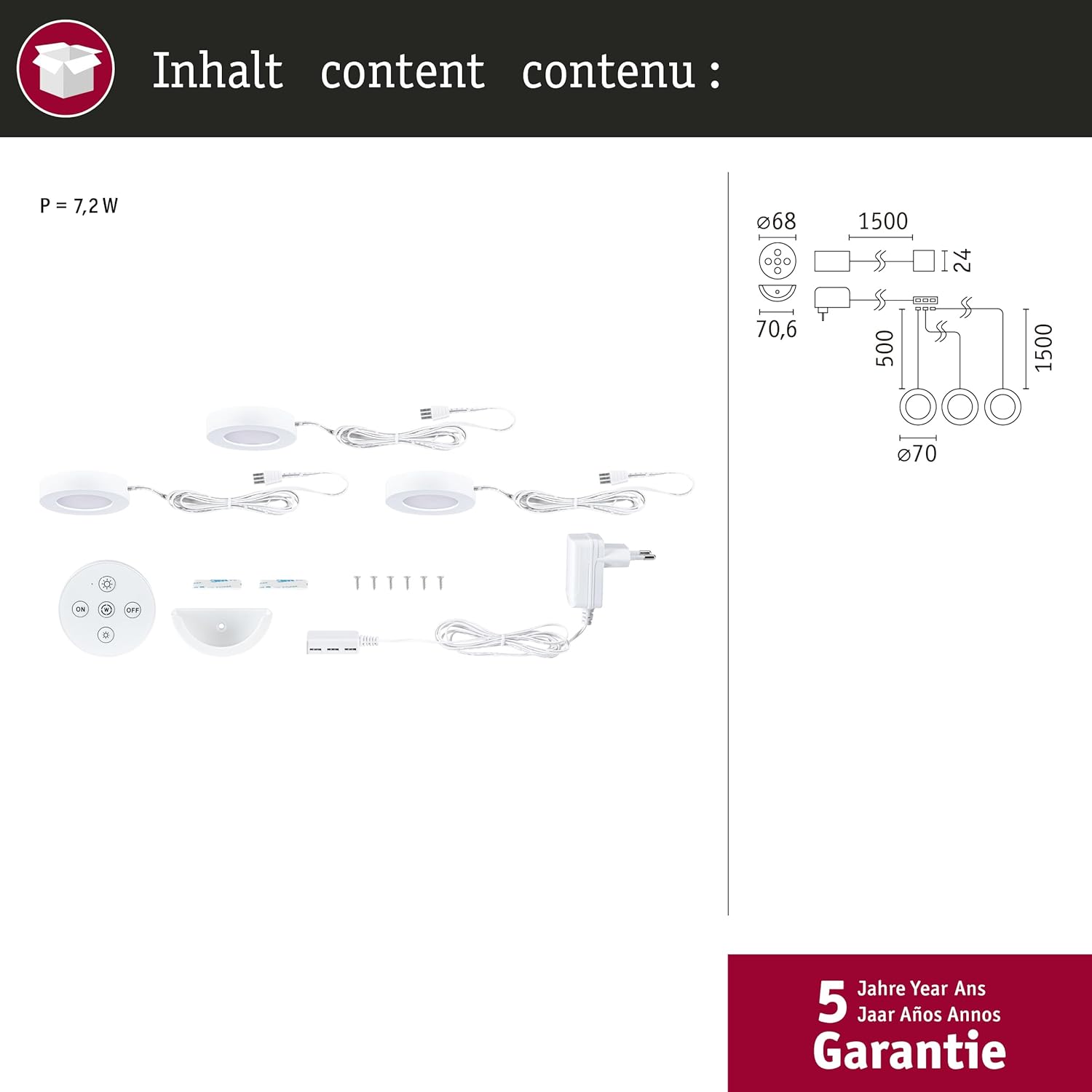
Product dimensions and component overview.
Akwụkwọ ikike
The Paulmann Batuno LED Cabinet Light Set comes with a 5-afọ akwụkwọ ikike from the date of purchase. This warranty covers manufacturing defects and material faults under normal use. Please retain your proof of purchase for warranty claims. The warranty does not cover damage caused by improper installation, misuse, accidents, or unauthorized modifications.
Nkwado ndị ahịa
For further assistance, technical support, or warranty inquiries, please contact Paulmann customer service. You can find contact information on the official Paulmann websaịtị ma ọ bụ site na onye na-ere ahịa gị.


