Okwu mmalite
This manual provides instructions for the MICTUNING P1s Wireless 8 Gang Switch Panel and the accompanying C2 Curved RGBW Rock Lights. Please read carefully before installation and operation to ensure proper use and longevity of the product.

Nfefeview image displaying the MICTUNING P1s Wireless 8 Gang Switch Panel alongside the C2 Curved RGBW Rock Lights and their packaging.
Ngwa ngwaahịa
Ngwungwu a na-agụnyekarị ihe ndị a:
- MICTUNING P1s Wireless 8 Gang Switch Panel
- Igbe njikwa
- C2 Curved RGBW Rock Lights (quantity may vary, e.g., 8 pieces)
- Switch Panel Holder
- -Dị-C Nchaji USB
- Wiring Harnesses and various installation accessories

A zuru ezu view of the MICTUNING P1s Wireless 8 Gang Switch Panel, its control box, various wiring components, and a sheet of customizable switch labels.
Ntọala na nwụnye
Wireless Switch Panel Setup
The P1s switch panel operates wirelessly, eliminating the need for direct wiring between the panel and the control box. This allows for flexible placement and use as a remote control.
A dedicated holder is provided for convenient placement and removal of the switch panel within your vehicle.

An image illustrating the wireless capability of the MICTUNING P1s switch panel, showing it being used as a remote control up to 165 feet from the vehicle.
Ntuziaka nwụnye: For optimal wireless performance and signal reception, it is recommended to position the antenna on the right A-pillar of the vehicle.
Nchaji mbụ
Before the first use, ensure the wireless switch panel is fully charged using the provided Type-C charging cable.
- The charging indicator light will display red while the device is charging.
- The indicator will turn green once the battery is fully charged.
- A full charge typically takes 2-3 hours and provides approximately 14 days of standby time or 8 hours of continuous use.

A close-up image showing the MICTUNING P1s Wireless Switch Panel being charged via a Type-C cable, with indicators for charging status and battery level.
C2 RGBW Rock Lights Installation
The C2 RGBW Rock Lights are designed for vehicle underbody or accent lighting. For detailed wiring diagrams, mounting instructions, and specific installation procedures for the C2 Rock Lights, please refer to the separate C2 Rock Lights manual or the MICTUNING official websaịtị.

An image displaying the MICTUNING C2 RGBW LED Rock Lights kit, including eight light pods, a control box, and wiring.
Ntuziaka ọrụ
Switch Panel Functions
Each of the 8 gangs on the switch panel can be customized to control various accessories with different operational modes:
- Ụkpụrụ mgbe niile: Provides continuous power to connected accessories, suitable for items like fog lights or auxiliary driving lights.
- Ụdị nwa oge: Activates the accessory only while the button is pressed, ideal for functions such as a horn or momentary warning lights.
- Ụdị strok: Causes connected lights to flash, useful for emergency or warning applications.

An image demonstrating the customization capabilities of the MICTUNING P1s switch panel, showing options for constant light, strobe, and momentary functions, along with brightness levels and color choices.
Backlight and Brightness Adjustment
The switch panel features customizable backlighting with 8 color options. These colors can be displayed in various modes, including Gradient, Jump, and Breathing effects.
Additionally, there are 5 levels of brightness adjustment for the panel's display, allowing you to optimize visibility according to ambient light conditions.
C2 RGBW Rock Lights Control (via App)
The C2 RGBW Rock Lights are controlled wirelessly through the dedicated "Mictuning" mobile application, available for download on your smartphone.
- Njikọ Bluetooth: The system utilizes an advanced Broadcom chip to ensure a stable and quick Bluetooth connection between your mobile device and the rock lights' control module.
- Njirimara ngwa: The "Mictuning" app allows you to easily customize the colors of your rock lights and control multiple sets simultaneously (up to 8 sets of 4pcs or 8pcs rock lights).
The C2 RGBW lights are designed to produce pure colors and include a separate pure white light, ensuring vibrant and clear illumination.

An image highlighting the pure color output and wide illumination angle of the MICTUNING C2 RGBW Rock Lights, emphasizing their 4-in-1 LED chip technology.
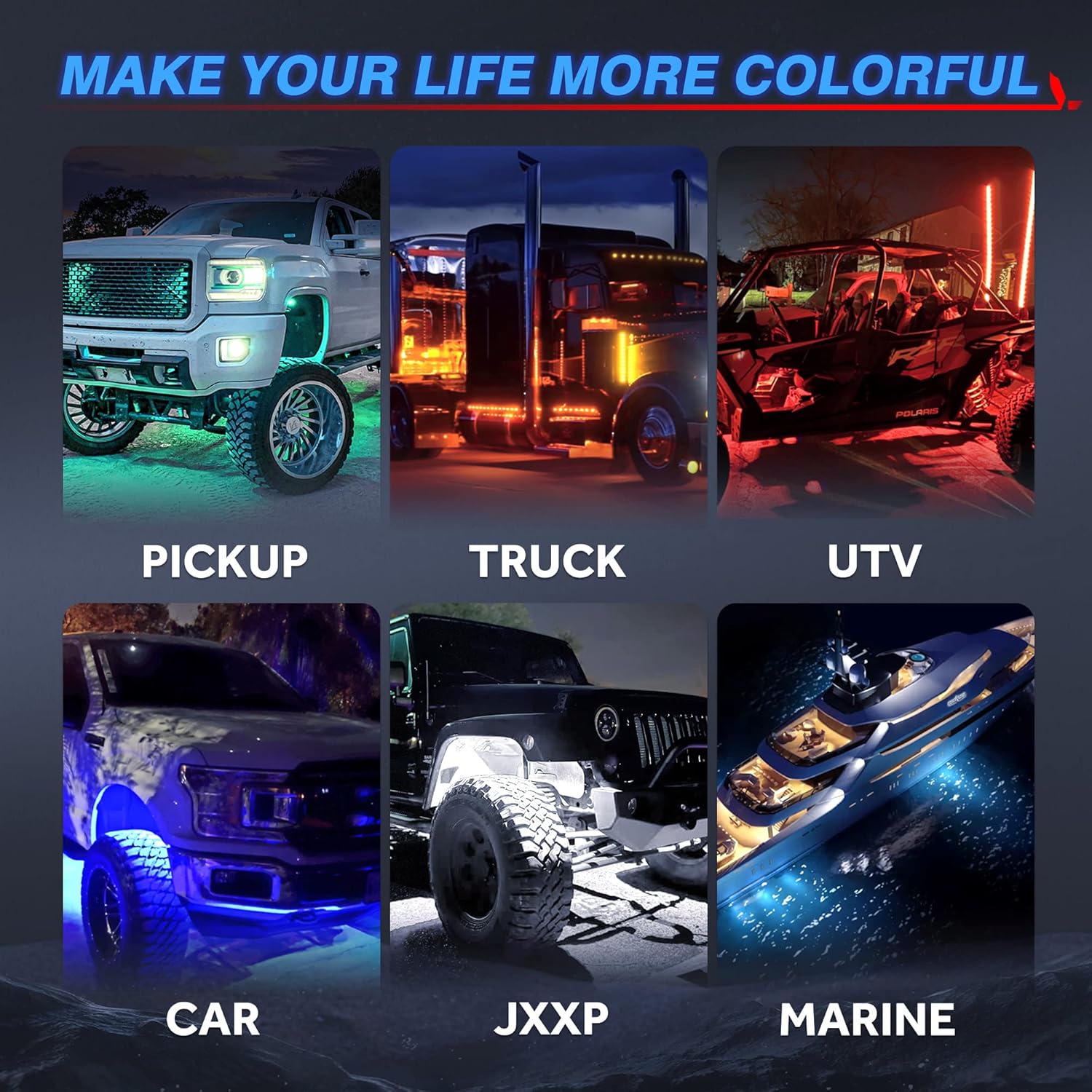
A collage of images showing the MICTUNING C2 RGBW Rock Lights installed on different types of vehicles, including pickups, trucks, UTVs, cars, Jeeps, and marine vessels, demonstrating their versatile application.
Nlekọta
Charging the Switch Panel
Recharge the wireless switch panel promptly when the battery indicator shows low power. Always use the provided Type-C charging cable to ensure compatibility and prevent damage.
Nhicha
To clean the switch panel and rock lights, gently wipe them with a soft, damp cloth. Avoid using abrasive cleaners, harsh chemicals, or solvents, as these can damage the product's finish or electronic components.
Nchọpụta nsogbu
Switch Panel Not Responding
- Ensure the switch panel is adequately charged. Check the battery indicators for current power level.
- Verify that the main control box is powered on and correctly installed with all connections secure.
- Check the distance between the wireless switch panel and the control box. The ideal operational range is up to 165 feet.
- Ensure there are no significant physical obstructions (e.g., thick metal barriers) blocking the wireless signal path.
Bluetooth Connection Issues (C2 Rock Lights)
- Confirm that Bluetooth is enabled on your mobile device.
- Make sure the "Mictuning" app is installed, updated to the latest version, and has necessary permissions.
- Try restarting the app and attempting to reconnect.
- Ensure the C2 Rock Lights control module is receiving power.
Ọkụ anaghị arụ ọrụ
- Inspect all wiring connections for both the C2 Rock Lights and the main control box to ensure they are secure and correctly wired.
- Verify the power supply to the control box is active and sufficient.
- Ensure the correct operational mode (Constant, Momentary, Strobe) is selected for the specific switch on the panel.
Nkọwapụta
MICTUNING P1s Wireless 8 Gang Switch Panel
- Oke ikuku: Up to 165 feet (under ideal conditions)
- Ndụ batrị: Approximately 14 days standby, 8 hours continuous use
- Oge nchaji: 2-3 hours (via Type-C port)
- Agba ọkụ azụ: 8 options (Gradient, Jump, Breathing modes)
- Ọkwa ihie: 5 nhazi ọkwa
MICTUNING C2 RGBW LED Rock Lights
- Ụdị LED: RGBW 4-in-1 Chip
- Rated Power per Pod: 5 W
- Measured Power per Pod: 4 W
- Lumen per Pod: 320 lm
- Total Lumen (8 pods): 2560 lm
- Nkuku Ogwu: 160° Wider
- Njikwa: Bluetooth via "Mictuning" App

A table comparing the specifications of MICTUNING C2 Rock Lights, such as rated power, measured power, lumen output, and LED chip type, against other rock light products, highlighting the C2's superior performance.
Akwụkwọ ikike na nkwado
For detailed warranty information, product registration, and technical support, please visit the official MICTUNING website or contact MICTUNING customer service directly. Specific warranty terms and conditions are not provided within this user manual.


