1. Okwu mmalite
This manual provides comprehensive instructions for the installation, operation, and maintenance of your Shelly BLU Button Tough 1. Please read this manual carefully before using the device to ensure proper functionality and safety. Keep this manual for future reference.
The Shelly BLU Button Tough 1 is a durable, battery-powered Bluetooth button designed for activating actions and scenes within your smart home ecosystem. It offers versatile control without constant reliance on a mobile phone, allowing for up to four pre-set actions or scenes through intuitive click combinations.
2. Ngwaahịa gafereview
The Shelly BLU Button Tough 1 is engineered for resilience and ease of use. Its robust design and Bluetooth Low Energy (BLE) technology ensure reliable performance and extended battery life.
Akụkụ ndị bụ isi:
- Bluetooth-arụ ọrụ: Utilizes BLE technology for quick response and longer battery life.
- Arụmọrụ ịpị ọtụtụ: Execute up to four pre-set actions or scenes with different click combinations (single, double, triple, long press).
- Exceptional Durability: IP54 rated, making it resistant to shocks, splashes, and dust. Suitable for various environments.
- Broad Range: Offers a significant operating range, connecting seamlessly with compatible Shelly gateways.
- Scene Activation: Directly trigger complex smart home scenes or control individual devices.

Figure 2.1: Shelly BLU Button Tough 1 and its packaging.

Figure 2.2: Dimensions of the Shelly BLU Button Tough 1, showing a thickness of 13mm and a width of 42mm.

Figure 2.3: The Shelly BLU Button Tough 1 operates via Bluetooth Low Energy (BLE), providing quick response times, extended battery life, and simplified device inclusion.

Figure 2.4: The Shelly BLU Button Tough 1 features IP54 durability, making it resistant to shock, splashes, and dust, suitable for outdoor applications.

Figure 2.5: Key features include an indoor range of 10m/33ft, outdoor range of 30m/100ft, strong encryption, beacon mode, and sound alerts.

Figure 2.6: The multi-click trigger allows execution of up to 4 pre-set actions or scenes, providing simple control over smart devices.

Figure 2.7: The button enables comprehensive control over smart lights, blinds, garage doors, and location-based automations.
3. Nhazi
3.1. Ntinye batrị
The Shelly BLU Button Tough 1 requires one CR2032 battery, which is included with the device. To install or replace the battery:
- Chọta ebe batrị dị na ngwaọrụ ahụ.
- Jiri nlezianya mepee mkpuchi nkebi ahụ.
- Fanye batrị CR2032 n'akụkụ dị mma (+) chere ihu n'elu.
- Mechie mkpuchi nke batrị batrị nke ọma.
3.2. Pairing with a Gateway
The Shelly BLU Button Tough 1 requires a compatible Shelly gateway for integration with the Shelly Smart Control app and your smart home system. Compatible gateways include the Shelly BLU Gateway, or any Shelly Plus, Pro, or Gen3 device.
- Ensure your Shelly gateway device is powered on and connected to your network.
- Budata wee mepee ya Ngwa njikwa Shelly Smart na ekwentị mkpanaaka gị.
- Follow the in-app instructions to add a new device. The app will guide you through the discovery and pairing process for the Shelly BLU Button Tough 1.
- Once paired, you can configure the button's actions and scenes within the Shelly Smart Control app.
Mara: For detailed instructions on setting up your specific Shelly gateway, please refer to its respective user manual.
4. Ntuziaka ọrụ
The Shelly BLU Button Tough 1 allows you to trigger various actions and scenes with different click combinations. These combinations are configured within the Shelly Smart Control app.
4.1. Configuring Actions
- Mepee Ngwa njikwa Shelly Smart.
- Navigate to the settings for your paired Shelly BLU Button Tough 1.
- You will find options to assign actions to different click types:
- Otu Pịa: A quick press and release.
- Pịa ugboro abụọ: Two quick presses in succession.
- Pịa ugboro atọ: Three quick presses in succession.
- Ogologo Pịa: Press and hold the button for a specified duration (e.g., 2 seconds).
- Select the desired action or scene for each click combination. Examples gụnyere:
- Turning lights on/off.
- Adjusting smart blinds.
- Opening/closing a garage door.
- Activating a "Good Morning" or "Good Night" scene.
- Chekwaa nhazi gị.
4.2. Using the Button
Once configured, simply press the button according to your defined click combinations to trigger the associated actions or scenes. The button provides tactile feedback upon press.
5. Nlekọta
5.1. Ngbanwe batrị
The Shelly BLU Button Tough 1 is powered by a CR2032 battery. When the battery level is low, the device may indicate this through the Shelly Smart Control app or reduced responsiveness. Replace the battery as described in Section 3.1.
Ịkpachara anya: Tụfuo batrị eji arụ ọrụ dịka iwu obodo siri dị.
5.2. Nhicha
The device is IP54 rated, offering protection against dust and splashing water. To clean the device:
- Jiri nro dị nro, kpọrọ nkụ, ma ọ bụ ntakịrị damp akwa .
- Avoid using harsh chemicals, abrasive cleaners, or solvents, as these can damage the device's surface or internal components.
- Ensure the device is completely dry before re-use, especially if it has been exposed to moisture.
5.3. Nchekwa
Store the Shelly BLU Button Tough 1 in a cool, dry place away from direct sunlight and extreme temperatures when not in use for extended periods. If storing for a long time, consider removing the battery to prevent leakage.
6. Nchọpụta nsogbu
If you encounter issues with your Shelly BLU Button Tough 1, refer to the following common problems and solutions:
6.1. Ngwaọrụ anaghị azaghachi
- Lelee batrị: Ensure the CR2032 battery is correctly installed and has sufficient charge. Replace if necessary.
- Njikọ ọnụ ụzọ ámá: Verify that your Shelly gateway (e.g., Shelly BLU Gateway, Shelly Plus/Pro/Gen3 device) is powered on, connected to your network, and within range of the button.
- Nhazi ngwa: Confirm that the desired actions are correctly configured for the button in the Shelly Smart Control app.
- Oke: Ensure the button is within the operational range of its paired gateway (up to 10m/33ft indoors, 30m/100ft outdoors). Obstacles can reduce range.
6.2. Nsogbu Njikọta
- Ndakọrịta ọnụ ụzọ ámá: Ensure you are using a compatible Shelly gateway.
- Tọgharịa bọtịnụ: If the button was previously paired or is not discoverable, perform a factory reset (refer to the Shelly Smart Control app or Shelly support for specific reset procedures).
- Versiondị ngwa: Ensure your Shelly Smart Control app is updated to the latest version.
6.3. Inconsistent Action Triggering
- Click Timing: For multi-click actions (double, triple), ensure your presses are distinct and within the expected timing window. Practice the click patterns.
- Gateway Load: If your gateway is managing many devices or complex automations, there might be slight delays.
6.4. Enyemaka ọzọ
If you cannot resolve the issue using the above steps, please refer to the "7. Warranty and Support" section for contact information and additional resources.
7. Nkọwapụta
| Njirimara | Uru |
|---|---|
| Onye nrụpụta | Shelly Europe |
| Nọmba akụkụ | 685 |
| Ibu Ibu | 0.529 ounce (15 grams) |
| Akụkụ ngwaahịa | 0.51 x 1.65 x 1.65 sentimita (13 x 42 x 42 mm) |
| Nọmba Nlereanya ihe | 3800235266854 |
| Batrị | 1 CR2032 batrị achọrọ (gụnyere) |
| Ụdị cell batrị | Lithium manganese dioxide |
| Agba | Mocha |
| Ihe onwunwe | Plastic |
| Ngbanwe Ụdị | 1-ụzọ |
| Ụdị nkwụnye | Ugwu elu |
| Gbanwee Style | Pịa bọtịnụ |
| Asambodo | CE, RoHS |
| Njikọta | Ike dị ala Bluetooth (BLE) |
| Nleba Nchedo (IP). | IP54 |
8. Akwụkwọ ikike na nkwado
8.1. Akwụkwọ ikike ngwaahịa
Shelly na-enye a Akwụkwọ ikike ngwaọrụ afọ 2 for the Shelly BLU Button Tough 1, covering manufacturing defects and malfunctions under normal use conditions. Please retain your proof of purchase for warranty claims.
8.2. Nkwado ndị ahịa
For any questions, technical assistance, or further support, Shelly offers multiple resources:
- Ngwa njikwa Shelly Smart: Provides remote control, device configuration, and notifications.
- Ntọala Ọmụma: Access product specifications, guidelines, and FAQs. Visit Shelly Support
- Nkwado ndị teknuzu: Contact Shelly's professional support team.
- Nzukọ ogbe: Engage with other users and experts in Facebook Support Groups and Reddit communities.
- Ụlọ akwụkwọ Shelly: Nyochaa nkuzi vidiyo na webinars maka mmụta miri emi.
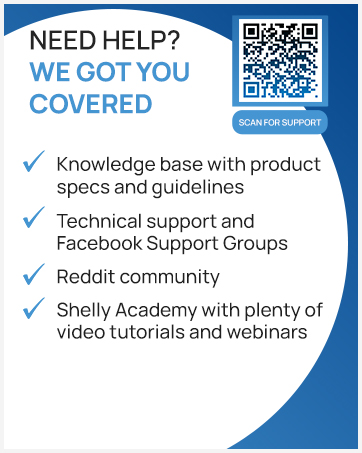
Figure 8.1: Scan this QR code for direct access to Shelly's support resources.


