1. Okwu mmalite na gafereview
The ARROWMAX Electric Engraving Pen (Model AM-230312) is a versatile, cordless rotary tool designed for fine work such as engraving, sanding, grinding, polishing, and carving on various materials including metal, wood, glass, and plastic. It features a high-performance hollow-core motor, an OLED display for status, and magnetic charging for convenience. This manual provides essential information for safe and effective operation, maintenance, and troubleshooting.

Figure 1: ARROWMAX Electric Engraving Pen and accessories.
2. Ihe ngwugwu
Chọpụta na ihe niile dị na ngwugwu:
- 1 x ARROWMAX Electric Engraving Pen
- 30 x Engraving Bits
- 12 x Polishing Bits
- 1 x Akpa nchekwa
- 1 x Akwụkwọ ntuziaka onye ọrụ
- 1 x USB Charging Cable (Magnetic)

Figure 2: Complete set of included components.
3. Akụrụngwa Ngwaahịa
The ARROWMAX Electric Engraving Pen is equipped with several features designed for precision and ease of use:
- Hollow-Core Motor: Provides 3 times the torque of a regular motor for enhanced precision.
- Ngosipụta OLED: Shows battery status, selected mode, and rotation direction.
- Nchaji magnetik: Convenient and secure charging directly in the storage case.
- Kemeghi Speed: Four RPM modes (15000, 20000, 25000, 30000 RPM) for various tasks.
- Ntụgharị ụzọ abụọ: Easily switch between forward and reverse rotation.
- Ahụ Aluminom Alloy: Durable and ergonomic design for comfortable handling.
- Chuck mgbanwe ngwa ngwa: Allows for easy bit changes without additional tools.

Figure 3: Key features of the ARROWMAX Engraving Pen.

Figure 4: Adjustable speed settings.

Figure 5: OLED display indicators.
4. Nhazi
- Ebube mbụ: Before first use, fully charge the engraving pen. Connect the magnetic USB charging cable to the pen's magnetic charging port and a suitable USB power source (e.g., computer USB port, USB wall adapter). The OLED display will indicate charging status. A full charge takes approximately 90 minutes and provides up to 120 minutes of uninterrupted work.
- Ịhọrọ ntakịrị: Choose the appropriate engraving or polishing bit for your task. The kit includes 30 engraving bits and 12 polishing bits suitable for various materials and applications.
- Inserting a Bit:
- Unscrew the chuck at the tip of the pen counter-clockwise.
- Insert the desired bit into the collet. Ensure the bit is fully seated.
- Tighten the chuck clockwise until the bit is securely held. Ensure it is tightened firmly to prevent the bit from dislodging during operation.

Figure 6: Inserting a bit into the chuck.
5. Ntuziaka ọrụ
- Power On/Off and Rotation Direction:
- Press the Power button (marked with a circle and vertical line) to turn the pen on. The OLED display will activate.
- Press the Power button again to switch between clockwise and anti-clockwise rotation. The display will show the current direction.
- To turn off the pen, press and hold the Power button for a few seconds.
- Ndozi Ọsọ:
- Press the Gear Adjustment button (marked with a 'G' or gear icon) to cycle through the four available RPM modes (15000, 20000, 25000, 30000 RPM).
- Select the appropriate speed based on the material and task. Lower speeds are suitable for delicate work, while higher speeds are for more aggressive material removal.
- Atụmatụ ojiji:
- Always wear appropriate safety glasses to protect your eyes from debris.
- Hold the pen firmly but comfortably. The ergonomic design allows for precise control.
- Apply light and consistent pressure. Excessive force can damage the bit, the material, or the tool.
- For engraving, use a steady hand and guide the bit smoothly along your desired path.
- For polishing, use the appropriate polishing bits and compounds, moving the tool in small, circular motions.
- Practice on scrap materials before working on your final project.

Figure 7: Engraving a 3D printed object.

Figure 8: Polishing a metal piece.

Figure 9: Sanding or carving wood.
Video 1: Demonstration of the ARROWMAX SGS ULTRA engraving pen rotary tool in various applications, including engraving and polishing different materials.
6. Nlekọta
- Nhicha: After each use, wipe down the engraving pen with a soft, dry cloth to remove dust and debris. For stubborn residue, a slightly damp enwere ike iji akwa mee ihe, hụ na ọ dịghị mmiri na-abanye n'ime ihe ndị dị n'ime.
- Nlekọta Bit: Clean bits regularly. Use a small brush to remove accumulated material. Store bits in their designated slots within the aluminum case to prevent damage and loss.
- Nchekwa: Store the engraving pen and all accessories in the provided aluminum case in a cool, dry place, away from direct sunlight and extreme temperatures.
- Nlekọta batrị: To prolong battery life, avoid fully discharging the battery frequently. Charge the pen when the battery indicator is low. If storing for an extended period, charge the battery to about 50% every few months.
7. Nchọpụta nsogbu
| Nsogbu | Ihe nwere ike ime | Ngwọta |
|---|---|---|
| Pen anaghị agbanwuo. | Batrị dị ala. | Charge the pen using the provided USB cable. |
| Bit is loose or falls out during operation. | Chuck adịghị ike nke ọma. | Ensure the chuck is tightened firmly after inserting the bit. |
| Reduced performance or unusual noise. | Bit is dull or damaged; debris in chuck/motor. | Replace the bit. Clean the chuck area. If problem persists, contact support. |
| Pen does not charge. | Cable or power source issue; magnetic connection not secure. | Check USB cable and power source. Ensure magnetic connector is properly aligned and connected. |
8. Nkọwapụta
| Njirimara | Nkọwa |
|---|---|
| Ụdị | ARROWMAX |
| Nọmba nlereanya | AM-230312 |
| Voltage | 5 volts |
| Isi Iyi Ike | Akwanyere batrị |
| Ụdị batrị | 1 batrị lithium polymer (gụnyere) |
| Ọsọ ntụgharị kacha | 30000 RPM |
| Ọsọ kacha nta | 10000 RPM |
| Ogo Chuck | 2.35mm diameter bits (compatible with standard bits) |
| Ibu Ibu | 12.7 ounces |
| Akụkụ | 8.78 x 7.95 x 1.14 inch (Ngwugwu) |
| Ngwa gụnyere | 1 engraving pen, 30 engraving bits, 12 polish bits, 1 storage bag, 1 manual, 1 USB charging cable |
9. Akwụkwọ ikike na nkwado
For warranty information, technical support, or service inquiries, please refer to the contact details provided on the product packaging or the official ARROWMAX websaịtị. Debe nnata nzụta gị dị ka ihe akaebe nke ịzụrụ ihe maka akwụkwọ ikike ọ bụla.
Manufacturer: Freemax Technology Company Limited (IMPORT)
Contact information (from product box image):
- Adreesị: Flat C, 2/F, Infotech Center, 21 Hung To Road, Kwun Tong, Hong Kong
- Tel: +852 3590 9790
- Email: ndewo@arrowmax-rc.com
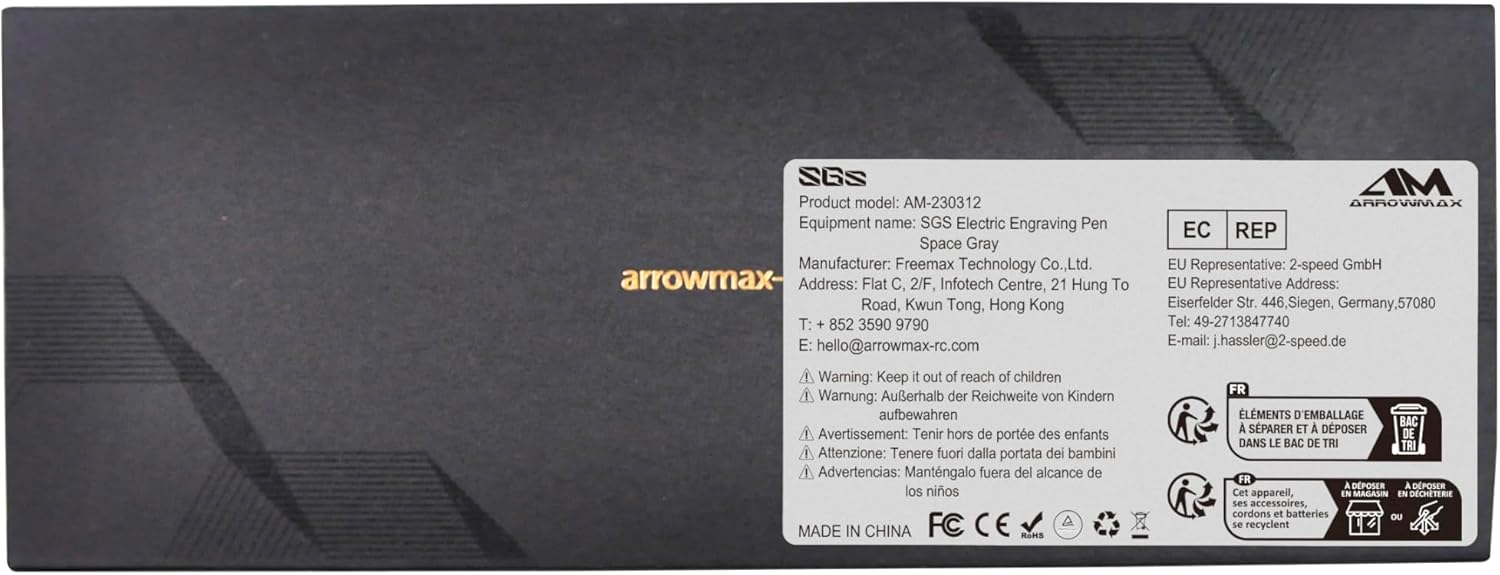
Figure 10: Product packaging with manufacturer details.


