Okwu mmalite
Thank you for choosing the AOC 27B3HA2 27-inch Full HD LED Monitor. This manual provides essential information for the safe and efficient use of your new monitor. Please read it thoroughly before installation and operation, and keep it for future reference.
The AOC 27B3HA2 features a 27-inch Full HD (1920 x 1080) IPS panel, offering wide viewing angles and vibrant colors. It includes a 100Hz refresh rate and 1ms MPRT response time for smooth visuals, Adaptive Sync technology, and eye-care features like Flicker-Free and Low Blue Light modes to enhance user comfort during extended use.

Foto 1: N'ihu view of the AOC 27B3HA2 monitor highlighting its 27-inch size, 100Hz refresh rate, Full HD resolution, Adaptive Sync, IPS panel, and 1ms MPRT response time.
Ozi nchekwa
- Isi mmalite ike: Use only the power adapter supplied with the monitor. Ensure the power outlet is properly grounded.
- Nkwanye: Place the monitor on a stable, flat surface. Avoid direct sunlight, heat sources, or excessive dust. Ensure adequate ventilation around the monitor.
- Mmiri: Do not expose the monitor to rain or moisture. Do not place objects filled with liquids on the monitor.
- Nhicha: Kwụpụ eriri ọkụ eletrik tupu ị sachaa ya. Jiri ákwà dị nro ma kpọọ nkụ. Ejila ihe nhicha mmiri ma ọ bụ ihe nhicha aerosol.
- Igwe ikuku: Akwụsịla oghere ikuku.
- Ije ozi: Anwala ịrụzi ihe nlele ahụ n'onwe gị. Nye ndị ọrụ ọrụ ruru eru ọrụ niile.
Ihe ngwugwu
Verify that all items are present in your package. If any items are missing or damaged, contact your retailer.
- AOC 27B3HA2 Monitor
- Nyochaa Stand (Base and Olu)
- Igwe ọkụ ọkụ
- HDMI USB
- Ntuziaka Mbido ngwa ngwa
- Akwụkwọ ikike kaadị
Melite
1. Ịchịkọta ihe nguzozi ihe nlele ahụ
- Jiri nlezianya tinye ihu ihe nlele ahụ n'elu ebe dị nro ma dị ọcha iji gbochie ọwa.
- Tinye olu kwụ n'azụ n'azụ ihe nleba anya site na ịhazi taabụ na ịkwanye ruo mgbe ọ batara n'ime ya.
- Tinye ntọala ihe nkwụnye ahụ n'olu ihe nkwụnye ahụ. Jiri skru e ji jide ya n'okpuru ntọala ahụ.

Ọgụgụ 2: N'azụ view of the monitor showing the stand attachment point.
2. Njikọ eriri
Ensure the monitor and your computer are turned off before making any connections.
- Njikọ ike: Jikọọ eriri ọkụ eletrik ahụ na ntinye ike nke ihe nlele ahụ wee jikọọ ya na oghere ọkụ eletrik nke ala.
- Njikọ vidiyo (HDMI): Connect one end of the HDMI cable to the HDMI port on your computer's graphics card and the other end to the HDMI 1.4 port on the monitor.
- Njikọ vidiyo (VGA): Ma ọ bụghị ya, jikọọ otu nsọtụ nke eriri VGA na ọdụ ụgbọ mmiri VGA dị na kọmputa gị, jikọọkwa nsọtụ nke ọzọ na ọdụ ụgbọ mmiri VGA dị na ihuenyo ahụ.
- Ntinye odiyo: If using VGA for video and you want audio through the monitor's speakers, connect an audio cable from your computer's audio output to the Audio In port on the monitor.
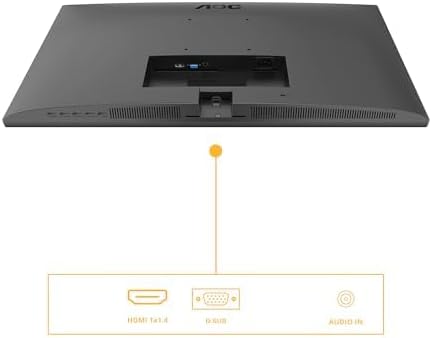
Figure 3: Diagram illustrating the available input ports on the monitor: HDMI 1.4, VGA (D-SUB), and Audio In.
3. Na-agbanye ike
- Gbanwuo kọmputa gị.
- Press the power button on the monitor. The power indicator light should illuminate.
- The monitor should automatically detect the active input signal. If not, you may need to manually select the input source using the OSD menu.
Na-arụ ọrụ Monitor
Ngosipụta na ihuenyo (OSD) NchNhr
The OSD menu allows you to adjust various monitor settings. The control buttons are typically located on the bottom or back of the monitor.
- Pịa NchNhr pịa bọtịnụ iji mepee menu OSD.
- Jiri bọtịnụ igodo ụzọ (Elu/ala or Aka ekpe/aka nri) to browse through menu options.
- Pịa Họrọ/OK pịa bọtịnụ iji tinye obere menu ma ọ bụ kwado ntọala.
- Pịa Ụzọ ọpụpụ button to go back to the previous menu or exit the OSD.
Key OSD Settings
- Ọkụ: Adjust brightness, contrast, and gamma settings.
- Nhazi onyonyo: Fine-tune image position, clock, and phase (primarily for VGA input).
- Color Setup: Select color temperature, user color, or preset modes.
- OSD Mbido: Adjust OSD language, position, and transparency.
- Mgbakwunye: Select input source (HDMI, VGA), reset settings, or view ozi.
- Ntọala egwuregwu: Enable or disable Adaptive Sync, adjust response time (Overdrive), and other gaming-related features.
- Ìhè na-acha anụnụ anụnụ dị ala: Activate this mode to reduce blue light emission for eye comfort.
- Flicker-enweghị: This technology is always active to minimize screen flickering and reduce eye strain.
Nlekọta
Nhicha Nyochaa
- Wepụ ihe nleba anya mgbe niile na oghere ọkụ tupu ihicha ya.
- Jiri akwa dị nro na-enweghị ntụpọ dampejiri mmiri mee ya ma ọ bụ ihe dị nro, ihe nhicha ihuenyo anaghị emebi emebi.
- Afesakwala ihe nhicha ozugbo na ihuenyo. Buru ụzọ tinye ya na akwa ahụ.
- Jiri nwayọọ hichaa ihuenyo ahụ iji wepụ uzuzu na ihe ndị na-adịghị mma.
- Maka onye nleba anya casing, use a soft, dry cloth. Avoid harsh chemicals.
Nchekwa
If you need to store the monitor for an extended period, disconnect all cables, disassemble the stand if necessary, and pack it in its original packaging or a suitable protective box. Store in a cool, dry place.
Nchọpụta nsogbu
| Nsogbu | Ngwọta enwere ike |
|---|---|
| Enweghị onyonyo na ihuenyo |
|
| Ozi "Ọ dịghị Signal". |
|
| Onyonyo na-agbagọ ma ọ bụ agbagọ |
|
| Enweghị ụda sitere na ndị ọkà okwu |
|
Nkọwapụta
| Njirimara | Nkọwa |
|---|---|
| Nọmba nlereanya | 27B3HA2 |
| Nha ihuenyo | 27 sentimita (68.6 cm) |
| Ụdị panel | IPS |
| Mkpebi | 1920 x 1080 (HD zuru ezu) |
| Akụkụ akụkụ | 16:9 |
| Ọnụego ume ọhụrụ | 100 Hz |
| Oge nzaghachi | 1ms MPRT |
| Icha ọkụ | 250 cd/m² |
| Ntinye vidiyo | 1x HDMI 1.4, 1x VGA (D-SUB) |
| Ntinye ọdịyo | Ee |
| Atụmatụ pụrụ iche | Adaptive Sync, Flicker-Free, Low Blue Light |
| Akụkụ ngwaahịa (ya na nkwụnye) | 9.06 x 24.41 x 18.11 sentimita asatọ |
| Ibu ihe (ya na nkwụnye) | 11.66 pound |
| Onye nrụpụta | AOC |
| Nọmba ndebanye aha EPREL | 1859411 |
For detailed product information and energy labeling, please refer to the official EPREL database:
 View Mpempe akwụkwọ ozi ngwaahịa EPREL
Figure 4: EPREL QR code and link for detailed product information.
Akwụkwọ ikike na nkwado
AOC monitors are manufactured to the highest quality standards. For information regarding your product's warranty, please refer to the warranty card included in your package or visit the official AOC websaịtị.
For technical support or customer service, please contact AOC directly:
- Onye na-eweta: AOC International (Europe) BV
- adreesị: Prins Bernhardplein 200 1097 JB Amsterdam, Netherlands
- Email nlekọta ndị ahịa: kevin.yang@tpv-tech.com
- Ekwentị nlekọta ndị ahịa: +31 (0)20 504 6962
- Ndị ọchịchị Websaịtị: https://eu.aoc.com
Please have your monitor's model number (27B3HA2) and serial number ready when contacting support.