1. Okwu mmalite
This manual provides comprehensive instructions for the safe and effective use of your GOWENIC Metal Detector A8. Please read this manual thoroughly before operating the device to ensure optimal performance and longevity. This device is designed for detecting various metals underground, including gold, silver, copper, and diamonds, with a specified range and depth capability.
2. Ozi nchekwa
Soro ntuziaka nchekwa ndị a mgbe niile ka igbochi mmerụ ahụ ma ọ bụ mebie ngwaọrụ:
- Operate the metal detector carefully and maintain stability, especially in undisturbed wilderness and jungle environments.
- Keep the device away from water and moisture unless explicitly stated as waterproof.
- Do not attempt to disassemble or modify the device, as this may void the warranty and cause malfunction.
- Jiri naanị chaja na ngwa ndị enyere.
- Chekwaa ngwaọrụ ahụ n'ebe dị jụụ, kpọrọ nkụ mgbe ọ naghị eji ya.
- Debe ebe ụmụaka na-apụghị iru.
3. Ngwaahịa gafereview
3.1 Akụkụ
The GOWENIC Metal Detector A8 typically includes the main detection unit, antenna, display screen, handle, power adapter, and a carrying case.

Image: GOWENIC Metal Detector A8, power adapter, and protective carrying case.
3.2 Ogwe njikwa
The control panel features buttons and indicators for selecting target metals, adjusting detection range and depth, and power management.

Image: Close-up of the GOWENIC Metal Detector A8 control panel, showing buttons for Copper, Silver, Gold, Diam (Diamond), Range, Depth, Search, Switch, and Charge, with illuminated indicators.
4. Nhazi
4.1 Mgbakọ
- Unpack all components from the carrying case.
- Attach the antenna to the designated port on the main unit.
- Ensure the display screen is securely mounted and connected.
- Verify all connections are firm before proceeding.
4.2 Ịchaji batrị
Connect the provided power adapter to the 'Charge' port on the device and plug it into a standard electrical outlet. The charging indicator will illuminate. A full charge typically takes several hours. Disconnect the charger once the battery is fully charged to prolong battery life. The device has an approximate battery life of 12 hours.
5. Ntuziaka ọrụ
5.1 Gbanyụọ ma ọ bụ gbanyụọ
Press the 'Switch' button on the control panel to power on the device. Press and hold the 'Switch' button to power off.
5.2 Selecting Target Metals
Use the dedicated buttons (Copper, Silver, Gold, Diam) on the control panel to select the type of metal you wish to detect. You can select one or multiple types simultaneously.

Image: Visual representation of various metal types that can be detected by the GOWENIC Metal Detector A8, including coins, rings, screws, gold, and silver.
5.3 Adjusting Range and Depth
Utilize the 'Range' and 'Depth' buttons to set your desired search parameters. The device has a maximum search range of 1000 meters and a maximum detection depth of 30 meters.

Image: The GOWENIC Metal Detector A8 in an open field, illustrating its wide detection range capability.
5.4 Scanning and Detection
Hold the device firmly by the handle and sweep it slowly over the search area. The microcomputer control chip unit calibration and self-test system allow for quick and convenient scanning. When a target metal is detected, the device will provide an indication, typically through visual cues on the display or audible alerts.
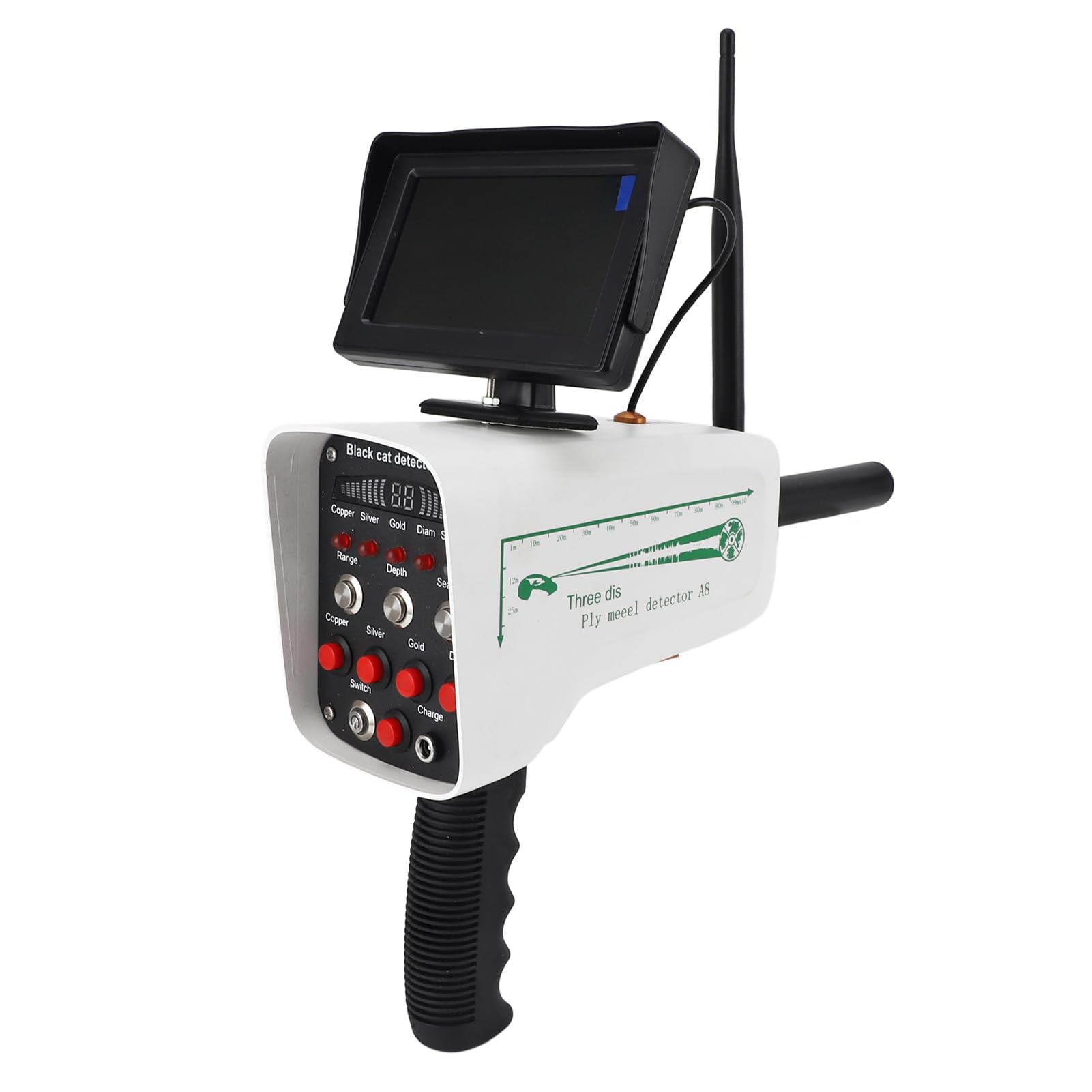
Image: The GOWENIC Metal Detector A8 actively scanning underground, with blue signal waves indicating the detection of buried metallic objects like rings, gold, and silver.

Image: The GOWENIC Metal Detector A8 indicating the presence of a coin buried beneath the surface, demonstrating its detection capability.
6. Nlekọta
- Nhicha: Jiri ákwà dị nro ma kpọọ nkụ hichaa ngwaọrụ ahụ mgbe ejiri ya mee ihe ọ bụla. Ejila ihe nhicha ma ọ bụ ihe mgbaze.
- Nchekwa: Store the metal detector in its protective carrying case in a dry, temperature-controlled environment. Remove batteries if storing for extended periods.
- Nlekọta batrị: Recharge the battery regularly, even if not in frequent use, to maintain its health. Avoid fully discharging the battery.
7. Nchọpụta nsogbu
| Nsogbu | Ihe nwere ike ime | Ngwọta |
|---|---|---|
| Ngwaọrụ anaghị agbanwu ọkụ | Low battery; loose connection | Chaji batrị; lelee njikọ eriri niile. |
| No detection or weak signal | Incorrect settings; interference; deep target | Verify target metal selection, range, and depth settings. Move away from known sources of electromagnetic interference. |
| Inaccurate location detection | Environmental factors; rapid movement | Ensure stable operation in undisturbed environments. Sweep slowly and consistently. |
8. Nkọwapụta
| Njirimara | Nkọwa |
|---|---|
| Ụdị | GOWENIC |
| Nọmba nlereanya | A8 |
| Agba | Ọcha |
| Ihe onwunwe | Acrylonitrile Butadiene Styrene |
| Isi Iyi Ike | Akwanyere batrị |
| Ndụ batrị | Awa 12 |
| Ugboro arụ ọrụ | 5600 kHz |
| Ogo nchekwa mba ụwa | IP54 |
| Kemeghi Ogologo | Ee |
| Ibu Ibu | 4.74 pound |
| Akụkụ ngwugwu | 16.14 x 13.78 x 3.94 sentimita asatọ |

Image: Diagram showing the dimensions of the GOWENIC Metal Detector A8.
9. Akwụkwọ ikike na nkwado
Your GOWENIC Metal Detector A8 comes with a standard manufacturer's warranty against defects in materials and workmanship. Please refer to the product packaging or the official GOWENIC websaịtị maka usoro na ọnọdụ akwụkwọ ikike akọwapụtara.
For technical support, troubleshooting assistance, or warranty claims, please contact GOWENIC customer service through the retailer where the product was purchased or visit the official GOWENIC support channels.


