1. Okwu mmalite
Welcome to the user manual for your Natec FURY SHOBO SH4F RGB MIDI TOWER PC Case. This guide provides essential information for the proper assembly, installation, operation, and maintenance of your new computer chassis. Please read this manual thoroughly before beginning installation to ensure optimal performance and longevity of your components.
2. Ntuziaka nchekwa
- Always disconnect the power supply from the wall outlet before installing or removing any components inside the PC case.
- Handle components with care to avoid damage from electrostatic discharge (ESD). Consider using an anti-static wrist strap.
- Keep small parts, such as screws, away from children.
- Hụ na ikuku dị mma gburugburu akpa PC ahụ iji gbochie oke okpomọkụ.
- Do not expose the case to extreme temperatures, humidity, or direct sunlight.
- Avoid placing heavy objects on top of the case.
3. Ihe ngwugwu
Biko chọpụta na ihe niile dị na ngwugwu gị:
- Natec FURY SHOBO SH4F RGB MIDI TOWER PC Case
- Accessory box (containing screws, cable ties, and other small parts)
- Akwụkwọ ntuziaka (akwụkwọ a)
4. Ngwaahịa gafereview
The Natec FURY SHOBO SH4F is a MIDI TOWER PC case designed for gaming and general-purpose computing, offering ample space for components and efficient cooling. It features a modern design with RGB lighting.
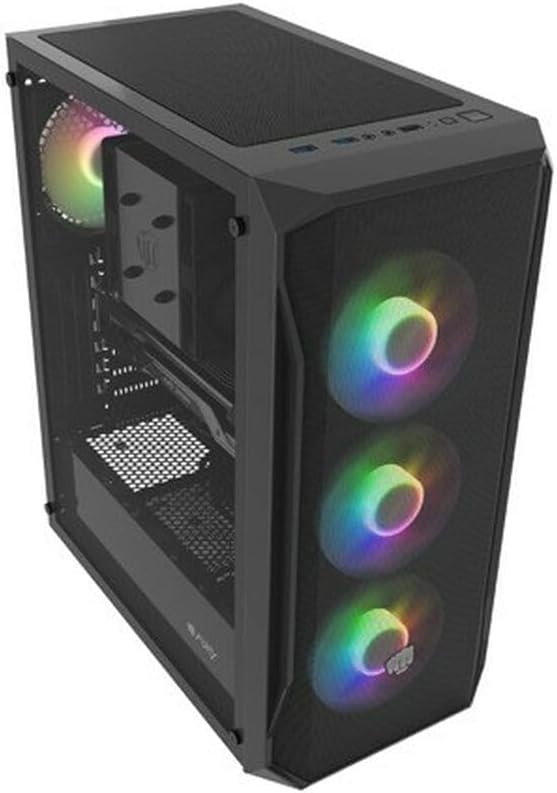
Ọgụgụ 4.1: Otu akụkụ view of the Natec FURY SHOBO SH4F RGB MIDI TOWER PC Case, showcasing its black metal and tempered glass construction. The front panel features a mesh design with three illuminated RGB fans, and a single RGB fan is visible at the rear exhaust. The top panel includes I/O ports and a mesh filter.
4.1 Panel I/O n'ihu
- bọtịnụ ike
- Tọgharịa bọtịnụ
- Ọdụ ụgbọ mmiri USB 2.0 (x1)
- Audio Jacks (Headphone/Microphone)
- RGB Control Button (if applicable)
4.2 Internal Layout
The case supports Micro ATX and Mini ATX motherboards and features a bottom-mounted power supply bay. It includes dedicated areas for storage drives and efficient cable management.
5. Setup and Component Installation
Follow these steps to install your PC components into the FURY SHOBO SH4F case.
5.1 Na-akwado ikpe ahụ
- Debe akpa ahụ n'elu ebe dị larịị ma kwụsie ike.
- Remove the side panels. Typically, the tempered glass side panel is secured with thumbscrews.
5.2 Nwụnye motherboard
- Install the I/O shield (if not pre-installed on your motherboard) into the rear opening of the case.
- Ensure the motherboard standoffs are correctly aligned for your Micro ATX or Mini ATX motherboard. Adjust or install additional standoffs if necessary.
- Jiri nlezianya tinye motherboard na ebe a na-akwụ ụgwọ, na-edozi oghere ndị ahụ.
- Secure the motherboard with the provided screws. Do not overtighten.
5.3 Ntinye ike
- Locate the power supply bay at the bottom rear of the case.
- Slide your power supply unit (PSU) into the bay from the rear of the case, ensuring the fan faces downwards (if the case has a bottom vent) or upwards.
- Chekwaa PSU site na skru site n'azụ ikpe ahụ.
5.4 Ntinye draịva nchekwa
Refer to your case's specific drive bay design for 2.5" SSDs and 3.5" HDDs. Typically, these involve trays or direct screw mounting.
5.5 Expansion Card Installation (e.g., Graphics Card)
- Wepụ mkpuchi oghere PCI-E dị mkpa n'azụ akpa ahụ.
- Insert your expansion card into the corresponding PCI-E slot on the motherboard.
- Secure the card with a screw or the case's retention mechanism.
5.6 Njikwa eriri
Utilize the cutouts and tie-down points behind the motherboard tray to route and secure cables. This improves airflow and aesthetics.
5.7 Connecting RGB Fans
The pre-installed RGB fans typically connect to a central RGB controller or directly to your motherboard's RGB headers. Consult your motherboard manual for specific RGB header locations and software control. Ensure all fan power cables are connected to appropriate fan headers on the motherboard or a fan hub.
6. Ịrụ ọrụ na PC gị
6.1 Gbanyụọ/ gbanyụọ
After all components are installed and cables connected, plug your power supply into a wall outlet. Press the power button on the front I/O panel to turn on your system. To turn off, use the operating system's shutdown function or press and hold the power button for several seconds.
6.2 RGB njikwa ọkụ
If your case features an RGB control button on the front I/O panel, press it to cycle through various lighting modes and colors. For advanced customization, use your motherboard's RGB software (e.g., ASUS Aura Sync, MSI Mystic Light, Gigabyte RGB Fusion) if the fans are connected to compatible headers.
7. Nlekọta
Ndozi mgbe niile na-enyere aka hụ na ịrụ ọrụ kacha mma ma gbatịa ndụ nke akụrụngwa PC gị.
7.1 Nhicha uzuzu uzuzu
The FURY SHOBO SH4F case includes dust filters (e.g., on the top and bottom). Periodically remove and clean these filters by rinsing them with water and allowing them to dry completely before re-installing. This prevents dust buildup and maintains airflow.
7.2 Nhicha mputa
Jiri ihe dị nro hichaa mpụta nke akpa ahụ, damp akwa . Zere ihe nchacha ma ọ bụ ihe mgbaze nke nwere ike imebi njedebe ma ọ bụ iko dị ọkụ.
8. Nchọpụta nsogbu
Ọ bụrụ na ị zutere nsogbu, rụtụ aka na usoro nchọpụta nsogbu ndị a na-emekarị:
- Enweghị ike: Ensure the power supply is properly connected to the wall outlet and the motherboard. Check all internal power cables (24-pin ATX, 8-pin CPU, GPU power). Verify the power button cable is correctly connected to the motherboard's front panel header.
- Ndị Fans anaghị agba ọsọ: Check if fan power cables are securely connected to the motherboard or fan hub. Ensure the power supply is functioning.
- Ọkụ RGB anaghị arụ ọrụ: Verify RGB cables are correctly connected to the RGB controller or motherboard header. If using a button, try cycling through modes. If using software, ensure it's installed and configured correctly.
- ekpo oke ọkụ: Ensure all fans are spinning correctly and oriented for proper airflow (intake/exhaust). Clean dust filters and internal components. Verify CPU cooler and GPU cooler are properly installed.
9. Nkọwapụta
| Ụdị | Natec |
| Usoro | SH4F |
| Nọmba nlereanya | NFO-2154 |
| Ụdị ikpe | Ụlọ elu Midi |
| Ndakọrịta Motherboard | Micro ATX, Mini ATX |
| Agba | Nwa |
| Ihe onwunwe | Ọla |
| Akụkụ ngwaahịa (LxWxH) | 19.69 x 16.93 x 9.84 sentimita (50 x 43 x 25 cm) |
| Ibu Ibu | 9.46 pound (4.3 Kilogram) |
| Ụdị Nkwanye Ike | Ugwu ala |
| Usoro jụrụ oyi | Ikuku |
| Ọnụọgụ nke ọdụ ụgbọ mmiri USB 2.0 | 1 |
10. Akwụkwọ ikike na nkwado
Natec products are manufactured to high-quality standards. For information regarding warranty terms and conditions, please refer to the warranty card included with your product or visit the official Natec website. If you encounter any issues not covered in this manual or require further assistance, please contact Natec customer support through their official channels.
Onye nrụpụta: Natec


